Recover Deleted Messages App
- 698.00
- 4.3
- Installs
- 10.00M
- Price
- Free

Screenshots
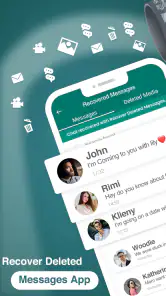
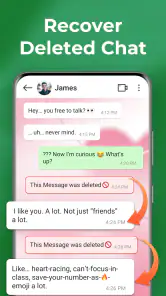



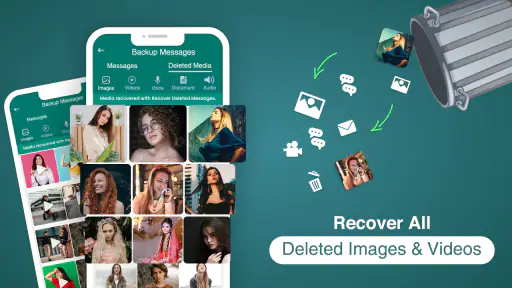

Analysis by Reviewed
When a message disappears, the first question is whether it can still be recovered at all. I’d treat Recover Deleted Messages App as a practical tool to try, not a guarantee: results depend on the message and the circumstances around its deletion. That distinction matters if you’re deciding between a recovery app, a backup, or simply asking the sender to share the message again.
Choose the recovery route that fits the situation
I’d begin by identifying exactly what went missing: a single text, a photo, an attachment, or a whole stretch of conversation. That helps set a sensible goal. Getting back one useful detail is different from expecting a complete chat history, and the more specific your need, the easier it is to judge whether a recovery attempt actually helped.
Think about the source, too. A message in a popular messaging service may be handled differently from a regular text, and media files can follow a different path from words in a chat. Before installing a recovery tool, check whether the original conversation still exists on another device or whether you have a backup you can restore. Those options may be more direct when they are available.
There is also a timing trade-off. If you have just noticed that something important is missing, avoid casually clearing more files or changing settings while you decide what to do. That is not a promise that leaving the phone untouched will recover anything; it is simply a cautious way to avoid adding more uncertainty to an already frustrating situation. Keep the search focused on the missing item rather than treating recovery as a general phone-maintenance task.
Privacy belongs in the decision as well. A recovery app deals with personal messages and potentially private media, so I’d read access prompts carefully and use it only for content I’m entitled to recover. If the material is sensitive and I’m not comfortable allowing an app to work with it, I’d choose another route, such as asking the sender to resend it or checking a backup I already trust.
Getting Started with the App
Installing the Recover Deleted Messages App is as straightforward as it gets. Just a quick search on the Play Store or App Store, and you’re on your way. The app is lightweight, so it doesn't eat up much of your phone's storage, which is always a plus, right?
Technoline Apps makes this free communication app, which is rated for Everyone and has a 4.3 average from around 95,000 ratings. It has passed 10 million installs, and version 915.2 supports Android 7.0 and later. The app is free to start, with in-app purchases ranging from $6.99 to $49.99 per item, so I’d check what is included before paying. It was released on November 21, 2020, and has 698 written reviews.
More From Our News Desk

Weather by Xiaomi Review: Clear at a Glance, Less Clear Up Close

X Under Pressure: Can It Recover When Posting Goes Wrong?

Clash of Clans Is Won Between the Battles

Android Auto Makes the Case for Quieter Car Software

MobiOffice: Transforming Mobile Productivity with Seamless Integration

EA SPORTS FC™ Mobile Soccer: Redefining Mobile Sports Gaming
How I’d approach a first attempt
I would treat the first run as a targeted search, not a promise to reconstruct everything. Have the relevant conversation or file in mind, follow the app’s recovery guidance, and check whether the result is actually the item you need. A useful outcome might be one address, a photograph, or a detail from a conversation; it does not have to mean that an entire thread returns in its original form.
If you are helping a less technical family member, keep the process calm and narrow. Ask what vanished and from which messaging app before starting, then look for that specific material together. This avoids turning a simple request into a confusing search through unrelated conversations, and it makes it easier to decide when to stop and use another option instead.
Because the app is free to start but also offers paid items, I’d make the value decision after seeing what the free route can do for your particular case. Don’t pay simply because a message matters to you; first establish whether the app can locate something useful and check what a paid item covers. The listed purchase range is broad enough that I’d be especially careful to understand the offer before confirming it.
Features That Stand Out
Once you get the app running, you’ll notice its sleek interface. It’s not overly complicated, which I appreciate. You're immediately guided on how to restore those precious messages, with step-by-step instructions that even the least tech-savvy among us can follow.
One feature that impressed me is its ability to recover not just SMS, but also MMS and even some social media messages. It's like a one-stop shop for message recovery. And for those of you who love to keep things organized, the app allows you to sort and categorize the recovered messages for easy access later. Neat, huh?
That organization can make a difference when you are looking for one detail rather than trying to restore an entire conversation. For example, if a delivery update vanished among routine chats, I’d focus on locating that particular message and keep any recovered material separate from current conversations. It’s a more manageable approach than treating recovery as a full phone cleanup.
There is also a trade-off in the broad approach: different messaging services handle messages and media in different ways, so I wouldn’t assume that a result for one kind of chat guarantees the same result for another. If a message is important, check the original app and any backup options first, then use recovery as another possible avenue.
For media, I’d verify the recovered item itself rather than relying only on a filename or a preview. A photo that appears in a result list is useful only if it opens and is the right image; the same goes for a document or other attachment. This small check can prevent the false relief of thinking you found something when the recovered entry is incomplete or unrelated.
Sorting is most helpful when you use it to answer a specific question: which conversation contains the missing item, or whether a recovered result belongs to the right person. I wouldn’t use recovered material as a substitute for a carefully maintained archive. Treat it as a lead to inspect, and save or organize anything important in a dependable place afterward.
Performance and Reliability
In my experience, the app performed admirably. The recovery process, while not instantaneous, is reasonably swift. I managed to retrieve messages that I had deleted over a month ago, which was quite a pleasant surprise. However, it’s important to note that the app’s success can depend on how recently the messages were deleted and the type of messages you’re trying to recover.
For an everyday case, imagine deleting a family member’s address from a conversation while clearing clutter. I’d open the app, follow its recovery guidance, and look for that specific exchange, while keeping realistic expectations if it doesn’t appear. If the sender is available, asking them to resend the address may be faster; if the conversation was backed up, restoring from that backup may be the more dependable choice.
That comparison is the main decision point. Backup tools are better when you already have a usable copy and want a familiar restore path; asking the other person is simplest when the message can be resent. This app is most useful when neither option solves the problem and you want to try to recover material from supported messaging sources. It is less suitable if you need a guaranteed, complete restoration or want to avoid giving a recovery app access to personal content.
It also helps to separate “finding something” from “restoring everything.” A targeted recovery can be worthwhile even when some messages remain missing, but anyone who needs a complete record for work, family administration, or documentation should not rely on a single recovery attempt. In that situation, a backup or an export made before deletion is a better foundation, with this app as a possible extra try rather than the only plan.
Compared with the usual alternatives in this communication niche, the app’s appeal is convenience: it brings a recovery attempt into one guided place rather than making you begin by searching through separate services. That does not make it a universal replacement for each service’s own backup or restore options. I’d choose the original app’s tools when they already contain the missing conversation, and use this one when I need another avenue and accept that results may vary.
As with any tech, it’s not foolproof, and there were a couple of instances where not all messages were recovered. But hey, recovering even some lost messages is better than none, right?
Who should use it, and who should look elsewhere
This is a reasonable option for someone who has a clear, limited goal, such as finding one deleted message or a particular piece of media, and is willing to follow guided steps. It may also suit a person who has already checked the conversation and backup route but still wants to try another method. The key is being comfortable with uncertainty and handling personal content thoughtfully.
I’d steer away from it if you expect a guaranteed restoration, need an exact complete archive, or do not want a recovery app involved with private messages. It is also not the best first move when the sender can simply resend the item or when an existing backup is clearly the safer path. In those cases, the ordinary alternative is less complicated and may better match what you need.
If you are deciding whether to keep it installed after a successful search, ask whether it has a continuing role for you rather than keeping it solely out of fear that something else might disappear. A recovery app is not the same thing as a backup routine. For messages you cannot afford to lose, I’d build a separate habit around preserving important information instead of assuming a future recovery attempt will work.
Is It Worth It?
If you’re someone who frequently finds themselves accidentally deleting important messages, this app could very well be a lifesaver. It’s user-friendly, efficient, and covers a broad spectrum of messaging platforms. Plus, it’s always great to have a tool that can potentially save you from some awkward "I didn’t get your message" situations.
I’d recommend it most to people who have a specific missing message or media item to look for, are comfortable following recovery instructions, and understand that outcomes can vary. It’s not my first pick when a backup is already available, and I’d skip it if you expect every deleted conversation to come back intact. Before considering a purchase, try the free option and decide whether the result is useful enough to justify any paid item.
My practical test is simple: can I identify what I need, do I have a safer copy already, and am I comfortable with the access involved? If the answers point toward trying a recovery app, this one has a clear enough purpose to be worth considering. If the missing item is easy to request again, or the privacy trade-off feels wrong, I’d save the effort and use another route.
To wrap it up, the Recover Deleted Messages App is definitely worth a try if you’re on the hunt for a reliable message recovery solution. It's not perfect, but it’s pretty darn close. Give it a whirl and see for yourself!
Recover Deleted Messages App Frequently Asked Questions
What information should I review before granting Recover Deleted Messages App access?
Because message recovery involves personal conversations and media, review each permission request before approving it and consider whether it matches the features you plan to use. The app is intended to recover messages, media, and files from popular messaging apps, so access to relevant notifications or files may be part of how it works. Use your own comfort level as a guide.
Who develops Recover Deleted Messages App, and is it intended for a particular age group?
Recover Deleted Messages App is developed by Technoline Apps and is rated for Everyone. It focuses on communication-related recovery tools, so it may interest people who want to retrieve messages, media, or files from popular messaging apps. As with any app that may handle personal content, younger users should follow their household’s guidance when reviewing permissions and making in-app purchases.
What should I check before installing Recover Deleted Messages App?
Check that your device runs Android 7.0 or later, then consider whether the app’s message-recovery features suit the messaging services you use. Recover Deleted Messages App is listed for Everyone and is free to download, though some features may involve in-app purchases. Reviewing its permissions and the way you manage message notifications can also help you decide whether it fits your privacy preferences.
Which devices can run Recover Deleted Messages App, and what does it cost to download?
Recover Deleted Messages App is available for Android devices running Android 7.0 or later. It is free to download, so you can install it without paying upfront. The app also offers in-app purchases priced from $6.99 to $49.99 per item, which may apply to optional features or content. Check the purchase details shown in the app before confirming any transaction.
What is the primary function of the Recover Deleted Messages App?
The Recover Deleted Messages App is designed to help users retrieve messages that have been accidentally deleted from popular messaging platforms. It scans the device to recover chats, images, and other media that might have been lost due to accidental deletion, app crashes, or other unforeseen issues.
Pros
- Recovers messages quickly and efficiently.
- User-friendly interface.
- Supports multiple messaging platforms.
- Secure recovery process.
- No root access required.
Cons
- Limited free features.
- May not recover all data.
- Occasional ads.
- Requires in-app purchases for full access.
- Not compatible with all devices.
- Category
- Communication
- Version
- 915.2













