Reason
- 7.00
- 4.7
- Installs
- 10.00K
- Price
- Free

Screenshots






Analysis by Reviewed
I spent time with Reason as a news and magazine app, and my first impression was that it is designed for readers who want more than a fast headline stream. The app comes from Reason Foundation and brings together journalism, ideas, videos, and podcasts through a libertarian viewpoint. That perspective is the central part of the experience, not a small detail to discover later.
That makes the app easy to place, but also easy to misunderstand. I would not treat it as a neutral replacement for every general news app on my phone. I see it more as a focused publication reader: useful when I want to follow a particular editorial outlook, compare arguments with coverage from other sources, or spend time with longer-form commentary instead of endlessly scrolling short updates.
The app is free, aimed at Everyone 10+, and works on Android from version 8.0 onward. It is currently at version 1.0.3, so I approached it as a relatively young product rather than a mature news platform with years of accumulated tools. Its average rating is 4.7 from around 91 ratings, and it has passed 10K installs. Those figures suggest a small but positive early audience, although they are not enough by themselves to tell me how well it will fit every reader.
What reading Reason feels like in daily use
The most useful way to understand this app is to imagine opening it with a question already in mind. I might be curious about a public policy debate, want to hear a podcast while commuting, or look for a video that approaches a familiar issue from a less conventional angle. Instead of presenting itself as a broad newsstand filled with unrelated publishers, the app gives me a more consistent editorial environment.
That consistency is both its strength and its main limitation. If I already appreciate libertarian analysis, the app can make it easier to find material that matches my interests. If I am trying to get a balanced overview of a developing story, I need to remember that one editorial lens cannot provide the whole picture. I would use it alongside a general news source, not as my only source for important events.
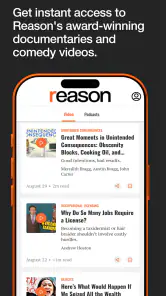
I also like the combination of formats. Written articles suit deliberate reading, while podcasts and videos make the same broad editorial world available when I am away from the screen. This matters in ordinary situations: I could read during a lunch break, switch to audio while doing household chores, and return to a video later when I have time to watch. The value is not simply having three media types; it is having different ways to engage with the same publication identity.
There is a practical trade-off here. A mixed feed can be less predictable than a single-format reader. Someone opening the app for only short headlines may find that the experience asks for more attention. I would not choose it when I need a rapid, neutral briefing in under a minute. I would choose it when I want to follow an argument, understand the reasoning behind a position, or make time for commentary that is more substantial than a notification.
More From Our News Desk

Weather by Xiaomi Review: Clear at a Glance, Less Clear Up Close

X Under Pressure: Can It Recover When Posting Goes Wrong?

Clash of Clans Is Won Between the Battles

Android Auto Makes the Case for Quieter Car Software

MobiOffice: Transforming Mobile Productivity with Seamless Integration

EA SPORTS FC™ Mobile Soccer: Redefining Mobile Sports Gaming
Why the viewpoint matters before you install
The phrase “libertarian perspective” should guide the decision to use the app. It tells me that the selection and framing of topics are part of the product’s identity. That can be valuable for readers who specifically want that viewpoint, especially when they are comparing political ideas or looking for criticism of conventional policy assumptions.
It also means I should read actively rather than passively. When an article makes a persuasive case, I would separate its evidence from its interpretation and then check how another publication handles the same subject. This is not a criticism unique to Reason; it is simply the responsible way to use a clearly positioned news source. The app works best as one voice in a wider reading habit.
For students, researchers, and curious readers, that editorial position can actually be useful. A defined perspective gives me something concrete to compare. Instead of pretending that all coverage begins from the same assumptions, I can notice where the app’s framing differs from public broadcasters, mainstream newspapers, or politically different magazines. That makes it more useful for media literacy than a feed whose point of view is difficult to identify.
Trust begins with visible choices
When I review a news app, I pay attention to what the product lets me understand and control, not just how attractive the content looks. In this case, the clearest trust signal is the app’s transparent editorial identity: it tells me the viewpoint I am entering. That gives me a better basis for judging articles than a vague promise of being simply “informative.”
I would still make a distinction between editorial transparency and data transparency. Knowing who develops the app and what perspective it follows helps me evaluate content, but it does not automatically answer every question about account handling, permissions, or personal information. I would check the permission prompts and privacy choices shown on my own device before granting access, especially if the app asks for anything beyond what I expect from a reading experience.
I do not consider a free download a reason to lower my standards. Free access is convenient, but I still want clear choices when the app requests device access, sends notifications, or handles any account-related action. My advice is simple: read each prompt instead of tapping through it, allow only what makes sense for the feature I am using, and revisit system controls if the app becomes more intrusive than expected.
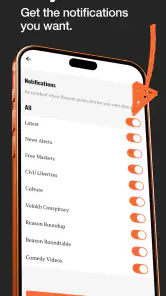
This is particularly relevant for news products because notifications can shape my attention. A headline alert may be useful during a major story, but too many alerts can turn a thoughtful reading app into a source of interruption. I would begin conservatively, enable only the notifications I genuinely want, and turn them off if they start encouraging reactive reading rather than intentional reading.
Account and control questions I would ask
A reader deciding whether to use the app will reasonably wonder whether an account is necessary, whether preferences can be changed, and whether content can be consumed without creating a profile. Those details should be judged through the screens and prompts presented during installation and use. I would not assume that a news app needs more personal information than the specific function requires.
My practical approach is to try the basic reading experience first. If the app allows me to browse its material without immediately asking for registration, I can decide whether its content is valuable before committing to an account. If a sign-in screen appears for a particular feature, I would consider whether that feature is worth sharing information for, rather than treating registration as automatic.
The same principle applies to notifications and device permissions. I want to see a clear reason for each request at the moment it appears. A podcast or video section may make me think about media playback behavior, while a reading feed makes me think about alerts and personalization. Those are different decisions, and I prefer making them separately instead of accepting one broad set of defaults.
For families, the Everyone 10+ age guidance is helpful as a starting point, but I would still use judgment. News and commentary can introduce mature political themes even when the app is not intended for adults only. A younger reader may need help understanding the difference between reporting, opinion, and advocacy. The age label is useful context, not a substitute for supervision or conversation.
Data-sensitive moments in a news routine
The most data-sensitive moments are usually not the article itself. They are the moments around installation, permissions, notifications, sign-in, and sharing. When I open a story from a notification, I am also deciding how much attention I want to give the app. When I watch a video or start a podcast, I may be using more network data and battery than I would for a short article.
That leads to a small but useful habit: I would reserve podcasts and videos for a connection and battery situation that suits them, rather than assuming every piece of content has the same practical cost. If I am on a limited mobile plan, written articles are the safer default. If I am commuting, I would prepare my listening routine in advance and avoid leaving media running when I am no longer engaged with it.
I would also be careful when sharing political or opinion content. The app’s viewpoint can make a story interesting to friends who disagree with it, but a shared headline may not communicate the article’s full argument. Before forwarding something, I would read beyond the title and include enough context to make clear whether I am sharing reporting, analysis, a video, or a podcast episode. That is a small step, but it prevents the app from becoming a source of misleading fragments.
Another useful distinction is between personalization and editorial selection. If the app shows me material that feels relevant, I should not automatically assume that it represents the full range of content available. I would occasionally browse beyond the first items presented, search by topic when possible, and compare the selection with an outside source. That keeps convenience from narrowing my information diet without my noticing.
How I would use it alongside other news apps
Reason is not the app I would open for a complete morning briefing across every region and subject. A general news aggregator is usually better for scanning many publishers, comparing breaking reports, and seeing which stories are receiving broad attention. A public-service news app may be preferable when I want a more institutional reporting style. A dedicated podcast app is often more flexible if audio discovery, playlists, and playback controls are my main priorities.
Where this app earns its place is in focused follow-up. I can use a broad news source to identify an issue, then turn to Reason for a libertarian interpretation, a longer argument, or a related podcast or video. That workflow gives the app a clear role without asking it to do something it was not built to do. It becomes a perspective-rich companion rather than a universal replacement.
There is also a benefit for readers who dislike algorithmic feeds that feel politically undefined. Here, the editorial angle is easier to recognize, so I know what kind of material I am likely to encounter. The trade-off is that readers seeking ideological variety must create that variety themselves by consulting other sources. I consider that an acceptable exchange if the app’s viewpoint is exactly what I came to explore.
For someone who already follows Reason through other channels, the app may be a more convenient central place for articles, videos, and podcasts. For someone unfamiliar with the publication, I would spend a few sessions sampling all three formats before deciding. One format may appeal much more than another, and that difference can determine whether the app becomes part of a routine or gets forgotten after one installation.
Three habits that make the experience more useful
My first recommendation is to use the app with a comparison rule: for any topic that could affect a personal decision or strongly shape a political opinion, read one relevant piece from another editorial perspective as well. This turns the app into a tool for evaluating arguments rather than a closed information loop.
Second, separate discovery from deep reading. I would skim the available subjects when I have a spare moment, then save my attention for one article, podcast, or video that genuinely deserves it. Mixing all formats at once can make the session feel scattered; choosing one purpose makes the app more satisfying and helps me remember what I consumed.
Third, review attention settings after a few days. My ideal notification level is rarely obvious on the first launch. If alerts are useful, I keep them limited. If they pull me into headlines when I am busy, I reduce them. This is an easy form of user agency, and it matters more to me than a flashy interface because it determines whether the app supports my routine or controls it.
A fourth habit is to label what I am reading in my own mind. I ask whether a piece is presenting facts, interpreting events, arguing for a policy, or offering commentary. Since the app brings together news, ideas, videos, and podcasts, that mental label helps me avoid treating every format as if it carried the same purpose or level of neutrality.
Who should choose it, and who should skip it
I would recommend Reason to readers who actively want libertarian commentary, enjoy moving between written and spoken content, and are comfortable evaluating a publication within a broader media mix. It is also a good fit for someone who wants a clearly identifiable editorial voice instead of an anonymous stream of headlines.
I would be more cautious recommending it to a person who wants strictly neutral presentation, comprehensive international coverage, or one app that replaces a newspaper, broadcaster, aggregator, and podcast service at the same time. The app’s focused identity is an advantage only when that focus matches the reader’s goal.
I would also skip it as a primary source for a fast-moving story unless I planned to verify important details elsewhere. That is not because a particular article must be wrong; it is because a single perspective and a mixed-format publication are not enough for every kind of news decision. In those moments, breadth, speed, and cross-checking matter more than editorial fit.
My cautious verdict after using it
Reason is most valuable when I use it deliberately, not automatically. Its free access, recognizable viewpoint, and combination of articles, videos, and podcasts give it a clear purpose in the News & Magazines category. The positive early response, including a 4.7 average and more than 10K installs, makes it look promising as a young app, but I would still judge it by whether its content and controls fit my own routine.
My trust in the experience comes mainly from knowing what editorial perspective I am choosing. For data and account decisions, I would rely on the permission prompts, privacy choices, and controls visible on my device rather than making assumptions. I would keep access limited to what I need, manage notifications carefully, and avoid confusing free availability with a reason to ignore privacy decisions.
In everyday use, I see the app as a focused reading and listening companion. I would open it after finding a topic through a broader source, use it to explore a libertarian argument or related media, and then compare what I learned with other coverage. If that sounds like the kind of informed, perspective-aware routine you want, the app is worth trying. If you want an all-purpose neutral news dashboard, another option will probably serve you better.
Reason Frequently Asked Questions
What kind of content does Reason offer?
Reason is a News & Magazines app from Reason Foundation, with news, ideas, videos, and podcasts from a libertarian perspective. It is suited to readers and listeners who want to explore current affairs and commentary through that viewpoint. Its focus is editorial content rather than general-purpose organization or productivity tools.
What is Reason, and what can I use it for?
Reason is an app designed to help users organize information, explore ideas, and make more thoughtful decisions through structured content and practical tools. Depending on the version and platform, it may be useful for research, note-taking, planning, or evaluating different options. Before downloading, review its current store description because available features can vary between Android, iOS, regions, and subscription plans.
Is Reason free to download and use?
Reason is free to download. Reason has a 4.7 average from around 90 ratings, and its audience can browse news, ideas, videos, and podcasts in the app. Check the Google Play Store or Apple App Store listing for the current download details before installing.
Does Reason require an account or an internet connection?
The requirements depend on how you intend to use Reason. Some basic features may work without registration, while saving data across devices, accessing personalized content, or using cloud-based functions may require an account. An internet connection can also be necessary for updates, synchronization, or online features. If offline access is important to you, verify which tools remain available without mobile data or Wi-Fi.
Is Reason safe and private to use?
As with any app, you should review Reason’s privacy policy, permissions, developer information, and recent user feedback before providing personal details. Pay particular attention to whether the app collects account information, usage data, device identifiers, or content you create. Download it only from an official store, keep your operating system updated, and avoid entering sensitive information unless you understand how that data is stored and used.
Pros
- Clean
- distraction-free interface for focused writing
- Supports Markdown formatting for structured notes
- Fast search makes finding saved thoughts easy
- Sync keeps notes available across supported devices
- Useful for journaling
- planning
- and quick idea capture
Cons
- Some advanced features may require a paid subscription
- Limited collaboration tools for shared documents
- Export options may not cover every preferred file format
- Large note collections can feel less organized without folders
- Offline availability may vary depending on the platform
- Category
- News & Magazines
- Version
- 1.0.3











