Rap Fame - Rap Music Studio
- 16.77K
- 4.6
- Installs
- 10.00M
- Price
- Free

Screenshots


Analysis by Reviewed
I like Rap Fame - Rap Music Studio best as a place to turn a passing lyric idea into a rough track without first learning a full desktop recording setup. If you’ve got a verse in your notes and want to hear it over a beat, the app gives you a straightforward place to experiment. I’d think of it as a creative starting point and a social space for rap, rather than a guaranteed substitute for a dedicated recording studio.
Who will get the most from it
The app makes the most sense for new rappers, casual writers, and anyone who enjoys recording short ideas and sharing them with other artists. A typical use might be finding a beat during a break, trying a few lines over it, and listening back later to decide whether the rhythm and delivery work. That quick loop can help you move past a blank page: you can test a phrase aloud instead of judging it only by how it looks in writing.
It may be less suitable if your priority is detailed audio engineering, tightly controlled production, or a polished release workflow. A mobile rap studio is convenient because it keeps the beat, vocal recording, and creative process together, but convenience is not the same as the depth of a specialist recording setup. I’d use it to sketch, practise, and share; for meticulous mixing, I’d choose a tool designed around that job.
A quick session that fits real life
For me, the most practical scenario is a short session between other commitments: I jot down a hook on the way home, open the app once I have a quiet moment, and test the lines against a few different beats. Rather than trying to finish a song in one sitting, I can focus on one decision—whether the words fit the rhythm—and leave the rest for later. That makes the app useful even when I only have time to capture a small piece of an idea.
A helpful habit is to keep the first take as a reference instead of immediately replacing it. A second pass may sound cleaner but lose the loose energy that made the original take interesting. I’d compare them before moving on, and note what changed: timing, emphasis, or simply confidence. This turns a quick recording into a small practice exercise rather than a one-shot attempt to make something release-ready.
Unleashing Creativity with Ease
The first thing that struck me about Rap Fame is how it makes the creative process feel like a breeze. Whether you’re a seasoned rapper or just starting out, the app offers a user-friendly interface that lets you dive right into creating your masterpiece. You don’t need to be a tech wizard to navigate through its features, which is a huge plus in my book.
Studio-Quality Production
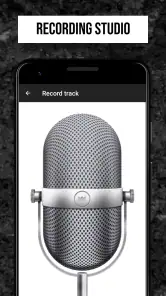
What’s better than having a studio in your pocket? With Rap Fame, you get access to high-quality beats and a recording setup that rivals professional studios. The app provides a plethora of beats across various genres, ensuring that you can find the perfect backdrop for your lyrics. The built-in recording studio is intuitive, with features that let you tweak your recordings to perfection. The sound quality is top-notch, which means your tracks will sound crisp and clean.
More From Our News Desk

Weather by Xiaomi Review: Clear at a Glance, Less Clear Up Close

X Under Pressure: Can It Recover When Posting Goes Wrong?

Clash of Clans Is Won Between the Battles

Android Auto Makes the Case for Quieter Car Software

MobiOffice: Transforming Mobile Productivity with Seamless Integration

EA SPORTS FC™ Mobile Soccer: Redefining Mobile Sports Gaming
Making a rough idea easier to finish
One practical way to use a beat library is to audition a few different moods before committing lyrics to one instrumental. A verse that feels natural over a slower groove may become crowded on a busier beat, so I’d record a short test first and listen back before building out the whole track. That small check can save time and reveal whether the cadence needs changing.
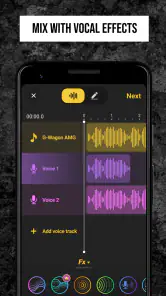
The vocal effects are useful for shaping the feel of a demo, but I’d treat them as creative tools rather than a promise that every room will sound like a treated studio. Recording somewhere quiet, keeping the phone at a consistent distance, and doing a quick test take can make a noticeable difference to how usable a vocal sounds. If you’re making a track to share, listening once with headphones and once through your phone speaker is a simple way to catch problems that might otherwise pass unnoticed.
Choosing beats with a purpose
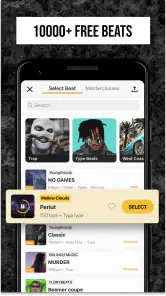
A library this large can make browsing feel like its own task, so I’d give each search a simple goal before I start. If I’m working on a reflective verse, I’ll listen for space between the main rhythmic elements; if I’m writing something more energetic, I’ll check that the beat leaves room for the vocal to cut through. The point is not to find the objectively perfect instrumental, but to avoid spending the whole session scrolling without recording anything.
I’d also test the same couple of lines over contrasting options instead of judging an instrumental by its opening alone. A beat can sound promising in isolation but leave awkward gaps or crowd the words once I rap over it. A short vocal test reveals that mismatch early. This is a useful trade-off in a beat-first workflow: the choice is quick and inspiring, but committing too soon can make you reshape lyrics around an instrumental that was never a good fit.
The Community Aspect
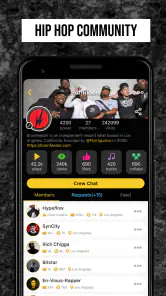
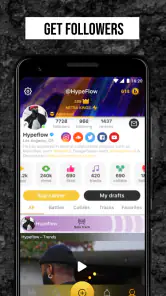
One of the standout features of Rap Fame is its vibrant community. The app isn’t just about creating music; it’s about connecting with fellow artists. You can share your tracks, get feedback, and even collaborate with other rappers. It’s like having a global network of artists right at your fingertips. The community is supportive and engaging, which makes the app feel like a big, friendly rap family.
A large audience can be motivating, but social feedback is most useful when you ask for something specific. Instead of simply posting a track and hoping for a response, I’d invite listeners to comment on one point, such as whether the hook is clear or the delivery sits well on the beat. That makes feedback easier to apply and helps you distinguish practical suggestions from general reactions. The network is part of the appeal, but anyone who prefers to keep early drafts private may find a social-first workflow less comfortable.
Sharing without losing the purpose of a draft
When I share an early recording, I try to decide first what I want from it: encouragement, a reaction to the idea, or useful notes on a specific performance choice. Those are different goals, and a rough demo may be good for one while still needing work for another. Keeping that distinction in mind helps me avoid treating a quiet response as a verdict on the song itself.
The social side is a stronger fit for people who enjoy listening to other rappers as well as posting their own work. If I only want to store private voice notes, the community features may add little to my routine; a basic recorder would be simpler. But if I’m willing to participate, listening and responding thoughtfully can make the app feel less like a folder of unfinished takes and more like a place to practise in public at my own pace.
Going Beyond Just Music
Rap Fame isn’t just about spitting bars. It’s an app that encourages learning and growth. There are challenges and competitions that push you to improve your skills and try out new styles. The app also offers tutorials and tips from established artists, which can be incredibly helpful if you’re looking to hone your craft.
Another cool feature is the live battles. They add a competitive edge to the experience and are a great way to test your skills against other rappers in real-time. Plus, it’s loads of fun!
Using challenges as practice, not pressure
I’d approach a challenge as a prompt to try a technique I might not choose on my own, rather than as a measure of whether I’m talented. A constraint can help when I’m stuck: I can focus on a different delivery or write around a new angle instead of waiting for inspiration. If the competitive element makes me rush or compare my early work too harshly with someone else’s, I’d step back and use the app’s recording tools privately for a while.
That distinction matters for beginners in particular. A battle or public challenge can be energizing, but it also asks you to be comfortable sharing and reacting quickly. Someone who needs time to revise every line may get more from recording a draft and returning to it later. The app can support both experimentation and performance, but I wouldn’t treat every feature as a required part of using it.
Where it fits among music apps
Compared with a general audio recorder, Rap Fame is more focused on rap: its beats and artist community give a lyricist a clearer route from writing to performing. Compared with a full digital audio workstation, it is the more approachable option for quick experiments, but it is not the choice I’d make when I need extensive control over every production decision. The right alternative depends on the task: use a basic recorder for capturing an idea with no social layer, a more advanced music app for detailed production, and Rap Fame when beats, vocal effects, and rap-focused sharing are the point.
It also helps to think about where a track is in its life. For a first sketch, keeping the beat, vocal take, and feedback loop together is convenient. When I’m ready to make precise edits or build a carefully controlled final mix, I’d move to a more specialised production environment rather than forcing a mobile app to do every job. That handoff is not a failure of the app; it is a sensible division of work between fast idea capture and detailed finishing.
Cost, compatibility, and the current version
It’s free to install, though in-app purchases range from $0.99 to $400.00 per item, so I’d check the purchase details before paying for anything and start with the free experience. The app is rated Teen, which is worth considering for younger users and families. Rap Tech Studios has kept the product current at version 3.74.1; it first appeared on May 20, 2015, and runs on Android 7.0 or newer. Those facts show that it has a long-running place in mobile music, though they don’t by themselves tell me what every update changed. Existing users should judge a new version by whether the recording and sharing experience still suits their routine, rather than assuming an update means a particular feature has been added.
For someone deciding whether to spend money, I’d begin by recording a simple demo and finding out whether the core workflow feels comfortable before considering any purchase. The range of optional spending makes it especially sensible to pause at each purchase screen and ask whether an item solves a problem I actually have. A new user may be better served by learning how to choose a beat and make a clear test recording first; spending is not a substitute for a quiet space, a steady performance, or useful revision.
What existing users should watch for
Because the app has been around for years and continues to have a current version, returning users may naturally wonder whether their familiar routine still works after an update. I’d check the parts I rely on—finding a suitable beat, recording a vocal, reviewing the result, and sharing only when I’m ready—rather than assuming that a version change has altered any particular feature. If something feels different, a short test project is a low-risk way to learn the current workflow before bringing an important draft into it.
For new users, the useful question is less “has it changed?” and more “does this format suit how I make music?” Rap Fame is at its best when I want an immediate rap-focused route from words to a performance and I’m open to a community element. If I need private archiving, highly detailed editing, or a tightly managed release process, I’d look elsewhere for that specific need. I’d watch how comfortably the app fits the habits I already have, not expect a version number alone to answer that.
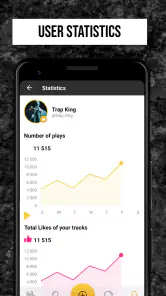
With an average rating of 4.6 from around 170,000 ratings and more than 10 million installs, it clearly reaches a broad audience. That scale can make the community feel lively, but it doesn’t guarantee that every listener will give detailed feedback or that every track will find an audience. I’d approach it as a place to practise and connect, not as a shortcut to recognition. If the app’s social side appeals to you, the community may be a meaningful part of the experience; if you only want private, precise production, another kind of music tool may fit better.
To wrap it up, Rap Fame - Rap Music Studio is more than just an app; it’s a platform that nurtures talent and builds a community. Whether you’re looking to make a name for yourself in the rap scene or just want to have some fun with your friends, this app is worth checking out. It’s got everything you need to let your creativity run wild, and who knows? You might just drop the next big hit!
Rap Fame - Rap Music Studio Frequently Asked Questions
What kind of app is Rap Fame - Rap Music Studio?
Rap Fame - Rap Music Studio is a music and audio app built around creating rap tracks and connecting with other rap fans and artists. It combines recording tools, beats, vocal effects, and social features in one place. If you are mainly looking for a conventional music player, its focus is different: the app is designed for making and sharing music.
Can I record and edit rap tracks in Rap Fame - Rap Music Studio?
Yes. The app includes a recording studio with vocal effects and mixing capabilities, so you can record over beats and shape the sound of your vocals. Its tools are aimed at helping users create rap music on a mobile device. You can explore the recording features at your own pace, then share tracks through the app’s community features if you want feedback or an audience.
What devices can run Rap Fame - Rap Music Studio?
Rap Fame - Rap Music Studio is a music and audio app for mobile devices, with versions available for Android and iOS. On Android, it requires version 7.0 or later, so checking your device’s operating system before downloading can help avoid compatibility issues. The app is free to download, though some optional content and features are offered through in-app purchases.
What features does Rap Fame - Rap Music Studio offer?
Rap Fame - Rap Music Studio provides a comprehensive suite of tools for aspiring rappers and music producers. The app features a high-quality recording studio with vocal effects, beat library, and mixing capabilities. Users can also connect with a community of fellow artists, share their tracks, and participate in rap battles. Additionally, it offers tutorials and tips to help users enhance their rap skills. Its library includes 10,000 beats, alongside vocal effects and a network of rappers and fans.
Is Rap Fame - Rap Music Studio suitable for beginners?
Yes, Rap Fame - Rap Music Studio is designed to accommodate both beginners and experienced artists. The app offers user-friendly features and tutorials that guide newcomers through the process of creating and sharing their music. Beginners can start by exploring the beat library, using vocal effects, and engaging with the community to receive feedback and inspiration. The app’s Teen content rating is worth considering for younger users and families.
Pros
- Easy to use interface for beginners
- Vast library of beats and sound effects
- Real-time collaboration features
- Built-in social platform for sharing
- High-quality recording capabilities
Cons
- Limited free version features
- Occasional app crashes reported
- Ads can be intrusive
- Requires internet for full functionality
- Some features need in-app purchases
- Category
- Music & Audio
- Version
- 3.74.1











