Radio Garden
- 3.17K
- 4.4
- Installs
- 10.00M
- Price
- Free

Screenshots
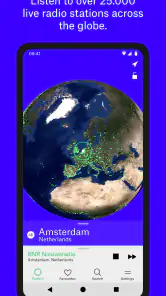
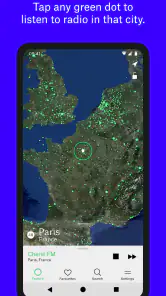
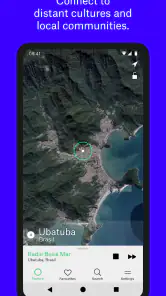
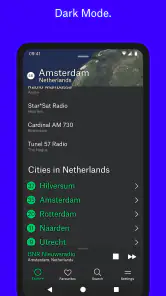
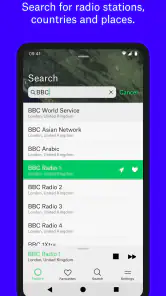
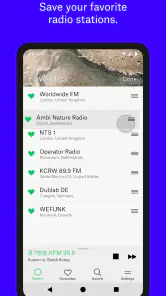
Analysis by Reviewed
I think Radio Garden is at its best when you treat it as a listening adventure, not as a replacement for a carefully organised music library. The pleasure is in moving around the map, finding a station you would never have searched for by name, and letting its local programming set the mood. That makes it a refreshing choice for curious listeners, though it is less suited to anyone who wants precise control over every track.
A listening habit built around place
The globe changes the way I browse. Instead of choosing a genre or typing an artist into a search box, I start with a place and see what is broadcasting there. That small change can make familiar background listening feel more exploratory: I might leave a station on while cooking, working through emails, or winding down in the evening, then switch cities when I want a different atmosphere.
For a practical tryout, I’d pick a region I know little about, listen long enough to get past the first song or presenter, and save anything I want to find again. Favorites are especially useful because the map is a lovely discovery tool but not always the quickest way to return to a particular station. I also find it more rewarding to explore with a loose plan—perhaps comparing a few cities—than to spin the globe at random and expect every stop to be a hit.
Making exploration work in a busy day
I find the app most useful when I give it a small job rather than expecting it to take over my listening life. For example, I might choose one city while making breakfast, keep the broadcast on through the first part of my routine, and save a station only if I genuinely want to hear it again. This keeps browsing from becoming an endless sequence of quick skips. It also turns a spare ten minutes into a low-effort way to encounter a different soundscape without planning a playlist first.
There is a helpful distinction between using the globe to discover and using favorites to return. If I already know what I liked, I go straight to the saved station instead of trying to relocate its dot. If I’m in the mood to explore, I use the map and accept that some stops will be less interesting than others. That two-step habit makes the app feel less like a novelty and more like a practical radio companion.
What the globe does better than a playlist
Most music apps are designed to deliver a chosen artist, mood, or genre with minimal interruption. Radio Garden offers a different bargain: less control over the exact sound, but more chance of encountering local presenters, unfamiliar languages, and programming that feels rooted somewhere. It is a good companion when I want the sense of tuning into another place rather than building the perfect queue.
That difference also sets a limit. A live station decides what comes next, so I can’t reliably skip to a specific song or keep the listening experience within one narrow style. If I need a predictable soundtrack for focused work, a playlist service may be the better tool. If I’m curious about what people are hearing elsewhere, the uncertainty is part of the appeal rather than a flaw.
More From Our News Desk

Weather by Xiaomi Review: Clear at a Glance, Less Clear Up Close

X Under Pressure: Can It Recover When Posting Goes Wrong?

Clash of Clans Is Won Between the Battles

Android Auto Makes the Case for Quieter Car Software

MobiOffice: Transforming Mobile Productivity with Seamless Integration

EA SPORTS FC™ Mobile Soccer: Redefining Mobile Sports Gaming
How it compares with other ways to listen
Compared with a standard music-streaming app, the key trade-off is control versus context. A playlist or on-demand catalogue is better when I want a particular artist, a clean run of familiar tracks, or music that stays within a carefully chosen mood. Radio Garden is better when I’m willing to let a broadcaster decide what comes next and want the place itself to shape the experience. It doesn’t compete on the same terms, and I wouldn’t use it as my only music app.
It also differs from a conventional radio directory. A directory is often the quicker choice if I have a station name in mind; the globe is more inviting when I don’t. The visual map gives browsing a sense of geography that a flat list can’t, but that visual approach can be slower when I’m trying to get somewhere specific. My practical advice is to use the map for discovery and keep favorites for repeat listening, rather than expecting either route to do both jobs equally well.
Who will get the most from it
I’d recommend it to travellers planning a trip, language learners who want casual exposure to speech, and anyone who enjoys discovering music without needing to identify every track. It can also suit a shared listening moment: put on a station from a city someone has visited, then let the broadcast prompt a conversation. For language practice, I’d treat it as informal listening rather than a structured lesson; live radio can move quickly and may include music, adverts, or discussion that is difficult to follow.
On a typical weekday, I might open it during breakfast, choose a distant city, and let the station play while I get ready. If the presenters or music catch my attention, I save the station; if not, I move on without turning the session into a search task. That is the most useful mindset I’ve found: browse lightly, keep a few discoveries, and don’t expect every station to match your taste.
Who may be better served elsewhere
I would steer away from it if your main goal is to replay exact songs, build a dependable workout mix, or listen without an internet connection. Live broadcasts are inherently less manageable than a personal library, and the app’s appeal depends on being open to whatever a station is airing at that moment. Someone who wants familiar local stations immediately may also find a local radio app or a station’s own app more direct than exploring a globe.
It is also not a substitute for a language course. Hearing another language in its natural broadcast setting can be motivating, but you cannot control the vocabulary, pace, or subject, and a presenter may move on before you have understood much. I’d pair it with structured study rather than relying on it to teach. The best fit is a listener who enjoys ambient discovery and sees an unfamiliar broadcast as an invitation, not an inconvenience.
Radio Garden is a free music and audio app from Radio Garden B.V., and its Teen content rating makes it suitable for a broad audience while still leaving room for varied live broadcasts. It has a 4.4 average from around 125,000 ratings, with over 10 million installs, which gives a sense of how widely the globe-based idea has caught on. The current version is 4.0.2, and it runs on Android 6.0 or later. Optional in-app purchases range from $2.49 to $25.99 per item, so I’d check the purchase details before buying anything; the core appeal is the act of exploring stations, not paying to make the globe interesting.
Ever stumbled upon an app that feels like a treasure chest of endless exploration? That's exactly what I felt when I first opened Radio Garden. Imagine spinning a virtual globe and tuning into radio stations from far-flung corners of the world. It's like having a global radio in your pocket, and trust me, it's as cool as it sounds.
Discovering a World of Radio
With Radio Garden, you're not just listening to music; you're diving into cultures, languages, and stories from around the globe, all through the magic of radio waves. It’s incredibly easy to use. You simply drag your fingers across a 3D globe and tap on any green dot that represents a live radio station. Boom! You're instantly transported to that location's airwaves. It's like teleporting, but with sound!
Features That Make It Stand Out
One of the coolest features of Radio Garden is its interactive globe interface. It's not just eye candy; it’s functional and intuitive. The app responds quickly, and the audio quality is impressive, even when you're streaming stations from halfway across the world. Another handy feature is the ability to save your favorite stations. So, if you stumble upon a quirky talk show in Tokyo or a salsa station in Colombia, you can bookmark it for easy access later.
Another standout feature is how it provides a bit of history for each station. You get to learn about the story behind the radio station and sometimes even a little history of the city it's broadcasting from. It adds a layer of depth that makes listening even more enriching.
Why You'll Love It
If you're a music lover or someone with an insatiable curiosity about other cultures, this app is a gem. It’s not just about the music, but also about connecting with different parts of the world in a really organic way. Plus, it’s free to use, which is always a huge bonus in my book!
The app also creates a sense of adventure. Each station is like a little mystery waiting to be unraveled. What kind of music will you hear? What language will be spoken? It’s these little surprises that keep the experience fresh and exciting every time you use it.
What I’d check before settling in
When I find a promising station, I give it a little time before deciding whether it belongs in my favorites. A few moments may reveal whether the broadcast is mostly music, conversation, or a mixture, which matters more than judging it by its first track. I also treat a saved station as a shortcut to a particular broadcast, not a guarantee that every future visit will have the same mood: live programming moves on, and that variability is part of the deal.
For a more deliberate listening session, I’d choose a broad area or a handful of cities with a reason to compare them, then stop once I’ve found something worth keeping. That prevents the globe from turning into a stream of taps with no memorable result. The strongest discovery often comes from staying with one broadcast long enough to hear its rhythm, rather than assuming the next dot must be better.
Where the experience can feel rough
The globe makes the first interaction memorable, but the same visual browsing can become less convenient once I have a specific destination in mind. A saved favorite solves that for stations I’ve already found; it does not change the fact that the app is built around live radio rather than precise track selection. If a stream is temporarily unavailable or simply not to my taste, the natural response is to try another station, not to expect a playlist-style fallback.
There is a small mental adjustment too: I have to accept that a station’s location does not guarantee a particular genre or a steady dose of local culture. The broadcast may include a presenter, music I wouldn’t choose, or material that makes little sense to me. I see that as an honest limit of radio rather than a defect to be fixed, but it does mean the app works best when I’m not in a hurry to hear something exact.
Final Thoughts
Wrapping it up, Radio Garden is more than just an app; it's a portal to the world. Whether you're looking to discover new music genres, learn a new language, or simply escape your local radio monotony, this app has something for everyone. It's a wonderful reminder of how connected our world really is, despite the distances. So, if you haven’t tried it yet, give it a spin and let your ears do the traveling!
A few expectations to keep in mind
Live radio is less predictable than an on-demand catalogue. A station may be between programs, play something outside your preferred genre, or speak in a language you don’t understand; those moments are part of the format, but they can make a quick search for a specific mood less satisfying. When a stream doesn’t suit me, I move to another dot rather than waiting for it to become something it isn’t.
The map is the app’s strongest identity, but it also asks for more browsing than a simple station directory. If you already know the exact station you want, a saved favorite is the sensible shortcut. If you mainly want albums, reliable artist recommendations, or offline listening, a conventional music service will fit better. Radio Garden’s strength is the unexpected live broadcast, not replacing those tools.
My recommendation
Radio Garden is a particularly good fit for listeners who enjoy happy accidents: people who like hearing a local presenter between songs, comparing the sound of different places, or adding a little variety to an everyday routine. I’d skip it if I needed a tightly controlled playlist or a radio app focused on familiar local stations. For everyone else, I’d give it a try with a few minutes to browse and save the stations that genuinely click. Its globe makes exploration feel effortless, while the live-radio format keeps the experience pleasantly human and occasionally unpredictable.
Radio Garden Frequently Asked Questions
Can I use Radio Garden to explore radio from a particular country or city?
Yes. Radio Garden is built around exploring live stations geographically, so you can rotate the globe toward a place that interests you and select a station shown there. This makes it useful for sampling broadcasts from a specific country or city, as well as for wandering between places and discovering stations you might not have searched for by name.
Does Radio Garden play live broadcasts or prerecorded music?
Radio Garden is centered on live radio broadcasts, rather than functioning as a library of prerecorded songs. You choose a station from the globe and listen to what that broadcaster is transmitting at the time. Since stations have their own programming, the listening experience can vary as you move between locations and broadcasters.
What kind of radio stations can I discover with Radio Garden?
Radio Garden lets you explore live radio broadcasts from locations around the world by rotating its globe. It is designed for listeners who want to hear stations from different countries and regions, whether they are looking for music or a sense of what is being broadcast elsewhere. The selection is explored geographically, so you can move around the globe and choose a station that catches your interest.
What is Radio Garden and how does it work?
Radio Garden is a unique app that allows users to tune into radio stations from all over the world. By simply rotating a 3D globe, listeners can explore live radio broadcasts from different countries and regions. The app provides an immersive experience, making it easy to discover new music and cultures without any geographical restrictions.
Is Radio Garden free to use or are there any in-app purchases?
Radio Garden is free to download, and in-app purchases are available. The app is listed with purchases ranging from $2.49 to $25.99 per item, so it is worth checking the purchase details before confirming anything. You can explore the app without treating it as a subscription service, while keeping in mind that optional paid items may be offered.
Pros
- Access to live radio stations worldwide.
- User-friendly interface and navigation.
- No sign-up required for streaming.
- High-quality audio streaming.
- Free to use without hidden charges.
Cons
- Limited offline features available.
- Occasional buffering on slower networks.
- No personalized station recommendations.
- Ads can be intrusive at times.
- Not available on all smart devices.
- Category
- Music & Audio
- Version
- 4.0.2











