Prank Video Call - Fake Chat
- 159.00
- 4.1
- Installs
- 10.00M
- Price
- Free

Screenshots
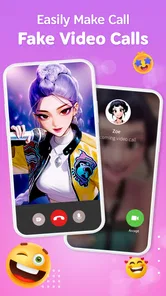
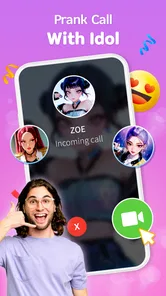
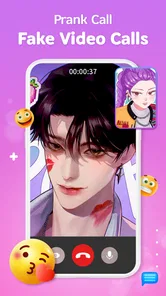
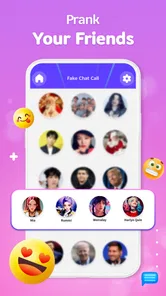
Analysis by Reviewed
I judge this kind of prank app less by how elaborate a fake call can look and more by whether it helps a joke land without making someone genuinely uneasy. Prank Video Call - Fake Chat is built around that quick reveal: set up a pretend call or chat, choose a moment, and let friends react. I find it works best as a playful prop for people who already enjoy staged surprises, not as a substitute for a real call or a way to fool someone for long.
A prank depends on timing more than realism
The central appeal is having a prepared fake-call or chat scenario ready instead of inventing the whole gag while everyone waits. That convenience can be useful when a group is together and a conversation has reached a lull. It also changes the kind of humor involved: rather than relying only on a punchline, you create a small setup and then decide when to reveal it.
I’d treat the app as a cue for a short scene, not a magic trick that guarantees a believable reaction. Friends differ in how readily they play along, and a setup that feels funny to one person can feel awkward to another. If someone is uncomfortable with staged calls, the better choice is a straightforward joke or a game everyone has agreed to play.
Preparing the moment without overplanning it
A little preparation can make the interaction smoother. Before opening the app, decide who the joke is for, what you want the group to notice, and how you will make the reveal. Keep the scenario simple enough that you can explain it in one sentence afterward. If you have to keep adding details to make the pretend call seem credible, the joke may be taking more effort than it is worth.
For a casual get-together, for instance, you might prepare a brief pretend call during a quiet pause, then reveal it as soon as your friend recognizes the gag. The group gets a shared moment rather than watching one person struggle to work out what is happening. I would avoid using a real person’s image or voice in a way that could imply genuine contact, private knowledge, or endorsement. A prank should become clear quickly and leave the person laughing too.
Unleashing Your Inner Prankster
When you first open the app, the interface is super user-friendly. You’re greeted with a straightforward dashboard that makes it easy to dive right into creating your fake calls and chats. Whether you’re tech-savvy or not, you’ll get the hang of it in no time.
Features that Spark Joy
The app is packed with features that let you customize your pranks to your heart’s content. You can choose from a variety of celebrity faces or even upload your own images to make the prank more personal. There’s also a library of voice clips to make your fake call sound as real as possible. And if you’re feeling creative, you can type out fake chat messages that look incredibly convincing.
More From Our News Desk

Weather by Xiaomi Review: Clear at a Glance, Less Clear Up Close

X Under Pressure: Can It Recover When Posting Goes Wrong?

Clash of Clans Is Won Between the Battles

Android Auto Makes the Case for Quieter Car Software

MobiOffice: Transforming Mobile Productivity with Seamless Integration

EA SPORTS FC™ Mobile Soccer: Redefining Mobile Sports Gaming
One of my favorite features is the scheduling option. You can set a fake call to come through at just the right moment—perfect for when you’re stuck in an awkward situation and need a quick exit strategy. It’s like having a wingman in your pocket!
Making the setup feel natural
The best way to use a scheduled prank is to plan the moment before you open the app. I’d keep the setup simple: choose a situation your friend will recognize, prepare the call in advance, and avoid making the joke depend on a long explanation. That small bit of preparation makes the timing feel more believable and keeps the punchline from getting lost in phone fiddling.
For example, at a casual get-together, you could arrange a pretend call during a lull in conversation, then let the group share the reveal. It works better as a quick shared joke than as a way to embarrass someone in front of people. I’d also avoid using a real person’s image or voice in a way that could be mistaken for an actual endorsement or private contact; the joke should be clear once it lands.
Why You’ll Love It
This app doesn’t just stop at fake calls and chats. It throws in extra fun with video call pranks. Imagine your friend’s face when they think they’re on a video call with their favorite celebrity. The reactions are priceless, and it’s all in good fun.
Prank Video Call - Fake Chat is also great for breaking the ice at parties or gatherings. It’s a conversation starter and a good way to lighten the mood. Plus, it’s suitable for all ages, so everyone can join in on the fun.
Keeping the joke comfortable for everyone
Even a harmless setup can go wrong if it touches on something personal. I’d avoid subjects such as emergencies, money, relationship trouble, school or work consequences, and anything that could make a person feel singled out. A silly celebrity-style surprise or an obviously playful chat is a safer direction, especially in a mixed group where you may not know everyone’s boundaries equally well.
There is also a practical audience question: a joke that works among close friends may not work with a new acquaintance, a child who takes the scene literally, or someone who is already having a stressful day. In those cases, skip the fake call and choose humor that does not depend on temporary deception. The “Everyone” age rating describes the app’s content classification; it does not mean every prank idea is suitable for every person or situation.
Where it fits among prank apps
Compared with a basic joke or a message you invent yourself, the appeal here is having a prepared fake-call or chat scenario ready to use rather than building the whole gag on the spot. That can make it easier for someone who wants a quick visual setup. If you prefer spontaneous humor, or if your friends dislike staged surprises, a simple verbal joke is likely the better choice.
There’s a useful difference between a prank that creates a brief surprise and one that makes someone worry. I’d keep these setups short, choose friends who enjoy this kind of humor, and reveal the joke promptly. The app is best treated as a small social prop, not as a way to make a believable claim about an emergency, a relationship, or a real person’s involvement.
Small choices that make a setup easier to manage
When you prepare a scenario, decide on the reveal before you start it. That prevents the awkward moment when a friend is waiting for an explanation and you are still trying to find the right screen. If the gag uses a chat, keep the exchange brief and avoid details that could be mistaken for real private information. If it uses a call, make sure the people nearby understand that this is a joke once the reaction has had its moment.
It is also worth thinking about the setting. A relaxed living room or a friendly group gathering gives you room to explain the prank immediately. A classroom, workplace, public counter, or other setting where bystanders may take the scene seriously is a poor fit. The same setup can feel harmless among friends and disruptive in a place where people are trying to get something done.
Who gets the most out of it
For a group of friends who already enjoy playful acting, the app can give one person an easy cue and give everyone else a shared moment to react to. It is less suitable for people who want a genuine video-calling tool, a private messaging service, or a serious way to contact someone. Those needs call for ordinary communication apps, not a prank setup.
I can also see it suiting someone who likes arranging a small social gag but does not want to improvise every detail. A host might prepare a quick bit for friends who have opted into silly party games, while a person who prefers low-key conversation may find the staged element more trouble than fun. If you are choosing it for a group, it is sensible to start with the friends most likely to enjoy the joke rather than making an unsuspecting guest the target.
What to expect before installing
The app is free, and Bravestars Casual lists it in the lifestyle category. It has an average rating of 4.2 from around 9,600 ratings, with over 10 million installs. Its current version is 4.0.3, and it was released on February 18, 2024. It is rated for Everyone and requires Android 7.1 or later. Those figures show that many people have tried it, but popularity does not guarantee that its style of humor will suit your friends.
If you are wondering whether it costs anything to try, it is listed as free. If your main question is whether you can use it to place a real video call or send genuine messages, that is not the purpose I would choose it for: its appeal is the staged prank. And if you need a dependable way to reach someone, use an ordinary calling or messaging app instead. That distinction is the most useful thing to know before deciding whether it belongs on your phone.
It also helps to keep expectations in proportion. A prepared fake call can provide the visual cue for a joke, but the people and timing around it do most of the work. I would not install it expecting a sophisticated communication tool or a guaranteed reaction. I would consider it when I already have a friendly audience and a simple, considerate idea.
Final Thoughts
If you’re looking for a way to bring some laughter and surprise into your day, this app is a must-try. It’s not just an app; it’s a tool for creating memories and sharing laughs with friends and family. Just remember, with great power comes great responsibility—prank wisely!
So, what are you waiting for? Dive into a world of fun and mischief. Download Prank Video Call - Fake Chat today and start plotting your next big prank!
Prank Video Call - Fake Chat Frequently Asked Questions
What devices and operating systems can run Prank Video Call - Fake Chat?
Prank Video Call - Fake Chat is an app for mobile devices, and its minimum operating system requirement is version 7.1. Check your device’s software version before downloading so you can avoid compatibility issues. The app is in the Lifestyle category and is rated for Everyone, making it broadly accessible to users who meet the system requirement.
Who develops Prank Video Call - Fake Chat, and is it popular?
Prank Video Call - Fake Chat is developed by Bravestars Casual. It has an average rating of 4.2 from around 9,600 ratings, and it has been installed over 10 million times. Those figures suggest that many people have tried the app, though individual experiences can differ depending on how they use its prank features.
What is Prank Video Call - Fake Chat and how does it work?
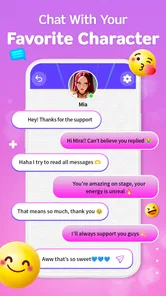
Prank Video Call - Fake Chat is an entertainment application designed to simulate fake video calls and chat conversations. Users can create custom video calls using pre-recorded videos or images, and customize chat messages to prank friends and family. The app provides a realistic interface that mimics popular messaging platforms, ensuring a convincing prank experience.
Is Prank Video Call - Fake Chat safe to use?
Yes, Prank Video Call - Fake Chat is safe to use as long as it is downloaded from a reputable app store like Google Play or Apple App Store. The app doesn't require access to sensitive personal information. However, users should be mindful of pranking responsibly, ensuring that their jokes do not cause distress or harm to others.
Do I need an internet connection to use Prank Video Call - Fake Chat?
While some features of Prank Video Call - Fake Chat may require an internet connection, such as downloading content or updates, the core functionalities like pre-loaded video calls and chat templates can be used offline. This makes it convenient for users who may not always have internet access but still want to enjoy the app's features.
Pros
- Realistic call interface for pranks.
- Customizable caller names and photos.
- Easy to use for all ages.
- Supports video and voice calls.
- Can schedule calls for perfect timing.
Cons
- Contains ads that disrupt experience.
- Limited free features available.
- Requires internet for full functionality.
- May not work on all devices.
- Privacy concerns with permissions.











