Podcast Player App - Podbean
- 28.54K
- 4.6
- Installs
- 10.00M
- Price
- Free

Screenshots

Analysis by Reviewed
When I choose a podcast app, I care about more than the size of its catalog. I want to find a good episode without a long search, keep track of what I meant to hear, and make listening fit around the rest of my day. Podcast Player App - Podbean brings discovery, playback and listener interaction together, so it suits people who want more than a bare-bones player. It is a free music and audio app from Podbean - Podcast & Radio & Audiobook, with optional in-app purchases; I’d treat those as a reason to check the purchase details before paying, rather than assume every feature costs extra.
How I’d decide if it fits
The key question is whether you want an app that helps you browse as well as listen. Podbean’s curated lists and trending shows can be useful when I’m in the mood for a new topic but don’t have a particular title in mind. If I already know exactly which shows I follow and only want a simple place to play them, a more minimal podcast player may feel less busy. The app is rated for teens, and its 4.6 average across around 213,000 ratings suggests plenty of listeners find the overall experience worthwhile, though personal preference still matters.
A listening routine that makes sense
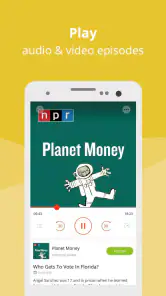
A practical way to use the app is to browse when you have time, then save the episodes you actually want for a commute or a stretch away from Wi-Fi. Downloads are most useful when planned ahead: I’d check that an episode is ready before leaving, rather than rely on a connection at the station or on the road. Playback speed can help with a talk-heavy episode, while a sleep timer suits listening at bedtime. Those tools are more valuable as a small routine than as settings to keep changing every time I open the app.
Discovering a World of Podcasts
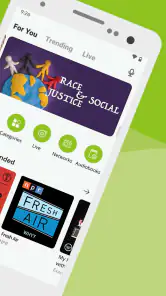
One of the first things you'll notice about Podbean is its vast library. Whether you're into true crime, tech talks, or comedy, Podbean has got you covered. The app provides curated lists to help you find new shows and even lets you explore trending podcasts. Trust me, you'll never run out of options!
User-Friendly Interface
The user interface is sleek and intuitive, making navigation a breeze. As soon as you open the app, you're greeted with a clean layout that highlights the featured podcasts. Searching for specific shows is straightforward, and the app's smart recommendations only get better the more you listen. It's like it knows exactly what you want to hear next!
Offline Listening
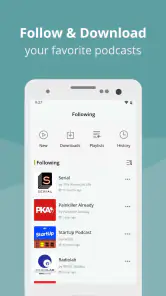
One of my favorite features is offline listening. You can download episodes to enjoy without the need for an internet connection. This feature is a lifesaver for those long commutes or when you're traveling without reliable Wi-Fi. Say goodbye to buffering issues and hello to uninterrupted listening bliss.
Customizable Experience
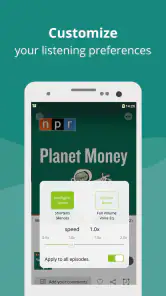
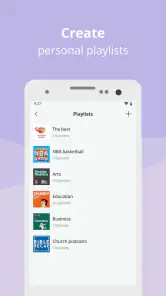
Podbean shines with its customizable features. You can adjust playback speeds, set sleep timers, and even create playlists of your favorite episodes. The app allows you to personalize your podcast experience, ensuring it fits perfectly into your lifestyle.
More From Our News Desk

Weather by Xiaomi Review: Clear at a Glance, Less Clear Up Close

X Under Pressure: Can It Recover When Posting Goes Wrong?

Clash of Clans Is Won Between the Battles

Android Auto Makes the Case for Quieter Car Software

MobiOffice: Transforming Mobile Productivity with Seamless Integration

EA SPORTS FC™ Mobile Soccer: Redefining Mobile Sports Gaming
Community Engagement
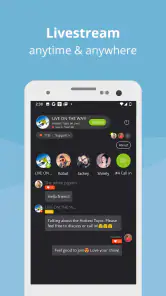
Another standout feature is the community aspect. Podbean allows you to interact with other listeners and even engage with podcast creators. You can leave comments, share episodes, and participate in discussions. It's not just about listening; it's about being part of a community that shares your interests.
Where another option may be better
For a listener who already has a carefully chosen queue and doesn’t want recommendations or discussions, a straightforward player can be a better fit. Podbean’s discovery and community elements are advantages only when you use them; otherwise, they may add choices you don’t need. Likewise, if your main priority is listening to music rather than spoken audio, a music-focused service is the more natural choice. I’d pick Podbean when podcasts are a regular part of the week and browsing is part of the fun.
Switching without losing your routine
If you’re moving from another podcast app, the main adjustment is rebuilding the shows and episode queue you rely on. I’d start by searching for your regular programs, then make a short playlist for the next few days instead of trying to organize everything at once. That gives you a quick test of whether the recommendations, playback controls and comments suit you. Podbean has reached over 10 million installs and is currently version 9.6.8 for Android devices running version 5.0 or later, but popularity alone won’t tell you whether its layout matches your habits.
Small trade-offs to keep in mind
Discovery can save time, but a large selection can also make choosing harder; I find it helps to pick one show from a recommendation and listen to an episode before adding more. Playlists are useful for grouping episodes by mood or situation, such as a short walk versus a longer trip, rather than letting an unfiltered queue grow. Downloads also take a little preparation, and community features are only worthwhile if you enjoy reading or joining listener conversations. These are manageable trade-offs, but they matter if you want a completely hands-off player.
Making discovery work for you
I wouldn’t treat recommendations as a to-do list. A more useful approach is to browse with a question in mind—perhaps “What would suit a quiet walk?” or “What topic do I want to understand better?”—then sample one candidate rather than subscribing to every appealing show. That keeps the home experience from becoming a pile of unfinished choices. If a suggestion misses, moving on is part of the process; recommendations can help surface possibilities, but they can’t replace your own judgment about a host’s style or a show’s pace.
For a household or a shared listening situation, I’d also think about whether comments and public interaction are something you want to use. They can add context and give listeners a way to respond, but they are not necessary to enjoy an episode. If you prefer podcasts as a private background activity, you can simply focus on playback and ignore the social side. That flexibility is useful, though anyone who wants an app with no visible community layer may prefer a more focused player.
Practical choices for busy days
A realistic weekday might start with a quick browse over breakfast, followed by choosing an episode for the trip to work. I’d download it while connected, then use a playlist to keep it separate from episodes meant for the weekend. If the commute is interrupted, having a deliberate queue makes it easier to return to the right show instead of searching from scratch. Later, the sleep timer can be handy when listening in bed, but I’d set it with the episode’s length and my own routine in mind rather than assume every listening session needs the same setting.
For longer trips, I’d prepare a little more carefully: choose a mix of episode lengths, download only what I realistically expect to hear, and check readiness before leaving. The benefit is less dependence on a stable connection; the trade-off is that offline listening asks for planning and device space. This makes Podbean especially practical for listeners who can prepare their queue ahead of time, while someone who wants everything to happen automatically may find that extra step irritating.
What switching really involves
Starting with a new podcast app does not require moving your entire listening history on day one. I’d use Podbean alongside the current player briefly, search for the few shows I listen to most, and build a small queue that covers the next several days. That trial reveals more than a long setup session: you can see whether the search and recommendations feel natural, whether downloaded episodes suit your travel habits, and whether playlists actually help you. Once the routine feels comfortable, you can decide whether to move the rest of your subscriptions.
The main cost of switching is attention, not just setup. You may need to remember which app has a particular show or unfinished episode while testing the new one. Keeping the old app available until you have checked your regular listening pattern avoids an abrupt break. I would not switch solely because an app is popular; I’d switch because its discovery, playback choices and listener interaction solve something that currently frustrates me.
How it compares with other listening styles
Compared with a stripped-back podcast player, Podbean puts more emphasis on browsing and interaction. That is a genuine advantage when you want fresh ideas or enjoy seeing how other listeners respond, but it can be unnecessary if you already have a stable set of subscriptions. Compared with music-first services, it is the more natural choice for spoken shows and episode-based listening, while a music service makes more sense when songs, albums and playlists are the center of your day. I’d choose based on what I actually listen to, not on which app has the longest list of features.
There is also a difference between a podcast app used as a discovery tool and one used as a reliable shelf for familiar shows. Podbean can serve both roles, but the balance depends on your habits. If you mostly want to press play on a known episode, its broader features may not change much for you. If you often finish a show and wonder what to try next, curated and trending options give you a reason to explore without leaving the app.
Who should give it a try
I’d recommend trying Podbean if you listen to podcasts regularly, enjoy exploring unfamiliar topics, or want to combine saved episodes with comments and creator interaction. It can suit commuters and travelers who are willing to download in advance, as well as listeners who like to arrange episodes around different parts of the week. The free starting point makes it straightforward to judge the experience for yourself, but I’d still check any purchase screen carefully so you know what an optional payment covers.
It is less compelling for someone who never browses, wants the fewest possible choices, or mainly listens to music. It may also be a poor match if you dislike maintaining a queue or preparing downloads before a trip. Those aren’t flaws for every listener; they are signs that a simpler player or a music-focused service may suit your routine better. The useful question is not whether Podbean can do more, but whether you will use those extra parts often enough to welcome them.
In summary, the Podcast Player App - Podbean is more than just a podcast player; it's a comprehensive platform for discovery and engagement. With its user-friendly interface, offline listening capabilities, and community features, it's a must-have app for any podcast lover. Give it a try, and you'll see why it's a favorite among many. Happy listening!
My recommendation
I’d recommend trying Podbean if you enjoy finding new shows, want offline episodes for travel, or like the idea of responding to creators and other listeners. Its free entry point makes it easy to see whether the combination works for you, while the in-app purchase range—from $0.99 to $99.99 per item—makes checking what a particular purchase offers sensible before committing. The app has been available since July 21, 2015, and has around 29,000 written reviews, but my deciding factor would still be how naturally it fits your listening routine. If you prefer a stripped-down queue and never use discovery or discussion, choose a simpler alternative; if those extras sound useful, Podbean is a solid place to start.
Podcast Player App - Podbean Frequently Asked Questions
Can I listen to podcasts and livestreams with Podbean?
Yes. Podbean is a podcast player for listening to podcasts and livestreams, making it useful if you want both on-demand shows and live audio in one app. You can explore available programs and use the player to listen. The experience will depend on the podcasts and livestreams you choose, so browsing the app can help you decide whether its selection suits your interests.
Who develops Podbean, and what kind of app is it?
Podbean is developed by Podbean - Podcast & Radio & Audiobook and belongs to the Music & Audio category. Its focus is podcast listening, with the app also promoting livestream playback. If you are looking for an app centered on spoken-audio content rather than a general-purpose music player, Podbean’s description gives you a clear sense of its main purpose.
Does Podbean require a recent Android phone, and how much space should I allow?
Podbean supports Android devices running version 5.0 or later, so it can work on a range of Android software versions. Before installing, check that your device meets this requirement and has enough available storage for the app and any episodes you choose to download. Keeping some space free can also make it easier to manage offline episodes later.
What devices and operating system versions can run Podbean Podcast Player?
Podbean Podcast Player is available for Android and iOS. On Android, it requires version 5.0 or later, so checking your device’s software version before downloading can help avoid installation problems. The app is listed as a Music & Audio app and is developed by Podbean - Podcast & Radio & Audiobook.
What features does the Podbean Podcast Player app offer?
The Podbean Podcast Player app offers a variety of features including personalized podcast recommendations, offline listening capabilities, and a user-friendly interface for both discovery and playback. Users can browse by category, search by keyword, and even listen to live podcasts. The app also supports customizable playlists and automatic download options for new episodes.
Pros
- User-friendly interface for easy navigation.
- Offers a wide variety of podcast genres.
- Offline listening feature available.
- Customizable playback speed options.
- Built-in sleep timer for convenience.
Cons
- Occasional ads on free version.
- Limited features without subscription.
- Some users report playback glitches.
- Interface can be slow at times.
- No direct podcast rating system.
- Category
- Music & Audio
- Version
- 9.6.8











