Pixl - Face Retouch & Blemish
- 1.13K
- 4.7
- Installs
- 5.00M
- Price
- Free

Screenshots
Analysis by Reviewed
On a shared household phone, a portrait editor can be more useful than it first sounds. One person may want to tidy up a selfie before sending it to friends, while someone else just wants to correct red-eye in a family picture. I’d treat Pixl - Face Retouch & Blemish as a quick, single-photo editing tool, not as a shared family album or a place to keep everyone’s pictures organized.
Sharing a device without sharing every choice
If several people use the same device, it helps to make editing decisions one photo at a time. Before passing the phone over, I’d save or share only the finished image the person actually wants to use, then let the next user choose their own photo. That small routine avoids confusion between someone else’s portrait and the version being edited. It also keeps the app’s purpose clear: a few targeted touch-ups, rather than a group workflow with shared profiles or coordinated projects.
For a quick household use case, imagine taking a group photo after dinner and noticing red-eye in one person’s eyes. The red-eye correction can address that specific distraction, while the skin-smoothing or teeth-whitening tools are better left to the person whose portrait is being adjusted. I’d ask before retouching another adult’s face; a tool being easy to use doesn’t mean everyone wants the same look.
Simple boundaries make better edits
Pixl is free, which makes it easy to try without committing to a purchase. The developer is Selfie Photo Editor & Vintage Filters, and the app is listed for Android from version 5.0 onward. Its current version is 1.0.14. I’d still keep expectations practical: this is for making modest corrections, not a substitute for a full photo library, a professional retouching suite, or a way to manage several people’s accounts.
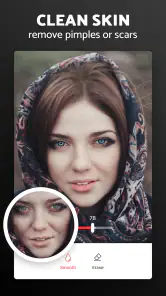
A useful habit is to keep an untouched original and compare it with the edited result before sharing. On a face, small adjustments can look natural on a phone but seem heavy when the image is viewed larger. I’d use blemish removal only on the spots I intend to change, then check the whole face at normal viewing size. That gives me a better chance of preserving skin texture instead of turning a portrait into a visibly smoothed image.
Getting to Know Pixl
First off, let's talk about what this app is all about. Pixl - Face Retouch & Blemish is designed to help you put your best face forward by offering a variety of tools to enhance your photos. It's like having a professional makeup artist and photo editor right in your pocket. Available on both Android and iOS, it's super accessible for anyone looking to give their photos that extra polish.
Features That Stand Out
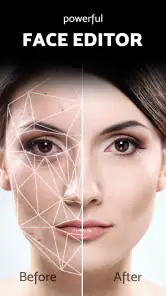
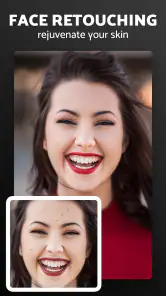
One of the standout features of Pixl is its blemish remover. Got a pimple or a little imperfection that's bothering you? No worries! This feature works like a charm. Just a few taps, and your skin looks smooth and flawless. It's almost like magic! And speaking of magic, the app also includes a face retouch option that subtly enhances your features without making you look like a completely different person.
More From Our News Desk

Weather by Xiaomi Review: Clear at a Glance, Less Clear Up Close

X Under Pressure: Can It Recover When Posting Goes Wrong?

Clash of Clans Is Won Between the Battles

Android Auto Makes the Case for Quieter Car Software

MobiOffice: Transforming Mobile Productivity with Seamless Integration

EA SPORTS FC™ Mobile Soccer: Redefining Mobile Sports Gaming
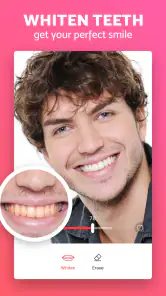
Another cool feature is the teeth whitening tool. We all love our coffee, but sometimes it doesn't love our teeth back. With Pixl, a bright, white smile is just a swipe away. And for those days when you're feeling a little extra, there are filters and effects that can add a unique touch to your photos, making them Instagram-ready in seconds.
Easy Peasy to Use
Now, you might be thinking, "This sounds great, but I'm not a tech wizard." Fear not! Pixl is designed with user-friendliness in mind. The interface is intuitive and straightforward, so you can easily navigate through the options without any hassle. Whether you're a seasoned photo editor or a total newbie, you'll find it a breeze to use.
What I really love about Pixl is that it doesn't overdo it with the editing. You still look like you, just a more polished version. It's perfect for those who want to enhance their natural beauty without going overboard.
Age, trust, and who it suits
The app has an Everyone content rating, and its audience makes sense: anyone wanting to make small portrait corrections can understand the basic idea. That rating is not a promise that every edit is suitable for every child, though. If a younger family member uses a shared phone, I’d stay nearby and talk about why an edited image can look different from real life. I wouldn’t frame smoother skin or whiter teeth as something a person needs; they’re optional effects, and an unedited photo is perfectly fine too.
Pixl has a 4.7 average from around 88,000 ratings, with over 5 million installs. Those figures suggest it has found a sizable audience, but I’d still judge it by the way its tools fit your own habits. If you want detailed control over layers, color, or precise selections, a more advanced editor is a better match. If your main goal is quick face-focused cleanup, this app has a narrower and more approachable job.
Where it fits in a real routine
I’d reach for it after taking a portrait in mixed indoor light, when a small distraction is more noticeable than the overall photo needs fixing. I’d correct one blemish or a red-eye issue, inspect the result beside the original, and stop if the change starts drawing attention to itself. For a full image with poor exposure, distracting backgrounds, or several people who need separate adjustments, a general photo editor gives you more room to work. Pixl’s appeal is its focus, but that same focus means it isn’t the right tool for every picture.
Filters can be tempting when you’re preparing a quick social post, but I’d apply them after correcting the specific detail I noticed. Otherwise, a strong effect can make it harder to tell whether the face retouch looks natural. For a profile picture, I’d also check the crop after editing: a good touch-up won’t help if the final framing cuts off the expression or feels too close.
Choosing it over a general photo editor
The practical choice is less about which editor has the longest tool list and more about what I want to fix. If the picture is basically good and a face detail is the only thing distracting me, Pixl’s portrait-first approach is appealing: I can concentrate on the person instead of navigating a broad set of image controls. A general editor is the better option when the problem is lighting, color, composition, or the background, because those changes affect the whole frame rather than just a face.
There’s also a useful trade-off between quick retouching and precise control. A focused tool can make a small correction feel approachable, but it may not suit someone who wants to adjust separate areas with fine-grained control or build a layered edit. I’d use Pixl for a casual selfie or a quick family-photo fix, then move to a more capable editor if I find myself wanting to reshape the overall image. That distinction prevents me from expecting one app to handle two very different jobs.
A careful workflow for everyday portraits
For a photo I’m likely to share, I’d start by choosing the one issue that actually bothers me rather than applying every available effect. I’d make that correction first, look at the face at ordinary viewing size, and only then decide whether a filter adds anything. This order matters: once an effect changes the overall appearance, it can be harder to judge whether the original retouch was subtle or whether I’ve simply become used to the edited version.
One less obvious check is to view the image away from the editing screen before calling it finished. A portrait can look pleasing while I’m focused on the tool, yet feel artificial when I return to it as a normal photo. I’d also compare the edited face with nearby faces in a group shot; smoothing or brightening one person much more than everyone else can make the edit stand out. If the app’s controls don’t give me the level of subtlety I want, the better choice is to leave the image alone or use a different editor, not keep pushing the effect.
What to expect before handing over the phone
Because a shared device doesn’t automatically mean shared preferences, I’d agree on a simple handoff: the person in the portrait chooses the edit, checks the result, and decides whether to keep or share it. That is especially helpful when someone wants to use a photo for a profile while another person prefers a natural family snapshot. Keeping the original separate from the retouched copy also makes it easier to change your mind later without having to recreate the starting point.
For a household deciding whether to try it, the main questions are straightforward. It’s free to try, it is intended for face-focused corrections, and its Everyone rating offers an age-context signal, but families still need to set their own expectations about edited images. I wouldn’t assume that an age rating creates separate users, private folders, or family controls. If those boundaries matter, the household should handle them through its own device habits rather than rely on a portrait editor to coordinate people.
Why You Should Try Pixl
So, why give Pixl a shot? In today's world, where our online presence is more important than ever, having an app that can help us present ourselves in the best light is invaluable. Plus, it's fun to play around with the features and see the transformation in your photos. Whether you're prepping for a big social media post or just want to feel good about the photos you share with friends, Pixl has got your back.
It’s a particularly sensible choice if you usually make one or two small fixes and don’t want to learn a complicated editing process. I’d skip it if you prefer untouched portraits, need extensive image controls, or expect it to organize shared family photos. The app’s free price and simple focus make experimenting low-pressure, while the best results still depend on restraint and checking the image before sending it on.
A practical household verdict
For everyday shared-device use, I see Pixl as a handy option when each person can choose and review their own edits. The 4.7 average is encouraging, and the Everyone rating gives households a useful age-context signal, but neither replaces a quick conversation about consent and realistic images. It doesn’t need to become a family project: a clear turn-taking habit and an untouched original are enough to keep the experience straightforward.
In conclusion, Pixl - Face Retouch & Blemish is a fantastic tool for anyone looking to enhance their photos with ease. With its user-friendly interface and powerful features, it's definitely worth a try. So, go ahead, download it, and let your selfies shine!
Pixl - Face Retouch & Blemish Frequently Asked Questions
Does Pixl work on iPhones as well as Android phones?
Pixl is an Android app, so iPhone owners should check the iOS App Store for an iOS version before downloading. On Android, it supports devices running Android 5.0 or later. If you use more than one kind of device, remember that availability and compatibility can differ between platforms, so confirm that the app is offered for the device you plan to use.
What kinds of photos can I edit with Pixl?
Pixl is intended for selfie and portrait touch-ups, with a focus on common face-editing tasks such as smoothing skin, correcting red-eye, and whitening teeth. It may suit casual edits to personal photos when you want to refine a face before sharing an image. Consider whether those beauty-focused tools match the kind of editing you expect before you install it.
Can I use Pixl without experience in photo editing?
Pixl is presented as a beauty editor for selfie retouching, so its purpose is approachable for people who want to make simple portrait adjustments. You do not need professional photo-editing experience to understand what its main tools are meant to do. Try making small changes first and compare the result with the original so your edits still look natural to you.
Is Pixl suitable for younger users?
Pixl has an Everyone content rating, so its stated age classification is intended for a general audience. Its focus is beauty editing, including selfie retouching and skin smoothing. Parents may still want to consider whether appearance-editing tools are suitable for a child and discuss healthy expectations around edited photos before allowing regular use.
Can Pixl improve a selfie without changing its overall look too much?
Pixl includes tools for smoothing skin, correcting red-eye, and whitening teeth, which can help address specific details rather than requiring a complete makeover. The final appearance depends on how you apply the edits and what looks right to you. For a subtle result, make restrained adjustments and check the image against the original before saving or sharing it.
Pros
- Easy-to-use interface for quick edits
- Variety of filters to enhance photos
- Advanced retouch tools for blemish removal
- Fast processing time for edits
- Supports high-resolution image exports
Cons
- Some features require in-app purchases
- Ads can be intrusive during editing
- Limited free version capabilities
- May not support all image formats
- Occasional app crashes reported
- Category
- Beauty
- Version
- 1.0.14