Piano - Play Unlimited songs
- 11.15K
- 4.3
- Installs
- 10.00M
- Price
- Free

Screenshots
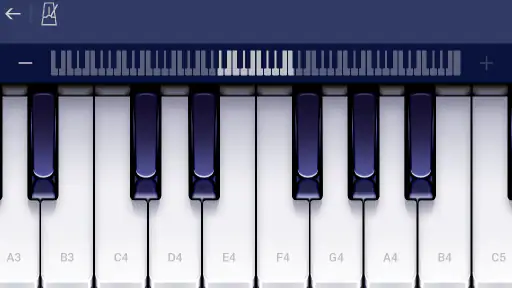
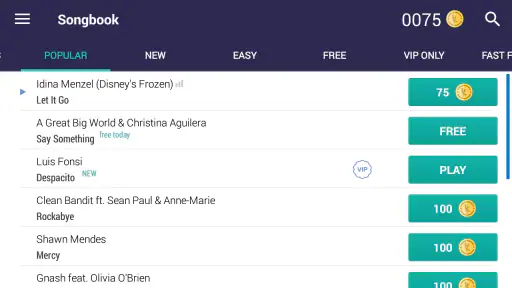
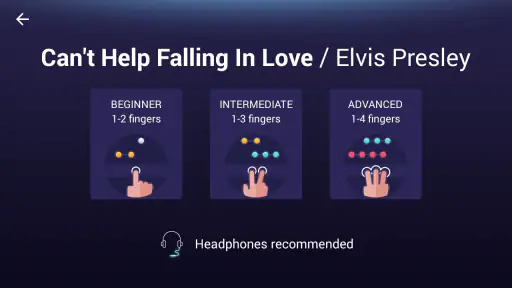
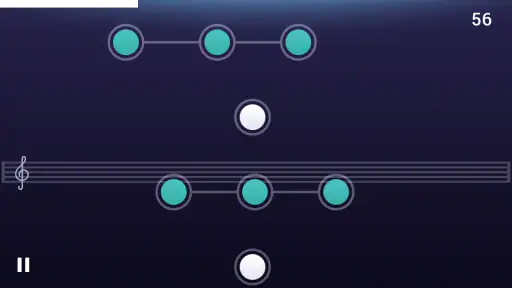
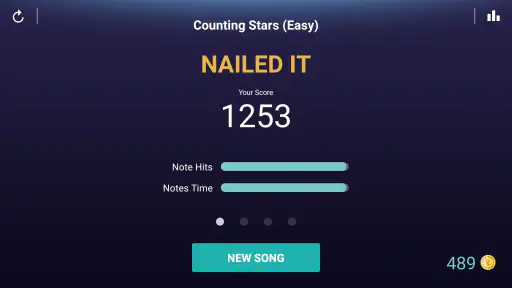
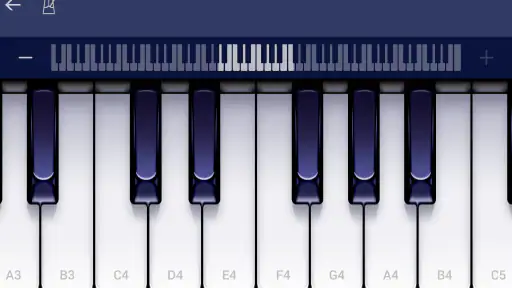
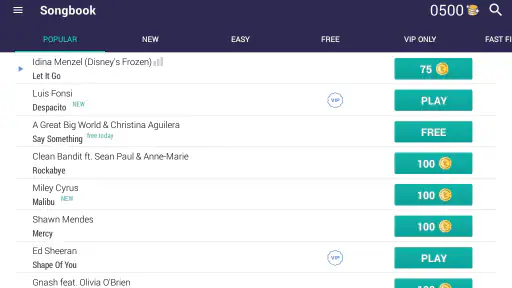
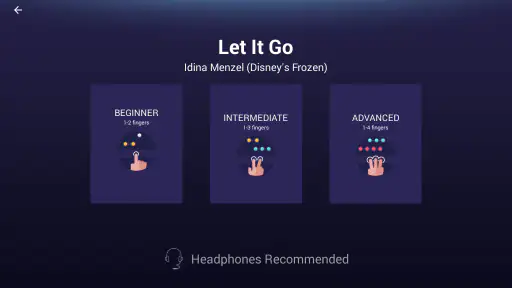
Analysis by Reviewed
I think the key to getting something useful out of a phone piano is deciding what you want from it before you start tapping: a quick music break, a first taste of keyboard play, or a way to follow a tune. Piano - Play Unlimited Songs is a free music-and-audio app from Yokee™ that’s built around playing songs on a touchscreen. It has a 4.3 average from around 225,000 ratings, and more than 10 million installs, which suggests it has found a broad audience. I’d treat it as an approachable way to experiment rather than a substitute for a real keyboard.
Who Will Enjoy a Phone Piano
The best fit, in my view, is someone who wants music to be easy to pick up and put down. A beginner can try following a melody without first learning where to place a full set of keys, while someone who already plays can use a familiar song as a brief change of pace. The screen-based format makes the first step feel less formal than sitting down for a scheduled lesson.
It is also useful when a physical instrument is impractical: during a quiet wait, while travelling, or in a small home where there is no room for a keyboard. I would keep expectations realistic, though. It can make musical interaction convenient, but it cannot teach the same finger spacing, hand movement, or touch control that comes from playing actual keys.
A Practical First Session
For a first try, I’d choose a song that I already recognize rather than something complicated. Familiarity gives me a better sense of whether I’m following the tune, instead of spending all my attention wondering what it should sound like. I’d take one short passage at a time, then repeat it before moving on. That keeps a casual session from turning into aimless tapping.
A realistic routine might be a few minutes after dinner: open the app, work through one section of a melody, and stop when attention starts to drift. If I return to the same passage another day, I can tell whether it feels more comfortable. That kind of small, repeatable goal is more useful than trying to finish an entire song in one sitting, especially when I’m new to touchscreen playing.
Upon downloading Piano - Play Unlimited Songs, I was immediately impressed by its sleek and user-friendly interface. It’s like having a pocket-sized grand piano ready to go wherever you are. The app doesn’t just throw you into the deep end; it offers a guided tour for beginners, which I found incredibly helpful.
Diving into the World of Music
One thing I’d keep in mind is that phone size affects how comfortable a session feels. A screen that is easy to hold can still feel tight when I’m trying to track notes and tap accurately. I’d begin with the device resting securely rather than juggling it in one hand, and I’d avoid practising somewhere that makes me rush. A calm setup matters more here than trying to play fast.
More From Our News Desk

Weather by Xiaomi Review: Clear at a Glance, Less Clear Up Close

X Under Pressure: Can It Recover When Posting Goes Wrong?

Clash of Clans Is Won Between the Battles

Android Auto Makes the Case for Quieter Car Software

MobiOffice: Transforming Mobile Productivity with Seamless Integration

EA SPORTS FC™ Mobile Soccer: Redefining Mobile Sports Gaming
Features Galore
The app boasts a vast library of songs across different genres. Whether you’re into classical, pop, or jazz, there’s something for everyone. I was thrilled to see my favorite songs available to play, and the app’s sheet music feature made it easy to follow along. Interactive lessons are a standout feature, breaking down songs into manageable parts so you can learn at your own pace.
That song-first approach is a useful difference from a general piano keyboard app, where the main attraction is often a playable instrument rather than guided material. Here, choosing a tune can give a session a clear purpose. I would still browse with a specific mood or difficulty in mind, instead of assuming that a large selection means every track will suit my current ability or patience.
Another cool aspect is the ability to record and share your performances. I felt like a pro after nailing a particularly tricky piece and couldn’t resist sharing it with my friends. The app also includes a metronome and various sound effects to enhance your practice sessions. It’s like having a personal music studio in your pocket!
Recording is most valuable as a way to listen back, not just as a finishing flourish. When I’m concentrating on the next tap, it’s easy to overlook uneven timing or a missed note. A replay gives me a more detached check, and I can decide whether to repeat the same passage or move on. I’d use sharing selectively: it can make a casual performance more fun, but it isn’t necessary for getting practice value from the app.
Learning Curve
If you’re worried about not having any prior piano experience, fear not. The app is designed to cater to all skill levels, from absolute beginners to seasoned players. I started as a newbie, and the step-by-step tutorials were a godsend. The lessons are structured in a way that makes learning not just easy but also enjoyable. It’s all about progression at your own speed, which I appreciated greatly.
For someone with prior keyboard experience, the benefit is different: the app can offer a convenient way to revisit songs, but tapping a screen may feel restrictive compared with controlling real keys. I wouldn’t use it to judge whether my piano technique is improving. It is better understood as a guided musical activity that can support curiosity and familiarity with melodies, rather than a complete course in playing an instrument.
A Routine That Makes Practice Easier
For a repeatable session, I’d pick one song, work through a short section, then replay that passage before moving on. That small loop makes it easier to notice whether I’m actually getting more comfortable instead of just tapping through a track once. If I’m using the metronome, I keep the goal modest: steadier timing first, speed later. Recording a run can also help me catch a stumble I didn’t notice while concentrating on the screen.
I’d also give each session one job. On one day, that might be following the notes without stopping; on another, it could be listening for a steadier pulse. Trying to fix every mistake at once is frustrating, especially on a small display where visual tracking already takes attention. Separating those aims makes the app easier to return to and helps me decide when a passage is good enough to leave for now.
On an ordinary commute or during a quiet break, the app works best as a focused, short activity rather than background entertainment. I can open it, try a familiar melody, and stop without needing to set up an instrument. For a child or a curious adult, that low-pressure access is a real advantage; the Everyone age rating also makes it broadly suitable for families. Still, I’d use headphones in shared spaces and avoid treating touchscreen taps as a reliable measure of acoustic piano technique.
Settings, Access, and Trade-Offs
Before settling into a routine, I’d check the available playback and practice controls and make sure the screen is comfortable to follow. Small adjustments to volume and a quieter environment can make timing cues easier to hear. If the display feels cramped, turning the phone sideways may help with visibility, though it won’t make the touch surface feel like full-size keys. These are simple habits, not secret shortcuts, but they make brief practice sessions less fiddly.
I’d make the first session a quick setup check as well as a musical one: find a comfortable volume, make sure I can follow the material without squinting, and try a short passage before committing to a long practice run. If I’m using the metronome, I’d listen at a level that stays clear without becoming distracting. These small choices can make it easier to focus, but they don’t change the basic trade-off of playing on a flat screen.
The app is currently at version 1.20.5 and supports Android 6.0 or later. It is free to install, with in-app purchases ranging from $0.99 to $47.99 per item. I’d explore the free experience first and only consider paying if the songs or access options I want justify it. A purchase may make sense for someone who returns often; someone who only wants occasional tapping should be cautious about spending before establishing that habit.
That is also the answer to whether it is worth paying for: I’d first see whether I actually use the app repeatedly and whether the available paid options match what I want. The range of in-app purchase prices makes it sensible to pause and check the specific item before buying. If my interest is only a quick novelty, the free starting point is the safer choice. If I build a regular song-practice habit, I can make a more informed decision instead of paying on impulse.
Compared with a conventional piano-learning app, this is more immediately playful and song-led; compared with a real keyboard, it is more portable but offers neither physical key spacing nor the same feel under the fingers. If your goal is structured technique, reading notation in depth, or preparing for lessons, a keyboard and a dedicated course are better tools. If you mainly want a casual way to engage with melodies, its interactive format is a friendlier starting point. The developer is Yokee™, and the app has around 11,000 written reviews alongside its broader ratings.
Compared with simply watching a piano tutorial, the interactive song format gives me something to do rather than only something to observe. But people who prefer to learn from printed notation or a teacher may find a dedicated course more useful, because their priorities are different from casual song practice. I’d choose this app when convenience and a guided tune matter more than building a formal, instrument-based technique.
Learning Curve
If you’re worried about not having any prior piano experience, fear not. The app is designed to cater to all skill levels, from absolute beginners to seasoned players. I started as a newbie, and the step-by-step tutorials were a godsend. The lessons are structured in a way that makes learning not just easy but also enjoyable. It’s all about progression at your own speed, which I appreciated greatly.
Even so, beginners should not mistake a smooth first session for mastery. Touchscreen play lowers the barrier to trying a tune, but it does not remove the value of practising patiently or listening closely. I’d use each lesson as a prompt to focus on one manageable task, then return to a keyboard or a teacher if I want to build more formal piano skills.
Endless Entertainment
What really sets this app apart is its ability to keep you entertained while learning. I found myself losing track of time as I delved deeper into the vast song collection. The regular updates ensure there’s always something new to learn, keeping the experience fresh and exciting.
For keeping that enjoyment useful, I’d alternate between a song I know well and one that asks a little more of me. The familiar choice can make a short break relaxing; a more challenging one gives me a reason to slow down and pay attention. If I start tapping without listening or feel annoyed by the screen, that is my cue to stop rather than force a longer session.
Where It Fits—and Where It Doesn’t
I’d recommend it to a curious beginner, a casual music fan, or someone who wants a song-centred activity that fits into spare moments. It is less suitable for a person who needs a full piano curriculum, precise physical technique, or a substitute for practising on an acoustic or digital keyboard. The choice is not really between “good” and “bad” piano learning; it is about whether a portable, touch-based experience matches the reason you want to play.
My practical rule is simple: use it when a phone is the instrument you have available, and reach for a real keyboard when your goal depends on physical control. That distinction keeps expectations fair. The app can make trying music feel accessible and enjoyable, but it cannot provide the tactile feedback or full-size layout that makes traditional practice valuable.
In conclusion, Piano - Play Unlimited Songs is a fantastic tool for anyone looking to explore their musical side without the commitment of traditional lessons. Its intuitive interface, extensive song library, and educational features make it a must-have app for music enthusiasts. Whether you’re looking to impress at the next family gathering or simply want to unwind with some tunes, this app has got you covered. Give it a go, and you might just discover a hidden talent!
Piano - Play Unlimited songs Frequently Asked Questions
Does Piano - Play Unlimited Songs require a lot of storage space?
The app is a music-focused piano experience, and downloading songs for offline play may use additional space on your device. If storage is tight, check your available capacity before installing and keep in mind that downloaded content can take more room than the app alone. You can manage what you keep on your device based on how often you plan to play offline.
Can I connect a physical keyboard or use headphones with the app?
Piano - Play Unlimited Songs is designed around tapping tiles on a phone or tablet, offering a quick way to interact with songs through the screen. If you prefer headphones, they can be useful for listening without disturbing others. The core experience is touch-based, so it is best suited to people who want to play directly on their device rather than use it as a traditional keyboard setup.
Is Piano - Play Unlimited Songs suitable for children and families?
The app is rated for Everyone, so its age classification makes it suitable for a broad audience, including families considering a music app for younger users. Its piano-focused format is centered on tapping tiles to play songs, making it approachable for casual play as well as music practice. Parents may still want to review any in-app purchase options before handing the device to a child.
What is Piano - Play Unlimited Songs app?
Piano - Play Unlimited Songs is a mobile application designed for music enthusiasts who want to learn and play piano on their mobile devices. The app offers a vast library of songs across various genres, allowing users to practice and play along. It is suitable for both beginners and experienced musicians, providing features like interactive lessons and customizable settings. Its store summary presents it as a piano game where players click tiles and enjoy the music.
How does the app help beginners learn to play the piano?
The app helps beginners by offering interactive lessons that guide users through the basics of playing piano. It includes tutorials that teach users how to read sheet music, understand piano keys, and play popular songs step-by-step. The app also provides feedback on performance to help learners improve their skills progressively. Its tile-tapping approach can make getting started feel less intimidating, though it is best viewed as a mobile learning and playing experience rather than a substitute for a full piano.
Pros
- Extensive song library available.
- User-friendly interface for beginners.
- Regular updates with new songs.
- High-quality sound reproduction.
- Customizable piano keyboard layouts.
Cons
- In-app purchases can be costly.
- Requires internet for full features.
- Ads can be intrusive at times.
- Limited offline song availability.
- Occasional app crashes reported.
- Category
- Music & Audio
- Version
- 1.20.5











