Photoleap: AI Photo Generator
- 2.61K
- 4.0
- Installs
- 10.00M
- Price
- Free

Screenshots

Analysis by Reviewed
Ever stumbled across an app that makes you go, "Whoa, how did they even do that?" Well, say hello to Photoleap: Photo Editor/AI Art. This app isn’t just your run-of-the-mill photo editor; it’s like having a mini digital art studio right in your pocket.
Unleash Your Inner Artist
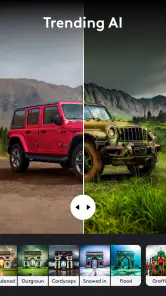
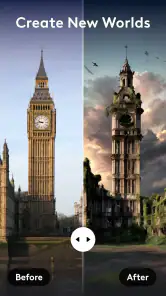
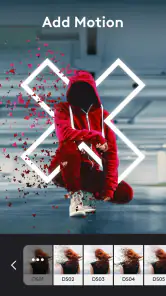
First off, let’s talk about the sheer range of features Photoleap offers. It’s not just about slapping a filter on a selfie. Nope, this app lets you dive deep into the world of AI-powered photo editing. You can create stunning double exposures, add surreal elements to your pictures, or even turn your mundane shots into vibrant pieces of art.
User Interface: Simple Yet Powerful
Now, I’m no tech wizard, but navigating through Photoleap is as smooth as butter. The interface is clean, intuitive, and doesn’t bombard you with a gazillion options right off the bat. It’s perfect for beginners who want to get their feet wet in photo editing without feeling overwhelmed.
Features That Stand Out
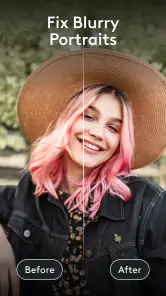
The magic really happens when you start exploring the different tools. From blending modes that allow you to merge images seamlessly, to advanced layering capabilities that give your edits a professional touch – Photoleap doesn’t disappoint. And let’s not forget the AI tools that are designed to enhance your photos with just a few taps.
Oh, and did I mention the artistic effects? They’re a game-changer. You can transform your photos into paintings or sketches, giving them that artsy edge that’s perfect for social media.
AI Art: Because Why Not?
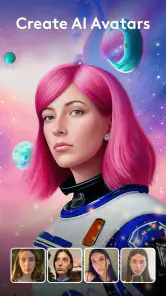
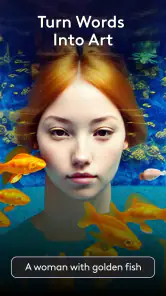
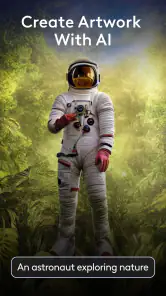
The AI art feature is like having a personal artist at your beck and call. You just select a style, and bam! Your photo is now a masterpiece. It’s fascinating to see how AI interprets your images and adds its unique twist. It’s like collaborating with a futuristic artist who never runs out of inspiration.
For those who love experimenting, the sky’s the limit. You can spend hours tweaking and tuning your photos, and the results are always worth the effort.
More From Our News Desk

Weather by Xiaomi Review: Clear at a Glance, Less Clear Up Close

X Under Pressure: Can It Recover When Posting Goes Wrong?

Clash of Clans Is Won Between the Battles

Android Auto Makes the Case for Quieter Car Software

MobiOffice: Transforming Mobile Productivity with Seamless Integration

EA SPORTS FC™ Mobile Soccer: Redefining Mobile Sports Gaming
Final Thoughts
In a world where visual content is king, having an app like Photoleap in your arsenal is a no-brainer. It’s versatile, powerful, and most importantly, fun to use. Whether you’re a casual user wanting to add some flair to your photos, or a budding artist looking to create something unique, Photoleap has got you covered.
So, if you’re ready to take your photo editing skills to the next level, give Photoleap: Photo Editor/AI Art a whirl. Trust me, you won’t be disappointed.
Photoleap: AI Photo Generator Frequently Asked Questions
What features does Photoleap: Photo Editor/AI Art offer?
Photoleap offers a comprehensive suite of photo editing tools, including layers, blending modes, special effects, and AI-driven art features. Users can create professional-grade edits with ease, thanks to its intuitive interface. Advanced AI capabilities allow for automatic enhancements and artistic transformations, making it a powerful tool for both novices and experienced photographers.
Is Photoleap suitable for beginners in photo editing?
Yes, Photoleap is designed to cater to both beginners and advanced users. The app's user-friendly interface and guided tutorials make it easy for new users to start editing photos. Meanwhile, its advanced features like layers and AI art tools provide depth for more experienced editors seeking to refine their skills.
How does the AI Art feature in Photoleap work?
The AI Art feature in Photoleap uses advanced algorithms to transform regular photos into artistic masterpieces. By analyzing the image's elements, the AI applies various artistic styles, mimicking famous art techniques. This feature allows users to explore creative possibilities without the need for extensive manual editing.
Are there any in-app purchases or subscriptions required for Photoleap?
Photoleap offers a free version with basic features, but for access to the full suite of tools, including premium filters and AI features, users can opt for a subscription. The subscription model provides regular updates and new features, ensuring users have access to the latest in photo editing technology.
What platforms is Photoleap available on?
Photoleap is available on both Android and iOS platforms. The app is optimized for a wide range of devices, ensuring a smooth user experience regardless of the operating system. Users can download Photoleap from the Google Play Store for Android devices or the Apple App Store for iOS devices.
Pros
- User-friendly interface
- Advanced editing tools
- AI art generation
- High-quality output
- Frequent updates
Cons
- Premium features cost
- Occasional crashes
- High battery usage
- Requires internet
- Limited free features
- Category
- Art & Design
- Version
- 1.68.3