

Motionleap by Lightricks
- 10.07K
- 4.0
- Installs
- 50.00M
- Price
- Free
Screenshots
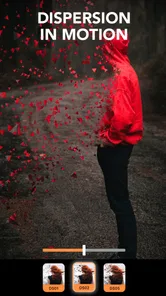
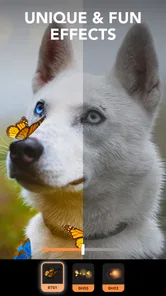
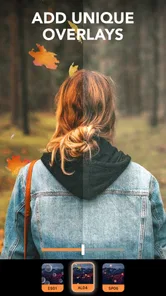
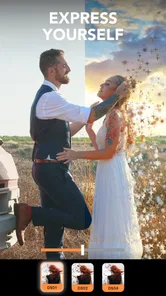
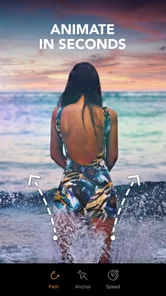
Analysis by Reviewed
I usually judge a photo editor by how quickly it turns an ordinary picture into something that feels alive without forcing me to learn a complicated desktop program. Motionleap caught my attention for exactly that reason. It is a photography app from Lightricks Ltd. built around animated photos, visual effects, and an AI art generator, but its real appeal is the way it encourages experimentation. I can start with one still image, add movement, try an atmospheric effect, and decide within minutes whether the idea works.
That makes it different from a conventional editor focused mainly on cropping, exposure, color, and retouching. Motionleap is more about giving a photograph a sense of motion or turning it into a stylized visual. I found it most enjoyable when I treated it as a creative tool rather than a replacement for a complete photo-management or professional editing workflow. If you want a quick way to make a landscape shimmer, a cloud layer drift, or a social post feel more dynamic, it is worth considering. If you mainly need precise color correction or detailed layer work, another kind of app may suit you better.
What I look for before choosing a motion photo editor
My first decision point is the type of result I want. There is a big difference between correcting a dark portrait, removing a distracting object, designing a collage, and animating part of a still image. Motionleap is aimed at the last two creative steps: making a picture feel active and adding a more artistic finish. That focus is useful because the interface does not need to behave like a full desktop editor, but it also means I would not install it as my only photography app.
The second question is how much control I need. A good animation tool should let me decide which areas move and which areas stay still. Otherwise, the effect quickly looks like a filter placed over the entire image. In my experience, the best results come from choosing a photo with a clear subject and a background that can tolerate movement. Water, smoke, clouds, hair, fabric, and light trails are natural candidates. A busy group photo or a tightly cropped face requires much more restraint.
The third criterion is patience. Motionleap makes experimentation approachable, but convincing animation still depends on careful masking and direction choices. I would not expect to tap one button and receive a flawless cinematic result every time. The app is friendly for beginners, yet its strongest output comes from users willing to make small corrections, preview the result, and remove effects that distract from the original subject.
It is also sensible to consider the device and operating system before committing to a workflow. The app supports Android from version 7.1 onward, which makes it accessible to many older devices, although the experience of editing animated images can still vary with hardware, image size, and the number of effects being used. I would keep the original photo untouched and work from a copy, especially when testing several ideas in succession.
The kind of user who will enjoy it most
I think Motionleap is a strong match for social media users, casual creators, travel photographers, and anyone who likes turning a static snapshot into a short visual experiment. It is also useful for people who have good images but do not want to spend an evening learning keyframes, masks, and compositing in a desktop application. The app gives that audience a more direct route from a still photo to something shareable.
More From Our News Desk

 Gmail
GmailGmail in a Busy Inbox: Who Benefits Most?
From first account to crowded workday, Gmail earns its place through dependable search and flexible sorting—but its best fit depends on how much inbox maintenance you can tolerate.

 Prime Video
Switching to Prime Video: What Changes in Your Viewing Routine
Prime Video can make a compelling second home for streaming, but switching means learning a different catalog, rental layer, and route from browsing to playback.

 Universal TV Remote Control
Universal TV Remote Control Works Best as a Reliable Backup
A phone remote earns its place through quick setup and reliable habits. Here is how to get more from Universal TV Remote Control—and where its limits show.

 Weather - By Xiaomi
Weather by Xiaomi Review: Clear at a Glance, Less Clear Up Close
Xiaomi’s weather app makes everyday forecasts quick to scan, but its calm surface can leave useful details and recovery paths harder to find than they should be.

 X
XX Under Pressure: Can It Recover When Posting Goes Wrong?
A resilience-focused review of X, examining setup, mistaken posts, interruptions, weak connections, and the gaps that matter when recovery needs to be dependable.

 Clash of Clans
Clash of Clans Is Won Between the Battles
Its raids are quick; its community is a long-term project of coordination, teaching, rivalry, and shared responsibility—with all the friction that entails.
Latest News



It can also help a creator develop a recognizable style. Instead of applying the same color filter to every picture, I can use movement selectively: a gentle drift in the sky, a flowing reflection, or a subtle shift in a background element. That kind of restraint often looks more personal than a heavy preset. The important word is selectively. When everything moves at once, the image loses its sense of place.
Where the editing experience is at its best
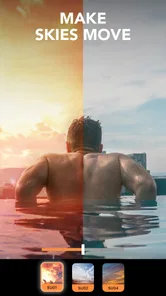
The central strength is the combination of motion and image effects in one focused workspace. I can begin with a landscape, mark a direction for the clouds, protect a mountain or building from unwanted movement, and then test an atmospheric effect. This is more engaging than simply choosing a visual preset because I am making a decision about the image itself: what should move, where it should move, and what must remain stable.
That workflow is especially effective for photos with a strong horizontal or vertical flow. A road leading into the distance, a waterfall, a line of trees, or a curtain caught by wind gives the animation a visual reason to exist. When the source image already suggests movement, the app helps amplify it instead of inventing an effect that feels unrelated.
The AI art generator adds another direction. I see it as a way to explore ideas rather than as a substitute for a carefully photographed image. It can be useful when I want to test a mood, create a visual concept, or move from a familiar photo toward something more illustrative. However, I would keep expectations practical: an AI-generated result may be attractive as an experiment while still being unsuitable when exact details, realistic anatomy, or faithful representation matter.
One of my favorite practical workflows is to begin with a restrained animation and only then consider effects. If the motion already makes the image interesting, I can use a lighter effect to support it. If I start with several dramatic effects, it becomes harder to tell whether the underlying movement is actually working. This order saves time and produces a cleaner result.
Three techniques that make a noticeable difference
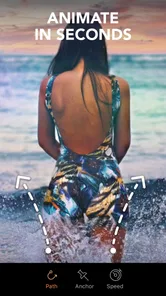
The first technique is to animate in short sections rather than trying to make the whole frame dynamic. For example, in a beach photo I might give the water a gentle directional flow while keeping a person, pier, or horizon fixed. The contrast between moving and still areas creates credibility. It also reduces the amount of correction needed around the main subject.
The second is to use protective boundaries generously around fine details. Hair, branches, railings, and building edges are easy places for motion to look unnatural. I found that a slightly smaller animated area often looks better than pushing movement right up to every edge. A viewer may not notice that the effect is modest, but they will notice when a solid object appears to bend or smear.
The third is to preview at several moments instead of judging only the first frame. A movement can look attractive at the beginning and become repetitive or distracting after a few seconds. I prefer a loop that is subtle enough to remain pleasant when watched repeatedly. This is one of the main differences between a quick novelty and an image I would actually share.
A fourth useful habit is to lower the ambition of the source image. A simple photo with one clear subject can produce a more convincing result than a technically impressive but cluttered scene. Motionleap gives me creative controls, but it cannot remove the visual confusion already present in a photograph. Choosing the right starting image is often more important than adding another effect.
Everyday use: turning a travel photo into a shareable moment
Imagine I return from a weekend trip with a photograph of a lake, distant hills, and a cloudy sky. The original picture may be pleasant but visually quiet. I can use Motionleap to suggest a slow drift in the clouds, leave the hills and shoreline still, and add a restrained atmospheric touch. The finished piece becomes more noticeable in a feed without requiring a completely new photograph.
I would then compare the animated version with the original before sharing it. If the movement makes the lake look artificial or pulls attention away from the scenery, I would simplify it. This comparison is important because animation can make a photo feel more dramatic while also making it less believable. The best result is not always the most active one.
The same approach works for a small business owner preparing a visual post. A café could animate steam above a drink photo, or a clothing creator could add a slight sense of movement to fabric. I would still keep the product itself stable and recognizable. For commercial work that needs exact brand colors, precise layouts, or repeatable campaign templates, I would move to a dedicated design tool after creating the concept here.
How it compares with familiar alternatives
Compared with a standard mobile photo editor, Motionleap wins when the desired output is movement rather than correction. A typical editor is usually quicker for straightening, exposure adjustments, cropping, and basic retouching. I would use that kind of app first if the image is technically weak. Motionleap becomes more valuable after the photo is already usable and I want to give it a distinctive visual treatment.
Compared with a video editor, it offers a simpler starting point for animating a single image. A video editor is the better choice when I need several clips, audio, captions, transitions, or a longer sequence. Motionleap is more focused: it lets a still image carry the creative idea. That focus reduces setup time, but it also limits the kind of finished project I would build inside it.
Compared with a professional desktop compositor, the app is easier to approach but less suitable for demanding precision. Desktop software generally makes more sense when I need complex masks, detailed timing, multiple assets, or a carefully controlled production pipeline. I would choose Motionleap for a quick concept, a personal post, or a visual experiment, then switch tools when the project becomes part of a larger edit.
AI-focused image applications are another alternative. They may be preferable when the main goal is to generate a new scene from an idea rather than animate an existing photograph. Motionleap makes more sense when I want to preserve the identity of the source image while adding energy or style. Its AI art function broadens the creative options, but I would still decide first whether I want transformation or generation.
What may frustrate you during real use
The biggest limitation is that good animation takes more judgment than the first preview suggests. Automatic-looking movement can be entertaining for a moment, but it often needs refinement around edges and subjects. I also found that dramatic effects can overpower the photograph quickly. Users who prefer a single-tap result may enjoy the novelty but become frustrated when trying to make the output look polished.
Another consideration is the free-to-use model. Motionleap is free to download, and the app is rated for Everyone, but it includes in-app purchases ranging from $0.99 to $199.99 per item. I would explore the free experience first and decide whether the available tools fit my needs before paying for anything. The wide range of possible purchase amounts is a reason to read each purchase screen carefully rather than assuming every feature is included at no cost.
The app has a 4.0 average from around 343 thousand ratings, with roughly 10 thousand written reviews, and it has passed 50 million installs. Those figures suggest a broad audience, but they do not remove the need to test it personally. Creative apps can feel very different depending on whether someone wants casual effects, controlled animation, or professional output. Popularity tells me it is established; it does not tell me that every workflow will suit me.
Version 1.8.1 is the version I would look for when checking the app on a compatible device. Since this type of editing can involve demanding visual processing, I would also keep enough free storage for source images and exported results. I would avoid judging the app solely from a low-resolution preview, because small screens can hide edge problems that become obvious when the result is viewed elsewhere.
The cost of changing from another workflow
Switching from a normal photo editor is relatively easy if I only want to create occasional animated posts. I can keep my existing editor for corrections, export a clean image, and bring that copy into Motionleap for movement and effects. This two-step approach is often more practical than trying to force one app to handle every task.
Switching from a video editor requires a different compromise. I may gain speed when animating one image, but I lose the broader timeline-based control used for multi-scene projects. I would not replace a video editor if my regular work includes music, narration, several clips, or carefully timed text. Instead, I would use Motionleap as a specialized step for creating an animated still that can later be placed in a larger video.
Switching from desktop software is mainly a question of precision. For quick social content, the lighter workflow may be a welcome relief. For client work, repeated revisions, or exact compositing, the convenience may not compensate for reduced control. My advice is to test one representative project rather than making a complete switch immediately. If the app handles the kind of image I use most often, it has earned a place in my toolkit.
Who should install it, and who should skip it
I would recommend Motionleap to someone who enjoys visual experimentation and wants more than static filters. It is particularly appealing if you regularly photograph skies, water, streets, fashion, food, or atmospheric scenes. It also suits beginners who want to understand the basic logic of selective animation without starting with a complex professional application.
I would be more cautious about recommending it to a photographer whose priority is raw processing, accurate color, batch editing, or detailed portrait retouching. Those needs belong to a different category. I would also suggest skipping it if you dislike adjusting masks and movement directions, because the app’s most convincing results depend on that involvement.
For younger users, the Everyone content rating makes the app broadly accessible, but I would still treat AI creation and in-app purchases as areas where a parent or guardian may want to be involved. The purchase range makes it especially sensible to review the screen before confirming any transaction.
My recommendation after using it
Motionleap is best understood as a focused creative companion, not an all-purpose photo editor. I like it because it gives a still image a new role: instead of merely looking at a photograph, I can decide how it should breathe, drift, shimmer, or change mood. The process is approachable, and the combination of motion tools, effects, and AI art offers more room to explore than a basic filter app.
My recommendation is strongest for casual creators and social publishers who want a fast way to make selected images stand out. Start with a simple photo, animate only one or two meaningful areas, protect the subject carefully, and preview the loop before adding more effects. That workflow reveals the app’s real strength while avoiding its most common visual problem: too much movement.
I would not make it my sole photography app, and I would not choose it over a full video editor or desktop compositor for complex productions. Still, as a free photography app from Lightricks Ltd. that turns still images into more expressive visual pieces, it earns a place on my shortlist. If you enjoy experimenting and are willing to make small corrections instead of relying entirely on one-tap results, I think you will get much more from it than the store summary alone suggests.
Motionleap by Lightricks Frequently Asked Questions
Does Motionleap use AI to create artwork?
Motionleap’s description highlights photo editing, effects, and an AI art generator for creating digital art. That makes it worth considering if you want both animated-photo tools and AI-assisted creative options in one photography app. The app’s other editing features can help you give images a more stylized look, while the AI art generator offers a different way to explore creative results.
Who makes Motionleap, and what kind of app is it?
Motionleap is a photography app developed by Lightricks Ltd. It is designed for people who want to edit images and create visual effects, including animated results from still photos. Its combination of photo-editing tools and AI art generation makes it relevant to casual creators as well as people who regularly prepare images for social media. It is rated for Everyone.
Can Motionleap animate any photo, or do some images work better than others?
Motionleap is most effective when a photo has a clear area you want to animate and distinct parts that should stay still. For example, a sky or a stretch of water can be easier to work with than a crowded scene with many overlapping details. You can experiment with motion paths and still areas, but the source image and careful masking make a noticeable difference to how natural the result looks.
What is Motionleap by Lightricks, and what can I use it for?
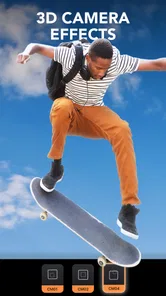
Motionleap by Lightricks is a mobile photo-editing app designed to add movement and visual effects to still images. After testing its main tools, I found it useful for animating skies, water, hair, clouds, and other selected areas, while also offering overlays, camera effects, filters, and adjustment controls. It is aimed at social media creators, photographers, and anyone wanting to turn ordinary photos into short animated clips.
Is Motionleap free to download and use?
Motionleap can generally be downloaded for free on supported Android and iOS devices, but the free experience is limited. Several advanced effects, animation options, artistic tools, and export features may require a subscription or in-app purchase, depending on the current version and platform. Before editing extensively, check the pricing screen and trial terms carefully, especially if you do not want an automatically renewing subscription. In-app purchases range from $0.99 to $199.99 per item.
Pros
- Easy-to-use interface for creating animated photos quickly.
- Offers precise motion paths and anchor points for detailed effects.
- Includes atmospheric overlays
- sky effects
- and animated elements.
- Exports content in formats suitable for social media sharing.
- Regular updates add creative tools and improve overall performance.
Cons
- Many advanced effects and tools require a paid subscription.
- Export settings may be limited unless you upgrade to the premium plan.
- Complex edits can take time to render on older smartphones.
- Some effects can look artificial without careful adjustment.
- The app may require substantial storage for downloaded assets and projects.











