Phone Tracker & GPS Location
- 65.00
- 3.5
- Installs
- 5.00M
- Price
- Free
Screenshots
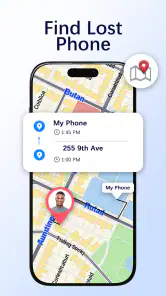
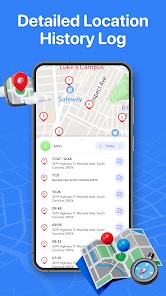
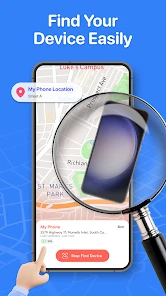
Analysis by Reviewed
I’d approach Phone Tracker & GPS Location as a tool for a specific, shared purpose rather than a way to watch someone without their knowledge. The useful first goal is modest: let the people involved exchange a location code, connect willingly, and confirm that the map helps with a real plan. That makes the first test more reassuring, and it gives everyone a chance to agree on when sharing makes sense.
What to expect from a code-based tracker
This is a free Maps & Navigation app from Smart Utilities Hub, built around sharing location by codes to help people stay connected. Its approach is different from simply sending a map pin in a chat: a one-time pin can show where you are at that moment, while a tracker is more useful when a group wants a shared location workflow. I’d choose between them based on the situation, not assume one replaces the other.
The audience figures suggest it has reached a broad group of users, though the average rating is 3.5 from around 6,600 ratings, so I wouldn’t treat popularity as proof that it will suit every phone or household. It has over 5 million installs, is rated for Everyone, and its current version is 2.5.7. It is free to install, with optional in-app purchases ranging from $2.99 to $139.99 per item; I’d check the purchase screen carefully before agreeing to anything, especially if I only need basic location sharing.
Make the first setup a shared decision
After installing it, I’d take a minute to read each screen and make sure the other person understands what the code is for before sharing it. A tracker works best when everyone knows who will be able to see a location and why. If you are setting it up for a family outing, explain the plan in plain language and let each person decide whether to join. That small conversation prevents a practical safety tool from feeling intrusive.
For a first test, use a low-pressure situation rather than relying on it during an emergency. Agree to meet at a familiar public place, exchange the code, and compare what each person sees with the actual arrangement. If the map seems slow or unclear, use a call or message as a backup. A location app can support communication, but it should not become the only way you can reach someone.
Turn a successful first check into a useful routine
A simple everyday trial could be coordinating a family member’s arrival after an evening class. Before they leave, agree that location sharing is for the trip and that they can tell you if plans change. You can check whether the shared view answers the practical question—are they still on the way, or should I call?—without repeatedly messaging them. I find that this is a better test than watching a dot continuously, because it measures whether the app reduces confusion rather than encouraging constant checking.
Another useful habit is to decide in advance what you will do if the map does not update as expected. Try a direct call, ask the person to send a fresh location through a messaging app, or agree on a meeting point. This fallback matters when someone’s phone is offline, the battery is low, or location access is limited. No tracker can replace a clear plan, and I would not rely on one as an emergency service.
More From Our News Desk

Weather by Xiaomi Review: Clear at a Glance, Less Clear Up Close

X Under Pressure: Can It Recover When Posting Goes Wrong?

Clash of Clans Is Won Between the Battles

Android Auto Makes the Case for Quieter Car Software

MobiOffice: Transforming Mobile Productivity with Seamless Integration

EA SPORTS FC™ Mobile Soccer: Redefining Mobile Sports Gaming
Phone Tracker & GPS Location first appeared on September 15, 2023, and it requires Android 7.0 or later. Those details make it easier to judge whether an older device is a candidate before you start setup. Since the app is available as a free download, the sensible approach is to try the shared-code workflow first and only consider a purchase if you understand what it unlocks and genuinely need it.
Ever found yourself in a situation where you're trying to meet up with friends, but someone always gets lost? Or maybe you're just worried about keeping track of your loved ones for safety reasons? Well, that's where the Phone Tracker & GPS Location app comes into play. Let me walk you through my experience with this app, and why it could be a game-changer for you.
Getting Started with Ease
First things first, downloading the Phone Tracker & GPS Location app is a breeze. It's available on both Android and iOS, so no one gets left out. Once installed, the app greets you with a straightforward interface that even your grandma could navigate—no offense to tech-savvy grandmas out there!
Features That Stand Out
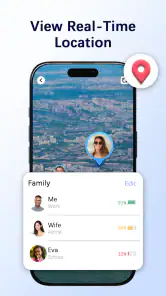
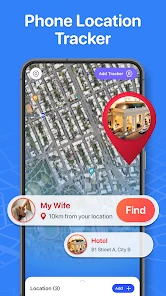
One of the main reasons I decided to test out this app was its real-time location tracking feature. Imagine this: you're at a crowded festival, and your phone buzzes. It's a notification showing you exactly where your friends are. No more frantic calls or confusing directions. Just open the app, and voila! You see their little dots moving on the map.
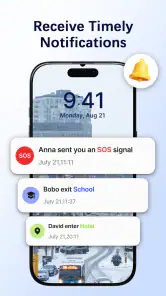
Moreover, the app allows you to set up geofences. What's that, you ask? It's like a digital fence you can draw on the map. Whenever someone crosses that boundary, you get an alert. Super handy if you're keeping an eye on your kids or checking if your partner remembered to pick up groceries on their way home.
User Experience
Using the app feels intuitive. The developers clearly put a lot of thought into the user interface. The colors are pleasing, and the buttons are where they should be, which saves you the hassle of tapping around aimlessly. Plus, the app runs smoothly with minimal battery drain—something we all can appreciate.
Privacy Concerns? Not Here!
In a world where privacy is a hot topic, the app’s developers have made sure your data is safe. You can control who sees your location and when. It’s all about consent and keeping things transparent. So, no need to worry about someone stalking your every move.
The app also supports multiple languages, making it accessible for people worldwide. Whether you speak English, Spanish, or Mandarin, the app's got you covered. Nice touch, right?
Choosing it for the right kind of coordination
I’d consider this app most useful for a small group that has a reason to coordinate repeatedly: household members travelling to meet, friends arriving separately at a busy venue, or relatives who want a shared way to check progress during a planned trip. The code-based approach makes the connection feel deliberate. It is less suited to someone who only needs to tell a friend where to meet once; sending a pin in a chat is simpler for that one-off job and does not ask the other person to build a recurring routine around a tracker.
For a first meaningful success, I would keep the test narrow. Pick one journey, make sure both people understand the code and the purpose, then use the location view to answer one practical question, such as whether it is time to head downstairs or wait a little longer. Afterward, agree whether the result actually helped. That small debrief is useful because it distinguishes a helpful shared view from a habit of checking just because the map is available.
What to do when the map and the plan disagree
A location marker is a clue, not a promise that someone is standing at that exact spot. If it appears stale, lands on the wrong side of a large building, or does not match what the person says, I would avoid making assumptions. Ask them to confirm by message or call, and use an agreed landmark for the final meeting. Dense crowds, indoor spaces, a phone with little battery, and restricted location access can all make a map less useful in the moment; the practical value is having a second way to coordinate, not insisting the marker must be right.
There is also a useful boundary between location sharing and safety monitoring. A shared map can reduce the number of “where are you?” messages on a journey, but it cannot tell you why someone has stopped, whether they are comfortable, or whether they need help. I would use it alongside an ordinary check-in, particularly for children, older relatives, or anyone travelling alone. It is not a substitute for consent, conversation, or emergency services.
Deciding whether a purchase is worth considering
Because the app is free to install but offers purchases, I would treat the first session as a test rather than committing to an upgrade out of curiosity. Read the purchase screen and identify exactly what an item adds before paying; the listed range runs from $2.99 to $139.99 per item, which is wide enough to make checking the details especially sensible. If the basic shared-code process already handles your intended routine, there may be no reason to spend anything. If a paid option is presented as essential to your plan, pause and decide whether another approach would meet that need more clearly.
People comparing it with a phone’s built-in location-sharing tools should focus on the group’s habits, not just the map. Built-in options may be more convenient when everyone already uses the same device ecosystem, while a chat pin is usually best for a single rendezvous. This app’s distinctive fit is a code-led shared arrangement. I would choose it when that explicit joining process suits the people involved, and choose a simpler tool when a group does not want another app or only needs a one-time location.
A calm first-use checklist
Before relying on a shared location during a busy outing, I’d check four things in a relaxed setting: that the other person has joined willingly, that both sides can identify the intended contact, that the map gives a useful enough view for the agreed plan, and that everyone knows what to do if it stops being helpful. This is not complicated setup for its own sake. It prevents the common confusion of mistaking a connection code for a guarantee of constant accuracy or assuming that seeing a marker means the person has seen your messages.
I would also agree on an endpoint for sharing, such as finishing the journey or reaching the meeting place, rather than leaving the purpose vague. That makes the arrangement easier to explain and gives everyone a natural moment to reconsider it. For parents and carers, this is particularly important: a location tool may help with a specific trip, but the person being located should still understand the arrangement in a way that fits their age and situation.
Final Thoughts
All in all, the Phone Tracker & GPS Location app is a solid choice for anyone looking to keep tabs on their loved ones or just ensure they never lose track of their own device. It's user-friendly, packed with useful features, and respects your privacy. So, if you're in the market for a reliable tracking app, give it a shot. You might just find it becomes one of those apps you can't live without.
Whether you're a parent keeping a watchful eye or someone just trying to stay connected with friends, this app offers peace of mind. Trust me, once you start using it, you'll wonder how you ever managed without it.
My practical recommendation
I’d try it if you have a clear, consensual reason to share locations with people who are willing to use the same routine, and I’d judge it by one ordinary trip rather than by its most impressive-sounding possibilities. It is less compelling for people who need only occasional directions, do not want location sharing to become ongoing, or prefer to keep coordination inside a messaging app. In those cases, a shared pin or a built-in location tool may be the tidier choice.
My main advice is to keep the app in its proper role: a convenience for coordination, not proof of someone’s safety and not a replacement for trust. Start with a simple plan, keep a call or message available, and only continue sharing when it remains useful to everyone involved. If it makes a family arrival or group meetup less confusing without creating pressure to monitor each other, that is a meaningful reason to keep it installed.
Phone Tracker & GPS Location Frequently Asked Questions
Can I share my location using a code?
Phone Tracker & GPS Location is described as an app for sharing location by codes to help keep loved ones safe. This makes it useful when you want to coordinate with people you trust. Before sharing, make sure the recipient is someone you know and are comfortable letting see your location.
What is Phone Tracker & GPS Location used for?
Phone Tracker & GPS Location is a versatile application designed to help users track the real-time location of their devices or those of family members. It provides precise GPS tracking capabilities, ensuring you can monitor the whereabouts of your loved ones, making it ideal for family safety and security purposes.
Is Phone Tracker & GPS Location free to use?
While Phone Tracker & GPS Location offers a free version with basic features, it may also include in-app purchases or premium subscriptions that unlock advanced functionalities, such as enhanced location tracking accuracy, ad-free experience, or additional safety features. Users should review the app's pricing details before downloading. The app is free to download, with in-app purchases ranging from $2.99 to $139.99 per item.
How accurate is the GPS tracking feature in Phone Tracker & GPS Location?
The GPS tracking feature in Phone Tracker & GPS Location is highly accurate, utilizing advanced GPS technology to pinpoint the exact location of a device. However, accuracy can vary based on factors like GPS signal strength, network connectivity, and the device's hardware capabilities. Users should ensure their location services are enabled for optimal performance.
Does Phone Tracker & GPS Location work internationally?
Yes, Phone Tracker & GPS Location is designed to work globally, allowing users to track devices across different countries. However, it's important to note that data roaming charges may apply when using the app in international locations, and users should check with their mobile service provider regarding any potential additional costs.
Pros
- Accurate real-time location tracking.
- Easy-to-use interface for all users.
- Battery-efficient GPS usage.
- Cross-platform compatibility.
- Detailed location history available.
Cons
- Requires constant internet connection.
- Privacy concerns for sensitive data.
- Limited features in free version.
- Drains battery over long use.
- Ads in free version can be intrusive.
- Category
- Maps & Navigation
- Version
- 2.5.7












