Phone GPS Tracker
- 56.00
- 3.8
- Installs
- 5.00M
- Price
- Free

Screenshots
Analysis by Reviewed
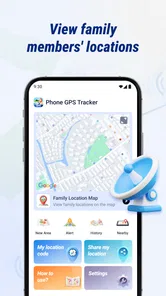
Phone GPS Tracker is built around a simple idea: letting people share their location so family members can check where one another are. I see the appeal less as a way to watch a map all day and more as a practical check-in tool—useful when a family is coordinating a journey, or when someone wants reassurance that a loved one has reached a destination. It is a free Maps & Navigation app from nd5star, and its straightforward purpose is easy to understand before you install it.
For a family considering a new locator, I would start with one recurring situation rather than asking everyone to track each other all the time. A weekly pickup, a shared trip to a crowded venue, or relatives travelling separately gives the group a concrete way to judge whether a shared map actually helps. If the need is occasional, a one-off location message may still be less effort.
Location sharing is the point, not the whole plan
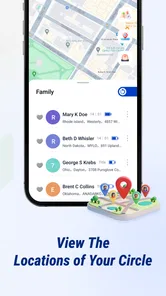
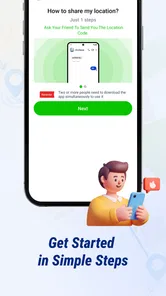
The app’s central capability is family location sharing with real-time tracking. In everyday terms, that can replace a string of messages asking “Where are you?” with a quick look at a shared location. The benefit is most obvious when plans involve several people moving independently: everyone can check the same basic picture instead of relying on updates arriving at just the right moment.
That convenience depends on the people involved agreeing to share their locations and keeping the arrangement clear. A tracker works best as a mutual coordination tool, not as a substitute for conversation or consent. I would discuss who can see whose location, and when sharing is expected, before making it part of a family routine. That small conversation can prevent a helpful safety measure from feeling intrusive.
The useful distinction is between checking progress and monitoring someone constantly. For a family meeting at a venue, a location check can answer whether someone is nearby. It should not become the only way to communicate a changed plan, a delay, or a problem. If a person needs to explain what is happening, a direct call or message remains clearer than interpreting a map.
What checking a location can—and cannot—tell you
A map position can help answer a narrow question: where does the phone appear to be? It does not, by itself, explain why someone has stopped, whether their plans changed, or whether they are able to respond. That is an important limit for parents and caregivers to keep in mind. Location information is useful context, but it is not a conversation and should not be treated as proof that everything is fine.
The same distinction matters when a phone is left behind, switched off, or not updating as expected. A person relying on a shared location should have a backup plan for important meet-ups: agree on a place and time, and use a direct call or message if the location view does not answer the question. That is especially sensible for travel, where a map alone can leave room for confusion.
More From Our News Desk

Weather by Xiaomi Review: Clear at a Glance, Less Clear Up Close

X Under Pressure: Can It Recover When Posting Goes Wrong?

Clash of Clans Is Won Between the Battles

Android Auto Makes the Case for Quieter Car Software

MobiOffice: Transforming Mobile Productivity with Seamless Integration

EA SPORTS FC™ Mobile Soccer: Redefining Mobile Sports Gaming
Before a journey, I would also make sure everyone knows the actual meeting point, not just the destination shown on the map. A broad location can help the group understand who is close, but it may not settle which entrance or side of a large venue to use. Pairing the map with a named landmark or a simple text keeps a useful general view from becoming a guessing game.
Making it useful during an ordinary day
Imagine a family heading to the same event from different places. One person is taking public transport, another is driving, and a third is arriving later. Instead of repeatedly asking each person for an update, family members can use the shared location view to get a general sense of progress. If someone is delayed, they can still send a message; the map simply helps everyone coordinate with less back-and-forth.
A practical habit is to treat location checks as occasional prompts, not a live commentary. Check when there is a real coordination need—such as deciding whether to wait at the entrance or head inside—then put the phone away. This keeps the app’s strongest idea focused on convenience and avoids turning routine movement into something the group feels obliged to explain.
It can also help to agree on a clear fallback in advance. For example, if the location view does not seem current, the family can use a normal call or choose a fixed meeting point. This is a small but valuable workflow improvement: it stops everyone from repeatedly refreshing a map when the information is not resolving the practical question.
For instance, on the way to a family dinner, one person might arrive early while another is still travelling. The early arrival can check whether the other person seems nearby before deciding to wait outside or take a table. If the map does not settle that decision, a short message can do so. That division of labour—map for broad progress, message for the detail—is more useful than expecting a location pin to explain the whole journey.
Phone GPS Tracker is rated for Everyone, which makes its intended audience broad, but the rating does not remove the need for thoughtful family rules. For younger users, adults should explain what sharing means and make sure the child knows whom to contact if plans change. For adults sharing with one another, the same principle applies: everyone should understand the arrangement rather than discovering it after the fact.
How it compares with familiar alternatives
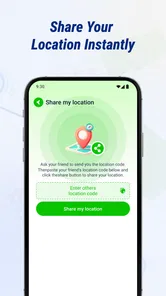
Compared with sending a location manually in a messaging app, a family locator is oriented around an ongoing shared view rather than a one-off update. That can be more convenient when several people need to coordinate repeatedly. On the other hand, if you only need to tell a friend where to meet you once, a message with a location may be simpler and avoids setting up a continuing sharing routine.
Compared with calling or texting, location sharing reduces the need for repeated status checks, but it is less expressive. A call can clarify a missed connection or an unexpected delay; a position on a map cannot. I would use Phone GPS Tracker alongside ordinary communication, not instead of it. The right choice depends on the task: shared location for a continuing family plan, a direct message for a specific update, and a call when the situation needs explanation.
It also makes sense to compare it with whatever location-sharing option a family already uses. If everyone is comfortable with an existing tool and it reliably meets the group’s needs, switching solely to add another map may create more confusion than value. Phone GPS Tracker is most compelling when the family wants a dedicated, shared location-checking routine and everyone involved is willing to use it.
That comparison is worth making before inviting the whole household. A dedicated app can make the purpose of the routine clear, while a familiar messaging app may keep coordination in a place people already check. The better choice is the one that reduces friction for the actual group; adding a second map that nobody remembers to open is not an upgrade.
The tradeoffs behind a live location view
The main tradeoff is that convenience relies on people and phones being available in the expected way. A location-sharing app cannot guarantee that every check will answer a question at the moment you have it. I would avoid making time-sensitive decisions based only on the map, especially if missing someone would create a safety concern. Set a meeting point and keep a direct way to reach one another.
There is also a social cost to consider. Some people find family sharing reassuring; others may find frequent checking uncomfortable. The best arrangement is a limited, mutually understood one: decide who is included and what the group uses the information for. If a person does not want to share their location, a different coordination method is more appropriate than pressuring them to install a tracker.
Another realistic friction is that every extra app adds a routine. Family members need to know which app to open and remember to use the agreed process. If only one person checks the map and everyone else continues to send separate updates, the hoped-for reduction in messages may not happen. Before making it a household habit, I would try it for a specific recurring need, such as coordinating arrivals, and see whether it genuinely makes that task easier.
Privacy should be part of that decision from the start. Keep sharing tied to a clear reason and review the arrangement when circumstances change. A location tool is not automatically a good fit just because it is available; it earns its place when the people using it understand the boundaries and find the shared view helpful.
One practical way to keep the routine from becoming burdensome is to agree on what counts as a reason to check. If the group only needs help with arrivals, keep the habit focused on that moment rather than treating the map as a general status feed. This makes it easier to explain the purpose to children and adults alike, and gives everyone a fair basis for deciding whether the arrangement still feels worthwhile.
Who is likely to get the most from it
I would consider Phone GPS Tracker for a family that regularly coordinates arrivals, outings, or separate journeys and prefers a shared location view to repeated check-in messages. It may also suit relatives who want a simple way to see whether everyone is broadly on track, provided they treat the information as a convenience rather than a guarantee.
I would skip it if you only need to share your position occasionally, if your group already has a location-sharing routine that works, or if ongoing sharing would create tension. Someone looking for turn-by-turn navigation or route planning should also choose a tool designed specifically for those tasks; the core appeal here is family location sharing, not a full navigation workflow.
The app has a 3.8 average from around 20,000 ratings and has been installed over 5 million times. Those figures suggest that many people have tried it, but they do not tell me whether its approach fits a particular household. Its price is free, so trying it is accessible, while the more important decision is whether everyone involved is comfortable with the sharing routine.
The current version is 1.7.1.0, and it requires Android 7.0 or later. It was released on January 20, 2026. For iPhone users, I would first check the availability and compatibility on their own platform rather than assume the Android requirements apply. The app’s developer is nd5star, and the product is best judged by the specific job it sets out to do: make family location checks easier.
For someone weighing whether to try it, the most useful test is not simply whether the map appears useful on the first day. I would ask whether the people sharing it remember to use it, whether it cuts down on needless check-ins, and whether the group is comfortable with the boundaries it agreed on. If those answers are positive, it has a practical role; if not, a quick message or an established family routine may serve better.
My overall take is that Phone GPS Tracker makes sense when a family has a recurring coordination problem and wants a shared view to reduce unnecessary “Where are you?” messages. Its value is not that it can explain every delay or replace a call; it is that a location check can make a familiar plan easier to manage. Used with consent, sensible expectations, and a backup way to communicate, it can be a practical addition. If you need occasional sharing or richer navigation instead, a simpler messaging option or a dedicated navigation app is likely the better fit.
Phone GPS Tracker Frequently Asked Questions
What is Phone GPS Tracker, and what can it do?
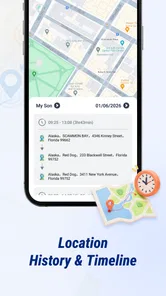
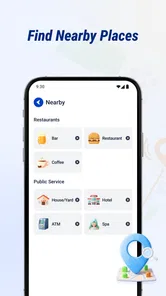
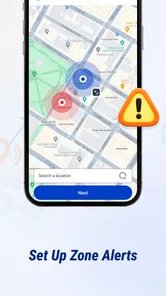
Phone GPS Tracker is a location-tracking app designed to show a phone’s position on a map, typically using GPS and, when needed, other location signals such as Wi-Fi or mobile networks. Depending on the version, it may also offer location sharing, saved places, or location history. Check the app’s listing and settings before installing, since features can differ between developers and versions.
Does Phone GPS Tracker need an internet connection and location permissions?
For the most accurate live location and map updates, the app generally needs location permission and an internet connection. GPS may determine a position without mobile data, but displaying or sharing that position can require connectivity. Android and iOS let you review or change location access in system settings; limiting access may reduce accuracy or prevent tracking features from working as expected.
Can I use Phone GPS Tracker to locate someone else’s phone?
A tracking app should only be used with the phone owner’s knowledge and consent. In most legitimate location-sharing setups, the other person must install or configure the app and approve sharing before their location is visible. Do not use Phone GPS Tracker to monitor someone secretly or bypass their device’s permissions; doing so can violate privacy, platform rules, or local law.
Will Phone GPS Tracker work when the phone is offline or switched off?
A phone that is offline may be unable to send its current position to a tracking service, so the app might show an older location or no location at all. If the device is switched off, its GPS cannot provide a live position. What remains visible depends on the app’s design and when it last received an update, so treat map results as time-sensitive rather than guaranteed.
Is Phone GPS Tracker free, and what should I check before downloading it?
Pricing and available features depend on the specific Phone GPS Tracker listing; an app may be free to install while offering subscriptions, ads, or in-app purchases. Before downloading, verify the developer, recent reviews, supported devices, and requested permissions in the official app store. Also read the privacy policy to understand how location data is collected, stored, shared, and deleted.
Pros
- Shows a phone’s location on a map for easier coordination.
- Can help locate a misplaced device when location sharing is enabled.
- Useful for checking the whereabouts of family members who consent to sharing.
- May provide location history for reviewing recent movements.
- Works with familiar GPS and map-based navigation features.
Cons
- Accurate tracking depends on GPS
- network coverage
- and device settings.
- Ongoing location access can drain battery faster.
- Tracking requires the other phone’s permission and cooperation.
- Location data can raise privacy concerns if shared too broadly.
- Features and availability may vary by device or operating system.











