Phantom
- 1.90K
- 4.8
- Installs
- 10.00M
- Price
- Free

Screenshots
Analysis by Reviewed
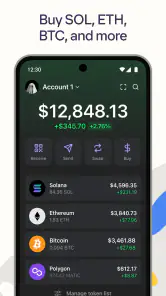
I tend to judge a crypto wallet less by how many tools it lists and more by whether I can understand what I’m doing before I confirm a transaction. Phantom is a finance app from Phantom Technologies, Inc., built around holding tokens, NFTs, and connecting with blockchain services. Its appeal is the attempt to make those activities approachable, but a friendly interface does not remove the need to check addresses, networks, and transaction details carefully.
Using Phantom for everyday crypto tasks
Phantom is free, rated for Everyone, and has an average rating of 4.8 from around 125,000 ratings, with over 10 million installs. It first appeared on April 12, 2022, and version 25.44.0 is the current version. The app’s reach suggests it is familiar to many crypto users, but popularity is not a substitute for deciding whether its wallet approach suits your needs.
Getting started and choosing the right wallet
The first practical question is whether you want a dedicated self-custody wallet or a crypto account managed by an exchange. Phantom fits people who want to manage wallet access themselves and use compatible decentralized apps. That independence comes with responsibility: recovery details and signing decisions matter, and a wallet cannot make a risky transaction safe simply by presenting it clearly. If you mainly buy crypto occasionally and want an account with built-in customer support, an exchange may feel simpler.
When setting up, I would slow down at every security step rather than treating setup like a routine app registration. Keep recovery information private, do not share it with anyone claiming to offer support, and be wary of links promising rewards or urgent fixes. A useful habit is to open a dApp from a source you already trust instead of following an unsolicited message. That small pause is more valuable than rushing through a polished interface.
Swaps, dApps, and NFTs in one workflow
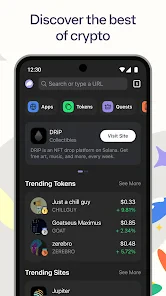
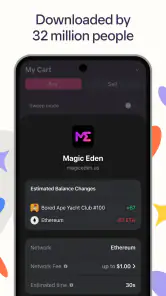
One of the standout features of Phantom is its integration with decentralized apps. The practical benefit is fewer app switches when you want to connect a wallet to a service. Before approving a connection or transaction, I would still check what the request is asking to do; connecting a wallet and authorizing an action are not the same thing. For someone exploring on-chain tools, that distinction is worth learning early.
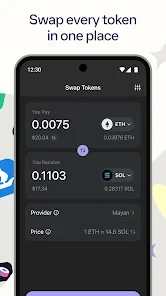
The in-app swap option can make exchanging tokens feel more direct than moving to a separate exchange, but convenience is not a guarantee of the best outcome. Compare the displayed details before confirming, especially when the amount matters to you. A cautious workflow is to test an unfamiliar process with a small amount first, where appropriate, and avoid approving anything you do not understand. That is a general wallet-safety practice, not a promise that every transaction can be reversed.
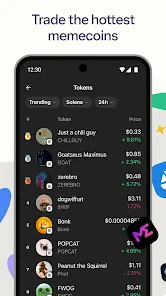
NFT support gives collectors a place to keep digital items alongside tokens rather than treating them as unrelated app tasks. It is most useful if you already interact with NFTs and want a wallet view for them; it is less compelling if you have no interest in collectibles. Seeing an item in a wallet should not be confused with verifying its value, origin, or the terms of a marketplace listing.
More From Our News Desk

Weather by Xiaomi Review: Clear at a Glance, Less Clear Up Close

X Under Pressure: Can It Recover When Posting Goes Wrong?

Clash of Clans Is Won Between the Battles

Android Auto Makes the Case for Quieter Car Software

MobiOffice: Transforming Mobile Productivity with Seamless Integration

EA SPORTS FC™ Mobile Soccer: Redefining Mobile Sports Gaming
Where Phantom fits—and where it does not
In an ordinary scenario, I might use Phantom to check a token balance during the day, then connect to a familiar dApp when I have time to review a transaction carefully. Keeping those steps together is convenient, but I would not use a quick glance at a balance as a reason to trade impulsively. If I needed a beginner-friendly way to learn about crypto without handling wallet recovery or transaction approvals, I would start with educational material or a simpler custodial option instead.
Compared with a centralized exchange app, Phantom is more oriented toward wallet control and decentralized services than buying and selling through a managed account. Compared with a basic wallet used only for holding assets, its dApp connections and swaps can make it more useful for active on-chain use. The trade-off is that more access creates more chances to encounter confusing approvals, unsuitable services, or scams. It is a better fit for a curious user willing to build careful habits than for someone who wants every decision handled for them.
Security, performance, and practical limits
Security deserves more than a reassuring label. I would treat the phone as one part of a wider safety routine: use a device you control, protect its screen access, verify the recipient and transaction details, and never share secret recovery information. No wallet interface can protect a user from every mistake or from voluntarily approving a harmful request. If a message pressures you to act immediately, stepping away and checking through a trusted route is the safer response.
There is also a learning curve even when the menus feel clean. Crypto terms, network choices, and transaction prompts can still be unfamiliar, and a wrong step may have consequences that are difficult or impossible to undo. The app is not a replacement for understanding the service you connect to, and it should not be treated as investment advice. I would keep only the assets I am prepared to manage with the care self-custody requires.
What the current version means for existing users
The version number shows that Phantom has continued through many iterations since its 2022 release, while the current version is 25.44.0. That is useful context for existing users: when an app changes, it is sensible to review update notes and re-familiarize yourself with any screens involved in approvals or security. A version number alone does not tell me which specific features changed, so I would avoid assuming a particular workflow has been added or altered without checking the app itself.
For returning users, the strongest reason to keep using a wallet is a workflow that remains understandable and dependable for their own needs. If you mostly hold assets and rarely connect to dApps, a simpler setup may be enough. If you regularly interact with decentralized services or keep NFTs, having those activities in one wallet can save friction. Either way, I would periodically review connected services and remove access I no longer need where the app provides that control.
My recommendation
Ah, the world of digital privacy and blockchain magic! Let me tell you about an app that’s making waves in the crypto community - the Phantom app. If you’ve ever dabbled in the universe of cryptocurrencies, you know the importance of having a reliable and user-friendly wallet. Enter Phantom, the crypto wallet that promises to simplify your life while ensuring your digital assets are secure.
From the moment I downloaded the app, I could tell it was designed with simplicity in mind. The installation process was a breeze. Available on both Android and iOS, this app swiftly guides you through setting up your wallet. Whether you're a seasoned crypto enthusiast or a curious newcomer, you’ll appreciate how user-friendly the interface is. It’s like having a friendly crypto expert right in your pocket, guiding you every step of the way.
Features That Stand Out
One of the standout features of Phantom is its seamless integration with decentralized applications (dApps). This means you can easily interact with your favorite dApps without leaving the app. The in-app swap feature is another highlight, allowing you to exchange tokens effortlessly without needing to connect to an external exchange. Talk about convenience!
Security is a big deal in the crypto world, and Phantom doesn’t disappoint. The app employs top-notch encryption practices to ensure your digital assets are safe from prying eyes. Plus, the ability to manage your NFTs (Non-Fungible Tokens) directly within the app is a neat addition for those who are into digital collectibles.
Why You Might Love It
If you’re all about speed and efficiency, Phantom will be right up your alley. Transactions are quick, and the app’s performance is impressively smooth. The clean, intuitive design means you won't get lost in a sea of confusing menus. Whether you’re checking your balance, swapping tokens, or exploring dApps, everything’s just a few taps away.
Another reason to fall in love with Phantom is the community support. The developers are actively engaged with users, constantly rolling out updates and improvements based on feedback. It feels good to know that the people behind the app are listening and striving to make it better every day.
Final Thoughts
In a world where digital security and ease of use are paramount, Phantom stands out as a stellar choice for managing your crypto assets. It’s more than just a wallet; it’s a gateway to the vibrant world of blockchain and decentralized finance. Whether you’re trading tokens, exploring dApps, or simply keeping track of your digital wealth, Phantom has got your back. So, if you haven’t yet embraced this powerhouse of a wallet, now might be the perfect time to dive in and see what all the fuss is about!
Phantom Frequently Asked Questions
Can I use Phantom without owning cryptocurrency?
Phantom is a crypto wallet for tokens and NFTs, so its main purpose is managing digital assets. You can download and explore the app before deciding whether to use it for assets, but it is not a general-purpose banking app. Consider whether you want a wallet for digital assets before installing, and take time to understand how you will protect access to it.
What should I prepare before setting up a crypto wallet?
Before setting up Phantom, think through how you will keep access to your wallet secure and how you will handle any recovery information the app asks you to manage. Treat wallet access details as sensitive, and avoid sharing them with other people. It is also sensible to familiarize yourself with the app’s setup steps before moving any digital assets into a wallet.
Is Phantom suitable for someone new to crypto?
Phantom may be approachable for people interested in a mobile wallet for tokens and NFTs, but using a crypto wallet still calls for care. If you are new to digital assets, take time to understand wallet access, security, and the risks involved before using it. The app’s friendly positioning does not replace learning the basics or making cautious financial decisions.
Can I use Phantom to manage NFTs as well as tokens?
Yes. Phantom is described as a crypto wallet for both tokens and NFTs, making it relevant to people who want a mobile place for these kinds of digital assets. Its focus is narrower than general banking, so consider whether those wallet functions match what you need. As with any crypto wallet, protect access carefully and think before handling assets.
What kind of app is Phantom?
Phantom is a finance app described as a friendly crypto wallet for tokens and NFTs. It is intended for people who want a mobile wallet experience centered on digital assets, rather than a general-purpose banking app. Before downloading, consider whether a crypto wallet fits your needs and take care to understand how you will protect access to your wallet and assets.
Pros
- Sleek and user-friendly interface.
- Supports multiple blockchain networks.
- Offers a secure wallet feature.
- Fast transaction processing speed.
- Regular updates with new features.
Cons
- Limited customer support options.
- Some features require a learning curve.
- Occasional sync issues with blockchain.
- No desktop version available yet.
- Requires internet access for functions.
- Category
- Finance
- Version
- 25.44.0











