PayByPhone
- 9.47K
- 3.8
- Installs
- 10.00M
- Price
- Free

Screenshots

Analysis by Reviewed
I find PayByPhone most useful when I already know the parking area accepts it and want to pay without walking back to a meter. Its role is narrow but clear: it helps handle a parking session from a phone, rather than trying to be a general navigation or travel tool. That focus can make an everyday stop less fiddly, though it does not remove the need to read the signs and follow the rules for the space.
Where it fits in a parking routine
For a commuter, the value is repetition: once the app is set up, paying in a familiar supported area can be quicker than searching for coins or handling a meter in bad weather. For a visitor, it can be useful when local instructions point to this payment option and there is little time to work out another method. I would not install it on the assumption that it replaces every city’s parking system; first check whether the places you actually use accept it.
That distinction is easy to overlook. Parking services are often tied to particular locations or operators, so an app that works for one errand may be irrelevant on the next street. If you usually park in one area with its own established service, staying with that familiar option may be simpler than adding another account and payment flow. If your trips vary and you encounter supported parking regularly, a single familiar process can be more useful.
Small checks that prevent avoidable mistakes
My most useful practical habit is to treat the sign and the app as a pair: read the posted instructions, identify the matching location, then check the session details before leaving the vehicle. This is especially worthwhile where neighboring blocks have different parking rules. A few seconds spent comparing the location information is less costly than discovering later that the payment was attached to the wrong area.
I would also make sure I can find the session end time after paying, rather than closing the app immediately and trusting my memory. If a visit might overrun, I would check whether extending is allowed for that space before relying on the feature. Remote payment can spare a return walk, but it cannot change a time limit or make an otherwise restricted space valid.
Who may prefer another option
The app is a weaker fit for people who rarely pay for parking, depend on cash, or cannot reliably use a phone during the parking process. It may also add unnecessary friction for someone whose regular parking locations already work smoothly with a different local app or a meter. In those cases, a familiar payment method is not a compromise; it is simply the more dependable choice for that person’s routine.
There is a practical accessibility trade-off here. Paying by phone can reduce walking to a meter, which may matter to someone with limited mobility, but it shifts the task onto a screen and a payment flow. I would not assume that this makes the process easier for everyone. Someone who finds small on-screen controls difficult, has trouble using a phone outdoors, or needs help completing digital transactions may want to arrange a comfortable way to pay before arriving.
More From Our News Desk

Weather by Xiaomi Review: Clear at a Glance, Less Clear Up Close

X Under Pressure: Can It Recover When Posting Goes Wrong?

Clash of Clans Is Won Between the Battles

Android Auto Makes the Case for Quieter Car Software

MobiOffice: Transforming Mobile Productivity with Seamless Integration

EA SPORTS FC™ Mobile Soccer: Redefining Mobile Sports Gaming
Reading the app quickly when time matters
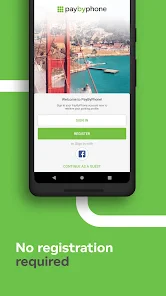
First off, downloading and setting up PayByPhone is a walk in the park, pun intended. Available on both Android and iOS, it’s just a few taps away in your respective app store. I was pleasantly surprised at how user-friendly the interface is. No unnecessary frills—just simple navigation, which is exactly what you need when you’re in a hurry.
That stripped-back approach matters most when you are standing beside a car, trying to read local parking instructions and enter the right details before moving on. I would still take a moment to check the zone or location code against the signs rather than rushing through the screen: a convenient payment flow cannot compensate for choosing the wrong parking area. For someone who prefers a more direct interface over a broad travel or mapping app, that focus is a strength.
Managing a session without returning to the car
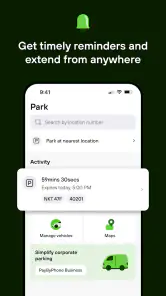
Once you have it set up, using it is as simple as pie. The app allows you to pay for parking with just a few taps. What’s fantastic is the ability to extend your parking session remotely. Imagine being in a crucial meeting and realizing your meter’s about to expire. With a quick tap, you can add time without breaking a sweat. Such a lifesaver!
That flexibility is especially handy when an appointment runs late or a shop visit takes longer than expected. I would treat an extension as something to check, not assume: local parking rules and the particular space still determine whether you may stay longer. If you know you will be away from your phone, setting a sensible reminder for yourself is a useful backup rather than relying on memory alone.
Notifications, location, and careful choices
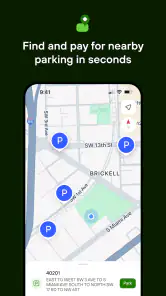
Now, let’s talk about the features. One standout feature is the notification system. It sends you reminders when your parking time is running low. No more parking tickets, which we all know are the bane of urban living. Another neat feature is the location finder. If you’re in a new area, the app helps you find available parking spots nearby. It’s like having a parking guide in your pocket.
I would read that location help as a starting point, not a guarantee that a space is open or suitable when you arrive. A useful everyday routine is to check the street signs first, select the matching location in the app, and then confirm the session is active before walking away. That small pause can prevent the common mistake of paying for the wrong zone, particularly in unfamiliar streets where nearby parking areas may look much alike.
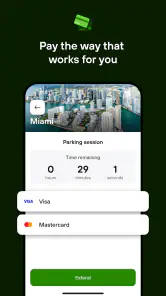
Additionally, the app supports multiple payment methods, making it convenient for users who prefer credit, debit, or even Apple Pay. The integration is seamless, and I didn’t experience any hiccups during transactions.
Different needs and remaining barriers
For drivers who find it difficult to walk back to a meter, paying from the phone can remove an unnecessary trip. It can also help when a passenger needs to manage the parking while the driver focuses on finding a safe place to stop. On the other hand, the process depends on being able to use a phone and complete the payment flow; someone without reliable phone access, a suitable payment method, or comfort navigating a screen may prefer a meter or another locally available option.
In bright sunlight, with gloves on, or while handling bags, any phone interaction can take more effort than it sounds. I would enter payment details and familiarize myself with the basic steps before arriving somewhere stressful, rather than trying to learn the interface beside a busy road. The app is best used while stationary, and it should never distract you while driving. Notifications can be helpful, but they are a prompt to check your session, not a substitute for observing posted restrictions.
Security, trust, and practical limits
When it comes to handling payments, security is a top priority. I found that PayByPhone uses encryption to keep your information safe. During my time using it, I didn’t encounter any security issues, which is reassuring when dealing with financial information.
The main trade-off is coverage: a phone payment app only helps where the parking operator accepts it. I would keep a physical payment option available for places that require one, and check local instructions before assuming the app works everywhere. If you already use a city-specific parking service that covers your regular destinations, switching between apps may add friction rather than remove it. For occasional trips across supported areas, however, having one familiar process can be worthwhile.
Who will get the most from it?
The app suits commuters, visitors, and anyone who regularly parks in places where mobile payment is accepted and values the option to manage a session remotely. A realistic use is arriving for a short appointment, paying from the curb once safely parked, then extending the session if the visit overruns. Someone who rarely pays for parking, prefers cash, or parks mainly in areas with another established payment method may have little reason to install it.
It has been around since 2011, and its current version is 25.8.0. The app is rated for Everyone, has an average rating of 3.8 from around 92,000 ratings, and has over 10 million installs. I take that reach as a sign that it serves a real recurring need, while the less-than-perfect average is a reminder that a payment app’s usefulness can depend heavily on the local parking setup and a smooth session at the moment you need it.
A balanced choice for supported parking
In conclusion, PayByPhone is a must-have app for anyone who frequently parks in urban areas. It’s intuitive, reliable, and packed with features that genuinely make life easier. While no app is without its quirks, PayByPhone comes close to perfection in making parking hassles a thing of the past. Whether you're a daily commuter or an occasional traveler, this app is worth every byte of space on your phone.
My more measured recommendation is to try it if your regular streets accept it, then judge it by how clearly you can confirm the location, payment, and end time in your own routine. Its strongest case is not replacing every parking method; it is making supported parking easier to manage when plans shift. For people who need a dependable non-phone fallback or who park somewhere the service is not accepted, the usual meter or local alternative remains the better choice.
How I would use it on an unfamiliar trip
Picture arriving for an appointment in a part of town I do not know. I would park first, get out of the flow of traffic, and read the sign rather than trying to select a location while still maneuvering the car. Then I would match the posted area to the app, choose the session, and check that the payment is active before walking away. This sequence keeps the phone task separate from driving and makes the sign—not a nearby pin or a guess—the final reference for the space.
If the appointment starts running late, a reminder gives me a chance to reassess. I would open the session and see whether extending is available, while also checking that the posted limit permits staying. If it does not, the useful answer is to move the car, not to treat a successful in-app payment as permission to remain. That is the key difference between managing payment conveniently and managing parking lawfully.
Comfort, attention, and access in the moment
The interface’s uncluttered feel may be welcome for someone who wants to complete one task rather than navigate a feature-heavy city guide. Still, a simple-looking app is not automatically effortless for every user. Screen glare, cold hands, a crowded curb, or difficulty reading and tapping can turn a few steps into a stressful task. I would set up the payment method and learn the basic route through the app while relaxed, so the first real use is not also a practice run.
For someone with limited mobility, avoiding a walk to the meter can be a meaningful benefit, especially when the vehicle is parked far from it or returning is inconvenient. But the benefit depends on being able to complete the phone interaction independently or with comfortable assistance. A passenger can help handle the session while the driver remains focused, but the driver should not be tapping through screens while the vehicle is moving or stopped in an unsafe place.
Notifications can support people who lose track of time during meetings or appointments, yet they are not a complete access solution. A phone may be muted, out of reach, or difficult to notice in a noisy setting. I would regard the reminder as one layer of support and use a separate personal reminder when being on time is especially important. That small redundancy matters more than expecting any single alert to work in every context.
What to compare before relying on it
Compared with a meter, the app can remove the need to carry coins and can let me manage a session remotely, but the meter may be the clearer option when I want to pay without a phone, account, or digital payment step. Compared with a city-specific parking app, PayByPhone may be more convenient when it is accepted across the places I visit; the local service may be better when it is the only option for my regular streets. The sensible choice is the one that matches the signs and works reliably where I park, not the one with the broadest promise.
I would also consider what happens if my phone battery is low, mobile access is unreliable, or I cannot comfortably finish a transaction at the curb. Keeping a backup payment method is practical, not a sign that the app has failed. Before depending on it for a time-sensitive appointment, I would try it on a low-pressure stop and learn where I can confirm the session details. That trial reveals whether its flow suits me without adding risk when I am already rushed.
An inclusive verdict for everyday parking
PayByPhone is a useful option for people who can comfortably use a smartphone and regularly encounter parking areas that accept it. Its strongest everyday benefits are avoiding a return trip to the meter, keeping an eye on a session, and having a way to respond when plans change. Those advantages are concrete, but they depend on local acceptance, clear sign-reading, and a phone interaction that suits the user and the situation.
I would recommend trying it if those conditions match your routine, while keeping a meter or another local method in mind for places that do not support it. The app can reduce one particular kind of parking hassle; it cannot make every curb accessible, guarantee a space, or replace attention to restrictions. For me, that is a fair and useful role: a focused payment tool that can make supported parking easier, provided I use it deliberately and have another plan when a screen is not the right tool.
PayByPhone Frequently Asked Questions
Can I use PayByPhone without creating an account?
PayByPhone is built around registering your vehicle and payment information so you can start a parking session through the app. That setup makes it easier to select a vehicle and handle a payment when you park. If you prefer not to enter those details in an app, consider whether this method of paying for parking suits you before downloading.
What information should I have ready before setting up PayByPhone?
Before using PayByPhone, have your vehicle details and payment information ready, since the app uses them to start parking sessions. Taking care to enter the correct vehicle information can help you select the right vehicle when you park. You should also be ready to check the parking location and session details before confirming a payment.
Does PayByPhone send reminders when a parking session is ending?
PayByPhone can send notifications when a parking session is about to expire, which gives you a reminder to check your remaining time. If the location and session allow it, you can extend your parking remotely through the app rather than returning to a pay station. Keep notifications enabled if you want to receive these prompts, and check the app for the session’s current status.
Is PayByPhone free to download, and what should I expect to pay?
PayByPhone is free to download, and its purpose is to make paying for parking from a phone quick and easy. The app itself may not be the only cost involved: parking charges depend on the location, and a service fee may be added to a session. Check the amount shown before confirming so you can review the total for that parking transaction.
What devices can run PayByPhone?
PayByPhone is available for Android and iOS devices, so many smartphone users can use it to handle parking payments. The current version is 25.8.0, and the app requires Android 9 or later. Before downloading, check that your phone’s operating system meets the requirement and that you can access the relevant app store on your device.
Pros
- Easy to use interface
- Quick payment processing
- Wide availability
- Secure transactions
- Detailed parking history
Cons
- Limited to certain locations
- Requires internet connection
- Occasional app crashes
- No cash payment option
- Limited customer support
- Category
- Auto & Vehicles
- Version
- 25.8.0