ParkMobile: Park. Pay. Go.
- 25.16K
- 4.4
- Installs
- 10.00M
- Price
- Free

Screenshots
Analysis by Reviewed
My first impression of ParkMobile: Park. Pay. Go. is that it aims to make a familiar city-driving chore less scattered: finding a place to leave the car and handling payment in one app. That can be genuinely useful, but the experience depends on the parking option you choose and on following the instructions at the location. I’d treat it as a practical tool, not a promise that every curb or garage will be available through a phone.
Where a parking search can get stuck
The trickiest moment is often not opening the app; it’s matching what you see on screen to the space in front of you. A nearby result may not be the right side of a street, the right parking zone, or the right kind of facility for your plans. I make a point of checking the posted sign and the location details before paying. If they don’t line up, I don’t assume the app overrides the sign.
Search results also help most when I already know roughly where I’m going. For a busy appointment, I’d look up the destination before setting off, compare the nearby options, and leave time to choose another if the first one doesn’t work. That is a more dependable use than expecting the app to solve a last-second parking scramble while I’m driving.
Finding a Spot Made Easy
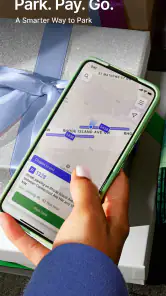
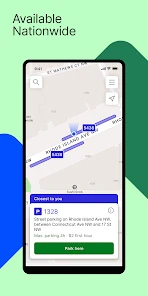
Gone are the days of aimlessly circling the streets. With ParkMobile, you can find available parking spots in real-time. The app pulls data from a vast network of parking spaces, giving you a bird’s eye view of where to park. It’s like having a personal parking assistant riding shotgun, minus the backseat driving! You simply open the app, search for your destination, and voilà, up pops a list of nearby parking options along with their rates. No more parking roulette, folks!
Setup checks that prevent avoidable mistakes
Before relying on a payment flow, I’d check that the app is ready to use and that the selected place is the one where the car is actually parked. A small mismatch in location or parking details can matter more than a polished screen. Take a moment to read the displayed instructions, confirm the vehicle or session information shown, and keep the relevant signs in view. Those are simple checks, but they reduce the chance of paying for the wrong place.
ParkMobile is a free Auto & Vehicles app from Parkmobile, LLC. It is rated for Everyone, and the current version is 25.46.1, with Android 6.0 as the minimum operating system. The app has a 4.4 average from around 83,000 ratings and more than 10 million installs. Those figures suggest it has broad reach, though they don’t guarantee that a particular street, city, or facility will suit your needs.
Paying is a Breeze
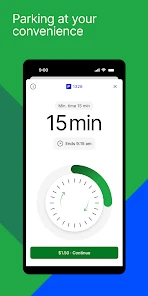
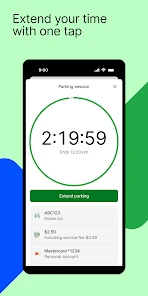
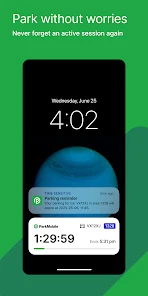
Once you’ve parked, paying for your spot is as easy as pie. Forget fumbling for coins or dealing with finicky meters. Just a few taps on your phone and your parking is paid. You can even extend your parking session remotely if you’re running late or decide to linger a bit longer at the café. The app sends you reminders before your session expires, so you don’t have to worry about racing back to avoid a ticket. This feature alone is worth its weight in gold!
More From Our News Desk

Weather by Xiaomi Review: Clear at a Glance, Less Clear Up Close

X Under Pressure: Can It Recover When Posting Goes Wrong?

Clash of Clans Is Won Between the Battles

Android Auto Makes the Case for Quieter Car Software

MobiOffice: Transforming Mobile Productivity with Seamless Integration

EA SPORTS FC™ Mobile Soccer: Redefining Mobile Sports Gaming
For a realistic errand, imagine arriving downtown for lunch and finding a supported space a short walk from the restaurant. I’d use the app to check the zone, start the session, and then pay attention to its end time rather than relying on memory. If plans change, the ability to extend can be handy, but I wouldn’t assume every parking rule or session can be changed in the same way. The safest habit is to check what the app allows for that specific stay and obey the posted limit.
Choosing the right option for the trip
One useful way to plan is to decide what matters most before searching: a short walk, a predictable arrival, or the simplest payment once parked. For a quick stop, a nearby supported space may be more convenient than driving around to compare every possibility. For an appointment with a fixed start time, I’d be more cautious and consider a garage or another clearly confirmed option rather than treating a nearby listing as a reservation. The app can help organize the choice, but the driver still has to judge whether the space and timing suit the visit.
This is where it differs from relying only on a parking meter or a garage’s own payment process. A meter is straightforward when you are already beside a clearly marked space, while a facility’s own instructions may be easier to trust when you have chosen that garage in advance. ParkMobile is most helpful when a location participates and you want to handle the search and payment through one familiar place. It is less compelling when the on-site method is already obvious or when a destination requires certainty before you set out.
Recovering when the workflow goes wrong
If a screen seems stalled or a payment step is unclear, I’d avoid tapping repeatedly and creating uncertainty about whether a session started. First, check the current session status in the app, then compare it with the location and any confirmation shown. If the app doesn’t clearly show an active stay, use the payment method or instructions posted at the parking spot rather than treating an unfinished screen as proof of payment. Keep any confirmation available until you’re done parking.
Likewise, if you return to the car and discover that the session is close to ending, check whether extending is available before counting on it. A reminder is useful, but it is not a substitute for checking the actual time and restrictions. For longer visits, I’d set a personal reminder as a backup, especially when I’m heading into a meeting where I may not look at my phone.
A small preparation step can make recovery less stressful: before leaving the vehicle, note the location information and the session end time in a way you can check quickly. If a later screen looks different from what you expected, you have something concrete to compare instead of trying to reconstruct the whole transaction from memory. I’d also wait for a clear confirmation before walking away, rather than assuming that reaching the final payment screen means everything has gone through.
If you are unsure whether the parking session is active, don’t start another one blindly just to feel safer. Check the app’s displayed status and the local instructions first; duplicate or mismatched actions can create a different problem. When the app cannot give you a clear answer, the marked on-site payment method is the sensible fallback. That approach may take an extra moment, but it is better than relying on a guess while the car is unattended.
Convenience at Your Fingertips
One of the standout features of ParkMobile is its integration with various cities across the country. Whether you’re in New York, Chicago, or Los Angeles, you can use the same app to find and pay for parking. Plus, it's not just for street parking. Many garages and lots have partnered with ParkMobile, giving you even more options to choose from. It’s truly a nationwide solution to a universal problem.
That reach makes it more convenient than juggling a different payment app for each participating location, but it shouldn’t replace checking the local signs or comparing alternatives. A meter, garage kiosk, or another payment method may be simpler if the location isn’t supported, the app is not working, or you prefer not to manage parking on your phone. I see ParkMobile as a useful option in the mix, not the only way to park.
Who benefits most from keeping it ready
I can see the strongest case for this app if you drive into different participating areas often enough that remembering a separate process each time becomes a nuisance. It may also suit someone who makes short visits with uncertain end times, since checking a session and seeing whether an extension is possible can be more convenient than returning to a meter. The key is to treat that flexibility as conditional: confirm the options for the specific space, and don’t build a plan around an extension until the app actually offers it.
For a visitor unfamiliar with a neighborhood, I’d use it as one part of the plan rather than the entire plan. Search the destination while parked or before the trip, decide on a backup such as a visible garage, and leave enough time to read the signs after arrival. That extra preparation is especially worthwhile when street restrictions, a tight appointment, or a crowded area could make a wrong choice costly in time or frustration.
By contrast, someone who rarely parks in areas covered by the app may not gain much from adding another step to the routine. If you prefer cash, have a straightforward meter in front of you, or don’t want to manage payment on a phone, the local method may be quicker. And if a trip depends on having a guaranteed place before arrival, I would favor an option that clearly confirms that arrangement rather than assuming a search result means a spot is held.
When the app may not be the problem
Parking rules are set by the place where you leave the car, so a confusing restriction or an unavailable space may have nothing to do with the app itself. A listed option doesn’t make a space yours until you’ve parked legally and completed the required steps. Read signs for time limits and restrictions, and use the exact location details shown for the space. If the posted instructions disagree with your assumptions, follow the instructions at the site.
The app is a better fit for drivers who regularly visit places where it supports parking and are comfortable checking session details on a phone. It may be less useful if you rarely park in participating areas, prefer cash or meters, or need certainty before arriving at a crowded destination. In those cases, choosing a garage directly or using the payment method clearly offered on-site may be the less stressful choice.
It is also worth separating a parking problem from a phone problem. If the app feels slow or a step does not finish, check that the phone is usable and that you can still read the location’s payment instructions; avoid troubleshooting while moving through traffic. A dead battery, poor attention, or a rushed decision can make any phone-based process less dependable. I’d rather switch to a clearly available on-site option than keep looking at a screen when I need to focus on driving or the street around me.
Even when everything works as intended, the app cannot decide whether a particular curb is legal for your vehicle or whether a posted restriction applies to your visit. The signs and the physical space remain the final check. That distinction matters: an app can reduce payment friction, but it does not remove the need to park responsibly or confirm that the chosen option matches the place where the car is left.
Moreover, the app’s interface is user-friendly and intuitive. Even if you’re not the most tech-savvy, you’ll have no trouble navigating its features. It’s clear that the developers put a lot of thought into making this app as accessible as possible.
Final Thoughts
Overall, I found ParkMobile: Park. Pay. Go. to be an invaluable tool for anyone who drives in the city. It simplifies the often stressful task of parking and turns it into a seamless experience. Whether you’re a daily commuter or just an occasional city visitor, having this app on your phone is a smart move. It saves you time, reduces stress, and even helps you avoid parking tickets. So next time you’re heading into town, make sure you’ve got ParkMobile downloaded and ready to go. Trust me, your future self will thank you!
ParkMobile: Park. Pay. Go. Frequently Asked Questions
Can I use ParkMobile to reserve a parking spot before I travel?
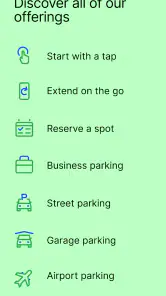
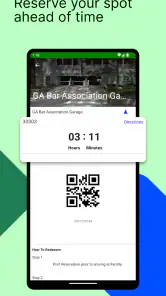
ParkMobile is designed to help users find parking and reserve a spot ahead of time, which can be useful when planning a trip or arriving somewhere busy. Open the app and search for your destination to see the parking choices available there. Check the details shown for a spot before reserving, so you know it suits your plans.
Is ParkMobile useful for planning a parking stop in advance?
Yes. ParkMobile’s focus on finding and reserving a spot ahead of time can help you include parking in your travel plans rather than searching only after you arrive. Search for the destination you have in mind, then review the options displayed and their details. Availability and suitability can depend on the specific place, so confirm the information in the app before making plans around a particular spot.
Is ParkMobile free to download, and what devices can run it?
ParkMobile is free to download, so you can install it and explore the app before deciding whether it fits your parking routine. It is available for Android devices running version 6.0 or later. The app is rated for Everyone, making its age rating suitable for a broad audience. Parking transactions or reservations may have their own costs, so review the terms shown for each option.
What is ParkMobile and how does it work?
ParkMobile is a convenient app that allows users to find and pay for parking spaces using their mobile devices. Once you download the app, you can enter your location to find available parking spots nearby. The app provides a variety of payment options and even sends reminders when your parking session is about to expire. It's designed to make parking easier and more efficient, saving you time and reducing the hassle of finding a spot.
Is ParkMobile available in my city?
ParkMobile operates in numerous cities across the United States. To check if it's available in your area, you can visit their website or use the app's location feature to see a list of supported cities. The app continuously expands its coverage, so even if it's not currently available in your location, it might be soon.
Pros
- User-friendly interface for easy parking
- Wide coverage in major cities
- Secure payment options
- Real-time parking availability updates
- Saves time with cashless transactions
Cons
- Limited functionality in smaller towns
- Occasional app crashes
- High service fees
- Requires internet for full functionality
- Not all parking spots are listed
- Category
- Auto & Vehicles
- Version
- 25.46.1