Number Locator- Call Location
- 386.00
- 4.3
- Installs
- 10.00M
- Price
- Free

Screenshots


Analysis by Reviewed
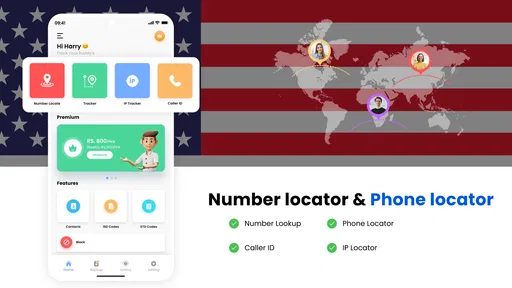
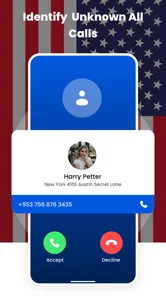
When an unfamiliar number appears on my screen, I want a useful clue, not a false sense of certainty. Number Locator- Call Location is built around that quick check: it aims to show where a phone number is associated with, so I can make a more informed choice about answering. It is a free maps and navigation app from Appstark Tech, rated for Everyone, and its appeal is the promise of a simple, focused tool rather than a full navigation suite.
What the first lookup can—and cannot—tell you
For a new user, the most helpful expectation is modest: a location label may add context to a number, but it is not a live position or a reliable identity check. I would use it to decide whether a call merits a closer look, then verify anything important through a voicemail, a saved contact, or a trusted channel. If a call claims to come from a bank, delivery service, or government office, I would contact that organization through a number I already trust rather than calling back solely because the displayed region seems plausible.
This distinction is especially useful when a number looks local. A familiar area does not prove the caller is nearby, and an unfamiliar area does not prove a call is suspicious. Treating either result as a clue rather than a verdict helps prevent two common mistakes: ignoring a legitimate call because its location looks odd, or answering a risky one because the location feels familiar.
What to expect from a number lookup
The key distinction to keep in mind is that a displayed city or state is a broad geographic hint, not a live map of the person holding the phone. That makes this kind of lookup more useful for deciding whether a call looks familiar than for tracking someone or finding an exact address. I would treat the result as context, then use my own judgement before answering or calling back.
The app has an average rating of 3.3 from around 14,000 ratings and has been installed over 5 million times. Those figures suggest plenty of people have tried it, but they are not a guarantee that every lookup will be useful. It is free to install, with optional in-app purchases ranging from $0.99 to $12.99 per item, so I would check any purchase prompt carefully and stick to the free experience unless I know what an upgrade offers.
Getting started and deciding when it helps
Upon downloading Number Locator- Call Location, I was greeted by a straightforward and easy-to-navigate interface. The app doesn't try to overwhelm you with unnecessary features or flashy graphics, which I personally appreciate. It's all about getting the job done with minimal fuss. The installation was a breeze, and I was up and running in no time.
First setup and a useful first check
For a first-time user, I would start with a number I can verify, such as a saved contact or a recent call from someone I know. That gives me a reality check on what the location result means before I rely on it for an unfamiliar caller. If the result is a region rather than an exact place, that is a reasonable cue; it is not evidence that the caller is physically there right now.
More From Our News Desk

Weather by Xiaomi Review: Clear at a Glance, Less Clear Up Close

X Under Pressure: Can It Recover When Posting Goes Wrong?

Clash of Clans Is Won Between the Battles

Android Auto Makes the Case for Quieter Car Software

MobiOffice: Transforming Mobile Productivity with Seamless Integration

EA SPORTS FC™ Mobile Soccer: Redefining Mobile Sports Gaming
If the app asks for access to call-related information, I would pause and consider whether that permission fits the feature I want to use. I would also avoid entering someone else’s number casually. A location lookup can be a practical screening aid, but it should not become a substitute for consent, common sense, or a direct conversation when those matter.
Making the first result useful
Rather than testing the app with a stranger’s number, I would begin with a contact whose general number location I already know. Then I would compare the result with that known context and decide whether the app’s level of detail is actually useful to me. This is a small but worthwhile calibration step: it shows whether I should think in terms of a broad area and stops me from expecting street-level precision later.
For an unfamiliar call, I would take a moment to note the result, check whether the caller left a message, and only then decide what to do. If the number repeatedly calls without a useful message, blocking may be the more practical next move. If it is a one-off call, I would avoid blocking immediately; a missed appointment call or an expected service call can look just as unfamiliar at first.
Features and Functionality
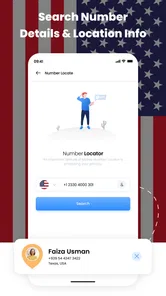
Number Locator- Call Location has a couple of neat features worth mentioning. First off, it provides the geographical location of phone numbers within seconds. I tested this with a few different calls from various locations, and the app accurately displayed the city and state for each one. It's not pinpoint accurate, but it gives a pretty good idea of where the call is originating from.
That limitation matters most when I am dealing with a number whose owner may have moved, or when a business routes calls through a central number. In those cases, a location label can reflect number information rather than the caller’s current whereabouts. My practical tip is to use the result as one small signal alongside voicemail, a known business contact page, or a message from the caller—not as proof of identity.
Another handy feature is the call blocking option. If you keep getting spam calls from a specific number, you can easily block it directly from the app. This feature alone makes the app worth considering, especially if you're plagued by telemarketers or robocalls.
When a quick check fits into a real day
Imagine I am waiting for a call about a repair appointment while working, and an unsaved number appears during a busy stretch. A location clue can help me decide whether to pause and check the call, but I would still let voicemail or a follow-up message clarify who it was. If the caller leaves no message and calls repeatedly, I can weigh that pattern before blocking. The useful workflow is not “location says answer”; it is “location gives me one extra piece of context, then I check the rest.”
This approach also helps when I am screening calls for a family member who is less comfortable with unfamiliar numbers. I can explain that the app may show a broad association, not where a person is standing, and help them make a call-by-call decision. I would not use it to monitor someone else or to make urgent safety decisions; those needs call for direct contact or appropriate emergency services, not a number lookup.
Everyday use, trade-offs, and alternatives
Imagine a delivery driver calls while I am in a meeting, but the number is not saved. A quick location clue might help me decide whether it could be a local call worth returning. If the same number keeps interrupting me with unwanted calls, blocking can be more useful than repeatedly looking it up. I would still check voicemail or a delivery notification before assuming the caller’s purpose from location alone.
For a first-time user, a sensible workflow is to look up an unfamiliar number once, note whether the result gives useful context, and then block only numbers I have decided I do not want to hear from. That avoids treating every unknown caller as spam. It also helps separate the app’s two jobs: location can help with a quick decision, while blocking is about managing repeated nuisance calls.
Compared with the phone’s built-in call screen or a contacts list, this app adds a geographic clue and a direct blocking option. The built-in tools may be enough if I only need to silence or block calls, while a dedicated caller-identification service may be a better fit if I want broader identity information. I would choose this app when a lightweight location check is the specific need, not as a replacement for turn-by-turn navigation or a complete spam-protection system.
Choosing the right tool for the job
The alternatives depend on what is bothering you. If the main problem is interruptions, your phone’s own call controls may be simpler because they are already part of your usual call workflow. If you want to know whether a business is legitimate, searching for its official contact details and calling that number is safer than trusting a location label. If you want a route to a place, a conventional navigation app is the right tool; this one is about phone numbers, not directions.
I would also keep the lookup occasional rather than turning it into a ritual for every call. For numbers that appear repeatedly, a short note about when they called and whether they left a message can be more useful than running the same lookup again. That gives me a pattern to act on, while avoiding the assumption that a geographic result changes or confirms the caller’s identity.
Performance and sensible limits
The app runs smoothly without any noticeable lag or crashes. It doesn't seem to hog your phone's resources, which is a big plus in my book. I can’t stand apps that slow down my device, and fortunately, Number Locator- Call Location is not one of them. The location identification is quick, and the call blocking feature works flawlessly.
It was released on April 30, 2020, and its current version is 2.38, with Android 7.0 as the minimum operating system requirement. That makes it worth checking your device’s compatibility before installing, particularly if you use an older phone. The app is not the right pick if you need precise real-time tracking, detailed route planning, or guaranteed identification of a caller; I would use a navigation app for routes and rely on trusted contact channels for identity checks.
Purchases, permissions, and practical boundaries
Because the app is free to install but offers optional purchases, I would treat any upgrade screen as a decision point rather than something to tap through automatically. I would first use the basic experience for the task I actually need and consider paying only if the app clearly explains what an item adds and I expect to use that benefit. A purchase is not a reason to assume that location results become exact or that unknown callers become verified.
Likewise, I would review any permission request in context. Call-related access may make sense for a call-management function, but I would not grant access automatically just because an app asks. If a permission does not seem connected to the feature I intend to use, I would stop and reconsider. That simple habit is useful for any phone utility, especially one used to inspect calls and numbers.
Who will get the most from it?
I can see this being useful for someone who gets occasional unfamiliar calls and wants a quick geographic clue, or for a person who prefers to block persistent nuisance numbers from one place. It is less suitable for anyone expecting to locate a person precisely, identify every caller with certainty, or replace the call controls already built into a phone. Keeping those expectations modest is the difference between a handy extra and a frustrating one.
It is also a reasonable fit for someone who is comfortable making the final call themselves: check the clue, consider the context, and decide whether to answer, return, ignore, or block. I would skip it if I rarely receive unknown calls, already find my phone’s built-in blocking tools sufficient, or need a dependable way to verify who is calling. In those cases, a dedicated identity-checking method or the phone’s own controls are more appropriate than a location-focused utility.
Final Thoughts
In conclusion, if you're someone who frequently receives calls from unknown numbers and you like to have a bit more information before picking up, this app might just be what you need. It's simple, effective, and does exactly what it promises. While it's not perfect—no app is, right?—it certainly makes managing calls a lot easier and less stressful. Give it a try and see how it fits into your daily routine. It might just become your new favorite tool for handling pesky calls!
Number Locator- Call Location Frequently Asked Questions
Does Number Locator- Call Location need an internet connection to work?
A connection can matter for an app that displays caller-location information on a map, since map and lookup features may rely on online services. If you plan to use Number Locator- Call Location while travelling or in an area with limited coverage, keep in mind that the experience may depend on your device’s connection. Its stated purpose is to help find a phone caller’s location through phone and call locator features.
Can I use Number Locator- Call Location while travelling or in another country?
The app is intended to help identify caller locations, but results for calls from other regions may not be the same as for familiar local numbers. Number recognition can depend on the number and the information available for it, and the app may not identify every international or masked call. If you often receive calls while travelling, treat any location shown as helpful context rather than a guaranteed result.
Is Number Locator- Call Location suitable for children and families?
Number Locator- Call Location has an Everyone content rating, so it is presented as suitable for a general audience. Families may still want to review how the app works and what device permissions it requests before a child uses it. In particular, consider whether access to location, contacts, or call-related information is appropriate for the intended user and device.
Will Number Locator- Call Location identify a caller’s exact address?
The app is designed to display caller-location information on a map, but that should not be taken as confirmation of a person’s exact street address or whereabouts. Location results can depend on factors such as network coverage, GPS signal, and information linked to a phone number. Use the display as general context for a call, not as a precise tracking or emergency-location tool.
Can I use Number Locator- Call Location to track someone without their knowledge?
Number Locator- Call Location is described as a tool for finding a phone caller’s location, but location information should be handled responsibly and with respect for other people’s privacy. A displayed result is not a guarantee of someone’s exact or live whereabouts. Use the app for legitimate caller identification purposes, follow applicable laws, and avoid treating a number lookup as permission to monitor another person.
Pros
- Accurate location tracking.
- User-friendly interface.
- Free to download and use.
- Low battery consumption.
- Supports multiple languages.
Cons
- Requires internet connection.
- Ads can be intrusive.
- Limited features in free version.
- May raise privacy concerns.
- Occasional location inaccuracies.











