Note AI: Smart Note Taker
- 170.00
- 4.4
- Installs
- 500.00K
- Price
- Free

Screenshots
Analysis by Reviewed
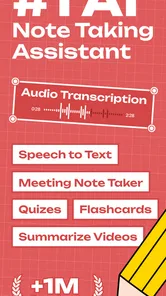
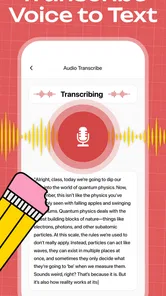
I tried Note AI: Smart Note Taker as a practical productivity app rather than treating it like a simple voice recorder. Its main appeal is straightforward: turn spoken audio into written notes and use AI-assisted organization to make those notes easier to work with later. That puts it in a useful space between a traditional recorder, a manual notes app, and a transcription service.
What makes the app worth considering is the way it targets a very common problem: I may remember that an important idea was discussed, but not the exact wording, action points, or order in which everything was said. Having a text version gives me something searchable and editable instead of forcing me to replay a long recording. At the same time, this is not automatically the right tool for every kind of note-taking. The value depends heavily on how often I work with spoken information and how much I am willing to rely on AI-generated organization.
How the cost affects the everyday value
Note AI is free to download, which makes it easy to test without committing money first. The app is published by HubX and is rated for Everyone, so its presentation is aimed at a broad audience rather than a specialist professional group. The free entry point is important here because transcription tools can feel difficult to judge from a store page alone. I would want to test the workflow with my own voice, background noise, speaking speed, and preferred note style before deciding whether it belongs in my routine.
There are in-app purchases ranging from $6.99 to $99.99 per item. That is a wide range, so I would not judge the paid value from the lowest figure alone. The sensible approach is to begin with the free experience, identify whether transcription actually saves me time, and then decide whether the paid option fits the amount of use I expect. Someone who records occasional personal reminders may find free access sufficient, while a student, researcher, or busy professional could place a much higher value on regular use.
The app has reached over 500K installs and holds a 4.4 average from around 13K ratings, which suggests that the basic idea is connecting with a substantial group of users. Those figures do not replace hands-on testing, but they do make the app feel more established than an obscure transcription experiment. It was released on Feb 28, 2025, and version 2.1.7 requires iOS or Android 12 or later, so anyone using an older device should check compatibility before planning around it.
I also noticed why the price question needs a little discipline. A free transcription app can save time, but it can also become expensive if I use it constantly and need a paid tier to keep that workflow comfortable. Conversely, paying for a tool that I only open once every few weeks would not make much sense. The right comparison is not simply “free versus paid”; it is the cost of the purchase against the minutes I save each week and the importance of keeping my notes organized.
What I actually get from the workflow
The central experience is built around speaking first and editing later. Instead of stopping during a meeting or class to type every thought, I can focus on the conversation and use the resulting text as a working draft. That is especially helpful when an idea arrives faster than I can write it down. I can then turn the rough transcript into a cleaner note, extract the useful parts, and leave the less important wording behind.
More From Our News Desk

Weather by Xiaomi Review: Clear at a Glance, Less Clear Up Close

X Under Pressure: Can It Recover When Posting Goes Wrong?

Clash of Clans Is Won Between the Battles

Android Auto Makes the Case for Quieter Car Software

MobiOffice: Transforming Mobile Productivity with Seamless Integration

EA SPORTS FC™ Mobile Soccer: Redefining Mobile Sports Gaming
I found this more useful for structured spoken material than for random sound. A short project briefing, a personal planning session, or a recorded explanation has a natural beginning and end, which makes the resulting text easier to review. A noisy café conversation or several people speaking over one another is a more demanding test. The app’s promise is attractive, but I would still treat the transcript as a draft that deserves a quick check rather than as a perfect official record.
One non-obvious advantage is that transcription changes the way I review information. With a recording alone, I have to remember roughly where a detail appeared and scrub through the audio until I find it. With text, I can scan for names, tasks, dates, or repeated ideas much more quickly. That makes the app useful even when I do not need an AI summary. The text itself becomes a practical index to the original conversation.
Another useful workflow is to speak a messy first version of a note and edit only after the thought is complete. I can describe a problem, list possible solutions, and mention questions without interrupting myself to format everything. Later, I can separate the result into headings or action points. This is often faster than opening a blank document and trying to make the first sentence perfect.
For personal planning, I would use it at the end of the day to talk through unfinished tasks. I might describe what needs attention, what is blocked, and what should happen next. The resulting note gives me a record to refine into a short plan. The benefit is not that the app magically manages my life; it is that speaking lowers the effort needed to capture the details before they disappear.
Where AI assistance helps and where I stay cautious
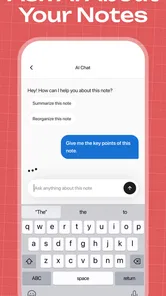
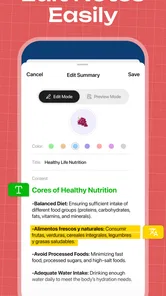
The AI note-taking angle is most valuable after the initial capture. A long transcript can contain useful information, but it may still be tiring to read line by line. AI-assisted organization can help me move from raw speech toward a more usable note. I would use that stage for identifying the main discussion points, separating decisions from background comments, and turning spoken intentions into a clearer checklist.
There is an important trade-off here. AI can make a note look polished while quietly weakening its accuracy. A summary may omit a minor detail that later becomes important, or it may interpret an uncertain statement too confidently. For that reason, I would compare any important summary with the original transcript. This is particularly important for work instructions, study material, interviews, or anything involving precise wording.
My practical tip is to give the app cleaner input whenever possible. I would begin a recording with a short spoken label, such as the project name and purpose, then pause briefly between separate topics. That simple habit makes the transcript easier to scan and gives the AI a clearer structure to work with. It also helps later when several notes cover similar subjects.
I would not use an AI-generated note as the only record of a sensitive decision. If the exact wording matters, I would preserve the transcript and, where relevant, check it against the audio. The app is better viewed as a fast assistant for capture and organization than as a substitute for careful human review.
Everyday situations where it earns its place
Imagine I am walking home after a meeting and suddenly remember three tasks, one concern, and an idea for the next presentation. Typing all of that on a phone would be awkward and slow. Speaking it into Note AI lets me capture the full thought while it is still fresh. Later, I can clean up the text and turn the useful parts into a short action list. That is a realistic situation where the app offers more than a standard typed notes tool.
Students may also find the format useful when reviewing their own explanations. After reading a difficult topic, I could explain it aloud in my own words and then inspect the transcript. Gaps become easier to spot because the text shows where I became vague or repetitive. I would not treat the app as a replacement for proper study, but it can support active recall and make spoken revision easier to review.
For writers, the app can serve as a way to collect rough ideas without sitting at a keyboard. I might describe a scene, a product angle, or a list of questions while away from my desk. The transcript would not be the finished draft, but it could preserve the natural order of ideas. This is especially useful when the goal is to avoid losing a thought, not to produce polished prose immediately.
It can also help people who think more comfortably by speaking than typing. That is not merely a convenience. The lower friction may encourage more consistent capture, which is often more important than having an elaborate note system that I rarely open. If I already have a strong typed workflow and almost never record voice, however, the app may add another step instead of removing one.
Trade-offs compared with familiar alternatives
A basic voice recorder is simpler and may be preferable when I only need an audio reference. It does not ask me to review a transcript, and it avoids the risk of trusting an imperfect conversion. The disadvantage is that finding one sentence inside a long recording is much slower. Note AI makes more sense when the written version has genuine value, not merely because transcription sounds modern.
A conventional notes app remains better for information that I already know how to write in a compact format. Shopping lists, short reminders, passwords-free checklists, and quick links usually do not need speech-to-text or AI assistance. In those cases, typing may be faster and more predictable. Note AI earns its place when the information begins as a long explanation, a stream of ideas, or a conversation that would be tedious to reconstruct manually.
Dedicated transcription services may be stronger for users who need a highly specialized workflow, extensive export options, or professional handling of long recordings. I would choose one of those alternatives if transcription accuracy, formal archiving, or advanced collaboration mattered more than convenience. Note AI is more appealing as an accessible productivity companion than as a complete professional records-management system.
There is also a privacy and concentration trade-off that I would consider before recording other people. Even when an app is convenient, I should make sure everyone involved is comfortable with the recording and transcription process. I would avoid treating the tool casually in confidential conversations. For personal voice notes, the decision is simpler; for meetings, interviews, or client discussions, responsible use matters as much as the feature itself.
Small habits that improve the results
I would keep each recording focused on one purpose whenever possible. A single note containing a meeting recap, grocery reminders, and unrelated ideas becomes harder to organize, no matter how good the AI assistance is. Separate recordings make the resulting text more useful and reduce the amount of cleanup later.
I would also speak punctuation and transitions naturally rather than racing through a list. Short pauses between topics help me identify where one idea ends and another begins. If I am dictating tasks, I would say the task first and the context second. That produces a more useful raw note than burying the action inside a long story.
A further tip is to review the transcript while the memory is still fresh. Corrections are easier when I still remember what I meant, and I can quickly fix names or specialized terms that speech recognition may misunderstand. Waiting several days turns a small editing job into detective work.
Finally, I would keep the app’s role narrow at first. Rather than moving every note into it immediately, I would test one recurring use case, such as post-meeting capture or spoken study summaries. If that single workflow saves time consistently, expanding use becomes a reasoned decision instead of an impulse based on the AI label.
Who should use it and who should pass
Note AI is a strong candidate for people who regularly receive information through speech and later need it in written form. Students, interviewers, writers, managers, researchers, and users who prefer dictation could all benefit from the lower effort of speaking first. It is also a good fit for anyone who often remembers an idea at an inconvenient moment and wants more than a short voice memo.
I would be more cautious if my notes are mostly tiny reminders or if I already have a fast, well-organized text system. The extra transcription step may not improve that workflow. I would also look elsewhere if I need a specialized professional archive, strict control over every word, or a tool chosen primarily for advanced collaboration rather than personal productivity.
The broad age rating makes the app approachable, but “Everyone” does not mean every use case is equally suitable. A child’s casual spoken reminder and a formal business record have very different accuracy and responsibility requirements. I would match the app to low-risk, reviewable tasks unless I had a clear reason to apply a stricter checking process.
My buy-or-skip verdict
My verdict is to try Note AI if spoken capture is already a problem for you, especially because the app is free to start. Its strongest value is not simply converting sound into words; it is reducing the gap between having a thought and turning that thought into an organized note. The combination of transcription and AI-assisted cleanup can make long spoken material much easier to revisit.
I would not pay automatically just because the app has a useful concept. I would first test whether its free access handles my normal speaking style and whether the resulting notes genuinely save time. If I use it several times a week and the paid option removes a real limitation for my workflow, the purchase may be worthwhile. If I only need occasional reminders, the free experience or a basic recorder may be enough.
Overall, I see Note AI as a practical bridge between voice recording and written productivity. It is most convincing when I have substantial thoughts to capture, not when I need a tiny typed note. The app has a clear everyday purpose, a current version of 2.1.7, and enough user adoption to justify a serious trial. My recommendation is simple: choose it for turning spoken ideas into reviewable notes, but keep human checking in the loop whenever accuracy matters.
Note AI: Smart Note Taker Frequently Asked Questions
Is Note AI: Smart Note Taker suitable for students and work meetings?
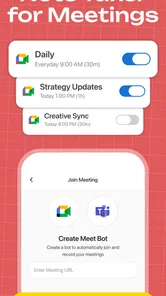
It can be a practical option if you want to turn spoken information into text and keep notes organized for later review. The app is aimed at productivity, with a focus on audio transcription and AI-assisted note-taking. Students might use it to capture ideas from study sessions, while professionals may find it helpful for meeting notes. Review any transcript before relying on it as a complete or exact record.
Which devices can run Note AI: Smart Note Taker?
Note AI: Smart Note Taker is available for devices running iOS 12 or later. Before downloading, check your device’s operating system version and make sure it meets that minimum. If you use more than one device, consider whether the app’s available synchronization options suit your setup, so your notes remain accessible in the way you expect.
What is Note AI: Smart Note Taker used for?
Note AI: Smart Note Taker is designed to help you capture, organize, and manage written information in one place. It can be useful for students, professionals, and anyone who needs to record ideas, meeting notes, reminders, or daily thoughts. Its AI-focused tools may also help summarize or structure content, making longer notes easier to review later.
Does Note AI: Smart Note Taker require an internet connection?
Some basic note-taking functions may work without an internet connection, depending on the version and device. However, AI features such as content generation, summarization, transcription, or cloud synchronization commonly require online access because processing may take place on remote servers. It is worth checking the app’s current requirements and testing offline access before relying on it for travel or limited-connectivity situations.
Is Note AI: Smart Note Taker free to download and use?
The app is free to download, but certain advanced features may be restricted behind in-app purchases. These limitations may apply to AI requests, storage, synchronization, export options, or usage quotas. In-app purchases range from $6.99 to $99.99 per item, so review the pricing details carefully before purchasing and make sure the available features fit your needs.
Pros
- Turns voice recordings into organized notes quickly.
- AI summaries help highlight key points from long conversations.
- Supports multiple note formats for different situations.
- Search tools make finding saved information simple.
- Useful for meetings
- lectures
- interviews
- and daily reminders.
Cons
- AI transcriptions may struggle with accents or background noise.
- Some advanced features may require a paid subscription.
- Cloud processing can raise privacy concerns for sensitive notes.
- Summaries may occasionally miss context or important details.
- Battery and data usage can increase during long recordings.













