Nextdoor: Neighborhood network
- 88.12K
- 4.5
- Installs
- 10.00M
- Price
- Free

Screenshots

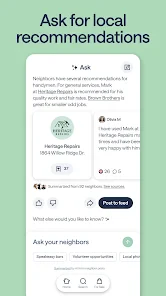

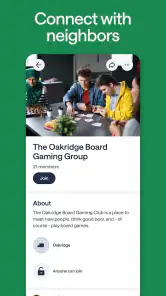
Analysis by Reviewed
Have you ever wondered what's happening right outside your door? Well, wonder no more because Nextdoor: Neighborhood network is here to keep you in the loop. This app is like the ultimate neighborhood watch, but with a friendly twist. Let me walk you through my experience with it.
Connecting with Your Community
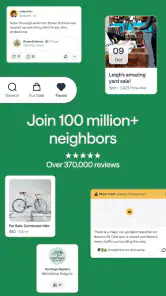
One of the first things I noticed about Nextdoor is how seamlessly it integrates into your daily routine. From the moment you sign up, you're connected to your local community. Whether you're looking for recommendations on the best pizza place in town or need help finding a lost pet, this app has got you covered. It’s like having a community bulletin board right in your pocket.
Getting Started
Setting up an account is as easy as pie. You just enter your address, verify your location, and voilà! You're part of your neighborhood's online community. The interface is user-friendly and intuitive, making navigation a breeze even for those who aren't tech-savvy.
Discover Local Events and Alerts
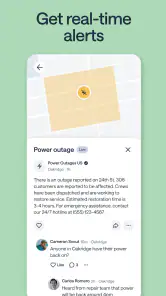
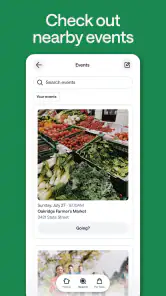
One feature I particularly love is the local events and alerts section. It keeps you updated on everything from street fairs to safety warnings. The app allows you to stay informed about what's happening around you, fostering a sense of belonging and security. Plus, you can even post your own events, which is perfect for promoting that garage sale you've been planning.
Marketplace for Neighbors
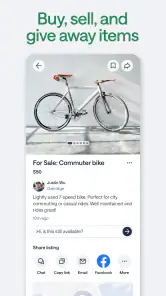
If you're a fan of garage sales and flea markets, you’ll appreciate the marketplace feature. It’s a fantastic way to buy, sell, or give away items within your community. I’ve found some real treasures here, and it's always reassuring to deal with people you might bump into at the local coffee shop.
Building Trust and Safety
Now, one might wonder about safety and privacy, but fear not! Nextdoor takes these issues seriously. The app verifies every member by address, which helps to create a safe environment. You can control what information you share, ensuring your privacy is respected while still being an active member of your community.
In a world where we often feel isolated, Nextdoor: Neighborhood network brings us closer to those living just around the corner. It's more than just an app; it's a community builder. So, if you’re looking to get more involved with your neighborhood, or simply want to know who’s responsible for those amazing holiday decorations down the street, give it a try. You might just find that your next best friend lives right next door!
More From Our News Desk

Weather by Xiaomi Review: Clear at a Glance, Less Clear Up Close

X Under Pressure: Can It Recover When Posting Goes Wrong?

Clash of Clans Is Won Between the Battles

Android Auto Makes the Case for Quieter Car Software

MobiOffice: Transforming Mobile Productivity with Seamless Integration

EA SPORTS FC™ Mobile Soccer: Redefining Mobile Sports Gaming
What to Expect from the Neighborhood Feed
I find Nextdoor most useful when I treat it as a local noticeboard rather than a complete picture of a community. Posts can be practical—someone asking for a reliable plumber, a neighbor sharing a lost-pet notice, or a resident mentioning an upcoming event—but the usefulness depends on how active people nearby are. A quiet feed does not mean the app is broken; it may simply mean neighbors have not started using it regularly.
That makes it a different choice from a general social network or a group chat. A chat is better for a small group that already knows one another, while Nextdoor can help surface questions and recommendations across a broader local circle. For urgent emergencies, though, I would use the appropriate emergency service rather than wait for a neighborhood post or reply.
Make the First Visit Count
For a first meaningful action, I’d begin with a specific, easy-to-answer question: for example, asking neighbors where they take a bicycle for repairs or whether anyone has seen a missing cat nearby. A focused post gives people enough context to respond usefully, without sharing personal details that are not needed. You can also start by reading for a while and noting which kinds of posts seem relevant before contributing.
A realistic use is planning a Saturday clear-out: check local posts for a community event, offer a usable household item through the marketplace, then arrange any exchange carefully and in a public, sensible way. That combines the app’s local discovery and neighbor-to-neighbor purpose without requiring you to make it part of every daily routine. For recommendations, compare more than one reply and use your own judgement; a neighbor’s suggestion is a helpful lead, not a guarantee.
Small Habits That Improve the Experience
One useful habit is to keep posts narrow and clear. If you need a recommendation, mention the kind of service and the general area rather than publishing your full address or a detailed schedule. For a lost pet, include information that helps identify the animal, but think carefully before adding contact details you would not want widely shared. This balance lets neighbors help while limiting unnecessary exposure.
I would also check the feed with a purpose instead of reacting to every alert. Local updates can be valuable, but a steady stream of neighborhood conversation may feel distracting if you only want occasional practical information. If a post concerns safety, separate firsthand information from speculation before passing it on. Community reports can draw attention to an issue, but they do not replace official updates or direct confirmation.
Who Will Get the Most from It
This lifestyle app is a better fit for someone who wants nearby recommendations, local notices, event discovery, or a convenient way to pass along an item. It can be especially handy after moving to an unfamiliar area, when you may not yet know whom to ask about everyday services. Nextdoor, Inc. develops the app, which is free to use; its audience rating is Teen. It has a 4.5 average from around 399,000 ratings, and more than 10 million installs.
On the other hand, I would skip it if you want a tightly managed private group for close friends, or if neighborhood posts are not something you want in your social feed. A dedicated messaging app is more direct for known contacts, and local search services may be more efficient when all you need is a list of businesses. Nextdoor’s value is the neighbor-to-neighbor context, not a replacement for every local service or social tool.
Practical Limits and a Sensible Next Step
Address-based membership can make local conversation feel more relevant, but it should not be mistaken for a guarantee that every post is accurate or every interaction is trustworthy. I would avoid posting sensitive information, take care with in-person exchanges, and use the app’s sharing controls thoughtfully. The neighborhood feel is its strength, but it also means the quality and tone of the experience can vary from one area to another.
The current version is 4.181.6, and the app requires Android 7.0 or later. If you decide to try it, give the feed a little time, make one practical contribution, and see whether the replies are useful in your area. That is a more reliable test than expecting a busy community immediately. For me, Nextdoor works best as an occasional local companion: open it when a neighborhood question or opportunity comes up, then keep using the other tools that suit the task better.
Nextdoor: Neighborhood network Frequently Asked Questions
Is Nextdoor available for both Android and iOS?
Yes. Nextdoor is an app for Android and iOS, so you can use it on a supported phone running either platform. Before downloading, check that your device meets the minimum operating-system requirement: Android 7.0 or later. The app is free to download, and its focus is connecting people with neighborhood news, alerts, recommendations, marketplace posts, and events.
Who develops Nextdoor, and what is the app’s main purpose?
Nextdoor is developed by Nextdoor, Inc. and is a lifestyle app centered on neighborhood connections. Its main purpose is to help residents keep up with information and conversations from nearby people. The app brings local alerts and news together with recommendations, marketplace posts, events, and other community updates, making it a place to check what is happening around your neighborhood.
Can I browse Nextdoor before joining my neighborhood?
Nextdoor is built around local neighborhood conversations, so its most useful content is tied to joining a neighborhood network. To take part, residents create an account and verify their address. Once connected, they can follow local discussions, see neighborhood alerts and news, and explore recommendations, events, and marketplace posts shared by people nearby.
What kinds of local information can I find on Nextdoor?
The app brings together several kinds of neighborhood content in one place. Residents can share local news and alerts, ask for recommendations, post about events, and use the marketplace to connect with people in the area. Discussions may also cover safety concerns or lost and found items, making the feed useful for keeping up with practical, everyday matters close to home.
What is Nextdoor and how does it work?
Nextdoor is a private social network specifically designed for neighborhoods. It allows residents to connect with each other, share local information, and stay updated on neighborhood activities. Users can create accounts using their real names and verified addresses to ensure privacy and security. The platform facilitates discussions on local events, safety concerns, lost and found items, and recommendations for local services, fostering a sense of community among neighbors.
Pros
- Connects neighbors easily
- Local recommendations available
- Organizes community events
- Safety updates in real-time
- Free to join and use
Cons
- Privacy concerns with data
- Notifications can overwhelm
- Limited to nearby areas only
- Some ads in free version
- Inconsistent user engagement
- Category
- Lifestyle
- Version
- 4.181.6











