Nest
- 128.05K
- 3.8
- Installs
- 10.00M
- Price
- Free

Screenshots
Analysis by Reviewed
I see a useful smart-home companion in Nest, but not a universal control center that will make every home simpler. Its real value depends on whether you own compatible Nest devices and want to manage them from one place. If you do, having core controls on your phone can make everyday adjustments more convenient; if you do not, the app has little reason to become part of your routine.
What it is best at in daily use
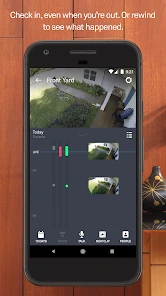
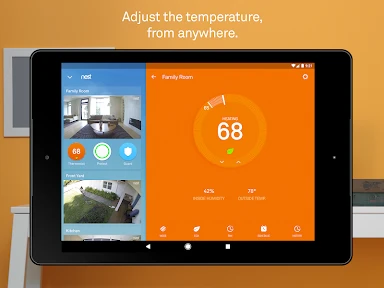
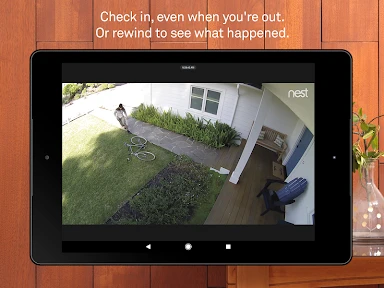
Nest is a free lifestyle app from Nest Labs Inc., and its focus is practical: connecting a phone with compatible home devices. A thermostat is useful when I want to adjust the temperature without going to the wall unit, while a camera can help me check what is happening at home when I’m out. The benefit is less about novelty than about being able to handle these small tasks remotely.
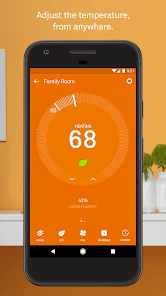
A realistic example is leaving for work and realizing the house is still set to a temperature you no longer need. Being able to check and change a connected thermostat from the app can save a return trip or an unnecessary stretch of heating or cooling. That convenience has a clear boundary, though: it relies on having the relevant device set up and connected. The app alone cannot make an ordinary thermostat or camera smart.
Worthwhile conveniences, with a few trade-offs
In a home with several compatible devices, a shared app can be easier than opening separate controls for each one. Still, I would not assume that every smart bulb, camera, or speaker will work just because it is part of a smart home. Device compatibility is the first thing I’d check before choosing this as my main control app. If your household already uses another ecosystem, its own app may be the more straightforward choice.
It also helps to approach energy information as a guide rather than a guaranteed bill reduction. Reviewing usage can make patterns easier to notice, but savings depend on how the home is heated or cooled and on the choices people make. Likewise, camera alerts are useful for awareness, not a replacement for checking an important situation yourself. Those distinctions matter when deciding how much to rely on a phone app for comfort or security.
Who should consider it
I’d recommend Nest most to people who already have compatible Nest equipment, want remote access to it, and are comfortable managing parts of the home from a smartphone. It is less compelling if you are shopping for a general-purpose smart-home app before picking devices, or if you prefer physical controls and rarely need to change settings while away. The app is rated for Everyone, has a 3.8 average from around 439,000 ratings, and has been installed over 10 million times, so it has a broad audience—but that does not guarantee it will suit every device setup.
The app first appeared on June 17, 2015, and version 5.84.0.4 supports Android 8.0 and later. Those details are useful if you are checking an older phone before installing. For practical setup, I’d start by confirming that each device you own is supported, then add only the controls you expect to use. That keeps the experience focused and makes it easier to tell whether remote access is genuinely useful in your routine.
More From Our News Desk

Weather by Xiaomi Review: Clear at a Glance, Less Clear Up Close

X Under Pressure: Can It Recover When Posting Goes Wrong?

Clash of Clans Is Won Between the Battles

Android Auto Makes the Case for Quieter Car Software

MobiOffice: Transforming Mobile Productivity with Seamless Integration

EA SPORTS FC™ Mobile Soccer: Redefining Mobile Sports Gaming
Smart Control at Your Fingertips
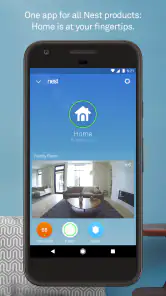
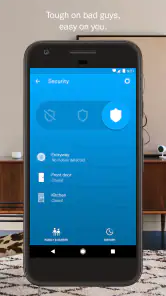
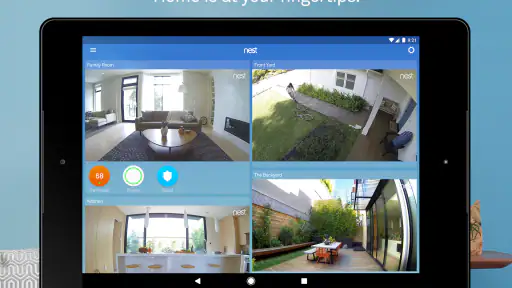
First off, the Nest app is all about giving you full control over your home environment right from your smartphone. Imagine adjusting your thermostat, checking your security cameras, and even controlling your lights, all while lounging on your couch or halfway across the world. The interface is sleek and user-friendly, which means you won’t need a degree in rocket science to navigate through it.
Seamless Integration
One of the standout features of the Nest app is its ability to seamlessly integrate with a wide range of smart devices. Whether it's your Google Home, Amazon Alexa, or various third-party smart devices, Nest plays well with others. This ensures that your smart home ecosystem is as cohesive as possible. No more juggling multiple apps to manage your home!
Energy Saving Made Easy
Concerned about your energy bills? The Nest app has got you covered. With its intuitive energy-saving tips and detailed usage reports, you can easily track and optimize your energy consumption. It's like having an eco-friendly guru whispering in your ear, guiding you towards a greener lifestyle.
Security at Its Best
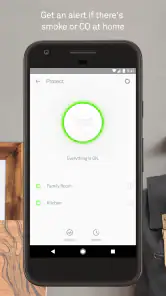
Security is a big deal, and Nest understands that. The app offers a robust suite of security features, from real-time alerts to video surveillance, ensuring your peace of mind whether you're at home or away. It's like having a virtual security guard watching over your house 24/7.
In conclusion, if you're looking to transform your home into a smart haven, the Nest app is your go-to solution. With its intuitive interface, seamless integration, and robust security features, it's an investment that pays off in convenience, security, and energy savings. So, go ahead, give Nest a try, and step into the future of home automation.
Nest Frequently Asked Questions
Can I use Nest to manage my home while I’m away?
Nest is built around managing connected-home devices from your phone, which can make it useful when you are away from home. The app’s store summary, “Your home in your hand,” reflects this remote-control focus. What you can check or change depends on the Nest devices linked to your account and the features those devices provide.
Is Nest suitable for someone who has never used a smart home app?
Nest may be approachable if you want one app for managing compatible Nest devices, rather than separate controls for each product. Its main value comes from linking it with Nest hardware, so your first steps will involve setting up an account and connecting supported devices. If you do not own Nest products, the app is less likely to be useful on its own.
Who develops the Nest app, and what kind of app is it?
Nest is a lifestyle app developed by Nest Labs Inc. It is intended to bring compatible Nest smart-home controls together on a mobile device. Its usefulness depends on the products you have connected and the tasks you want to handle, such as managing home devices remotely. The app is free to download.
What devices and operating systems can I use the Nest app on?
Nest is a lifestyle app from Nest Labs Inc. for managing a connected home from a phone or tablet. Before downloading, check that your device runs Android 8.0 or later if you are installing the Android version. The app is free, and its broad focus is reflected in the simple store summary, “Your home in your hand.”
Do I need Nest hardware to get started with the app?
The Nest app is designed to work with Nest smart home devices, so its main controls and home-monitoring features are intended for people with compatible Nest products. If you are considering the app without any Nest devices, it may have limited practical value for you. The app brings device controls together rather than serving as a standalone home-monitoring service.
Pros
- Seamless integration with smart home devices
- User-friendly interface enhances experience
- Energy-saving features reduce utility bills
- Remote access offers convenience and control
- Regular updates improve functionality
Cons
- Initial setup can be time-consuming
- Compatibility issues with older devices
- Subscription required for premium features
- Occasional connectivity issues
- Limited support for third-party apps
- Category
- Lifestyle
- Version
- 5.84.0.4











