n-Track Studio DAW: Make Music
- 2.26K
- 4.2
- Installs
- 10.00M
- Price
- Free
Screenshots
Analysis by Reviewed
I find mobile recording most useful when an idea arrives before I can get to a computer. n-Track Studio DAW: Make Music is a music and audio app from n-Track that aims to turn a phone or tablet into a place to record, arrange, and mix. It has a 4.2 average from around 64,000 ratings, and its reach—over 10 million installs—suggests plenty of people use it to make more than quick voice memos. My cautious take is that it can be a capable creative workspace, but a DAW still asks for patience and attention, especially on a small screen.
Getting started and deciding what to trust
The first question I’d ask of any recording app is not just what it can do, but what choices I have when I use it. The app is free to install, rated for Everyone, and its current version is 10.4.148; optional in-app purchases range from $0.99 to $34.99 per item. Those details are useful context, but they don’t tell me what permissions or data practices apply on a particular device. I would read each permission request in context and check the platform’s privacy and account controls rather than assume a music app needs access to everything.
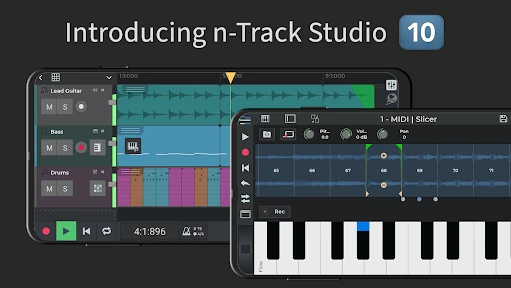
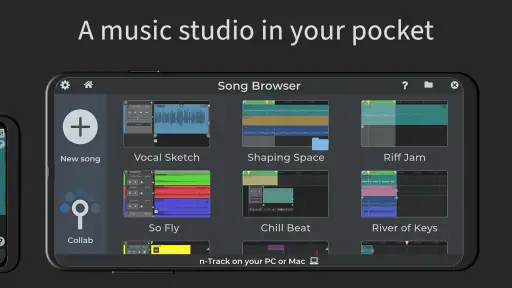
From the moment I launched n-Track Studio DAW: Make Music, I was impressed by its sleek and intuitive interface. The app opens up a world of possibilities with its multitrack recording capabilities and a plethora of built-in effects. Setting up a new project is a breeze, and I immediately appreciated how user-friendly the layout is. Even if you're not a tech-savvy musician, the app's design makes it easy to jump right into creating your next masterpiece.
Features that shape a recording workflow
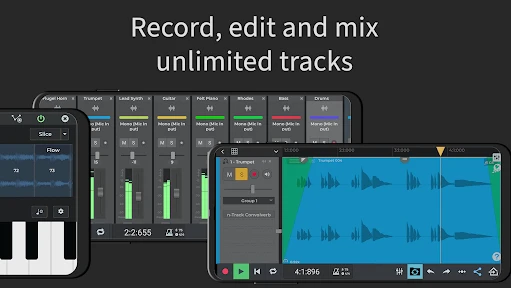
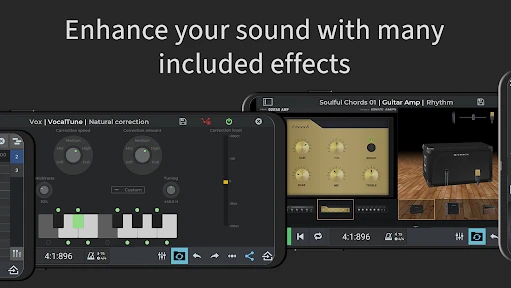
One of the standout features of n-Track Studio DAW is its ability to record unlimited audio and MIDI tracks. This means you can layer your sounds as much as you need, which is crucial for building rich, complex compositions. I found the real-time effects processing particularly impressive, allowing me to tweak my sound with precision. The variety of effects available, from reverb to delay, is enough to keep any music producer happy.
For a useful first session, I’d keep the arrangement deliberately small: record a vocal or guitar idea, add a guide part, then use effects to hear how the layers sit together. This makes it easier to tell whether a problem comes from the performance, the balance, or the effect itself. It also avoids the common mobile-DAW trap of adding tracks simply because there is room to do so. Unlimited track capacity is flexibility, not a reason to build an unwieldy project.
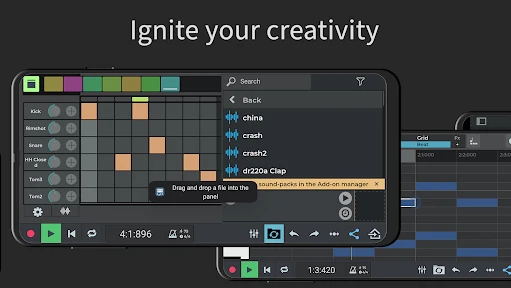
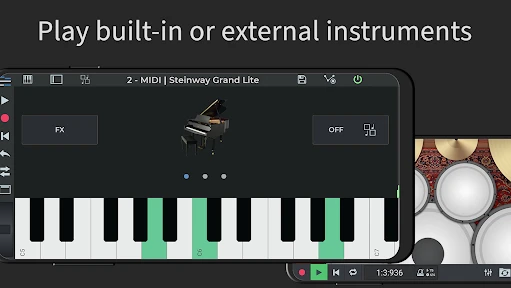
Another feature that caught my attention is the built-in virtual instruments. These are perfect for when inspiration strikes and you're away from your physical instruments. The quality of these virtual instruments is top-notch, and the app even supports external MIDI devices, giving you the flexibility to expand your sound palette.
Good fits, and situations where I’d choose differently
I’d recommend this kind of setup to a songwriter who wants to capture guitar and vocal ideas, a beat-maker who enjoys arranging parts, or a podcaster who needs more than a single-track recorder. A realistic use is sketching a chorus during a quiet break: record the melody, add a simple accompaniment, and adjust the mix before the idea disappears. If you connect an external MIDI device, it can also be a practical way to enter notes without tapping every part onto the screen.
More From Our News Desk

Weather by Xiaomi Review: Clear at a Glance, Less Clear Up Close

X Under Pressure: Can It Recover When Posting Goes Wrong?

Clash of Clans Is Won Between the Battles

Android Auto Makes the Case for Quieter Car Software

MobiOffice: Transforming Mobile Productivity with Seamless Integration

EA SPORTS FC™ Mobile Soccer: Redefining Mobile Sports Gaming
The trade-off is that a phone display is still a cramped place to edit detailed timing or manage a dense mix. I’d use headphones when judging effects and balance, and save fine editing for a larger screen if the project becomes complicated. Compared with a basic voice recorder, this gives you a much broader multitrack workflow; compared with a desktop DAW, it prioritizes portability over the comfort of a large display and mouse or keyboard. If your main goal is simply to record a meeting or make a quick spoken note, a simpler recorder is likely less work.
For a beat-maker, I’d treat the phone as a sketchpad rather than assume every arrangement should be finished there. Build a short loop, listen for whether the parts leave room for one another, and only then add more layers. That approach is especially useful when working with touch controls: it reduces the amount of precise editing you need to do and makes it easier to hear whether the musical idea itself works before spending time polishing it.
For podcast work, the distinction between recording and publishing matters. A multitrack setup can help you keep a voice take separate from an intro or other audio, which gives you more control while mixing. But if your routine is only to capture a short message and send it immediately, the extra project and mixing steps may slow you down. I’d choose this app when I expect to edit, not merely when I need a microphone recording.
There is also a useful middle ground for musicians who already work on a computer. I’d use a mobile session to collect a rough vocal, a melody, or a rhythm while away from the desk, then decide whether the idea deserves a fuller arrangement later. The phone is valuable here because it lowers the effort of starting; it does not need to replace a desktop workflow to be worth using. Before relying on a project across devices, though, I’d check the saving and transfer process that is actually available to me and test it with a throwaway sketch.
Performance, learning, and everyday friction
In terms of performance, the app runs smoothly on both Android and iOS devices. I tested it on a mid-range smartphone, and it handled my projects without lag or crashes. The developers have clearly optimized the app for mobile devices, ensuring that users can enjoy a seamless music-making experience.
Usability is another area where this app excels. The controls are responsive, and the learning curve is minimal, even for beginners. The app also offers a range of tutorials and support to help you get the most out of its features. Whether you're editing audio clips, mixing tracks, or experimenting with effects, everything feels intuitive.
Even with an approachable layout, I wouldn’t expect every part of a DAW to feel obvious on first use. Recording, arranging, and mixing ask different questions, and a control that makes sense while tracking may be less convenient when editing a crowded project. I’d learn by completing a tiny song or spoken segment, not by opening a blank project and trying every control at random. That gives each feature a practical purpose and makes it easier to decide which parts of the workflow I’ll actually use.
One small but worthwhile habit is to record a short test before a take that matters. Listen back at a comfortable volume, check that the intended source is present, and make sure any effects are helping rather than disguising a poor recording. This costs little time and can save a frustrating session, especially when recording in an unfamiliar room or switching between the built-in microphone and an external setup. I’d also keep the phone positioned so that touching the screen does not disturb a performance.
In practice, I would still learn one task at a time rather than trying to master recording, MIDI, effects, and mixing in one sitting. Start with a short project, check that the input is captured cleanly, then add effects only after the raw recording sounds right. This keeps troubleshooting manageable: if the result is too noisy or too processed, you can identify which step needs attention. For a long session, I’d also make a habit of saving between major changes, as with any creative project on a mobile device.
Visible choices and a measured verdict
Before recording something personal, I’d review the device’s permission prompts and decide whether the requested access makes sense for the task. A microphone is plainly relevant to recording, while other requests deserve their own explanation before I agree. I’d also check the app’s available account and privacy settings, and the platform controls for managing permissions. These are practical checks, not a reason to assume the app behaves in a particular way; they help me keep control of what I share and when.
That caution matters if you plan to record conversations, client work, or unfinished songs you consider private. I’d avoid treating any mobile project as a guaranteed backup: keep important work in a place you control and verify that a saved project opens before clearing files or changing devices. For a first-time user, the sensible questions are straightforward: can I record without buying anything, can I use my own MIDI gear, and will this suit a simple voice note? The free install gives you a way to explore, MIDI-device support offers an option for external input, and the app’s multitrack design is more than a voice-note tool—but optional purchases mean I’d check what a desired feature costs before building a workflow around it.
Cost is worth considering before a project becomes central to your routine. The app is free to start, while optional purchases are available, so I’d explore the workflow I need before paying for anything and confirm that a specific purchase addresses a real limitation for me. I would not buy an upgrade just because a project has grown complicated; first I’d work out whether the friction comes from a feature restriction, from the small screen, or simply from an arrangement that needs simplifying.
For privacy-conscious users, the practical choice is to keep permissions purposeful and revisit them when the way you use the app changes. A microphone permission makes sense when recording; it need not be treated as blanket approval for every situation. I’d also avoid capturing another person’s voice without their agreement, particularly for interviews or client material, and keep sensitive recordings out of casual sharing workflows. These habits provide more meaningful control than guessing about how an app handles information behind the scenes.
The app is aimed at Everyone, but that does not mean every user will find its workflow equally comfortable. A beginner who wants to learn recording and layering can start with a small project and grow gradually. Someone who needs a polished, detailed mix with many edits may be happier doing the fine work on a computer. And a person who only wants to save a quick reminder should choose a basic recorder instead of taking on a DAW’s extra decisions.
Overall, n-Track Studio DAW: Make Music is a fantastic tool for anyone looking to create music on their mobile device. It combines powerful features with ease of use, making it suitable for both amateur and professional musicians. The app's flexibility and performance make it a valuable addition to any music producer's toolkit.
If you're passionate about music production and want a reliable DAW on your phone or tablet, give this app a try. With its comprehensive set of features and user-friendly interface, it's an excellent choice for music creation on the go.
n-Track Studio DAW: Make Music Frequently Asked Questions
Can I use n-Track Studio DAW to record vocals, instruments, beats, or podcasts?
Yes. n-Track Studio is a music-making app for recording, mixing, and mastering, with support for recording voice and guitar as well as creating beats and podcasts. It can suit different kinds of projects, from capturing an idea to working on a more developed recording. The range of tools may make it useful for musicians and other creators who want to work with audio on a mobile device.
Can I save and export finished recordings from n-Track Studio DAW?
The app is intended to help you record, mix, and master music, so completing and keeping a project is central to its workflow. Before starting a project, it is sensible to make sure your device has enough storage for recordings and project files. Export options and any restrictions can depend on the version and features you use, so check the available controls in the app when you are ready to share a finished track.
What is n-Track Studio DAW and what features does it offer?
n-Track Studio DAW is a comprehensive digital audio workstation app designed for music enthusiasts and professionals to create and edit music. It offers a range of features, including multi-track recording, MIDI editing, a vast library of effects and virtual instruments, and real-time audio effects processing. The app is compatible with both Android and iOS platforms, making it versatile for on-the-go music production.
Is n-Track Studio DAW suitable for beginners in music production?
Yes, n-Track Studio DAW is designed to be user-friendly for beginners while offering advanced features for experienced users. It includes tutorials and a simple interface that makes it easy for new users to navigate and understand. However, mastering all its features may take some time and practice, but the app provides enough support to facilitate learning.
Can I use headphones or an external microphone with n-Track Studio DAW?
Using headphones can be helpful when recording and mixing, since they let you monitor audio without playing it through a device speaker. An external microphone may also be useful if you want a different recording setup from the built-in microphone. Compatibility can depend on your device and its connections, so check that your equipment works with your phone or tablet before you begin a session.
Pros
- User-friendly interface for beginners.
- Wide range of virtual instruments included.
- Supports high-quality audio recording.
- Cross-platform compatibility available.
- Regular updates and feature additions.
Cons
- Requires a powerful device for smooth operation.
- Limited free version features.
- Somewhat steep learning curve for advanced features.
- Occasional app crashes reported.
- In-app purchases can be expensive.
- Category
- Music & Audio
- Version
- 10.4.148











