MyDyson™
- 1.89K
- 3.6
- Installs
- 5.00M
- Price
- Free

Screenshots
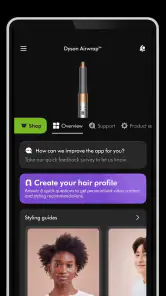
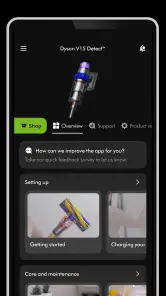
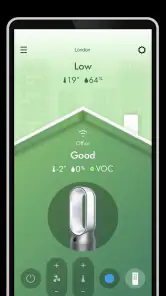
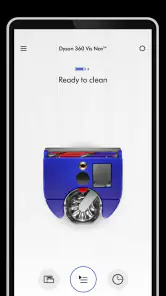
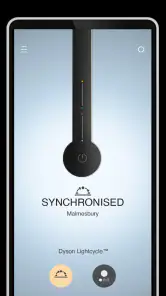
Analysis by Reviewed
When I’m deciding whether to install a companion app, I want to know what it will actually help me do after the initial setup. With MyDyson, the answer depends on the Dyson products in my home: it can bring care guidance, support and connected-device controls together, but it is not much use as a general household organizer. I see it as an optional tool for making ownership a little easier, rather than a reason by itself to choose a particular appliance.
Free to try, with value tied to your equipment
The app is free, so there is no download charge to weigh against its convenience. That is a straightforward benefit, but it is different from saying that owning the hardware is inexpensive or that every feature is available for every product. The practical value comes from the Dyson devices you already have and whether their care information, support or smart controls are things you will use.
Dyson Ltd makes the app for its own product ecosystem, and it sits in the lifestyle category rather than trying to manage appliances from every brand. It has an average rating of 3.6 from around 32,000 ratings, which I take as a reason to approach it with sensible expectations: useful to some owners, but not necessarily smooth or important enough for everyone. Its reach is substantial, with over 5 million installs, though popularity alone does not tell me whether it fits a particular household.
What the app can take off your plate
The clearest reason I would keep it installed is to have product-specific information and support in one place. If a vacuum seems to be performing differently, for example, I would rather look for guidance that matches the device than sift through broad search results and hope the advice applies. The same principle helps with routine care: reminders can prompt me to check a filter or cleaning task, while the actual maintenance still depends on me following through.
I find those prompts most helpful as a memory aid, not as a promise that the app can monitor every aspect of an appliance’s condition. A reminder gives me a reason to check, but it does not clean a filter or establish that a product has a fault. For safe handling, I would still follow the instructions for the particular device, especially when a task involves taking parts apart or preparing the appliance for cleaning.
A smoother routine for a shared home
One practical use is to make product care easier to hand over. If different people in a household take turns vacuuming, the app’s device-specific guidance can give everyone a common reference instead of relying on one person to remember the right routine. I would register the product and check the relevant advice before setting up a recurring chore, so the information is available when someone actually needs it.
That small change can help avoid a familiar household problem: a maintenance task gets postponed because nobody is sure what to do or when to do it. It will not settle disagreements about whose turn it is, and it does not replace reading the product’s instructions, but it can make the care part less dependent on memory. For someone living alone who already knows the routine, that advantage may be much smaller.
More From Our News Desk

Weather by Xiaomi Review: Clear at a Glance, Less Clear Up Close

X Under Pressure: Can It Recover When Posting Goes Wrong?

Clash of Clans Is Won Between the Battles

Android Auto Makes the Case for Quieter Car Software

MobiOffice: Transforming Mobile Productivity with Seamless Integration

EA SPORTS FC™ Mobile Soccer: Redefining Mobile Sports Gaming
When connected controls earn their place
If a Dyson product supports smart connection, app controls can be useful when reaching the appliance would interrupt what I am doing. I can imagine adjusting a connected purifier from another room rather than walking over just to change a setting. That convenience matters most when I already have a reason to control the device remotely; it is less persuasive if I prefer its physical controls or rarely change settings.
I would separate this benefit from the app’s care and support tools. A person can get value from product guidance without wanting remote control, while another owner may install it mainly to operate a compatible smart product. Before building the app into a daily routine, I would check that the specific appliance supports the functions I want and consider whether opening a phone app is actually easier than using the appliance itself.
How it compares with manuals and general searches
The usual alternatives are a product manual, manufacturer support pages, general web searches and the device’s own controls. MyDyson’s advantage is bringing product-related help and, for compatible connected products, control into one app. In return, it is limited to Dyson equipment and is not a single dashboard for a mixed-brand home. If most of my appliances came from other manufacturers, I would still need their own instructions and tools.
That makes the choice fairly practical. If I often need to look up care steps or want a connected Dyson device on my phone, one place for those jobs can save a little searching. If I have one basic product, rarely need advice and am comfortable with its built-in controls, the manual may be enough. The app costs nothing to download, but setting it up and learning where things are takes time, so I would want a specific task in mind before making it part of my routine.
What to expect from help and troubleshooting
Having support close to the product information can make it easier to start with relevant guidance when a question comes up. I would use troubleshooting steps as a way to understand what to check next, not as a guarantee that every problem can be fixed in the app. If the issue seems more serious or the instructions point me elsewhere, I would follow that route rather than repeat steps that are not helping.
This distinction matters because an app can make support easier to find without replacing every kind of help. Someone who prefers to speak directly with a person may still want another support channel, while a quick maintenance question may be well served by product-specific guidance. The app is most useful when it shortens the path from “something seems off” to an appropriate next step.
Who is likely to get enough value
I would recommend trying it if I owned a Dyson product and regularly forgot care tasks, wanted product-specific troubleshooting close by, or had a compatible smart device I hoped to control remotely. It is also a reasonable fit for a household where more than one person looks after the same appliance and could benefit from having the same guidance at hand.
I would skip it, or at least avoid relying on it, if I did not own Dyson hardware, wanted one app to manage a collection of different brands, or preferred not to use a phone for simple appliance tasks. An owner who already knows the upkeep routine and rarely needs support may install it, browse once and have little reason to return. The best test is to name the job it should do before downloading it.
Final thoughts
My more measured verdict is that MyDyson is worth trying when you already own a Dyson product and want product-specific care, help or connected controls in one place. It is less compelling if you do not own Dyson hardware, rarely need support, or prefer to manage appliances without an app. The app is listed for Everyone, and its current version is 6.4.25480, with Android 10 as the minimum OS. For the right owner, free access makes it an easy companion to test; it is not a substitute for choosing the appliance that best suits your needs.
MyDyson is a free lifestyle app from Dyson Ltd for people who want a single place to look after their Dyson products. I’d treat it as a companion to owning the hardware, not as a reason on its own to buy a Dyson. The app has an average rating of 3.6 from around 32,000 ratings, so expectations are best kept practical: it can make ownership easier, but it is not automatically essential for every device or household.
What free access is worth
There is no charge to download the app, which makes trying it a low-risk choice if you already own a compatible product. That does not tell you whether a particular Dyson device is worth buying; the app’s value depends on the products you own and the tools available for them. With over 5 million installs, it clearly serves a sizeable group of Dyson owners, but I would judge it by whether it saves me time with my own equipment rather than by its popularity.
Useful when ownership needs a little help
The clearest benefit is having product information, care guidance and support gathered in one place instead of searching through paperwork or general web results. For example, if a vacuum’s performance seems to have changed, I would start with the device-specific guidance before guessing at the cause. Reminders can also help me build filter and cleaning tasks into a routine; they are most useful when I act on them, not when I expect an alert to maintain the appliance for me.
A small but worthwhile habit is to register products and check the app before a maintenance task, rather than waiting until something feels wrong. That makes the guidance easier to find at the moment I need it and can prevent a simple care question from turning into a long search. I would still use the product’s own instructions for any task where safe handling matters.
Your Dyson Companion
First off, if you’re like me and sometimes forget when it’s time to clean or replace filters, the MyDyson™ app has got you covered. It sends you handy reminders so your devices are always running at peak performance. It’s almost like having a little voice in your pocket saying, "Hey, time to give your vacuum some love!"
Features That Make Life Easier
One of the coolest features is the personalized dashboard. It gives you a snapshot of all your registered Dyson products. This means you can see the status of your devices at a glance. Plus, if you ever run into issues, troubleshooting is a breeze with step-by-step guides right there in the app.
And let’s not forget about the product tips and tricks. The app provides insightful advice on how to use your devices more efficiently. I found some great tips on maximizing battery life for my cordless vacuum, which is a total game-changer!
That guidance is most useful when I match it to the exact product I own instead of treating every tip as universal. If several people share household chores, I’d keep the app’s care advice as a reference for whoever handles the vacuum or purifier, so maintenance does not depend on one person remembering everything. It is a modest workflow change, but it can make routine upkeep less easy to overlook.
Connecting and Controlling
If you own one of Dyson’s smart products, you can link it up to the app for real-time control. Imagine adjusting the settings on your air purifier without leaving the comfort of your couch. It’s those little conveniences that make the MyDyson™ app worth its weight in gold.
The connectivity is seamless, and the app walks you through the setup process with ease. I was pleasantly surprised at how quickly I could get everything up and running. No tech degree required!
In a normal day, remote control is most valuable when the device is somewhere inconvenient: I might adjust a connected purifier from another room rather than interrupt what I’m doing. I would not choose an app-controlled workflow if I mainly want a simple physical control or if I do not own a compatible smart product. For those households, the appliance’s own controls and printed guidance may be all they need.
Where it fits—and where it doesn’t
Compared with the usual alternatives—manufacturer support pages, manuals and separate device controls—the app’s appeal is consolidation: product help and, for connected models, control sit together. The trade-off is that this convenience is tied to Dyson products, and smart features depend on having a compatible device. It is not a general home-management app, so it will not replace tools for appliances from other brands.
If you are deciding whether to install it, ask what you would use first: maintenance reminders, product-specific troubleshooting, or remote control. A vacuum owner who often forgets care tasks may get steady practical value; someone with a single basic product who already knows its upkeep may open the app rarely. The app is free, but time spent registering devices and learning its layout is still a small cost, so I would only invest that time if one of those jobs matters to me.
Customer Support at Your Fingertips
Another aspect where this app shines is customer support. With a simple tap, you can access help for any product-related queries. Whether you need advice on maintenance or assistance with a malfunctioning device, support is just a click away.
For a quick care question, having support close at hand is convenient; for anything involving a fault, I would use the guided help as a starting point and follow the next steps it gives rather than assume an in-app guide can resolve every issue. If you prefer speaking to someone or searching independently, the app may feel like an extra route rather than a replacement for those habits. Its value is strongest when the product context helps you reach relevant help faster.
Final Thoughts
In conclusion, the MyDyson™ app is a must-have if you own Dyson products. It’s intuitive, user-friendly, and packed with features that genuinely enhance the ownership experience. Whether it’s managing your devices, accessing tips, or getting support, this app does it all. It’s like having Dyson in your pocket, ready to help whenever you need it. So, if you haven’t downloaded it yet, what are you waiting for?
My more measured verdict is that it is worth trying when you already own a Dyson product and want product-specific care, help or connected controls in one place. It is less compelling if you do not own Dyson hardware, rarely need support, or prefer to manage appliances without an app. The app is listed for Everyone, and its current version is 6.4.25480, with Android 10 as the minimum OS. For the right owner, free access makes it an easy companion to test; it is not a substitute for choosing the appliance that best suits your needs.
MyDyson™ Frequently Asked Questions
Can I use MyDyson™ without owning a Dyson product?
MyDyson™ is built around managing Dyson products in one app and enjoying the full Dyson experience, so its main purpose is most relevant to people who own or plan to use a Dyson appliance. You can download the app for free, but its product-management features are intended to accompany Dyson devices. Consider whether you have a product you want to manage before installing it.
What should I check before connecting a Dyson product to MyDyson™?
Before setting up a product, check that your phone runs Android 10 or later and that the Dyson product you want to use is compatible with the app. Compatibility can differ by product, so confirm it for your particular appliance through Dyson’s product information. Having the right phone and a supported product helps you know whether the app’s management features will be useful for your setup.
Is MyDyson™ free to download, and what devices can install it?
MyDyson™ is free to download and is intended for devices running Android 10 or later. The app is rated Everyone, making it suitable for a broad audience. Before downloading, check that your phone’s operating system meets this requirement and that you have enough space for the installation. A compatible phone is the first step to managing Dyson products through the app.
What is MyDyson™ and how does it enhance my Dyson experience?
MyDyson™ is a companion app designed to enhance your experience with Dyson products. Through the app, users can manage and control their Dyson appliances, access user manuals, receive maintenance alerts, and explore personalized tips for optimal usage. This app integrates seamlessly with various Dyson devices, ensuring that you get the most out of your high-tech investments.
Is MyDyson™ compatible with all Dyson products?
MyDyson™ is compatible with a wide range of Dyson products, including vacuum cleaners, air purifiers, fans, and hair styling tools. However, it is essential to check the specific product compatibility on the app's description page or Dyson's official website to ensure your device can connect and be controlled via the app.
Pros
- Easy-to-navigate user interface.
- Comprehensive product support.
- Regular software updates.
- Customizable notifications.
- Enhanced product warranty management.
Cons
- Requires account creation.
- Limited language support.
- Occasional app crashes.
- High data consumption.
- Limited offline functionality.
- Category
- Lifestyle
- Version
- 6.4.25480











