My Location - Track GPS & Maps
- 687.00
- 4.3
- Installs
- 10.00M
- Price
- Free

Screenshots
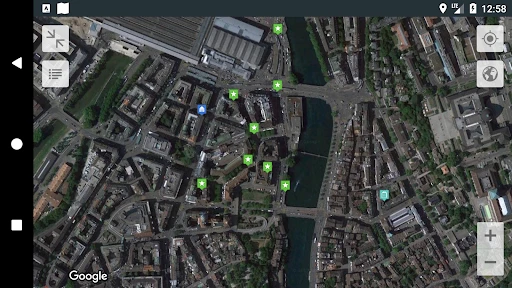
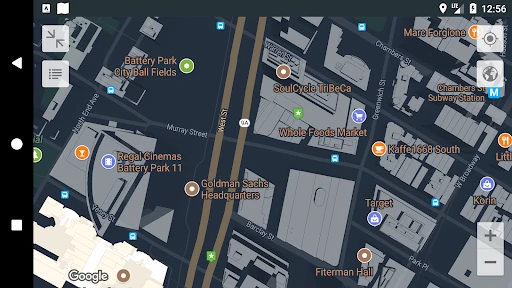
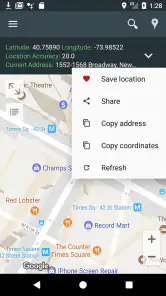
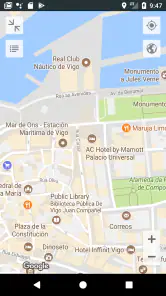
Analysis by Reviewed
When I need to remember where I left the car, mark a useful meeting point, or make sense of an unfamiliar area, I want a location tool that gets to the point. My Location - Track GPS & Maps is built around that practical need: it helps me orient myself, keep places I may want again, and share a location. I see its strongest role as a handy companion for everyday wayfinding, rather than a complete replacement for a dedicated navigation service.
A useful map starts with knowing where you are
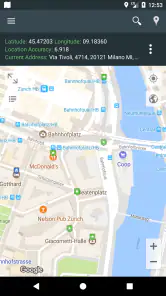
Opening a map and quickly finding my position sounds basic, but it matters when I am standing on a busy street, coming out of a station, or trying to meet someone in an unfamiliar part of town. My Location focuses on that starting point instead of asking me to plan a complicated journey first. Its straightforward approach is useful when I want to get my bearings and decide what to do next.
That distinction shapes how I would use it. A full navigation app is often best when I have a destination and need a carefully guided trip. Here, the central value is being able to work with my current location: keep a place, share where I am, or track a route. Those are small actions, but they solve recurring problems that do not always need a large suite of travel tools.
Places are more useful when you save them deliberately
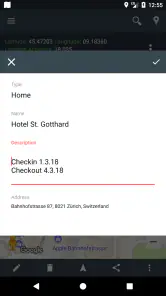
Saving a place is more than a novelty when I treat it as a simple memory aid. In a large parking area, I can mark the spot where I left the car rather than relying on a vague description. At a street market or festival, I can keep a meeting point so that a friend and I have a common reference if we get separated. A saved location can also help me remember the entrance to a building or the start of a walk that I may want to repeat.
My practical tip is to save places at the moment they become useful, not later from memory. A pin dropped while I am standing at the actual spot is more dependable than trying to reconstruct it after walking several blocks. I would also give saved places names that make sense to me—“north entrance” is more helpful than a list of anonymous points when I return days later.
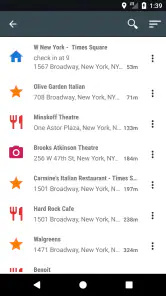
This kind of personal map is not the same as a curated list of recommendations. It is valuable precisely because the locations can be meaningful to my own routine: a pickup point, a trailhead, or the side entrance I need for an appointment. If I want reviews, opening hours, or suggestions for places nearby, a broader map service is a better companion. My Location’s appeal is the practical record of where I have been and where I want to find my way back.
How it fits into everyday navigation
My Location is a free Maps & Navigation app from Andev, and its focus on location makes it easy to understand without treating it as a full travel planner. It has a 4.3 average from around 64,000 ratings and has passed 10 million installs, suggesting that many people use it for this kind of straightforward task. The age rating is Everyone. The current version is 3.102, and the app is available on supported devices running version 8.1 or later. Optional in-app purchases range from $0.99 to $13.99 per item, so I would check the purchase details in the app if I am considering anything beyond its free use.
More From Our News Desk

Weather by Xiaomi Review: Clear at a Glance, Less Clear Up Close

X Under Pressure: Can It Recover When Posting Goes Wrong?

Clash of Clans Is Won Between the Battles

Android Auto Makes the Case for Quieter Car Software

MobiOffice: Transforming Mobile Productivity with Seamless Integration

EA SPORTS FC™ Mobile Soccer: Redefining Mobile Sports Gaming
Sharing a location can simplify a meeting
Location sharing is most useful when an address alone is not enough. If I am meeting a friend at the edge of a park, outside a busy venue, or near a large building, sending a location can reduce the back-and-forth of explaining which entrance or corner I mean. It can also help when I am already on the move and want someone to find my current position rather than follow a written description.
There is a small but important trade-off: a shared location is useful only if the recipient can open and interpret it. Before relying on it for an important meetup, I would check that the other person has received the point and understands where it leads. For a time-sensitive pickup, I would send a short note alongside the location—such as which side of the street I am on—because a map pin does not always explain the final few steps.
I also treat sharing as a deliberate action rather than something to do casually. A location can reveal where I am, so I would send it only to the person who needs it and for the reason I intend. That is sensible practice with any location-sharing tool, and it makes the feature more useful: I can get help coordinating without turning every trip into a broadcast.
Route tracking is different from turn-by-turn guidance
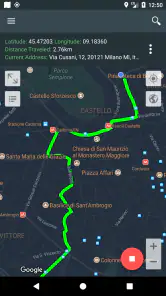
Tracking a route and navigating to a destination solve related but different problems. Route tracking can help me keep a record of the path I am taking or understand where I went; turn-by-turn navigation is about receiving directions as I travel. My Location’s emphasis on tracking and locating places suits people who want to stay oriented or retain a route, but I would not choose it blindly as my only tool for a complex drive through an unfamiliar region.
For a walk around a new neighborhood, I might use it to keep the route in view while I explore side streets and make my way back. For a long car journey with several complicated turns, I would first consider a navigation app whose main job is step-by-step route guidance. The better choice depends on whether I need to remember a path or be actively directed along one; those needs are easy to confuse when all the tools appear on a map.
One useful habit is to decide what I need before setting off. If I only need to save a starting point or share where I am, I can keep the task simple. If I need continuous directions, I should test the guidance before I depend on it for a trip. That avoids discovering at a junction that I expected a tracking tool to behave like a dedicated navigator.
Where it sits beside familiar map apps
Most people already have a general-purpose map app on their phone, and that may be enough for searching businesses, comparing routes, or getting around a city. I would keep using one for those broader jobs. My Location makes more sense when I want a focused way to work with my position, saved places, shared locations, and routes without turning every task into a search for a destination or a recommendation.
That narrower focus is both its appeal and its limitation. A dedicated navigation service may be a better pick for extensive route planning, detailed travel choices, or a trip where I need a wide range of map information. A note-taking app can store an address, but it is less immediately visual when I need to see where a point sits in relation to me. My Location occupies the middle ground: more spatial than a written note, less of an all-purpose travel hub than a large map platform.
I would not install it simply because I expect it to replace every map tool I already use. I would install it if I regularly forget parking spots, need to exchange precise meeting points, or want a direct way to keep track of a route. For occasional navigation to a well-known destination, the default map app on my phone may already do the job with less setup.
Small habits that make location tools more reliable
GPS positioning is a practical aid, not a reason to stop checking my surroundings. Tall buildings, dense streets, and places with few obvious landmarks can make it harder to match a marker to the exact doorway or side of a road. If a point matters, I compare the map with street signs, entrances, and nearby landmarks rather than assuming that a marker alone tells the whole story.
I also avoid treating route records as a substitute for preparation. Before a walk in an unfamiliar area, I look at where I am starting and what recognizable place can help me confirm I am on the right track. If I am using the app to keep a route, I pay attention to whether location tracking is behaving as expected instead of waiting until the end to find out. These checks are especially worthwhile when the route matters more than casual sightseeing.
For a group outing, I would agree on one saved meeting point before people split up. “Meet by the entrance” can mean several things in a large public space; a marked spot plus a plain-language description is clearer. This workflow uses the app’s location tools without expecting the map to solve every communication problem on its own.
Who will get the most from it
I think this app is best for people who have a few recurring location problems rather than a constant need for sophisticated trip planning. Drivers who forget where they parked, walkers who want to keep a route in mind, and friends coordinating a meeting in a confusing area have clear reasons to use it. It may also appeal to anyone who prefers a direct location-focused tool instead of opening a larger service full of features they do not need for a quick task.
It is less compelling for someone who rarely saves places or shares a position and already relies on a map app for every journey. It is also not my first choice when the main requirement is detailed route planning or a complete travel-information experience. In those cases, a familiar full-featured map service is likely to be more convenient. The key question is not whether My Location can be useful, but whether its particular kind of usefulness matches what I actually do.
For a first-time user, I would try one low-stakes task: save the car after parking, or send a location to a friend who is meeting me nearby. That reveals whether the app’s style fits my routine without making an important journey depend on an unfamiliar workflow. If I find myself repeating the task, keeping it installed makes more sense than adding another app just in case.
What I would check before depending on it
Before using any location app for an important trip, I make sure I know how to find the function I need and that the map is showing the place I expect. I would test saving a point and opening it again, or share a location with someone I trust and ask whether it is clear on their end. These quick checks answer the practical questions that matter more than a long feature list: can I retrieve the spot later, and can another person understand the location I sent?
I would also keep a backup plan for situations where precision matters. A street address, a named landmark, or a brief written instruction can fill in details a pin cannot convey. If I am heading somewhere unfamiliar, I would not assume that a saved point alone tells me which entrance to use or what to do after I arrive. Pairing the map with ordinary judgment makes the app more dependable, not less useful.
Cost is another straightforward consideration. The app is free to download, with optional purchases priced per item, so I can begin with the basic experience and decide whether any paid option is worth it to me. I would avoid buying anything until I have identified a specific need it solves; location saving and sharing are only valuable if they fit my habits, not because an upgrade is available.
Navigation Made Simple
The first thing you notice about My Location - Track GPS & Maps is its simplicity. You don’t need a degree in rocket science to work your way around this app. Just open it, and boom, there’s your location on a map. The interface is clean, intuitive, and clutter-free, which is just the way I like it. No unnecessary buttons or confusing menus, just straightforward navigation to get you from point A to point B.
Features That Stand Out
Now, let’s talk about the features because this app is packed with them. First off, the real-time GPS tracking is spot on. I’ve used it in crowded city streets and off the beaten path, and it’s always accurate. The map updates in real-time, so you’re never left guessing where you are.
Another feature I love is the ability to save your favorite locations. Whether it’s that cute little cafe you stumbled upon or the spot where you parked your car, you can save it in the app for future reference. This feature alone has saved me a ton of time and frustration.
Never Miss a Turn
One of the standout features, in my opinion, is the turn-by-turn navigation. It’s like having a co-pilot who never sleeps. The voice prompts are clear and timely, ensuring you never miss a turn. Plus, it recalculates routes quickly if you decide to take a detour, which is perfect for those impromptu sightseeing adventures.
The app also integrates seamlessly with your phone’s contacts, so you can easily navigate to your friends’ places without having to type out addresses. It’s these little conveniences that make a big difference in everyday use.
Ending on a High Note
Overall, My Location - Track GPS & Maps is a must-have for anyone who values ease of navigation and reliable GPS tracking. It’s user-friendly and packed with features that make exploring new places a breeze. So, next time you’re planning a trip or just heading out on a spontaneous adventure, let this app be your trusty guide. Trust me, you’ll wonder how you ever got by without it!
My Location - Track GPS & Maps Frequently Asked Questions
Can I use My Location - Track GPS & Maps to share a place with someone?
Yes. Sharing locations is one of the app’s central purposes, alongside saving places and tracking a route. It may be useful when you want to pass a destination or your location to another person. As with any location-sharing tool, check what you are sharing and choose carefully when to share it, especially if the information is sensitive.
Is My Location - Track GPS & Maps suitable for everyday trips as well as travel?
The app is intended for practical location tasks, including saving places, sharing locations, and tracking routes. Those tools can be useful for everyday journeys as well as when exploring somewhere unfamiliar. Its Maps & Navigation focus makes it relevant to users looking for a location utility, though how well it fits your routine will depend on the way you prefer to plan and follow trips.
What is My Location - Track GPS & Maps, and who is it for?
My Location - Track GPS & Maps is a Maps & Navigation app from Andev, built around saving places, sharing locations, and tracking your route. It may suit people who want a straightforward way to keep track of destinations and location details. The app is free to download, and its Everyone content rating makes it suitable for a broad audience.
Which devices can run My Location - Track GPS & Maps?
My Location - Track GPS & Maps is an app in the Maps & Navigation category, developed by Andev. It requires Android 8.1 or later, so check your device’s operating system before downloading. The app is rated for Everyone, making it suitable for a broad audience. Its current version is 3.102.
What features does My Location - Track GPS & Maps offer?
My Location - Track GPS & Maps provides a comprehensive suite of features such as real-time GPS tracking, detailed maps, and navigation tools. It includes features like location sharing, route planning, and the ability to save favorite locations. Additionally, it offers offline map access, which is particularly useful when traveling in areas with poor internet connectivity.
Pros
- Accurate GPS tracking for real-time location.
- User-friendly interface with simple navigation.
- Offline maps available for remote areas.
- Customizable location alerts and notifications.
- Lightweight app
- doesn't drain battery.
Cons
- Contains in-app ads
- can be distracting.
- Limited features in the free version.
- Requires constant GPS for accuracy.
- Frequent updates may consume data.
- May have privacy concerns for some users.
- Category
- Maps & Navigation
- Version
- 3.102











