Music Maker JAM: Beatmaker app
- 54.30K
- 4.5
- Installs
- 10.00M
- Price
- Free

Screenshots
Analysis by Reviewed
Before I decide whether a music-making app is worth keeping, I ask a simple question: can I get something enjoyable out of it without first buying into a complicated setup? Music Maker JAM makes a strong case for trying that out. It is a free music and audio app from Loudly, built for making tracks on a phone rather than studying production before you can begin. I like that approachable idea, though the value depends on whether its loop-based way of working suits the music I want to make.
What the free starting point means
You can get started without paying, while in-app purchases range from $0.99 to $49.99 per item. That gives the app a low-friction entry point, but it also means free access and the full range of paid choices are not the same thing. I’d explore the free experience first and only consider a purchase if I found a specific sound or option I genuinely wanted; I wouldn’t spend simply because an upgrade is available.
That distinction is especially useful if you’re trying the app for a particular occasion rather than taking up music production as a lasting hobby. A playful track for a friend, a rough idea for a song, and a regular creative routine are different reasons to spend. I’d first see whether I return to the free tools across several sessions. If I keep hitting the same missing option and know exactly why I want it, a purchase may make sense; if I’m only browsing, paying in advance would be guesswork.
Where the value comes from
The strongest value here is immediacy. Rather than beginning with a blank project and building every sound from scratch, I can combine ready-made musical parts into a track and concentrate on mood, rhythm, and arrangement. That’s useful when I have a rough idea but don’t play an instrument, or when I want to make something for fun without turning the evening into a technical lesson.
There is also a social side to the creative process: listening to other people’s tracks can give me a starting point when my own ideas stall. I’d use that as inspiration, then make deliberate changes instead of treating another creator’s arrangement as a template to copy. For a quick personal project, the ability to record vocals and share a result can make the app feel like a complete creative loop, from first sketch to something I can send to a friend.
Trade-offs I’d weigh
Loop-based creation is a convenience, but it can also shape the sound of what I make. If I want complete control over recording, detailed editing, or a track built entirely from original performances, I’d be better served by a more traditional music-production app and, potentially, external equipment. Here, the appeal is getting to a musical idea quickly; the compromise is that this is not the same workflow as a full desktop studio.
I’d also keep an eye on purchases while exploring. A free start is helpful, but a broad price range for in-app items makes it sensible to decide what I need before spending. The app is rated Teen, so that age guidance is worth bearing in mind when choosing it for a younger music fan.
More From Our News Desk

Weather by Xiaomi Review: Clear at a Glance, Less Clear Up Close

X Under Pressure: Can It Recover When Posting Goes Wrong?

Clash of Clans Is Won Between the Battles

Android Auto Makes the Case for Quieter Car Software

MobiOffice: Transforming Mobile Productivity with Seamless Integration

EA SPORTS FC™ Mobile Soccer: Redefining Mobile Sports Gaming
Unleashing Creativity
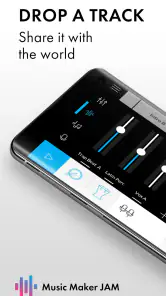
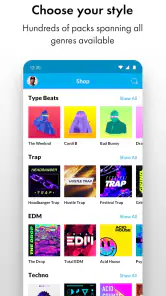
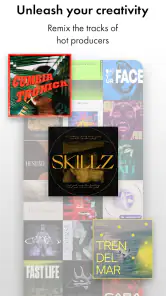
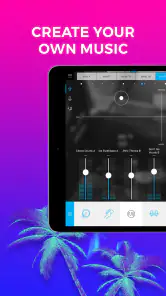
When I first opened Music Maker JAM, I was greeted with a sleek interface that made me feel like a pro DJ ready to drop some beats. The app offers a vast library of loops and samples spanning various genres like hip-hop, EDM, jazz, and more. It’s like having an endless supply of ingredients to cook up your next hit, and the best part? You don’t need any prior musical knowledge to get started.
Getting Into the Groove
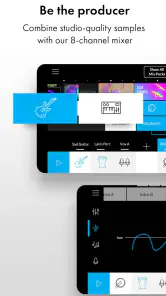
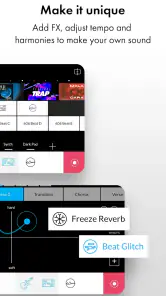
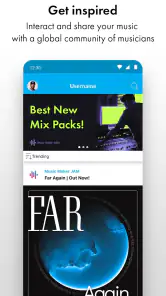
One of the features I absolutely love is the app’s intuitive drag-and-drop functionality. You can effortlessly mix tracks, adjust tempo, and tweak sounds until it matches the vibe you’re going for. It’s super satisfying to see your creation come to life, layer by layer, like a painter adding strokes to a canvas. And if you’re ever stuck or in need of inspiration, the community aspect of the app is fantastic. You can explore tracks made by other users, join challenges, and even collaborate on projects. It’s a vibrant ecosystem that keeps your creative juices flowing.
One practical way I’d use that workflow is to make a short sketch during a commute or a spare moment, then revisit it later with fresh ears before sharing it. That pause matters: a loop can feel exciting on first listen but become repetitive once it has been running for a while. I’d try changing the arrangement or tempo before adding more layers, since a simpler mix can make the central rhythm easier to hear. This is also a useful way to learn what each part contributes instead of stacking sounds just because they’re available.
Compared with a conventional multitrack workstation, the app’s loop-first approach is less intimidating and quicker for experimenting with genre and feel. Compared with a basic voice recorder, it offers a more musical playground for building a backing track around an idea. Neither comparison makes it the right tool for every job: if I needed precise editing or wanted to record a band as it performs, I’d choose software designed around that kind of control. For casual beatmaking and fast drafts, though, lowering the setup barrier is a real advantage.
Making a sketch work harder
I find it helps to begin with a clear purpose for a project: a short mood piece, a rhythmic bed for a vocal, or an experiment with a particular style. That gives me a way to judge each loop instead of treating every available sound as something that must be used. If the first combination feels crowded, I’d remove parts before searching for more. In a loop-based app, restraint is a practical production choice, not a sign that the idea is unfinished.
A useful second pass is to listen for the part that should lead. If the beat is the focus, I’d keep other layers from competing with it; if I want a vocal to carry the idea, I’d leave enough space around it. That simple check can make a quick phone-made sketch feel more intentional. It also gives a beginner a concrete way to learn arrangement: notice what changes when one layer enters or disappears, rather than changing several things at once.
Sharing Your Masterpiece
Let’s talk about sharing because, let’s be honest, what’s the point of creating if you can’t show it off? Music Maker JAM makes it easy to export your tracks and share them on social media platforms or directly with friends. Whether you’re aiming to impress your followers or just want to send a personalized birthday rap to a friend, this app has got you covered.
For a realistic everyday use, I can imagine putting together a quick birthday backing track, recording a vocal over it, and sending the finished idea privately rather than trying to make a release-ready single. That’s where the app’s combination of loops, recording, and sharing feels most useful: the result can be personal and fun without requiring a separate recording setup. If the first take sounds rough, I’d treat it as a playful message, not a reason to buy extra tools just to polish a one-off gift.
Before sharing, I’d listen through once with the specific recipient in mind. A track that works as a private joke may not suit a public post, and a busy backing can make spoken or sung words harder to follow. Keeping the arrangement simple around a vocal is a small but worthwhile choice. The app makes sharing part of the creative process, but deciding where and with whom to share remains a personal call.
Moreover, for those looking to record vocals, the app provides a built-in recording feature that syncs seamlessly with your tracks. So, if you’ve got lyrics in mind, you can lay them down and create a fully polished song without needing any additional equipment.
Questions worth settling before you begin
If you’re wondering whether you need musical training, I wouldn’t treat that as a barrier. The app’s loop-based approach gives you a way to start by listening and arranging rather than playing an instrument. That doesn’t mean every result will sound finished automatically: choosing parts that work together and deciding when to stop layering still take attention. But a beginner can make a satisfying experiment without first learning a traditional studio workflow.
If you’re asking whether it can replace a full production setup, my answer is no—not for every kind of project. It makes more sense as a quick creative tool for arranging loops, trying a direction, recording a vocal idea, or sharing a lighthearted track. Someone who needs detailed editing, live multitrack recording, or complete control over original sounds should look at a more specialized workstation instead. The right choice depends on whether speed and accessibility matter more than depth.
I’d also consider what “finished” means before I start. For a birthday message or a personal sketch, a lively idea that communicates the mood may be enough. For a polished release, I would want a workflow that gives me more control over performance and editing. That distinction can prevent frustration: the app is enjoyable when I judge it by the kind of phone-made project it is suited to, not by standards meant for a full studio.
Who I’d recommend it to
I’d recommend it to curious beginners, casual creators, and musicians who want a quick way to try ideas without opening a more demanding production setup. It can also suit someone who enjoys discovering other users’ tracks and learning by experimenting with arrangements. I’d skip it if my main goal were detailed studio control, recording several live instruments, or making every sound from scratch; a dedicated production tool is a better match for those needs.
It is also a reasonable fit for someone who likes short creative sessions. You could test a rhythm while waiting for a friend, save the idea mentally or as a sketch, and decide later whether it deserves more work. That convenience is different from sitting down for a focused recording session, and I wouldn’t confuse the two. If I knew I wanted to produce long, carefully edited songs, I’d start with a tool designed for that commitment rather than expecting a mobile loop maker to grow into a studio.
The app has a 4.5 average from around 761,000 ratings, and it has been installed over 10 million times. Those figures suggest it has reached a broad audience, but they can’t tell me whether its creative approach fits my habits. Its current version is 7.14.2, and it runs on Android 7.0 or later, useful details to check against an older device before downloading.
Final Thoughts
In conclusion, Music Maker JAM is more than just an app; it’s a gateway to musical exploration. It’s perfect for both beginners looking to dip their toes into music production and seasoned musicians wanting to experiment with new sounds. With its user-friendly interface and extensive library of sounds, it’s a must-try for anyone with a passion for music. So why not download it and start creating your next masterpiece today? Who knows, you might discover a hidden talent you never knew you had!
If you’re ready to embark on your musical journey, head over to your app store and grab Music Maker JAM. Happy beatmaking!
Music Maker JAM: Beatmaker app Frequently Asked Questions
Can I make a track without knowing how to play an instrument?
Yes. Music Maker JAM is built around arranging musical elements, so you can start shaping a track without playing an instrument or having formal music training. You can experiment with beats, loops, and samples, then adjust how they fit together. If you do play or sing, recording your own vocals or instruments can add a more personal touch.
Can I record vocals or instruments in the app?
Yes, Music Maker JAM lets you record live audio, so you can add vocals or instrument parts to a project. This gives you a way to combine your own performances with the app’s beats, loops, and samples instead of relying only on pre-made material. You can also use effects and mixer controls to shape how those recorded parts sit in the track.
Does Music Maker JAM cost anything to download and use?
Music Maker JAM is free to download, so you can try its music-making tools without paying upfront. The app also offers in-app purchases, with items ranging from $0.99 to $49.99, which may matter if you want to explore optional extras. Check the purchase details in the app before confirming anything, especially if you plan to keep your music-making sessions within a specific budget.
Which devices can run Music Maker JAM?
Music Maker JAM is available for Android and iOS devices. On Android, it requires version 7.0 or later, so it is worth checking your device’s software version before downloading. The app is a music and audio tool rather than a game, and its Teen content rating is another useful consideration when deciding whether it is suitable for the intended user.
What is Music Maker JAM and how does it work?
Music Maker JAM is a versatile music creation app available on Android and iOS that allows users to create and share their own music tracks. It features an easy-to-use interface with a wide range of beats, loops, and samples across different genres. Users can mix these elements to produce unique soundtracks and even record their own vocals or instruments to add a personal touch.
Pros
- User-friendly interface for beginners
- Wide variety of music genres available
- Regular updates with new features
- Collaborative options with other users
- High-quality sound output
Cons
- Limited features in free version
- Requires internet for full functionality
- Occasional app crashes reported
- Some features are behind a paywall
- Advertisements can be intrusive
- Category
- Music & Audio
- Version
- 7.14.2











