Mr. Number: Spam Call Blocker
- 73.82K
- 3.8
- Installs
- 10.00M
- Price
- Free

Screenshots


Analysis by Reviewed
I see Mr. Number: Spam Call Blocker as a practical way to put some distance between you and nuisance calls, especially if unknown numbers interrupt your work or family time. It is a focused communication app from Hiya rather than a replacement for your phone’s calling tools. That distinction matters: its value is in helping you judge and filter calls, while your regular phone app remains the place to make and manage them.
My overall view is that it works best as a selective screening layer, not an automatic answer to every unfamiliar ring. The useful part is having several ways to assess and manage a number; the risk is that a filter can catch a legitimate caller if you make its rules too broad. I would recommend it to people who want more control than basic call settings provide, but only if they are willing to review borderline cases rather than blindly block them.
Who gets the most out of it
I’d consider it if you receive enough unfamiliar calls that checking each one has become a small daily chore. A freelancer waiting for new-client calls, for example, may not want to silence every number that is not saved in contacts. A call-identification and blocking tool offers a more selective approach: you can review a suspicious call and decide whether it deserves attention instead of treating all unknown callers alike.
Articles Related to Mr. Number: Spam Call Blocker
Clash of Clans Is Won Between the Battles
Its raids are quick; its community is a long-term project of coordination, teaching, rivalry, and shared responsibility—with all the friction that entails.
Android Auto Makes the Case for Quieter Car Software
The car interface is no longer judged by how much it can do, but by how quietly it helps. Android Auto shows what drivers now expect—and what still gets in the way.
MobiOffice: Transforming Mobile Productivity with Seamless Integration
MobiOffice: Word, Sheets, PDF is redefining mobile productivity with a surprising blend of functionality and innovation.
EA SPORTS FC™ Mobile Soccer: Redefining Mobile Sports Gaming
Dive into EA SPORTS FC™ Mobile Soccer, where immersive gameplay and strategic depth transform mobile sports gaming.
That same distinction can help when you are arranging repairs or waiting for a medical office to return a call. Those callers may not appear in your contacts, so blocking all unknown numbers could create a bigger problem than the interruptions you are trying to avoid. I would leave room for those calls, use identification and lookup as clues, and block only when the evidence points to repeated unwanted contact.
It is less suitable if you rarely receive unwanted calls, prefer not to adjust calling settings, or already find your phone’s built-in filtering sufficient. Blocking tools can be a poor fit for anyone who needs to answer calls from changing numbers and would rather screen each one manually. I would start conservatively, then tighten the rules only if unwanted calls remain a real problem.
A sensible way to use the filters
The most useful habit is to treat blocking as a set of choices, not a switch to turn everything off. Blocking an individual number makes sense when the same caller keeps returning; broader area-code or country filters can be tempting, but they may also catch legitimate calls. If you regularly hear from people in a particular region, think through that trade-off before applying a wide rule.
One practical approach is to keep a short mental distinction between a number you know is unwanted and one you simply do not recognize. The first can justify a direct block; the second may deserve a lookup or a wait-and-see decision. This is especially helpful if you are job hunting, selling something locally, or expecting a callback after filling out a form, since those situations naturally bring calls from numbers you have not saved.
You May Like

How Microsoft OneDrive Became a Mobile Productivity Giant

How Google Translate Breaks Language Barriers Effortlessly

Why Google Sheets Is the Ultimate Mobile Productivity Tool

Unveiling the Dynamic World of My Talking Tom Friends

Free Fire MAX: Dominating the Battle Royale Arena

Free Fire: Winterlands – The Ultimate Winter Gaming Adventure
For a practical routine, I’d first check an unfamiliar number with the lookup option, then decide whether to leave it alone, block it, or report it. Reporting is most helpful when you have a solid reason to identify a call as spam, rather than using it as a shortcut for any number you do not recognize. That careful approach makes the community reporting function more useful and reduces the chance of treating a legitimate caller unfairly.
Getting Started with Mr. Number
First off, downloading and setting up Mr. Number is a breeze. Available for both Android and iOS, I found it on the app store and installed it in just a couple of minutes. The initial setup guides you through permissions and necessary settings, which is straightforward even for those who aren't tech-savvy. What I appreciated was the simple interface. It’s clean and to the point, focusing on functionality over flashy design.
Before relying on any call filter, I would take a moment during setup to understand which calling controls are handled by the app and which remain in the phone’s own settings. That small check can save confusion later if a call behaves differently from what you expected. It also makes the experience easier to troubleshoot: change one relevant setting at a time, then see whether the result matches your intention instead of switching on every available restriction at once.
Features That Stand Out
Now, let's get into the meat of what this app offers. The primary feature, of course, is blocking spam calls. But Mr. Number goes a step further by providing options to block specific numbers, area codes, and even whole countries. This level of customization is perfect for those who want to tailor their call filtering precisely.
The wider filters are most useful when you have a clear reason to rule out a group of calls, not just because a setting sounds thorough. Someone who never expects calls from a particular country might find that option convenient, while a person with international clients or family could easily block something important. I would think of these controls as targeted tools for a known pattern, rather than as a way to make the phone silent at any cost.
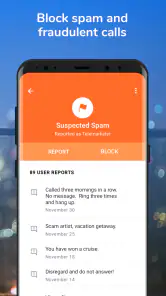
Another cool aspect is the ability to report spam. This contributes to a community-driven database that helps keep others safe from unwanted calls. It feels good to be part of a network that’s actively working to make our phones ring less and only when we want them to.
There is a trade-off in community reporting: the quality of a shared signal depends on people distinguishing genuine spam from calls that are merely unexpected. If a call is from a legitimate business you do not recognize, reporting it as spam may be an overreaction. I would reserve reports for calls that show a clear nuisance pattern or seem deceptive, and use blocking for personal decisions about numbers I do not want to hear from again.
User Experience and Interface
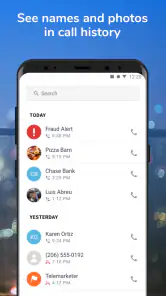
Using the app daily, I found the call log feature particularly useful. It categorizes calls into different types—spam, suspected spam, and safe numbers. This categorization helps me quickly identify which calls to ignore and which might need a callback. The app also integrates seamlessly with your phone's existing call log, ensuring there's no disruption to how you usually manage calls.
A useful habit is to scan the log before clearing it, especially after a day when you were busy and missed several calls. A label can help prioritize what to inspect, but it should not replace context: the time of the call, whether you were expecting contact, and whether the number appears again all matter. That quick review is a better fit for cautious users than treating the categories as a definitive verdict.
The interface is intuitive, with large, easy-to-read icons and clear instructions. Even if you’re not particularly tech-inclined, navigating through the features is a walk in the park. The app even offers a reverse lookup feature, allowing you to search unknown numbers before deciding to block them.
Lookup is particularly handy when a call arrives at an awkward moment. Rather than calling back immediately or blocking the number while distracted, you can check it later and make a calmer decision. I would still avoid treating a lookup result as proof of identity; it is one piece of context, and a cautious callback decision should also take your own expectations into account.
User expectations and trade-offs
Number identification is a useful clue, not a guarantee that you can safely ignore every unfamiliar call. I’d check the log before clearing it, particularly when you are expecting a delivery, an appointment callback, or a return call from a business. If a number is only marked as suspicious, using the lookup feature first is a more cautious choice than immediately applying a broad block.
For a realistic workday, imagine you are waiting for a call from a new client while several unwanted calls have already interrupted a meeting. You could use the log afterward to separate calls flagged as suspicious from the one that might relate to your appointment, then look up the uncertain number before deciding what to do. That workflow does not promise perfect identification, but it lets you reduce interruptions without shutting the door on every new contact.
It is also worth remembering that call filtering works alongside your phone’s own calling controls. If a setting behaves differently than you expect, check both the app and the phone’s call-management options rather than assuming one screen controls everything. The app is free to start, while in-app purchases range from $0.99 to $24.99 per item, so I would decide whether any paid option addresses a specific need before spending.
The free starting point makes it reasonable to try the basic approach before considering a purchase, but I would not pay simply because a call-filtering app offers extras. First identify the problem you want to solve: repeated calls from the same number, too many uncertain calls, or a need for more control over broad patterns. If the current setup already handles that problem, there is little reason to add expense; if not, weigh a paid option against your actual call habits.
Reliability and Performance
In terms of performance, Mr. Number delivers consistently. During my time testing it, I noticed a significant decrease in spam calls. The app runs smoothly in the background, and I didn't experience any lag or crashes. Battery consumption is minimal, which is a nice bonus since no one wants an app that drains their phone's juice.
Even with a smooth day-to-day experience, I would judge reliability by whether the app helps me make better decisions, not by expecting every unwanted call to disappear. New numbers and ambiguous callers are exactly where a label can be uncertain. If an important call is missed or a legitimate number is flagged, revisit the relevant blocking choices rather than assuming that stronger filtering is always better.
One thing to note is the importance of keeping the app updated. Regular updates ensure that the app's spam database is current and that you're protected from the latest tactics used by spammers.
The version available now is 14.7.5-11717, and the app supports Android 6.0 and later. It has been around since July 5, 2010, and its reception is mixed but substantial: the average rating is 3.8 from about 204,000 ratings, alongside roughly 74,000 written reviews and more than 10 million installs. Those figures suggest an established tool with plenty of users, not a promise that every call will be classified correctly. It is rated for Everyone.
I read the mixed reception as a reminder that call identification is a judgment aid, not a service that can remove every source of uncertainty. How useful it feels will depend on the kinds of calls you receive and how much time you are willing to spend reviewing them. A person with repeated unwanted calls may value the extra controls far more than someone who gets only an occasional unfamiliar ring.
How it compares with basic call screening
Compared with relying only on a phone’s built-in call controls, Mr. Number is appealing when you want number lookup, reporting, and more granular blocking in one place. Built-in screening can be the better choice if you want the simplest setup or prefer not to add another app to manage. The right choice depends on whether you value extra control enough to review another interface and maintain its settings.
Another alternative is to handle calls manually: let an unknown number go unanswered, check the voicemail or call history, and decide whether to return it. That can be the least complicated method if unfamiliar calls are rare, and it avoids setting up additional filters. The app makes more sense when that repeated manual check has become disruptive, or when you want the lookup, reporting, and blocking choices together rather than relying on memory and guesswork.
That comparison also points to a useful limit: no filter can make the judgment for you in every borderline case. If your work depends on answering new callers, broad blocking may cost you more than the spam it prevents. If your main problem is repeated nuisance calls from identifiable numbers, targeted blocking is a safer starting point than an aggressive blanket rule.
I would also skip it if your priority is simply to silence every call from people outside your contacts. That is a different goal from identifying likely spam, and a broad silence rule can interfere with legitimate first-time contact. In that situation, your phone’s own controls or a manual screening routine may suit you better, while this app is strongest when you want to distinguish among unknown numbers instead of treating them all alike.
Final Thoughts
Overall, Mr. Number: Spam Call Blocker is a robust and effective solution for anyone plagued by unwanted calls. It’s easy to use, highly customizable, and part of a community effort to reduce spam. While no app can guarantee 100% blockage, my experience with Mr. Number has been overwhelmingly positive. If you're seeking peace from incessant ringing by unknown numbers, this app is definitely worth a try.
My recommendation is more specific: try it if you want a hands-on way to check suspicious callers and apply selective blocks, and keep the first rules narrow until you see how they affect your normal calls. If you need a zero-maintenance solution or cannot risk missing calls from new numbers, stick with basic screening or manual review. The choice is less about blocking as much as possible and more about finding the level of filtering that fits your day.
Ready to give it a shot? You can find Mr. Number on both the Google Play Store and the Apple App Store. Happy spamming (or rather, un-spamming)!
Mr. Number: Spam Call Blocker Frequently Asked Questions
Who develops Mr. Number, and what is the app mainly used for?
Mr. Number is a communication app developed by Hiya. Its main purpose is to help identify and block fraud, scam, and spam calls, making it useful for people who want more control over unwanted calls. The app focuses on call screening rather than messaging or general phone management, so its appeal is clearest if nuisance calls are a problem for you.
How widely used is Mr. Number, and what do its store ratings suggest?
Mr. Number has more than 10 million installs and an average rating of 3.8 from around 204,000 ratings, alongside about 74,000 written reviews. That points to a well-established app with a substantial user base, though experiences can vary depending on the calls people receive and how they configure blocking. Reading recent feedback can help you decide whether it suits your needs.
Is Mr. Number free to download, and are there in-app purchases?
Mr. Number is free to download, so you can try its call-identification and blocking features without an upfront purchase. The app also offers in-app purchases, with items ranging from $0.99 to $24.99. Check the purchase details shown on your device before confirming anything, and consider whether the free features meet your needs first.
What is Mr. Number: Spam Call Blocker and how does it work?
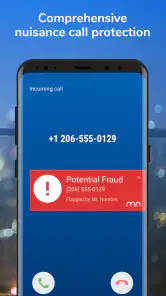
Mr. Number: Spam Call Blocker is an app designed to identify and block unwanted calls, such as spam and telemarketers, on your Android or iOS device. It works by cross-referencing numbers with its extensive database to identify potential spam. Users can also manually block numbers and report new spam calls to help other users.
Is Mr. Number available for both Android and iOS devices?
Yes, Mr. Number is available for both Android and iOS platforms. You can download it from the Google Play Store for Android devices and the App Store for iOS devices. The app offers similar features across both platforms, ensuring a consistent experience for all users.
Pros
- Effective spam call blocking
- Customizable block settings
- Easy-to-use interface
- Caller ID features included
- Light on battery usage
Cons
- Premium features require payment
- Occasional false positives
- Limited international coverage
- Ads in free version
- May block unknown important calls

- Category
- Communication
- Version
- 14.7.5-11717












