Hiya: Spam Blocker & Caller ID
- 74.44K
- 4.1
- Installs
- 10.00M
- Price
- Free

Screenshots
Analysis by Reviewed
Most unknown calls create a small but persistent interruption: I have to stop what I’m doing, decide whether the number matters, and then deal with the possibility that it was junk. That is the everyday problem Hiya: Spam Blocker & Caller ID is meant to ease. It is a free communication app from Hiya, and its appeal is less about changing how I call people than about helping me make a quicker, clearer choice when my phone rings.
A calmer way to handle unknown numbers
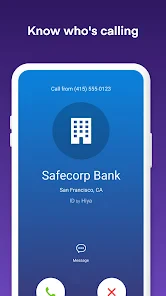
The useful shift is in the moment before I answer. Caller identification can give an unfamiliar number context, while spam blocking is intended to reduce unwanted calls. I like that combination because it helps separate “I don’t know this number” from “this call is probably not worth interrupting my day for.” It is especially relevant if you receive calls while working, caring for someone, or trying to keep family time uninterrupted.
Picture a weekday afternoon: I’m expecting a delivery or a call about an appointment, but I’m also getting nuisance calls. Ignoring every unknown number could mean missing something useful; answering all of them breaks my focus. Having caller information available gives me a better basis for choosing. It is not a guarantee that every caller will be identified correctly, so I’d still use judgment when a call matters.
Articles Related to Hiya: Spam Blocker & Caller ID
Clash of Clans Is Won Between the Battles
Its raids are quick; its community is a long-term project of coordination, teaching, rivalry, and shared responsibility—with all the friction that entails.
Android Auto Makes the Case for Quieter Car Software
The car interface is no longer judged by how much it can do, but by how quietly it helps. Android Auto shows what drivers now expect—and what still gets in the way.
MobiOffice: Transforming Mobile Productivity with Seamless Integration
MobiOffice: Word, Sheets, PDF is redefining mobile productivity with a surprising blend of functionality and innovation.
EA SPORTS FC™ Mobile Soccer: Redefining Mobile Sports Gaming
Dive into EA SPORTS FC™ Mobile Soccer, where immersive gameplay and strategic depth transform mobile sports gaming.
Where a caller screen fits into a busy day
The benefit is not simply fewer rings; it is being able to decide whether a ring deserves an immediate response. When I’m concentrating, I can avoid treating every unfamiliar number as an urgent request for attention. Later, I can look back at the call and decide whether to return it, rather than letting an unexpected interruption set the rhythm of the day.
This can be especially useful for people who use one number for both personal and practical matters. A parent waiting for a school call, someone coordinating appointments, or a freelancer expecting a new client may not want to silence unknown callers altogether. Caller identification offers a middle path: screen with context, but keep the option to answer when the situation calls for it.
The Mighty Shield Against Spam Calls
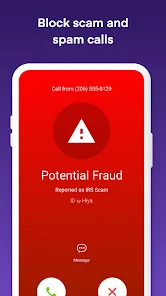
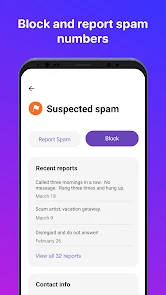
The first thing I noticed when I started using Hiya was its seamless integration with my phone’s existing call system. It’s like having an invisible barrier that filters out all those pesky calls. Whether it's telemarketers, scammers, or those annoying robocalls, Hiya identifies them and blocks them before they can even say "hello." And trust me, the peace and quiet are heavenly.
Caller ID with a Twist
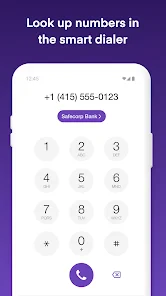
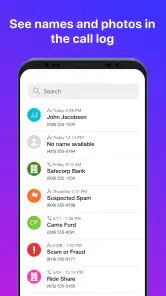
One of the standout features of Hiya is its ability to provide detailed Caller ID information. Not only does it show the name of the caller, but it also gives context about the caller’s location and the type of call. This extra layer of information is super handy when deciding whether or not to answer a call from an unknown number.
You May Like

How Microsoft OneDrive Became a Mobile Productivity Giant

How Google Translate Breaks Language Barriers Effortlessly

Why Google Sheets Is the Ultimate Mobile Productivity Tool

Unveiling the Dynamic World of My Talking Tom Friends

Free Fire MAX: Dominating the Battle Royale Arena

Free Fire: Winterlands – The Ultimate Winter Gaming Adventure
Moreover, the app maintains a vast database of spam numbers, which is constantly updated. So, you can rest assured that Hiya's got your back when it comes to keeping your phone safe from unwanted intrusions.
Caller ID without autopilot
I find caller identification most helpful when I treat it as a prompt, not a verdict. If I’m waiting on a call from a new clinic, a school, or a repair person, I’m more likely to answer an unfamiliar number; if the context looks suspicious, I can let it go and check later. That cautious approach matters because a caller label can guide a decision, but it cannot replace common sense or a callback through a trusted number.
Compared with relying only on a phone’s built-in blocking tools, a dedicated caller-ID app can add another layer of context around unfamiliar calls. The trade-off is that it asks me to make room for a separate service and decide how much filtering I want. If I rarely receive nuisance calls, my phone’s existing controls may be enough. If repeated interruptions are a regular part of the day, Hiya is easier to justify.
Making a missed call easier to handle
A useful habit is to separate screening from follow-up. If I don’t answer an unfamiliar number, I can check the call information and voicemail before deciding whether to call back. That avoids a rushed response while I’m in the middle of something, but it also keeps me from dismissing a legitimate caller just because I didn’t recognize the number at first glance.
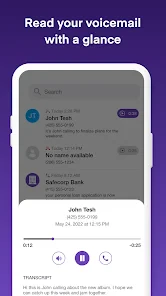
Visual voicemail can support that slower workflow by making messages easier to review, but it does not remove the need to listen for context or verify a request. If someone leaves a message about an appointment or a service visit, I’d use the details as a clue and contact the organization through a number I already trust when anything feels unclear. That is a better safeguard than treating any caller label or message as proof of identity.
User-Friendly Experience
Now, I know what you might be thinking: "Another app means another icon cluttering my home screen, right?" Well, not really. Hiya is designed to be unobtrusive. Once you set it up, it runs quietly in the background, doing its thing without demanding constant attention. It’s like having a diligent assistant who doesn't need micromanaging.
The interface is clean and straightforward. With just a few taps, you can dive into the app's settings, check call logs, or even customize your call-blocking preferences. It’s all very intuitive, which means you don’t have to be a tech wizard to navigate through it.
Keeping control of your attention
For me, the best setup is not necessarily the strictest one. I’d start with a less aggressive blocking preference, then review the call log after a few days to see whether useful calls are being caught or nuisance calls are still getting through. That small check is a practical way to tune the balance between quiet and availability, especially if work or family relies on reaching you by phone.
Visual voicemail is part of the app’s appeal, but I would think of it as a convenience rather than a reason to switch blindly from a familiar voicemail routine. If you already depend on your carrier’s voicemail or prefer handling messages through your phone’s default tools, compare the workflows before making Hiya your everyday option. The app is most compelling when caller identification and spam control are the main problems you want to solve together.
Setting a boundary without going unreachable
There is a meaningful difference between blocking a caller and choosing not to answer in the moment. I’d use filtering to reduce the calls that are clearly unwanted, but I would avoid turning every unknown number into a hard no if I’m expecting something important. That distinction helps keep a quiet phone from becoming an inaccessible one.
If your number is used for both work and personal life, it can help to decide in advance what deserves an interruption. For example, I might answer during a window when I’m expecting a time-sensitive call, then let other unfamiliar calls wait while I’m focused. Hiya can provide context for that choice, but the boundary itself comes from how I choose to manage availability.
Who is likely to benefit
I’d recommend trying it if unknown calls regularly interrupt you, or if you need to screen numbers without automatically ignoring every caller you haven’t saved. It is less compelling for someone who receives few unwanted calls, never answers unfamiliar numbers, or wants a completely hands-off system with no possibility of reviewing a questionable block. In those cases, basic phone settings—or simply keeping a personal block list—may be the simpler choice.
It is also not the best fit if you strongly prefer to keep calling and voicemail inside the phone’s built-in tools, or if you don’t want to adjust another app’s call-handling settings. The usual alternative—using the phone’s own caller screen and manually blocking repeat nuisances—takes more individual effort, but keeps the workflow simpler. I’d choose that route if unwanted calls are occasional; I’d consider Hiya when the repeated interruptions make manual handling feel like a chore.
Hiya has a 4.1 average from around 263,000 ratings, and it has been installed over 10 million times. It is rated for Everyone, works on Android 6.0 and later, and the current version is 14.7.5-11717. Those figures suggest it is a widely used option, but I’d still judge it by whether its caller information and filtering suit the calls you actually receive.
Is It Worth the Download?
In a world where our phones are practically an extension of ourselves, keeping them free from unwanted disturbances is crucial. Hiya: Spam Blocker & Caller ID does just that with remarkable efficiency. It offers a free version that covers the basics, and for those who want a little extra oomph, there’s a premium version with additional features.
The app also includes in-app purchases ranging from $1.99 to $24.99 per item, so I’d check what a paid option adds before spending anything. My advice is to begin with the free experience and see whether it changes your call routine enough to matter. One possible friction point is the setup: call-screening tools need to work alongside your phone’s own calling features, so take a moment to make sure the choices you enable match how you want calls handled.
Before settling on a setup, I’d think about what a good result actually means for me. It might mean fewer interruptions during focused work, more confidence deciding whether a new number is relevant, or simply less time spent manually rejecting repeat nuisance callers. If the main issue is messages rather than calls, the phone’s normal voicemail may already do enough; if the issue is uncertainty about incoming numbers, the caller-ID layer is likely to matter more.
One practical trade-off is that filtering can be imperfect in either direction: unwanted calls may still reach you, and a legitimate call may look unfamiliar or be handled in a way you didn’t intend. That is why I would not turn on the strongest setting and forget about it. A quick review of recent calls and blocked entries gives me a chance to notice a pattern and adjust instead of assuming the first configuration is right for every week.
So, next time your phone rings, you can feel confident knowing that Hiya is on the job, ensuring that only the calls you want to take get through. It’s like having a personal doorman for your phone, and honestly, who wouldn’t want that?
My verdict is that Hiya is most useful as a quiet buffer, not a substitute for attention or judgment. It can help restore a little control over interruptions while leaving you in charge of which calls deserve an answer. If you want that extra context and regularly deal with unwanted calls, it is worth trying; if your built-in phone tools already keep things calm, there may be no reason to add another layer.
Hiya: Spam Blocker & Caller ID Frequently Asked Questions
Can I use Hiya to identify calls from numbers that are not saved in my contacts?
Yes. Hiya is designed to identify unknown callers as well as block spam calls, so it can help you assess a call even when the number is not saved in your contacts. Caller identification can be useful when you want to decide whether to answer or return a call. Its information is intended to help manage calls, but it should not be treated as a guarantee about who is calling.
What does Hiya’s secure caller protection focus on?
Hiya focuses on caller identification and spam-call blocking, helping you manage calls from known and unknown numbers. Its store summary also describes secure visual voicemail as part of the app’s offering. Together, these tools are aimed at making incoming calls and voicemail easier to review. If your main concern is unwanted calls, the caller ID and blocking features are the most relevant place to start.
Does Hiya offer visual voicemail, and what does that feature do?
Hiya’s store summary describes the app as offering secure visual voicemail alongside caller ID and spam blocking. Visual voicemail lets you view voicemail messages in an app interface rather than relying only on a traditional voicemail menu, which can make messages easier to review. The feature may be especially useful if you often miss calls and want a clearer way to keep track of messages.
What is Hiya: Spam Blocker & Caller ID and how does it work?
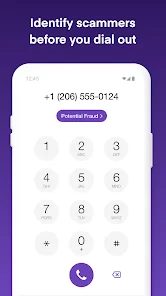
Hiya is a mobile application designed to block spam calls and identify unknown callers. It works by accessing a vast database of known spam numbers and caller ID information. When you receive a call, Hiya cross-references the number with its database and alerts you if the call is potentially spam or fraud. The app also provides caller ID services to help you identify who is calling, even if the number isn’t saved in your contacts.
Is Hiya: Spam Blocker & Caller ID free to use?
Hiya is free to download and offers basic features like spam call blocking and caller ID. The app also offers in-app purchases, with prices ranging from $1.99 to $24.99 per item. If you are deciding whether to download it, you can start with the free offering and consider paid options only if they suit your needs.
Pros
- Effective spam call blocking
- Accurate caller ID recognition
- User-friendly interface
- Regular updates enhance features
- Customizable call blocking settings
Cons
- Subscription required for full features
- May block some wanted calls
- Occasional app crashes
- Limited free version functionality
- Ads in free version can be intrusive

- Category
- Communication
- Version
- 14.7.5-11717












