Messages - Text Messenger App
- 186.00
- 4.1
- Installs
- 1.00M
- Price
- Free

Screenshots
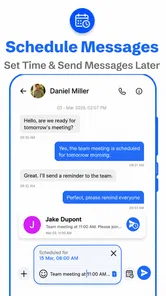
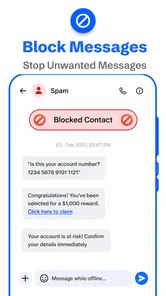
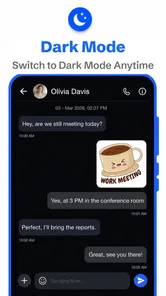
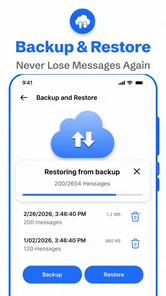
Analysis by Reviewed
On a busy morning, I want a message to reach the right person without having to think about which screen or extra service to use. That is the basic appeal of Messages - Text Messenger App: it is a tools app for everyday SMS and MMS, built around the familiar act of opening a conversation and writing. I see it as an option for people who want a focused place for carrier-style messaging, rather than another social network to manage.
A familiar starting point for everyday texting
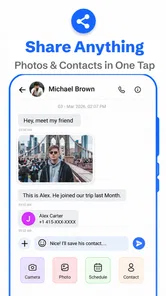
The useful way to judge a messaging app is to follow an ordinary task. I open a conversation, type a short update, check the recipient, and send it; for a longer exchange, I can attach a photo or other media through MMS. That straightforward flow suits practical messages such as confirming a pickup, letting a family member know I am running late, or sharing a picture that makes more sense than a description. The key trade-off is that SMS and MMS are not the same as internet chat: delivery and any carrier charges depend on the messaging service and plan I use.
A realistic day might start with a quick note to a family member about when I expect to arrive, followed by a picture of the item they asked me to pick up. I would keep the time or location near the beginning, then add any explanation underneath. That small writing habit is more useful than a decorative theme when someone is glancing at a notification between errands. It also makes the conversation easier to search visually later, because the important detail is not buried in a long paragraph.
From recipient check to useful handoff
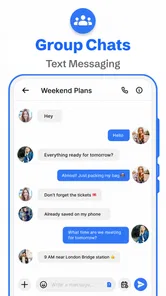
For a group making last-minute plans, I would keep the message specific and check who is included before sending. A single clear note can save several separate replies, but group texts can also become noisy when people respond at different times. If the conversation needs read receipts, reactions, or a shared online history, a dedicated internet messenger may be a better fit. Here, the appeal is keeping ordinary texting uncomplicated.
That recipient check matters most when a message contains an address, a handoff time, or a photo meant for one person. I treat the send action as the start of a handoff, not proof that the other person has understood the plan. For anything time-sensitive, I phrase the request so the recipient can answer with a simple confirmation. If a group thread starts branching into several separate decisions, I would move the discussion to a service better suited to ongoing coordination rather than letting a basic text exchange become difficult to follow.
Where it fits among messaging choices
Compared with a phone’s default texting app, a separate SMS tool is most worthwhile when its layout and personal touches feel better to use. The app’s developer is Apps Specials, and the overall proposition is deliberately practical rather than built around a large ecosystem of social features. I would consider it for someone who texts often, prefers a clean interface, and does not need every conversation tied to a particular chat platform.
It is less suitable if most of your contacts expect to communicate through an internet-based service, or if you rely on desktop syncing and advanced collaboration. Before switching, I would check whether the conversations and habits I care about work as expected on my device. A messaging app can be pleasant to use yet still be the wrong choice if friends, family, or work contacts rarely use SMS and MMS.
More From Our News Desk

Weather by Xiaomi Review: Clear at a Glance, Less Clear Up Close

X Under Pressure: Can It Recover When Posting Goes Wrong?

Clash of Clans Is Won Between the Battles

Android Auto Makes the Case for Quieter Car Software

MobiOffice: Transforming Mobile Productivity with Seamless Integration

EA SPORTS FC™ Mobile Soccer: Redefining Mobile Sports Gaming
Ever found yourself tangled in the web of endless messaging apps, each claiming to be the best, but none really hitting the mark? Well, let me share my experience with Messages - Text Messenger App, a hidden gem in the realm of communication tools. I gave it a spin, and here's my take on it.
Why Choose Messages - Text Messenger?
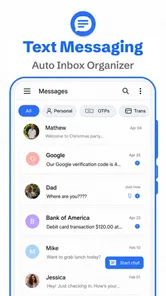
First off, let's talk about the user interface. It’s as if the developers read my mind and put together everything I’d ever wanted in a messaging app. Navigating through the app feels intuitive and seamless, with everything placed just where you’d expect it to be. No clutter, no unnecessary frills - just pure, straightforward messaging.
One feature that truly stands out is the customization options. You can tweak the theme to match your style or mood, and even personalize chat bubbles. This might sound trivial, but trust me, it adds a personal touch that makes texting more fun. Plus, with the app being lightweight, it doesn’t hog your phone’s resources. It’s like having the best of both worlds: functionality and efficiency.
Keeping It Simple and Secure
In an age where privacy is paramount, Messages - Text Messenger App doesn’t skimp on security. It offers end-to-end encryption, ensuring that your conversations stay private and secure. It’s always reassuring to know that your chats aren’t being eavesdropped on, right?
Additionally, the app supports multimedia messaging. So, whether you want to send a quick text, a funny meme, or a picture of your latest culinary masterpiece, you’re all set. The media sharing is smooth and doesn’t take forever to upload, which is a huge relief for someone like me who’s always on the go.
Integration and Compatibility
Another aspect worth mentioning is how well this app integrates with other platforms. Whether you’re on Android or iOS, switching between devices is a breeze. It’s compatible with a variety of devices, so you’re not limited to just one ecosystem. This flexibility is a massive plus for anyone juggling multiple gadgets.
Moreover, the app regularly gets updates. These aren’t just standard bug fixes; they often include new features and improvements that keep the app fresh and exciting. It’s nice to see developers who are actively working to enhance user experience.
Practical checks before making it your default
Because SMS apps handle personal conversations, I would make one small check before relying on any new one: send a test text to someone I can confirm with, then try a photo message if MMS matters to me. That helps separate an app’s interface from the behavior of the phone and carrier. If a message is important, I still look for a clear delivery outcome rather than assuming that tapping send guarantees the other person has read it.
One useful habit is to keep a text concise when it contains a time, address, or instruction. If I am coordinating a handoff, I put the essential detail near the start, then add context after it. This makes the message easier to scan in a busy thread and reduces the chance that someone misses the part they need. Custom chat styling can make an app feel more personal, but clarity remains more valuable than decoration.
Who is likely to be happiest with it?
I would shortlist this app for someone who mainly wants to send regular texts and picture messages, likes a customizable presentation, and does not want a feature-heavy social platform. It can also suit a person replacing a default interface they find awkward, provided the app works with their messaging setup. If nearly all of your conversations happen in internet chat apps, though, installing another SMS client may add little to your day; staying with the service your contacts already use is often simpler.
For a household that uses texting to coordinate rides or errands, the practical benefit is having a dedicated place for those short exchanges without adopting a new network that everyone must install. I would still keep expectations modest: the app can make composing and viewing a message more comfortable, but it cannot make every contact respond promptly or turn a carrier text into a collaborative task board. For work conversations with files, searchable project history, or several people making decisions at once, a work chat service is likely the cleaner choice.
The app is free to download, with in-app purchases ranging from $2.49 to $29.99 per item, so I would look at any optional purchase carefully and decide whether it changes something I actually use. It is rated for Everyone, has a 4.2 average from around 10,000 ratings, and has passed one million installs. Those figures suggest a broad audience, but they do not tell me whether its particular interface will suit my habits. I would try the free experience first rather than paying for customization on the assumption that I need it.
What to check before settling in
A sensible switch is gradual rather than all at once. I would first try the app for a low-stakes exchange, then test a picture message and a group conversation if those are part of my routine. That gives me a chance to notice whether the recipient list, conversation view, and send feedback suit the way I actually text. Once it feels familiar, I can decide whether its presentation is enough of an improvement to make it my regular choice.
One trade-off is that a more personal interface does not necessarily mean more powerful messaging. A different SMS client may make ordinary conversations feel better organized for me, while the phone’s built-in app may remain the simpler option if I value familiarity and do not want to change my habits. Likewise, an internet messenger is usually preferable when both sides need online features or a conversation should continue across devices. I would choose based on the route my contacts already use, not on appearance alone.
A grounded verdict
Messages - Text Messenger App is free, currently at version 2.3.24, and works on devices running Android 8.0 or later. It was released on August 13, 2024. I would recommend it selectively: it makes the most sense when standard SMS and MMS are central to your routine and a tidy, personalized screen is a real benefit. Its strongest case is not replacing every way people communicate, but making the ordinary text-message path feel more comfortable.
There are also reasons to choose something else. If you need cross-device conversation continuity, rich group tools, or a messaging service that works over the internet independently of carrier texting, compare those needs against what you already use before switching. And if privacy is your deciding factor, I would verify the app’s current privacy details directly rather than treating a security claim as the whole picture. For a person who wants straightforward texting with a little room to make the interface their own, it is a reasonable app to try; for everyone else, the best messenger is often the one their contacts already open.
Messages - Text Messenger App Frequently Asked Questions
Will Messages - Text Messenger App work on my device?
Messages - Text Messenger App is a messaging tool for Android devices running Android 8.0 or later. It is designed for SMS and MMS messaging, so it may suit you if you want a dedicated interface for everyday texts and media sharing. Check your device’s Android version before downloading, and make sure the app is compatible with your phone.
Do I need a mobile plan or internet connection to send messages?
The app is intended for SMS and MMS, so sending messages may depend on your mobile carrier and plan. Texts and multimedia messages can be subject to your carrier’s charges or requirements. The app itself does not replace a mobile service plan, so it is worth checking your plan before using it regularly, particularly if you expect to send many photos or videos.
What features does the Messages - Text Messenger App offer?
The Messages - Text Messenger App provides a variety of features including SMS, MMS, group chats, and multimedia sharing. Users can send and receive text messages, photos, videos, and voice messages. It also supports emojis and stickers to enhance the chatting experience, and offers customizable themes and notifications to personalize the app to your liking.
Is the Messages - Text Messenger App free to use?
Yes, the Messages - Text Messenger App is free to download and use. However, it may require a data plan from your mobile carrier to send and receive messages, especially multimedia messages. Some advanced features or add-ons might be available for purchase within the app, but the basic messaging functions are free.
How secure is the Messages - Text Messenger App?
The Messages - Text Messenger App prioritizes user privacy and security by implementing end-to-end encryption for messages. This ensures that only you and the person you're communicating with can read the messages. Additionally, the app does not store your personal messages on their servers, further enhancing privacy.
Pros
- User-friendly interface
- Customizable themes
- Supports multimedia messages
- Fast message delivery
- Low data usage
Cons
- No end-to-end encryption
- Limited group chat features
- Ads in free version
- Occasional notification delay
- No desktop version