Messages: SMS Texting App
- 3.13K
- 3.9
- Installs
- 10.00M
- Price
- Free

Screenshots

Analysis by Reviewed
I judge a messaging app less by the first few minutes than by whether it still feels useful once the novelty wears off. Messages: SMS Messaging is a communication app from Apps Specials, and its appeal is easy to grasp: it gives everyday SMS and MMS conversations a dedicated home, with message scheduling as a practical extra. My first impression was of a familiar tool rather than a new social network to maintain. That can be a real advantage if you want texting to stay simple.
Why the first week feels easy
Getting started felt straightforward, and the clean layout made it easy to focus on conversations instead of learning a new system. For the first few days, small choices such as changing themes, chat bubbles, or font size can make the inbox feel more personal. I’d treat that customization as a comfort feature, not a reason by itself to switch: the real test is whether the app makes your routine texting easier.
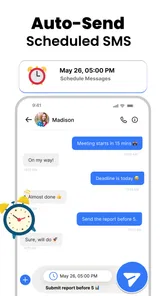
The most useful early discovery is scheduling. I’d use it for a birthday greeting, a reminder to send a message during someone’s working hours, or a follow-up I don’t want to forget. A good habit is to write the message when I think of it, then choose a sensible send time and check the recipient before scheduling. That turns the feature into a memory aid rather than a way to send messages on autopilot.
Where recurring value comes from
Scheduling is also what can give the app value after the first-week appeal fades. If I regularly need to send timely texts but don’t want to rely on remembering at exactly the right moment, it can become part of a dependable routine. For instance, I might draft a message after dinner and schedule it for a more considerate time the next day. The benefit is modest but tangible: fewer forgotten messages and less need to keep a reminder in my head.
It is still a texting tool, not a replacement for every kind of communication. SMS and MMS suit quick coordination, short updates, and sharing media with people I already contact by phone number. For group plans that need reactions, shared media, or a richer ongoing conversation, a dedicated internet messaging service may be a better fit. I’d choose based on how the other person communicates, rather than expecting one app to cover every conversation.
What changes the long-term calculation
There are practical trade-offs to keep in mind. Scheduled messages are only helpful if I review them when plans change; otherwise a well-meant text could arrive at the wrong time. Multimedia messages can also behave differently from internet-based chat, so I wouldn’t assume that sending a photo or video has the same experience as using a data messaging service. When a conversation is urgent or sensitive, I’d send it directly and make sure it has gone through rather than relying on a scheduled send.
It is also worth asking whether a separate messaging app solves a real problem for you. If your phone’s existing texting app already handles your daily needs, switching may add little beyond a different look and scheduling. On the other hand, if you often forget to send routine texts or want more control over how your inbox looks, those specific conveniences can justify trying another option. People who need their conversations to follow them across devices, or who primarily use encrypted internet chat, should compare those needs carefully before making this their main messenger.
More From Our News Desk

Weather by Xiaomi Review: Clear at a Glance, Less Clear Up Close

X Under Pressure: Can It Recover When Posting Goes Wrong?

Clash of Clans Is Won Between the Battles

Android Auto Makes the Case for Quieter Car Software

MobiOffice: Transforming Mobile Productivity with Seamless Integration

EA SPORTS FC™ Mobile Soccer: Redefining Mobile Sports Gaming
The app is free to install and is rated for Everyone. It has a 4.1 average from around 181,000 ratings, with over 10 million installs, so it has clearly reached a broad audience. The current version is 2.5.18, and it runs on Android 6.0 or newer. In-app purchases range from $1.99 to $49.99 per item, so I’d check what an optional purchase offers before paying; the basic appeal is the everyday texting workflow, not a promise that every useful feature costs nothing.
Setting Up and First Impressions
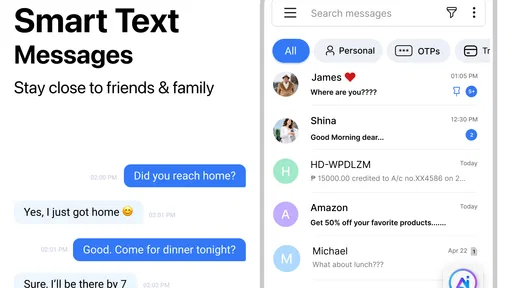
Downloading and installing Messages: SMS Messaging was a breeze. Just a few taps, and I was ready to roll. The app doesn’t bombard you with unnecessary permissions or complicated settings right off the bat. It’s straightforward, and I appreciate that. When you open it for the first time, you’re greeted with a clean, intuitive interface. No clutter, no fuss. Just what you need to get started with your conversations.
Features That Stand Out
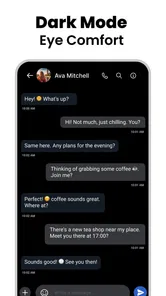
Now, let’s talk about what makes this app a cut above the rest. One of my favorite features is the ability to customize the look and feel of the messaging environment. You can change themes, chat bubbles, and even the font size to fit your style. It’s like dressing up your messages in a way that feels uniquely you.
Another cool feature is the scheduling option. Ever wanted to send a birthday message exactly at midnight but knew you'd be asleep? Well, this app has got your back. You can schedule messages to be sent at a later time. It’s like having a personal assistant who never forgets!
Integration and Compatibility
In terms of integration, Messages: SMS Messaging plays well with other apps and services. Whether you’re on Android or iOS, it syncs seamlessly with your contacts and calendars. I found it particularly handy to have all my messages in one place, without needing to jump between different apps.
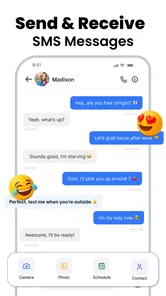
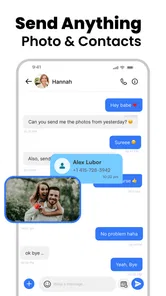
Plus, it supports multimedia messaging, which is a big win in my book. Sending photos, videos, or even voice notes is easy and fast, keeping your conversations lively and engaging.
Security and Privacy
In today’s digital age, security is a big deal. I’m happy to report that Messages: SMS Messaging takes privacy seriously. The app offers end-to-end encryption, ensuring that your chats are safe from prying eyes. It’s reassuring to know that your private conversations remain just that – private.
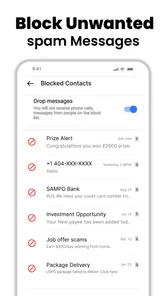
Moreover, they have implemented measures to keep spam at bay. The app automatically filters out suspicious messages, so you only get the important stuff. It's like having a security guard for your inbox!
Making everyday messaging more dependable
A practical way to decide whether the app belongs in your routine is to use it for one recurring task rather than moving every conversation at once. I might start with a weekly check-in or a message I often forget to send, then see whether preparing it in advance genuinely reduces effort. This small trial also makes it easier to notice whether the scheduling step fits naturally into my day or becomes one more thing to manage.
For a busy household, that could mean drafting a pickup update while plans are being made, then scheduling it for the time when the other person is likely to need it. For someone working irregular hours, it could help avoid sending a non-urgent text late at night. Neither example makes the app a substitute for a conversation that needs an immediate response; they show where a prepared SMS can be more considerate than relying on memory.
I’d also keep scheduled texts specific and low-risk. A simple reminder or greeting is easier to prepare safely than a message whose wording depends on what happens later. Before setting a time, I’d check the recipient, message, and intended moment together. If the arrangement changes, reviewing queued messages should be part of the same habit as updating the plan. That quick check is a useful safeguard against a message that is technically delivered but no longer appropriate.
Choosing between texting and internet chat
The main comparison is not just which app has the prettiest inbox; it is what kind of connection a conversation needs. Phone-number texting is convenient for brief exchanges with people who may not share the same chat service. Internet messengers are often a better choice when a group depends on ongoing replies, shared media, or conversations across several devices. I’d keep this app in the mix for direct, practical SMS and MMS, while using another service when the conversation itself calls for richer tools.
That distinction matters for photos and other media, too. MMS is useful when a quick attachment is enough, but I would not assume it behaves like sending media through an internet-based service. If quality, large files, or a continuing shared thread matters, I’d use the channel that the people involved already rely on. For a quick snapshot or simple update, staying in a text conversation may be the more convenient choice.
One question I’d consider before switching is whether this will become the default app for text messages on my phone. If the operating system asks me to choose a default, I’d do that only after deciding that I want this app handling ordinary incoming and outgoing SMS. The point of a dedicated texting app is reduced friction; splitting attention between two inboxes can cancel out that benefit. If I’m only curious about the themes, I’d test the interface carefully before changing a routine I already like.
Maintenance without turning it into another chore
The ongoing effort should stay small. I’d settle on a readable appearance once, avoid tweaking it every few days, and check scheduled messages when plans change. If I use scheduling often, a brief review of upcoming sends can prevent an outdated note from going out. If I rarely schedule anything, there is little reason to create a formal routine around the feature; the app should make texting simpler, not demand regular administration.
Optional purchases are another point to approach deliberately. Since the app can be installed for free and includes in-app purchases, I’d first use the basic experience for the task I actually care about. Before spending, I’d identify what the particular purchase adds and whether I would use it repeatedly. That is more useful than paying because a customization option looks appealing during the first few days.
There are also ordinary reasons a text may not be the right channel: the other person may prefer a different service, a group may need features SMS does not provide, or a message may be too important to leave until a scheduled time. In those cases I would choose another communication method rather than trying to make this app cover every situation. Its strongest case is narrower and more convincing: straightforward phone-number conversations, with an interface I can adjust and the option to prepare a message ahead of time.
How I’d make it part of a routine
For lasting usefulness, I’d keep the workflow deliberately small: customize the display once to improve readability, then use scheduling only for messages with a clear deadline or social reason. A weekly check of anything scheduled is a sensible safeguard if plans shift. This avoids turning a helpful tool into another inbox that needs constant attention, and it gives me a fair way to tell whether the app is earning a place on my phone.
That maintenance question matters because the app’s benefits are practical rather than dramatic. If the schedule feature saves me from repeatedly setting reminders, it has recurring value. If I rarely send timed messages and already like my default texting app, there may be no reason to maintain a second routine. I’d give it a short, ordinary trial—using it for the conversations I already have—rather than migrating everything just to explore its appearance options.
Who should keep looking
I’d recommend considering it for someone who mostly texts by phone number, appreciates a more adjustable interface, and has a recurring reason to prepare messages in advance. I’d be more cautious if your priority is cross-device continuity, richer group-chat tools, or privacy features you can independently verify for the exact conversations you plan to have. In those cases, a familiar default messenger or a dedicated internet chat app may serve you better. The key question is not whether this app has more options, but whether its particular options match your week.
The Final Verdict
In conclusion, if you’re in the market for a reliable, feature-rich messaging app that doesn’t compromise on privacy, Messages: SMS Messaging is definitely worth checking out. It’s user-friendly, highly customizable, and secure. Whether you’re a casual texter or someone who lives for messaging, this app has something to offer. Give it a try, and you might just find yourself sticking to it for the long haul. Happy texting!
Messages: SMS Texting App Frequently Asked Questions
Is Messages: SMS Messaging free to download, and are there optional purchases?
Messages: SMS Messaging is free to download, and its core SMS and MMS functions can be used without a subscription. Optional in-app purchases are available, with items priced from $1.99 to $49.99. Consider whether you are interested in paid extras before making a purchase, and review any purchase prompt carefully so you know what you are selecting.
What is Messages: SMS Messaging designed to do?
Messages: SMS Messaging is a communication app focused on SMS and MMS. Its store description highlights sending messages and scheduling SMS in a chat, so it may be worth considering if you want a dedicated app for everyday texting. As with any messaging app, your experience will depend on your device settings and the messaging features you choose to use.
Who develops Messages: SMS Messaging, and how popular is it?
Messages: SMS Messaging is developed by Apps Specials. It has an average rating of 4.1 from around 181,000 ratings, with approximately 2,600 written reviews and over 10 million installs. These figures can give you a general sense of its reach and user feedback, but individual experiences may differ depending on the device and how the app is used.
Can Messages: SMS Messaging replace my phone’s default texting app?
Messages: SMS Messaging is a communication app for sending SMS and MMS, so it may suit users who want a dedicated place to handle everyday texts. Before switching, check how your device manages default messaging apps and SMS permissions; those settings affect whether messages are handled here or in another app. You can also keep your current setup until you are comfortable with the change.
What features does Messages: SMS Messaging offer that make it stand out from other messaging apps?
Messages: SMS Messaging offers several standout features, including customizable themes, group chat capabilities, and an intuitive user interface. It also provides robust privacy settings, ensuring that your messages remain secure. In addition to standard SMS and MMS support, the app supports multimedia sharing, allowing users to send images, videos, and voice messages easily. These features make it a comprehensive choice for users seeking a reliable messaging app.
Pros
- Clean and intuitive user interface
- Supports group messaging seamlessly
- Variety of emojis and stickers
- Efficient message search functionality
- Reliable delivery notifications
Cons
- Lacks end-to-end encryption
- Limited customization options
- No support for multimedia messaging
- Occasional notification delays
- Ads in the free version












