Marvel Unlimited
- 10.29K
- 4.7
- Installs
- 5.00M
- Price
- Free

Screenshots



Analysis by Reviewed
I find that Marvel Unlimited works best when I treat it as a place to follow a character or explore a longer story, rather than as a quick way to sample one random issue. It is a comics app from Marvel Comics, and its large catalogue makes it especially appealing if you already know that you want more than the films can offer. The main thing I keep in mind is that a library this broad is most enjoyable when I have a little time to choose a path through it.
When the connection becomes part of the reading experience
Browsing and choosing are the moments when a dependable connection matters most. If I open the app without a particular issue in mind, I may spend time searching characters, series, and collections before settling on a read. That discovery process is useful, but it also means the app feels less suited to a rushed moment when I need to find something instantly. I get more out of it when I decide on a character or story arc before opening the catalogue.
Marvel Unlimited gives readers access to over 30,000 comics, with new issues added every week. That breadth is a strength, but it can also make the first choice harder: a familiar hero may appear across many runs and eras, and starting in the middle of a long storyline can be confusing. I recommend using a curated reading list as a starting point, then branching out when a particular supporting character or event catches your attention. That simple approach turns a huge archive into a more manageable reading plan.
Reading in the gaps of an ordinary day
The phone format suits short breaks: I can read a few pages while waiting, then return to the same story when I have a longer stretch. Smart Panels can make dense artwork easier to follow on a small display by guiding attention from panel to panel. I would still switch to a larger screen when I want to take in a full-page spread or study the details of the artwork; the guided view is helpful, not a replacement for seeing the whole page.
For a commute, a trip, or a spotty signal, preparing comics ahead of time can make a real difference. I would choose the next issue or a short run while connected rather than rely on browsing in the moment. That is a practical habit for any mobile reader, and it helps keep a reading break focused on the story instead of on searching. The app is most convenient when I plan a little around where I expect to read.
What to expect when something interrupts
Network trouble can turn a smooth session into a pause, especially if I am still browsing or have not prepared the comic I want. I find it sensible to open a chosen issue before leaving a reliable connection and make sure it is ready for later. If a page or selection does not load as expected, I would first check the connection and retry, then return to the series or reading list instead of repeatedly tapping through the same screen. That is not glamorous advice, but it avoids wasting a short break.
There is a trade-off between a boundless catalogue and a simple reading queue. A dedicated comic shop or a reader focused on comics from several publishers may be a better fit if you want to buy individual books or keep your collection independent of one publisher’s ecosystem. By contrast, this app makes more sense to me when Marvel is the reason I am reading and I want to explore runs beyond the issues I would otherwise pick up. The experience is shaped by that focus, not by being a universal comic shelf.
More From Our News Desk

Weather by Xiaomi Review: Clear at a Glance, Less Clear Up Close

X Under Pressure: Can It Recover When Posting Goes Wrong?

Clash of Clans Is Won Between the Battles

Android Auto Makes the Case for Quieter Car Software

MobiOffice: Transforming Mobile Productivity with Seamless Integration

EA SPORTS FC™ Mobile Soccer: Redefining Mobile Sports Gaming
Planning a reading path instead of getting lost
One question new readers often have is where to begin when a character has decades of history. I would not try to read everything in publication order on the first visit. Instead, I’d choose a character I already enjoy, use a curated list or event search to find a coherent starting point, and give that run a few issues before hopping elsewhere. If a story introduces a character or team I like, I can then follow that thread. This keeps the archive from feeling like homework and makes exploration more rewarding.
For someone returning after a long break, the app is also useful as a way to reconnect without needing to remember exact issue numbers. Searching by a familiar character or event can narrow the field, while themed collections can provide a route into stories that sit outside the best-known film adaptations. I would still check the issue sequence before committing to a crossover: an event can draw on several titles, and reading only its central issues may leave some character turns unexplained.
Choosing comics for the moment
The ideal issue depends on how much attention I can give it. A short, self-contained story is easier to enjoy in a noisy waiting room than a sprawling event that asks me to keep track of several teams and plotlines. When I only have a few minutes, I’d return to a series I already know instead of opening a complicated new arc. For a quiet evening, I’m more likely to explore a collection and spend time with a longer run.
That distinction matters for younger readers as well as busy adults. The app carries a Teen age rating, so I would not treat the entire library as automatically suitable for every child simply because it is a comic reader. A parent choosing stories should look at the individual comic and its themes, rather than relying on the app’s broad identity or a familiar superhero name. That little bit of selection makes the experience more responsible and more likely to fit the reader.
Discover a Universe of Comics
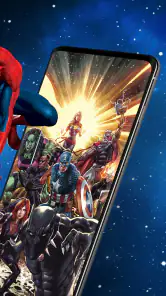
At first glance, Marvel Unlimited offers an impressive library of over 29,000 comics. Yes, you read that right! You can explore stories from the Golden Age of Comics all the way to the latest releases. It's like having a comic book store right in your pocket. I was blown away by the sheer volume and variety of comics available. Whether you're into the legendary tales of Spider-Man or the epic sagas of the Avengers, there's something for everyone.
Easy Navigation and User-Friendly Interface
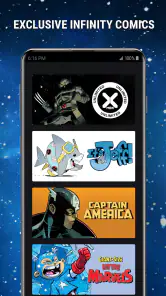
One thing that really impressed me was how easy it is to navigate through the app. The interface is intuitive and user-friendly, making it simple for even a novice comic reader to jump right in. You can search for comics by character, series, or event, and the app even offers curated reading lists to help you get started. How cool is that?
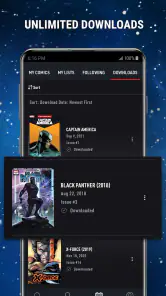
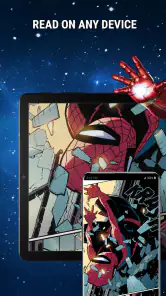
Another standout feature is the "Smart Panels" technology. This nifty feature allows you to zoom in on each panel, guiding you through the story in a cinematic way. It's perfect for reading on smaller screens, and it really enhances the overall reading experience. Plus, you can download comics to read offline, which is a lifesaver when you're on the go.
Always Something New
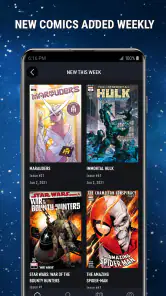
Marvel Unlimited keeps things fresh by adding new comics weekly. This means you'll always have something new to read. They also run special events and themed collections, which are a fantastic way to discover new characters or story arcs you might not have considered before. It's like having a never-ending supply of superhero adventures at your fingertips.
If you're worried about missing out on the latest releases, don't be. While there is a slight delay between the physical release of a comic and its appearance on the app, the wait is usually only three months. Given the extensive back catalog available, you'll have plenty to keep you occupied in the meantime.
How it fits beside other comic options
Compared with buying a single digital issue at a time, a subscription-led library is most appealing when I expect to read widely across Marvel rather than collect a handful of specific issues. It invites sampling: I can try a different era, follow a supporting character, or switch series after an event without making every experiment a separate purchase. The trade-off is that readers who care about owning particular books or maintaining a mixed-publisher library may prefer a digital storefront or a local shop, where their choices are not centered on one publisher.
It also differs from simply reading a printed collected edition. A physical volume gives me a deliberate sequence and a larger page to appreciate the art, while the app is easier to carry and better suited to quick searches across characters and storylines. If collecting covers, keeping books on a shelf, or seeing every page at once is part of the pleasure, the phone experience will not replace that. I see the app as a flexible reading companion, not a substitute for every way of enjoying comics.
Who will get the most from it
I would recommend it to readers who return to Marvel often, whether they want to follow a familiar hero through different eras or use a themed collection to find an unexpected series. Someone who reads across publishers, prefers owning specific digital issues, or mainly wants a quick standalone story may be happier with a different comics service or a local comic shop. The value here comes from exploring Marvel broadly, not from being the best choice for every kind of reader.
For a practical routine, I might pick a reading list on a quiet evening, note which issue comes next, and prepare that selection before a journey the following day. If I am unsure where a major event begins, I would use the app’s character and event search to orient myself rather than assume the first result is the ideal entry point. A little planning saves time and makes a sprawling universe feel less intimidating.
Keeping a mobile session manageable
A useful habit is to choose a small, definite reading goal before travelling: one issue, the next chapter of a run, or a few entries from a list. That gives me a natural stopping point and reduces the temptation to browse repeatedly when the connection is unreliable. It also makes it easier to tell whether I have prepared enough for the journey. For a longer trip, I’d plan more than one option while online, since the story I expect to read may not suit the mood or the amount of time I actually have.
When I read on a phone, I try not to judge a comic solely by how well it works in guided panel view. That format can help with close-up dialogue and compact screens, but compositions sometimes rely on the relationship between several panels or the impact of a full-page image. I switch back to the full page when a reveal, splash, or visual sequence deserves room. Taking a moment to change how I view a page is a small but meaningful way to preserve the artist’s intended rhythm.
Cost, access, and the final call
The app is free to install, but its in-app purchases range from $9.99 to $68.99 per item, so I would check the purchase details before committing. It has a 4.7 average from around 86,000 ratings, and more than five million installs. Its Teen age rating is worth keeping in mind when choosing comics for younger readers. Version 7.94.0 supports devices running Android 6.0 or later.
Because access and purchases are not the same thing, I would pause at the payment screen and make sure I understand what a particular item provides before buying. The app can be explored without paying to install it, but that alone does not mean every comic or reading option is included at no additional cost. I’d also consider my own reading habits: someone who reads Marvel regularly may see more value in broad access than a reader who opens a comic only occasionally. The right choice depends on how much I will actually use the catalogue, not just how impressive its size sounds.
My verdict is positive if Marvel is the publisher you most want to read and you enjoy browsing as much as following individual stories. The catalogue, guided reading, and weekly additions make it easy to build a habit around characters and runs. I would not choose it for an all-publisher collection, and I would plan around connectivity rather than assume every part of discovery will work equally well on a weak signal. For the right reader, though, it is a convenient way to spend a spare ten minutes with a comic—and a good reason to keep going when the next issue is only a tap away.
In conclusion, Marvel Unlimited is a must-have for any Marvel fan. It provides an unparalleled access to the rich world of Marvel comics, all in one convenient app. Whether you're a seasoned comic book reader or a newbie looking to dive into the Marvel Universe, this app has got you covered. So, what are you waiting for? Grab your digital cape and start exploring!
Marvel Unlimited Frequently Asked Questions
What kind of reading experience does Marvel Unlimited offer?
Marvel Unlimited is a comics app centered on Marvel’s digital library, making it a convenient option for readers who want to explore stories featuring the publisher’s characters in one place. Its library includes a wide range of comics, and new issues are added every week. It is especially suited to people interested in discovering Marvel series and following stories through digital reading.
Who develops Marvel Unlimited, and is it a popular app?
Marvel Unlimited is developed by Marvel Comics and belongs to the comics category. It has an average rating of 4.7 from around 86,000 ratings, with roughly 10,000 written reviews and over 5 million installs. These figures suggest that it has attracted a substantial audience, though whether its library and reading experience suit you will depend on the Marvel stories you want to read.
Can I use Marvel Unlimited on Android, and what OS version is required?
Yes, Marvel Unlimited is available as an Android app, and it requires Android 6.0 or later. Before downloading, check the operating-system version on your device to make sure it meets that requirement. The app is designed for reading Marvel comics digitally, so a compatible device is important if you want to browse the library and read stories comfortably.
Is Marvel Unlimited free to download, and do I need a subscription to read comics?
Marvel Unlimited is free to download, but reading its comic library requires a subscription. The app offers in-app purchases, with listed items ranging from $9.99 to $68.99. This means you can install it and explore the app before choosing a plan, but you should expect paid access to the comics rather than a fully free reading experience.
What age is Marvel Unlimited intended for?
Marvel Unlimited has a Teen content rating, so it is aimed at teenage readers and older. The app focuses on Marvel comics, and individual stories can differ in tone and subject matter. If you are choosing the app for a younger reader, it is sensible to review the comics they plan to read and consider whether those particular stories are appropriate for them.
Pros
- Huge library of Marvel comics.
- New issues added weekly.
- Offline reading available.
- User-friendly interface.
- High-quality scans.
Cons
- Requires internet for updates.
- Subscription is costly.
- Limited non-English content.
- No family sharing option.
- Can be slow on older devices.
- Category
- Comics
- Version
- 7.94.0