KMPlayer - All Video Player
- 6.45K
- 4.1
- Installs
- 10.00M
- Price
- Free

Screenshots


Analysis by Reviewed
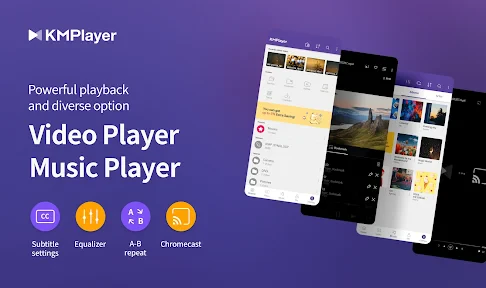
My first impression of KMPlayer - All Video Player is that it aims to be more than the basic player already on a phone: it brings local video and music playback together with extra controls and ways to watch. That can make a strong first-week case if you regularly receive videos in different formats or want more say over how playback looks and feels. The real question, though, is whether those options remain useful once the novelty wears off.
What makes the first week appealing
When I’m trying a new video player, the first test is practical: can I open a file without hunting for another app, and can I adjust the picture without digging through a maze of menus? KMPlayer’s broad format support and playback controls make it an appealing option for someone whose phone holds a mix of clips, films, and music. Its developer, PANDORA.TV, has built a player aimed at both casual watching and people who like to fine-tune their media experience.
A useful habit is to try the controls on a short clip before settling in for a film. That gives you a chance to get comfortable with gestures, picture adjustments, and the floating screen without interrupting a longer watch later. The floating view is most helpful for light multitasking, such as checking a message while keeping a video visible; it is less suited to anything that needs your full attention, and a smaller picture is naturally harder to enjoy.
A practical test before it becomes a habit
I’d also use the first few sessions to find out which parts of the app solve real problems for me. Try one file that your usual player struggles with, one clip with subtitles, and one video you might watch while doing something else. That small comparison is more revealing than browsing settings for their own sake: it shows whether KMPlayer actually reduces friction in your routine or simply gives you more controls to explore.
For someone who often receives videos from friends or moves personal clips between devices, format flexibility can matter more than a polished home screen. For someone who watches only short social clips or streams from a single service, the difference may be barely noticeable. I’d judge the app by how often it handles something the default player does not, rather than by how many capabilities I can discover on day one.
Seamless Playback Experience
You know how frustrating it can be when you’re all set to watch a movie, and bam! Your player doesn’t support the format. Well, with KMPlayer, those days are behind you. This app is like the Swiss Army knife of video players, supporting a vast array of formats including MP4, AVI, MKV, and even those pesky WMV files. I’ve thrown pretty much every format I could think of at it, and it handled them all like a champ.
One of the standout features is its ability to play high-definition videos without breaking a sweat. Whether it's 4K or even 8K, KMPlayer manages to deliver a crystal-clear viewing experience. The app also provides a plethora of options to tweak the video settings, from brightness to saturation, so you can tailor your watching experience just the way you like it.
More From Our News Desk

Weather by Xiaomi Review: Clear at a Glance, Less Clear Up Close

X Under Pressure: Can It Recover When Posting Goes Wrong?

Clash of Clans Is Won Between the Battles

Android Auto Makes the Case for Quieter Car Software

MobiOffice: Transforming Mobile Productivity with Seamless Integration

EA SPORTS FC™ Mobile Soccer: Redefining Mobile Sports Gaming
Intuitive Interface
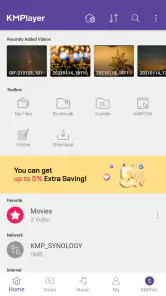
The user interface is another area where KMPlayer shines. It’s clean, intuitive, and easy on the eyes. Navigating through the app is a breeze, thanks to its well-organized menu. I particularly appreciate the gesture controls that make it super simple to adjust the volume or skip through a video without having to fumble with on-screen buttons. It’s the little things that make a big difference, right?
KMPlayer also offers a floating screen feature, allowing you to watch videos while multitasking. Imagine watching your favorite series while texting your friends or browsing the web—pretty cool, huh?
Advanced Features
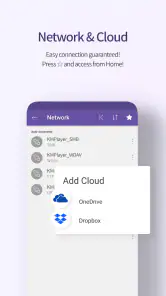
If you’re someone who likes to have a bit of fun with your media player, then you’ll love the extra features KMPlayer has up its sleeve. It includes a built-in subtitle editor, which is a lifesaver if you ever encounter out-of-sync subs. There’s also a network feature to stream videos directly from cloud services, making it super convenient if you’re low on storage space.
For those who enjoy listening to music, KMPlayer doesn’t disappoint. It supports a variety of audio formats and provides an equalizer to enhance your listening experience. Honestly, it’s like having a mini home theater in your pocket!
Making it part of a routine
Its month-to-month value depends less on a long list of features than on whether you repeatedly need them. If you watch downloaded videos during a commute, keep family clips in several formats, or switch between music and video, one player can simplify that routine. If you mostly stream through one service, the built-in player there may already be the easier choice. KMPlayer is most worthwhile when it solves a recurring playback problem, not just because it offers many settings.
For a realistic evening use, I’d open a saved film, check the subtitle timing before settling in, and adjust the picture once for the room’s lighting. If the file is stored remotely, the network option may save a local copy from taking up space, though streaming depends on a dependable connection. I’d still keep an offline file for travel or patchy reception rather than assume a cloud stream will always be available.
Where it fits among other players
Compared with the default player on a phone, KMPlayer is attractive when format flexibility, gestures, subtitle adjustment, or picture tuning matter to you. A basic player may be quicker for a one-off clip because it asks you to learn less. Streaming apps are better when the content is in their catalogs and you want recommendations or a simple play button; they are not a direct substitute for a player focused on personal media files. I’d choose KMPlayer for control over files I already have, and a simpler alternative when I only want to tap and watch.
That extra control has a trade-off: more options can mean more time spent choosing settings. I wouldn’t adjust every picture control for every video. If a clip already looks right, leaving it alone is the least fussy approach; reserve brightness or saturation changes for a screen or file that genuinely needs them. For subtitles, make a small timing correction and check it against dialogue again before changing anything further, so one fix does not create a new mismatch later.
Small workflow choices that make a difference
When a subtitle looks out of sync, I’d first decide whether the mismatch stays consistent through the whole clip. If it does, a modest timing adjustment is a sensible first try; if the timing drifts as the video continues, repeatedly changing the offset may not solve the underlying issue. The practical lesson is to test the adjustment against dialogue near the beginning and later on, instead of assuming the first corrected line proves the whole file is fixed.
For remote playback, I’d treat the network option as a convenience for occasional viewing rather than a replacement for a travel-ready copy. Before leaving home, opening the file while connected can help reveal whether the source is available and whether the connection feels steady enough for the situation. If I’m boarding a train or heading somewhere with unreliable reception, a locally saved video is the safer plan; the feature is most useful when avoiding storage pressure matters more than having guaranteed access.
Keeping the app useful without extra fuss
KMPlayer is free to download, with in-app purchases listed from $1.99 to $19.99 per item. I’d start with the free experience and only consider a purchase if a specific paid option solves a problem I actually encounter. Its Everyone age rating makes it broadly suitable from a content-rating perspective, but that alone does not tell you whether every video you play is appropriate for every viewer; the files and streams you choose still matter.
The app has a 4.1 average from around 390,000 ratings and more than 10 million installs, so it is an established choice rather than a niche experiment. It was released on March 19, 2014, and version 35.12.050 requires Android 7.0 or later. Those details help set expectations for compatibility, but I’d still check that my own device runs a supported system before building a viewing routine around it.
Maintenance and sources of fatigue
For long-term use, I’d keep the workflow simple: use one player for local files, make subtitle or picture changes only when needed, and avoid relying on network playback when the connection is uncertain. A player that handles everything can become clutter in your routine if you spend more time exploring controls than watching. Likewise, the floating screen is convenient in short bursts but can make both the video and the task beside it feel cramped.
KMPlayer is not the right fit if your main need is a streaming subscription library, automatic recommendations, or the fewest possible controls. It is also less compelling if your phone’s built-in player already opens your usual files and you rarely adjust subtitles or picture settings. In those cases, keeping another app installed may add little beyond a second icon.
Who gets lasting value from it
I’d recommend it most to people who keep a personal collection of videos, encounter different file types, or regularly need to correct subtitles and tune playback. Those are repeatable needs, so the extra controls can earn their place after the initial curiosity fades. It can also suit a household where one person wants a reliable player for saved films while another occasionally uses the audio controls for music.
I’d skip it if nearly all my viewing starts inside subscription services, if I never handle local files, or if I prefer the phone’s simplest possible play-and-pause experience. Those habits don’t make KMPlayer a poor app; they just leave fewer reasons to open it. A streaming service’s own player is usually the more direct choice for its catalog, while the built-in phone player can be less work for familiar clips.
Final Thoughts
Wrapping it up, I’d say KMPlayer - All Video Player is a solid choice for anyone looking to enjoy videos and music on their mobile device without any hassle. It’s packed with features that cater to both casual users and media enthusiasts alike. Whether you’re watching a blockbuster movie or just catching up on some YouTube videos, KMPlayer has got your back. So why not give it a try and see how it transforms your media experience? You might just find it’s the only player you’ll ever need.
My more measured recommendation is to try it with the files and habits you already have, rather than expecting it to replace every media app on your phone. If its format support, subtitle tools, and playback controls save you effort week after week, it earns its place. If you stop using those extras after the first few days, a simpler player is probably the better long-term choice.
What I’d check before settling on it
Before making it my regular player, I’d answer a few practical questions through ordinary use: does it open the specific files I watch, are its gestures comfortable on my screen, and do I actually need the subtitle or picture tools? I’d also check that my Android version meets the requirement and that my preferred files are accessible from the locations I use. These quick checks are more useful than installing it and assuming every feature will fit my routine automatically.
My lasting verdict is that KMPlayer earns space when it serves as a dependable tool for personal media, not when I expect it to replace streaming services or make every video more exciting. The best way to keep it useful is to leave most settings alone, reach for its specialist controls only when a file calls for them, and rely on offline playback when access matters. That balance lets the app’s flexibility help without turning routine viewing into another project.
KMPlayer - All Video Player Frequently Asked Questions
Can KMPlayer play videos stored on my phone, or is it mainly for streaming?
KMPlayer is presented as an all-in-one media player for watching video, and it can stream content directly from the internet as well. That makes it useful whether you want to play media on your device or access online content. If you mainly watch locally stored videos, check how the app fits your library and playback habits after installing it.
Does KMPlayer include subtitle options and playback controls?
Yes. Subtitle support is one of KMPlayer’s stated features, and the app also offers settings for adjusting subtitles and playback speed. These options can be helpful when you want to tailor viewing to your preferences. You can explore the controls while playing a video and see whether the available adjustments work well for the way you watch.
What is KMPlayer and what are its main features?
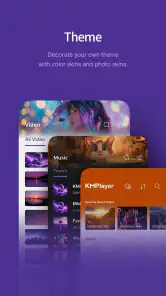
KMPlayer is a versatile multimedia player in the Video Players & Editors category, developed by PANDORA.TV. It supports a wide range of audio and video formats, making it a popular choice for users who want an all-in-one media solution. It offers features like subtitle support, high-definition playback, and customizable interface options. Additionally, KMPlayer can stream content directly from the internet, making it convenient for users who enjoy online media.
Is KMPlayer available for my device, and what should I check before installing it?
KMPlayer is available for Android and iOS, and its minimum operating system requirement is Android 7.0. Before downloading, check that your device meets the requirement for the version you plan to install and that you have enough storage for the app and your media. The app is rated for Everyone, so its content rating is suitable for a general audience.
Is KMPlayer free to use or are there any in-app purchases?
KMPlayer is free to download, but it also offers in-app purchases priced from $1.99 to $19.99 per item. Its store summary says, “Play Video and Earn Money on KMPlayer!” The original app information describes ads and says purchases may remove them or unlock additional features, such as premium themes or advanced playback controls. Check the purchase details in the app before paying, as options can vary.
Pros
- Supports a wide range of video formats.
- User-friendly interface for easy navigation.
- Offers high-quality video playback.
- Includes subtitle support for various languages.
- Customizable playback settings.
Cons
- Contains in-app ads and purchases.
- May consume significant battery life.
- Occasional lag on low-end devices.
- Advanced features require premium version.
- Limited customer support availability.
- Category
- Video Players & Editors
- Version
- 35.12.050











