iRobot Home (Classic)
- 22.16K
- 3.9
- Installs
- 10.00M
- Price
- Free

Screenshots
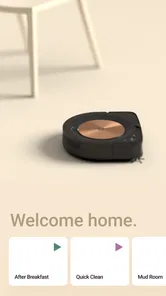
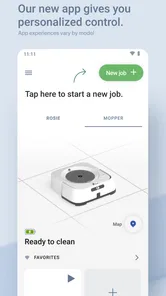
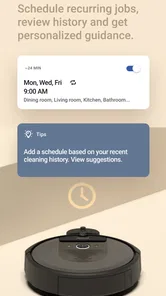
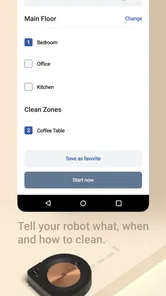
Analysis by Reviewed
I see iRobot Home as a practical remote for an iRobot cleaning device, rather than a cleaning app that can do much on its own. Its value depends on whether you already use compatible iRobot hardware and want an easier way to manage it. As a free Lifestyle app from iRobot, it is easy to try; the more important question is whether its controls fit the way you actually clean.
The value of free access
The app is free, so there is no app purchase to weigh against its convenience. That does not make a robot cleaner free: the useful part of the experience depends on owning an iRobot product. I would judge the app as an added control layer, not as a standalone alternative to buying cleaning equipment. If you already have a compatible device, trying the app costs nothing; if you do not, the app alone will not deliver cleaner floors.
Its reach is substantial: iRobot Home has more than 10 million installs and an average rating of 4.0 from around 179,000 ratings. Those figures suggest many people use it, but they are not a guarantee that every feature will suit every device or household. The app has been available since September 16, 2015, is rated for Everyone, and has accumulated around 22,000 written reviews.
Setting Up: A Breeze
Let’s start at the very beginning, the setup process. If you’ve ever had nightmares about connecting devices to Wi-Fi, fear not! The iRobot Home app makes the process smoother than a freshly vacuumed carpet. Simply download the app, and it guides you through every step, ensuring your robot is connected and ready to tackle the dust bunnies of doom lurking in your living room.
Features That Shine
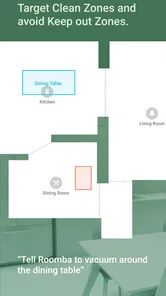
Once you’ve got everything set up, it’s time to explore the app’s features. And boy, does it deliver. From scheduling cleaning sessions to setting up virtual boundaries, the app gives you control over your cleaning routine like never before. Imagine lounging on your couch, coffee in hand, as you instruct your robot to start cleaning. It’s like magic, only real!
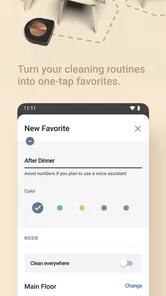
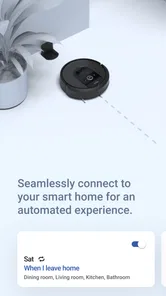
Another standout feature is the ability to customize cleaning preferences. Whether you want a quick sweep before guests arrive or a deep clean after a wild party, the app has got you covered. Plus, the integration with smart home systems means you can control your robot with just your voice. Now, how cool is that?
Making the controls work for your home
A useful way to think about schedules and boundaries is to match them to the routines that cause the most friction. For example, you might schedule a run while the household is usually out, then use a boundary to keep the robot away from a spot where cables or pet bowls tend to get in its way. That is more practical than starting a run at random and repeatedly rescuing the robot from the same obstacle.
More From Our News Desk

Weather by Xiaomi Review: Clear at a Glance, Less Clear Up Close

X Under Pressure: Can It Recover When Posting Goes Wrong?

Clash of Clans Is Won Between the Battles

Android Auto Makes the Case for Quieter Car Software

MobiOffice: Transforming Mobile Productivity with Seamless Integration

EA SPORTS FC™ Mobile Soccer: Redefining Mobile Sports Gaming
For an everyday scenario, picture getting ready to leave and noticing crumbs in the kitchen. Starting a cleaning session remotely can be handy if the robot is ready to run and the floor is clear. I would still do a quick check for loose cords, small objects, or anything that could snag; app control does not remove the need to prepare the room. This small habit is a better use of the convenience than assuming every space is automatically safe to clean.
Why a little preparation still matters
One practical tip is to use the app to reinforce a room-preparation habit rather than trying to replace it. If a particular area regularly causes trouble, first identify what makes it awkward: a bowl that gets nudged, a cord that trails across the floor, or a doorway that is sometimes closed. Then decide whether moving the obstacle, changing the routine, or using a boundary is the least inconvenient fix. These choices are specific to your home, and a setting that helps in one room may be unnecessary in another.
I would also avoid making a complicated schedule before you know when cleaning actually fits your household. Start with one predictable run, observe whether the space is ready at that time, and adjust only if it causes interruptions. This gives you a clearer sense of whether automation is helping or simply creating another thing to remember. A modest routine that works is more valuable than a busy schedule you keep pausing or changing.
User Experience: Top Notch
The user interface is another area where this app shines. It’s intuitive, easy to navigate, and doesn’t require a tech guru to understand. Everything is laid out clearly, from the map of your home to the status of your cleaning sessions. And if you ever run into trouble, the app provides support options to help you troubleshoot any issues.
But what really sets the iRobot Home app apart is its ability to learn and adapt. Over time, the app gets familiar with your home’s layout and your cleaning preferences, constantly improving its efficiency. It’s like having a cleaning service that gets smarter with each use.
What to expect from the app over time
I would think of the map and session information as aids for planning, not as a reason to stop paying attention to how the robot behaves in your rooms. A map can make it easier to understand where a run is intended to go, while the status helps you see whether the session is underway or finished. If the real layout changes—perhaps you move furniture or start keeping a door shut—reviewing your normal routine is sensible instead of assuming yesterday’s pattern remains ideal.
People often ask whether they need to use the app every time. In my view, no: its strongest role is setting up the controls you want and using them when they are more convenient than going to the device. If you prefer a physical start for ordinary runs, you can keep doing that and reserve the phone for scheduling, checking status, or an occasional remote start. The app is most useful when it removes a small recurring hassle, not when it becomes a task in itself.
Where the convenience has limits
The app’s usefulness is tied to the iRobot device you own, so I would not choose it simply because I want a general smart-home dashboard. Compared with manually starting a cleaner using its physical controls, the app can make scheduling and remote direction more convenient; compared with a brand-neutral home-control app, it is focused on the iRobot cleaning task rather than coordinating a whole household. If you prefer to press a button and leave the rest alone, the extra controls may not change your routine much.
There is also a real-world trade-off: a schedule only helps when the robot can move through the space and the household routine supports it. If rooms are often cluttered, doors are regularly shut, or you need to supervise every run, remote starting may save less effort than expected. I would treat maps, boundaries, and preferences as tools for shaping a routine, not as a promise that every session will be hands-off.
Comparing phone control with simpler options
The usual alternatives are not always competing apps. For a person who wants only to start a cleaner in the same room, its physical controls may be quicker than opening a phone and choosing a session. For someone who wants to plan around work or errands, an app-based schedule can be more useful than remembering to start the device each time. A general smart-home app makes more sense if the main goal is managing a mix of household brands, while iRobot Home is the more direct choice when the task is controlling an iRobot cleaner.
There is a useful middle ground: use the app for the decisions that benefit from a screen, such as setting a routine or checking a session, and keep everyday operation simple. This avoids treating every available control as something you must use. It also makes the choice clearer for households where one person likes automation but another would rather tap a button on the device.
Who is likely to get the most from it?
I would recommend giving it a try if you already own an iRobot product and want to set a repeatable cleaning rhythm, start a session while away, or adjust where the robot should go. It is especially sensible for someone who likes having status and controls on a phone instead of relying only on the device itself. The app is a weaker fit for people without iRobot hardware, anyone seeking one control center for products from several brands, or households where a robot cannot run without constant intervention.
It is also a better match for homes where the floor can usually be made ready before a run. A household with predictable periods when rooms are clear may get more from scheduling than one where toys, bags, and cables move around throughout the day. Pet owners may appreciate being able to plan around bowls or usual messes, but they still need to consider whether the robot can safely navigate the space. In other words, the app can organize a workable routine; it cannot make an unsuitable room suitable by itself.
If you share the cleaner with other people at home, agree on a basic routine before adding lots of changes. A schedule that suits one person may conflict with another person’s habits, and a boundary that solves one recurring problem may affect how someone else expects the robot to move. Starting with a common, simple plan can prevent the phone controls from becoming a source of confusion instead of convenience.
If you are deciding whether to rely on voice commands, schedules, or manual starts, begin with the method that best matches your day. A schedule suits predictable routines; a remote start is useful for an occasional spill or last-minute tidy; voice control can help when your hands are occupied, provided your existing smart-home setup supports it. Keeping one simple routine at first also makes it easier to spot whether the app is genuinely saving effort.
What I would check before depending on it
A natural question is whether every control will be available for every iRobot product. I would avoid assuming that the app behaves identically across a whole product range: the device you own is what determines which controls are relevant in practice. Before building a routine around a particular option, check that it appears for your cleaner and try it while you are home. That is a low-stress way to learn what the app can do for your setup before you rely on it during a busy day.
Another question is whether remote control means you can ignore the room once a run starts. I would not treat it that way. Remote starting saves a trip to the device, but it does not clear the floor, open doors, or resolve a snag. If your space often changes, keep the first runs of a new routine supervised and adjust your preparation habits based on what actually happens. The convenience is real, but it is conditional on the room and cleaner being ready.
Final Thoughts
In a world where time is precious, the iRobot Home app is a game-changer. It offers a seamless, efficient way to keep your home clean without lifting a finger. From its easy setup to its customizable features, it’s designed to make your life easier and your floors cleaner. So if you’re looking to add a touch of tech-savvy convenience to your cleaning routine, this app is definitely worth checking out. And remember, a cleaner home is just a tap away!
My verdict is straightforward: it is worth trying when an iRobot cleaner is already part of your home, because the app is free and its controls can make an existing routine easier to manage. I would skip it as a reason to buy into a cleaning setup by itself, and I would choose a simpler manual approach if phone controls add more steps than they remove. For the right owner, its value is not magic; it is the small, repeatable convenience of putting a cleaning run where it fits your day.
iRobot Home (Classic) Frequently Asked Questions
Can I use iRobot Home (Classic) without owning an iRobot product?
iRobot Home (Classic) is built as a control companion for iRobot products, so it has little practical use without a device to manage. If you are looking for a general home-management app, this is not its focus. Owners can use it to access app-based controls for supported devices, making it most relevant once you have an iRobot product.
What should I check before connecting my robot to the app?
Before setting up iRobot Home (Classic), check that your particular iRobot product is supported and that you can follow the app’s connection instructions. Compatibility matters because the controls and options available through the app depend on the device. If you are unsure, consult iRobot’s official compatibility guidance so you can make an informed decision before downloading.
Is iRobot Home (Classic) free to download, and what is its age rating?
iRobot Home (Classic) is a free Lifestyle app from iRobot, so you can install it without paying for the download. Its content rating is Everyone, making it suitable for a general audience. The app is intended as a control companion for iRobot products, so its usefulness depends on whether you have a compatible robot to manage.
What is iRobot Home (Classic) used for?
iRobot Home (Classic) is designed to provide control for iRobot products. It serves as a companion app for managing supported devices, letting owners use app-based controls instead of relying only on the robot itself. If you are considering downloading it, first make sure you have an iRobot product that works with this app, since the app’s purpose is tied to controlling those devices.
What features does the iRobot Home app offer?
The iRobot Home app offers a range of features designed to enhance the functionality of your Roomba or Braava robot. These include scheduling cleaning sessions, customizing cleaning preferences, and receiving notifications about your robot's status. Additionally, the app provides detailed cleaning reports and maps, integration with smart home devices, and voice control through Alexa or Google Assistant.
Pros
- User-friendly interface with intuitive controls
- Seamless integration with smart home devices
- Customizable cleaning schedules and zones
- Real-time cleaning progress updates
- Supports multiple user profiles for family use
Cons
- Requires stable internet for optimal performance
- Limited features without premium subscription
- Occasional app crashes reported by users
- Setup can be time-consuming for new users
- Privacy concerns with data sharing policies











