Hearing Clear: Sound Amplifier
- 2.69K
- 4.5
- Installs
- 5.00M
- Price
- Free
Screenshots
Analysis by Reviewed
Before I install a listening app, I ask a practical question: do I need a quick boost for a particular moment, or am I looking for dependable help with hearing throughout the day? Those are different needs. Hearing Clear: Sound Amplifier is aimed at the first, turning an Android phone into a listening aid for everyday situations. I’d treat it as a tool to try when speech or nearby sounds are hard to pick out, not as a substitute for a hearing assessment or dedicated hearing equipment.
A useful fit for short listening tasks
The app makes most sense when you can choose where to sit, what to listen to, and when to stop. At a small meeting, for example, I’d position myself near the person speaking, connect headphones, and make a modest adjustment rather than immediately raising everything. That combination gives the phone’s microphone a clearer chance to capture the intended voice. It is less suited to listening while walking through traffic, where concentrating on amplified sound could distract from important cues around you.
It may also help with a quiet conversation at home or with hearing soft environmental sounds during a calm moment. A practical tip is to test the setup in a familiar room first: check that the sound is comfortable, then adjust one control at a time. If you change volume and frequency together, it becomes harder to tell which adjustment actually helped. The result will depend on the phone, headphones, room, and distance from the sound source, so I wouldn’t expect the same experience in every setting.
Where it sits among hearing options
Compared with simply turning up a television or asking someone to repeat themselves, a listening amplifier gives you a personal control point. That can be convenient when you want a little more detail without changing the volume for everyone else. Compared with dedicated hearing aids, though, a phone-based app is a more situational option: you need the phone and headphones, and it is not tailored through a professional fitting. If hearing difficulty is persistent, affects several parts of daily life, or makes conversations routinely tiring, I’d look beyond an app and ask a qualified hearing professional about suitable support.
There is also a trade-off between amplification and comfort. Raising sound too far can make background noise more prominent along with speech, which may leave a busy room feeling harsher rather than clearer. I’d start low, pause between changes, and stop if listening becomes uncomfortable. For a conversation, a quiet location and a closer seat may do more than pushing the controls higher. The app is most useful as one part of that setup, not a way to make every noisy environment easy to hear.
Getting Started with Ease
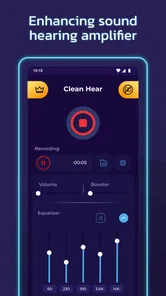
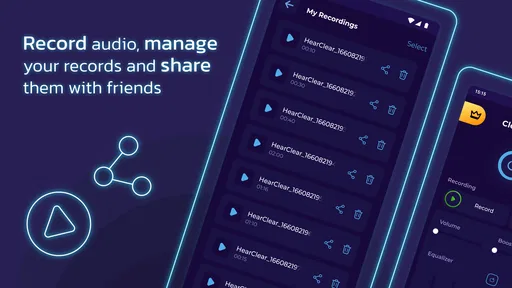
Right off the bat, Hearing Clear: Sound Amplifier impresses with its no-fuss installation process. Available for both Android and iOS, downloading and setting it up is as easy as pie. Once you're in, the app presents a minimalistic interface that's pretty easy to navigate. No complicated settings or technical jargon to wade through, which is a huge plus if you ask me.
Amplifying Sounds Like Never Before
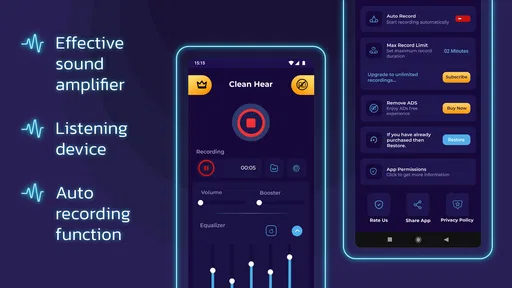
The core feature of this app is, of course, its ability to amplify sound. And boy, does it deliver! When I first tested it, I was amazed at how it could pick up even the faintest sounds and enhance them. Whether it's the rustling of leaves, a distant conversation, or even the subtle hum of a refrigerator, this app catches it all. It's like having super hearing! Just plug in your headphones and let the app do its magic.
More From Our News Desk

Weather by Xiaomi Review: Clear at a Glance, Less Clear Up Close

X Under Pressure: Can It Recover When Posting Goes Wrong?

Clash of Clans Is Won Between the Battles

Android Auto Makes the Case for Quieter Car Software

MobiOffice: Transforming Mobile Productivity with Seamless Integration

EA SPORTS FC™ Mobile Soccer: Redefining Mobile Sports Gaming
Customizable Settings
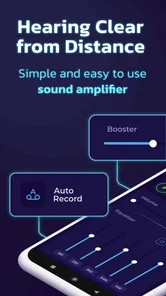
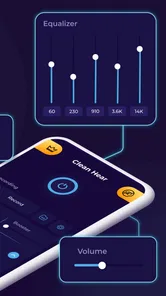
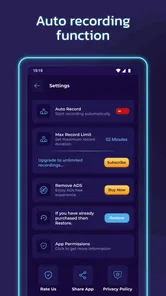
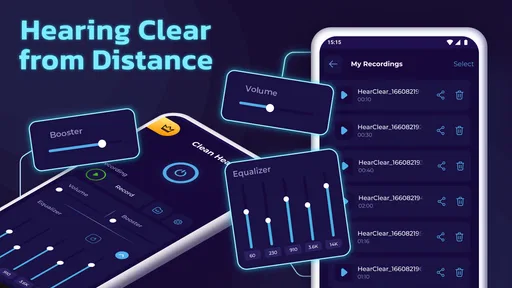
One thing I really appreciate about Hearing Clear is its customizable settings. The app allows you to adjust the sound frequency and volume to suit your personal preferences. So, whether you're trying to catch every word in a meeting or simply enjoy the serene sounds of nature, you can tweak it to match your needs perfectly. It's all about making the app work for you, which is something I'm always on board with.
Real-Life Utility
Now, let's talk about the real-life utility of this app. I decided to test it out in various environments - busy streets, quiet parks, and even at home. In each scenario, the app proved to be incredibly useful. In crowded places, I could easily hone in on conversations I wanted to hear, and in quieter settings, it was nice to amplify ambient sounds without them becoming overpowering. It's kind of like having a personal sound technician in your pocket!
But, a little disclaimer here: while the app is fantastic, it isn't meant to replace professional hearing aids if you have significant hearing loss. Think of it more as an enhancement tool for everyday situations where you might need a little auditory boost.
Making the choice
Hearing Clear is a free productivity app from TarrySoft, with a 4.5 average from around 43,000 ratings and over 5 million installs. It is rated for Everyone, runs on Android 5.0 or later, and its current version is 2.7.7. Optional in-app purchases range from $0.99 to $99.99 per item, so I’d check the purchase screen carefully and use the free experience first to decide whether it suits your routine. Its release date was October 29, 2021, and the volume of user feedback suggests it has attracted a broad audience, though ratings alone can’t tell you whether it will work well with your particular phone and headphones.
If you’re wondering whether you need special equipment, the practical starting point is a compatible pair of headphones and your phone; the app’s listening setup depends on that combination. I’d also consider whether you can keep the phone close enough to the person or sound you want to hear. For a speaker across a table, placing the phone nearer the conversation may be more useful than holding it at your side. Before relying on it in an important conversation, try it at home and learn how the controls affect comfort and clarity.
TarrySoft’s app is a reasonable experiment for someone who wants occasional listening help and is comfortable using a phone as part of the setup. I’d skip it if you need hands-free support all day, have significant or worsening hearing concerns, or expect it to cleanly separate one voice from a loud crowd. In those cases, a professional assessment or a purpose-built hearing device is a better next step. For casual use, start with a quiet setting, keep the volume moderate, and judge it by whether speech becomes easier to follow without making the rest of the sound tiring.
Choosing it for a real routine
A useful way to judge the app is to picture a specific moment rather than an idealized promise of better hearing everywhere. Suppose I’m visiting a relative and the conversation keeps drifting because I’m seated farther away. I could move closer, place the phone near the speaker, connect headphones, and make a small adjustment. If that makes the exchange easier without raising the television or asking everyone else to change how they speak, the app has served a clear purpose. If I still struggle, I would not keep turning it up simply because more volume is available.
That example also points to a practical limitation: the phone becomes part of the listening arrangement. It needs to be positioned sensibly, and using headphones can make it less convenient to follow several people around a table. For a one-to-one conversation, the arrangement is easier to manage than a lively family meal where speakers change quickly. I’d choose a quiet corner and a clear line of sight before assuming the settings are the problem.
Small habits that improve the trial
When testing sound adjustments, I’d use the same short passage of speech each time, such as a familiar conversation in a quiet room. Keep the phone and listener in the same positions, change one setting, then compare. This simple routine helps distinguish a genuine improvement in speech clarity from a louder sound that merely feels more noticeable. It also makes it easier to return to a comfortable level if an adjustment adds too much room noise.
I’d test with the headphones I expect to use most often, because changing the listening setup can change the result. A setting that feels acceptable in a calm room may be unpleasant in a more reflective space or around background activity. Before using the app for a call, appointment, or important discussion, I’d try an ordinary conversation first. That is a low-pressure way to learn whether the phone placement and controls are practical for me.
Another trade-off is attention. A listening app can help you focus on a sound, but keeping track of a phone, headphones, and volume can itself be distracting. I would not use it in a situation where I need to hear alarms, traffic, or people approaching from different directions. For those moments, awareness of the whole environment matters more than amplifying one chosen sound.
Who may prefer another approach
This is most appealing to someone who wants occasional help, already carries an Android phone, and can use headphones comfortably for a short period. It may also suit a person who wants to experiment with sound adjustment before deciding whether a more involved solution is worth exploring. The free starting point lowers the barrier to trying it, although I’d pay attention to any optional purchase prompt rather than treating every paid option as necessary.
I’d be more cautious if the difficulty is frequent, affects both quiet and busy conversations, or has begun to interfere with work, family life, or safety. A general amplifier can make sound louder, but louder is not always clearer, particularly when background noise rises with the voice. A professional hearing assessment is a better route when you need to understand the cause of a lasting change or choose equipment for regular use. A properly selected hearing device may be preferable when you need support without setting up a phone each time.
There are also simpler alternatives for particular problems. If the issue is only that a television is too quiet for one person, changing its volume or using a personal listening arrangement may be easier for everyone. If you miss one speaker in a meeting, moving closer and reducing background noise may help more than amplification. Hearing Clear occupies a useful middle ground for brief, personal listening, but it is not automatically the best answer to every sound problem.
What to expect from the first try
The first session is best treated as a comfort check, not a test of hearing ability. Choose a quiet place, begin at a low level, and listen to a familiar voice. If the result is clearer, note the setup that worked: where the phone was, which headphones you used, and whether a frequency adjustment made a difference. If it sounds sharp, noisy, or tiring, lower the level or stop. There is no benefit in pushing through discomfort.
People often wonder whether an app like this can replace hearing aids or make a crowded room effortless. I wouldn’t count on either. It is a phone-based aid for selected listening moments, while dedicated devices and professional advice are designed for broader or more persistent needs. Nor would I assume that a good result with one phone and headphone combination will carry over unchanged to another. A short trial in your usual setting is the most useful way to decide.
For someone concerned about spending, the sensible approach is to explore the free use first and only consider an in-app purchase if a clearly useful option is presented and the cost makes sense to them. Since the listed purchase range extends from $0.99 to $99.99 per item, I would read each prompt before confirming. The app’s basic idea is easy to evaluate without committing to a paid choice: try a modest adjustment during an ordinary conversation and ask whether it genuinely reduces effort.
My recommendation
Hearing Clear is a free productivity app from TarrySoft, with a 4.5 average from around 43,000 ratings and over 5 million installs. It is rated for Everyone, runs on Android 5.0 or later, and its current version is 2.7.7. Optional in-app purchases range from $0.99 to $99.99 per item, so I’d check the purchase screen carefully and use the free experience first to decide whether it suits your routine. Its release date was October 29, 2021, and the volume of user feedback suggests it has attracted a broad audience, though ratings alone can’t tell you whether it will work well with your particular phone and headphones.
If you’re wondering whether you need special equipment, the practical starting point is a compatible pair of headphones and your phone; the app’s listening setup depends on that combination. I’d also consider whether you can keep the phone close enough to the person or sound you want to hear. For a speaker across a table, placing the phone nearer the conversation may be more useful than holding it at your side. Before relying on it in an important conversation, try it at home and learn how the controls affect comfort and clarity.
TarrySoft’s app is a reasonable experiment for someone who wants occasional listening help and is comfortable using a phone as part of the setup. I’d skip it if you need hands-free support all day, have significant or worsening hearing concerns, or expect it to cleanly separate one voice from a loud crowd. In those cases, a professional assessment or a purpose-built hearing device is a better next step. For casual use, start with a quiet setting, keep the volume moderate, and judge it by whether speech becomes easier to follow without making the rest of the sound tiring.
Final Thoughts
In conclusion, I’d say Hearing Clear: Sound Amplifier is a nifty app to have on your phone. It's user-friendly, effective, and offers a unique way to enhance your hearing experience. Whether you’re in a noisy environment or just want to catch the subtle nuances of your surroundings, this app has got your back. So, if you're looking for a way to amplify your hearing without any hassle, give it a shot. Trust me, you won't regret it!
Hearing Clear: Sound Amplifier Frequently Asked Questions
Does Hearing Clear: Sound Amplifier work on iPhone or iPad?
Hearing Clear: Sound Amplifier is an Android app, so it is intended for use on compatible Android phones and tablets rather than iOS devices. If you are looking for a sound-amplifying app for an iPhone or iPad, check that app’s platform details before downloading. For Android users, the key first step is making sure the device meets the app’s software requirement.
Do I need headphones to use Hearing Clear: Sound Amplifier?
The app is designed to amplify sound picked up by your phone and deliver it through headphones, so headphones are central to the listening setup described for it. Before trying it, connect the headphones you plan to use and check that the sound is comfortable. Results can vary depending on your phone, microphone placement, and headphones, so it is sensible to test it in a quiet setting first.
What Android version do I need to use Hearing Clear: Sound Amplifier?
Hearing Clear: Sound Amplifier is an Android app, so check your device’s software version before downloading. It supports Android 5.0 and later, which covers a broad range of Android phones and tablets. The app is free to download and is rated for Everyone. If your device meets the minimum requirement, you can try it without paying upfront.
Who makes Hearing Clear: Sound Amplifier, and is it widely used?
Hearing Clear: Sound Amplifier is developed by TarrySoft and is presented as a listening device for Android. It has an average rating of 4.5 from around 43,000 ratings, with about 2,700 written reviews and over 5 million installs. Those figures suggest that many Android users have tried it, though your experience will still depend on your device and listening setup.
What is Hearing Clear: Sound Amplifier and how does it work?
Hearing Clear: Sound Amplifier is an innovative app designed to enhance your hearing by amplifying surrounding sounds in real-time. It functions by using your smartphone's microphone to pick up ambient sound and then processes it to deliver clearer and amplified audio through your headphones. This makes it particularly useful in environments where background noise can interfere with your ability to hear clearly, such as crowded places or during conversations.
Pros
- Enhances sound quality significantly.
- User-friendly interface for easy use.
- Customizable sound settings.
- Battery-efficient operation.
- Supports a wide range of devices.
Cons
- Limited features in free version.
- Requires access to microphone.
- Occasional background noise issues.
- May not work well in noisy environments.
- Subscription required for premium features.













