Hawaii News Now Weather
- 336.00
- 4.7
- Installs
- 100.00K
- Price
- Free

Screenshots
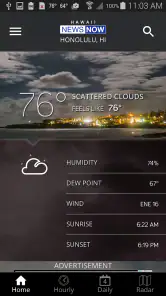
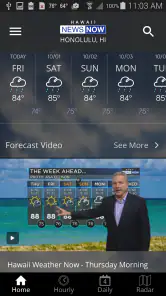
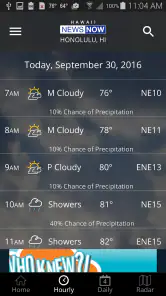
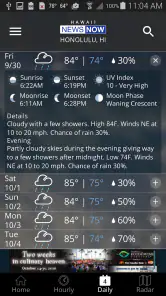
Analysis by Reviewed
Weather apps are easy to judge when the sky is clear: open one, glance at the forecast, and move on. The real test comes when I am deciding whether to leave home before a sudden shower, checking conditions near the coast, or trying to make sense of changing weather while my connection is weak. That is where Hawaii News Now Weather earns attention. It is a free weather app from Gray Media, built around the local Hawaii News Now experience rather than a generic worldwide forecast tool.
After using it as a practical day-to-day weather companion, I found its biggest strength to be focus. It feels intended for people who want weather information connected to Hawaii News Now, not for users searching for an enormous collection of global meteorological tools. The app has a 4.7 average from around 1.2 thousand ratings, and that level of approval makes sense if your routine revolves around local conditions and quick decisions. It is available to everyone, has passed one hundred thousand installs, and remains easy to try because there is no purchase barrier.
My overall view is positive, with one important qualification: the quality of the experience depends heavily on having a usable connection when you need current information. That is not unusual for a modern weather app, but it matters more in Hawaii, where travel between areas, coastal activity, mountain roads, and changing local conditions can make timing important. I would recommend it to many local users, while still keeping a second source in mind for specialized forecasting or situations where connectivity is uncertain.
How Hawaii News Now Weather fits into everyday forecasting
A local-first approach rather than an overloaded weather dashboard
The app’s identity is clear from its name and developer. Gray Media presents Hawaii News Now Weather as a full-featured weather app, but I would describe its practical appeal more simply: it gives Hawaii News Now viewers a dedicated way to check the weather without treating the forecast as an unrelated utility. That connection is useful because many people already think about weather through local news coverage, especially when conditions are unsettled.
I prefer this kind of focused setup when I only need an answer to a simple question: should I carry rain protection, is it sensible to drive now, or should I postpone an outdoor plan? A general weather service may offer more layers, more international coverage, and more technical controls, but those additions can also make the first screen feel busy. Hawaii News Now Weather is easier to approach when the goal is a fast local check rather than a deep forecasting session.
The app has been available since December 20, 2011, and its current version is 6.2.512. That long presence gives it a familiar, established feel rather than the impression of a newly launched experiment. It also requires iOS 9 or later, which places it within reach of older compatible devices. For someone maintaining an older iPhone, that minimum requirement is worth noticing before assuming a newer handset is necessary.
What I would check before leaving home
My usual routine is to open the app before a commute or outdoor errand, look at the immediate conditions, and then compare that information with the timing of my plans. I do not treat a weather icon as a guarantee. Instead, I use it as a decision aid: whether to leave earlier, pack an extra layer, protect equipment, or choose an indoor alternative.
More From Our News Desk

Clash of Clans Is Won Between the Battles

Android Auto Makes the Case for Quieter Car Software

MobiOffice: Transforming Mobile Productivity with Seamless Integration

EA SPORTS FC™ Mobile Soccer: Redefining Mobile Sports Gaming

How Microsoft OneDrive Became a Mobile Productivity Giant

How Google Translate Breaks Language Barriers Effortlessly
This is particularly useful for plans that cross different parts of the island. A forecast that looks comfortable at home may not tell the whole story for a route toward the coast, a higher elevation, or another community. The app is most valuable when I use it repeatedly during the day instead of checking once in the morning and assuming the situation will remain unchanged.
One practical habit is to check just before departure and again when an activity is likely to last several hours. That reduces the risk of relying on an old glance. It also helps me notice when a plan is becoming less sensible, even if the change is not dramatic enough to feel like a major weather event.
Connectivity is part of the forecast experience
Because current weather information is delivered through an online app, network quality shapes how confidently I can use it. On a strong connection, checking the forecast feels direct and convenient. In a crowded public area, inside a building with poor reception, or while moving through a patchy coverage area, the experience can become less predictable simply because fresh information may take longer to appear.
I would not plan around the assumption that the app will provide a complete current forecast without connectivity. Instead, I check it while I have a reliable signal and avoid making it my only preparation for a remote outing. This is not a criticism unique to this app; it is the basic trade-off of live weather services. The important point is to recognize the trade-off before depending on it in a place where reconnecting may be difficult.
For ordinary city errands, that dependency is rarely a serious obstacle. I am usually surrounded by enough coverage to refresh information when needed. For a long drive, a hike, a boat trip, or any plan where the phone may spend time outside dependable service, I would review conditions beforehand and keep the relevant details in mind rather than assuming I can always reopen the app.
Using it in mobile situations without wasting attention
A weather app should work with the way people actually hold a phone. I tend to use Hawaii News Now Weather in short sessions, often while standing near a door, waiting for transportation, or preparing to leave a workplace. That makes a clear path to current conditions more important to me than a large collection of advanced panels.
My advice is to avoid turning every check into a long browsing session. Decide what you need before opening the app: current conditions, the outlook for the next part of the day, or a broader planning view. Once I have that question in mind, I can make a faster decision and avoid repeatedly refreshing out of habit.
That approach is also kinder to a phone battery and mobile data plan. A quick forecast check is different from leaving a weather app open while traveling for hours. When I am using cellular data, I prefer to refresh intentionally, especially if I am in an area where the signal is unstable and the app may need extra time to load information.
A realistic morning scenario
Imagine I am leaving for work, taking a child to school, or heading to an appointment across town. The sky outside may look harmless, but the plan includes walking, waiting, and spending time outdoors. I open the app on a dependable connection, check the current situation, and look at the forecast window that covers the trip rather than focusing only on the moment I launch it.
If the outlook looks unsettled, I can adjust before stepping out: carry rain protection, allow additional travel time, or change an outdoor meeting location. If everything looks stable, I still know that the app is a snapshot of changing conditions, not a promise. Later, before returning home, I can check again. That second check is the part many people skip, and it is often more useful than spending extra time studying the first forecast.
In this situation, the app does not need to replace every other planning tool. It simply gives me a local weather checkpoint at the moments when the information can change what I do. That is a sensible role for it, and one it handles better than an app that overwhelms me with unrelated global details.
Where it may not be the best choice
I would hesitate to make this my only weather resource if I needed highly specialized information for aviation, marine navigation, scientific work, or detailed long-range planning. Those tasks can require tools designed around technical observations and professional decision-making. A news-connected local weather app is better suited to everyday awareness than to replacing specialist services.
I would also think twice if my main requirement were worldwide travel planning. The local Hawaii News Now connection is an advantage for a Hawaii-centered routine, but it is less compelling when I regularly move between countries or need one consistent tool for many distant locations. A broad international weather service may be more convenient in that case, even if its interface feels less locally grounded.
Users who expect dependable access in areas with little or no service should also prepare differently. I would check conditions before leaving coverage, note the important timing information, and avoid assuming that a live app can solve a connectivity problem after it begins. The app is useful in connected mobile life; it is not a substitute for preparation.
Handling weak signals and interrupted checks
The most frustrating weather-app moment is not a wrong icon; it is needing an update and being unable to get one. If the connection drops while I am checking Hawaii News Now Weather, I treat the interruption as a reason to pause rather than repeatedly tapping refresh. Moving to a place with better reception, waiting briefly, or checking before departure is usually more practical than fighting the same failed request.
I also try to separate two situations: an app that is slow because the network is weak, and a forecast that has genuinely changed. A delayed screen does not tell me whether conditions are improving or worsening. Once service returns, I prefer to perform one deliberate refresh and reassess the whole plan instead of relying on a partial view.
This is a small but important workflow improvement. Weather information has a time context. If I lose service halfway through a check, I do not mentally treat the old information as current forever. I mark it as the last useful update and make a cautious decision until I can reconnect.
Keeping mobile data use sensible
The app is free, which makes it accessible for casual use, but “free” does not mean I should use it without considering my mobile plan. Weather checks are generally short, yet repeated refreshing, browsing while traveling, and leaving connected screens open can add unnecessary usage over time. My preferred routine is to check on Wi-Fi when convenient, then use cellular data for purposeful updates when I am away from home.
For a day outdoors, I would review the forecast before leaving, make a note of the key time period, and refresh only when a decision actually depends on newer information. That gives me much of the practical value without turning the app into a constant background companion. It is also less distracting, since I am checking weather to support an activity rather than watching every small change.
Another useful distinction is between planning and reassurance. Planning requires a few well-timed checks. Reassurance can lead to opening the app again and again without changing what I will do. I find the first habit more efficient, especially when the signal is inconsistent or the battery is already low.
How it compares with the usual alternatives
Compared with the default weather tool on a phone, Hawaii News Now Weather feels more relevant to someone who wants a Hawaii News Now-centered experience. The default option may be perfectly adequate for a quick temperature glance, but it can feel generic. This app’s value is not simply that it shows weather; it is that the weather check sits in a local news context that many Hawaii users may already trust as part of their daily routine.
Compared with large national or international weather platforms, the trade-off is breadth versus local focus. Bigger services often appeal to people who want extensive location coverage, elaborate maps, or many technical controls. I would choose one of those when I am traveling widely or analyzing conditions in detail. I would choose Hawaii News Now Weather when my everyday decisions are centered on Hawaii and I want a straightforward local check.
It also differs from relying on a browser search. A search can answer a single question, but opening a dedicated app is more consistent when weather checking is part of a routine. The benefit is strongest when I already know I want the Hawaii News Now weather experience. If I only need a one-time answer for an unfamiliar place, a broader service may be faster.
Who will get the most from it
I see this app as a good fit for Hawaii residents, regular visitors, commuters, families planning outdoor activities, and anyone who prefers a local news brand over an anonymous forecast interface. It is especially suitable for people who want to check conditions several times a day without needing a technical weather workstation.
The age rating is Everyone, so it is also an uncomplicated option for a household where several people may need basic weather information. A parent can use it before school travel, an older relative can use it for errands, and a visitor can use it to reconsider plans when the weather changes. The free price removes one common reason to avoid trying it.
I would skip it as a primary choice if I need worldwide coverage, professional-grade forecasting detail, or dependable use far from a network. In those cases, another service may better match the task. That does not make this app weak; it means its strongest value comes from its local, connected, everyday role.
My final connectivity verdict
Hawaii News Now Weather succeeds when I use it as a timely local checkpoint rather than an all-purpose emergency system. The app is easy to try, has a strong 4.7 average, and comes from Gray Media with a long history dating back to 2011. Its free access and Everyone rating make it approachable, while the current 6.2.512 release supports users who want a maintained app on compatible devices.
The central limitation is equally clear: current information depends on the network being available when I need it. I would check before entering a weak-coverage area, avoid assuming that a previous screen is permanently current, and use cellular data deliberately instead of refreshing constantly. Those habits make the app more dependable in real life without pretending that connectivity problems do not exist.
My recommendation is simple: choose it if your weather decisions are mainly Hawaii-based and you value a local news connection. For everyday commutes, errands, school runs, and outdoor planning near reliable service, it is a practical companion. If your needs are global, highly technical, or offline-first, I would pair it with a different tool. Used within its natural limits, Hawaii News Now Weather gives me the right balance of local relevance and quick access, provided I remember that the forecast is only as reachable as the connection carrying it.
Hawaii News Now Weather Frequently Asked Questions
Who develops Hawaii News Now Weather, and what is it designed for?
Hawaii News Now Weather is developed by Gray Media and is a weather app built around local conditions in Hawaii. Its purpose is to make forecasts and weather information for the islands easy to check in one place. It may be useful for residents following their home community, visitors planning activities, and anyone who wants to keep an eye on changing local conditions.
What devices and operating systems can run Hawaii News Now Weather?
The app is available for Android and iOS devices, with device compatibility depending on the operating system version. On Android, it requires version 9 or later. Before downloading, check your device’s software version and confirm that the app is offered for your particular device in its app store. Keeping your operating system current can also help with compatibility and app performance.
What is Hawaii News Now Weather?
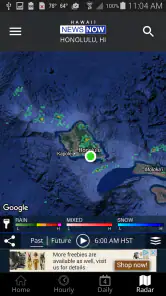
Hawaii News Now Weather is a weather app focused on conditions across the Hawaiian Islands. It provides current temperatures, hourly and extended forecasts, radar imagery, satellite views, weather alerts, and forecast updates from the Hawaii News Now weather team. It is designed for residents, travelers, and anyone who needs localized information for Oahu, Maui, Kauai, the Big Island, and surrounding areas.
Does Hawaii News Now Weather provide severe weather alerts?
Yes, the app can provide notifications and information about significant weather conditions, including tropical storms, hurricanes, flash floods, high surf, strong winds, and other official warnings. Alert availability can depend on your selected location, device permissions, and regional notification settings. Users should enable notifications and location access if they want timely updates, while also checking official emergency sources during dangerous conditions.
Can I use the app to check weather for different Hawaiian islands?
Yes, Hawaii News Now Weather allows users to view forecasts for multiple locations rather than limiting them to their current position. You can search for cities or communities and save preferred locations for quicker access. This is particularly useful when planning travel between islands, comparing conditions in coastal and inland areas, or monitoring weather at home while visiting another part of Hawaii.
Pros
- Accurate local forecasts tailored to Hawaii’s islands and microclimates.
- Real-time alerts help users prepare for storms
- flooding
- and severe weather.
- Radar and satellite views make tracking incoming weather systems easy.
- Simple interface provides quick access to current conditions and forecasts.
- Useful live updates from a familiar local news and weather team.
Cons
- Some features may depend on a reliable internet or mobile data connection.
- Frequent alerts can feel excessive if notification settings are not adjusted.
- Forecast details may vary in accuracy across smaller
- remote areas.
- Advertising may interrupt the experience or take up screen space.
- The app is primarily useful for Hawaii residents and visitors.
- Category
- Weather
- Version
- 6.2.512













