GPS Navigation Route Finder
- 197.00
- 4.4
- Installs
- 10.00M
- Price
- Free

Screenshots


Analysis by Reviewed
If you're anything like me, getting lost is practically a hobby. Whether it's missing a turn in your own neighborhood or wandering aimlessly in a new city, having a trusty navigation app is essential. That's where the GPS Navigation Route Finder steps in. With its promise of getting you from point A to B without the hassle, I decided to give it a whirl and see if it lives up to its expectations.
Choosing a route before the trip begins
I find a navigation app most useful when it helps me make a calm decision before I’m already under pressure. For GPS Navigation Route Finder, I’d begin at home or while parked, enter the destination, and check that the result points to the right street or landmark. This is especially worthwhile when an address is unfamiliar or several places have similar names. Taking a moment to confirm the destination can prevent a perfectly clear set of directions from leading to the wrong entrance.
A realistic use would be leaving work for an appointment across town during a busy afternoon. I’d check the route before starting the car, listen to the guidance once underway, and avoid trying to edit the destination at a red light or while moving. If plans change, the safer handoff is to pull over or ask a passenger to handle the phone. That small routine matters more than any clever route suggestion: navigation is helpful only if it doesn’t pull my attention away from driving.
First Impressions
Upon launching the GPS Navigation Route Finder, I was greeted with a clean and intuitive interface. The layout is straightforward, making it easy for even the most tech-averse individuals to navigate through its features. I appreciated the lack of clutter and unnecessary frills, which often plague other navigation apps. Instead, this app seems to be all about getting the job done with efficiency.
From Destination to Departure
For an ordinary commute, I’d start by entering a familiar workplace or appointment, then check that the selected destination is the right one before setting off. That small pause matters when search results include similar street names or places in neighboring districts. If I’m heading somewhere unfamiliar, using a landmark rather than relying on a partial address can make the starting point clearer. I’d do this while parked, not while moving, so I can review the route without dividing my attention.
The app is free to download, and it is made by Travel Tools Studio. Its listing shows a 4.4 average from around 26,000 ratings, with over 10 million installs. Those figures suggest it has found a broad audience, but they don’t tell me whether its routes suit every local street or driving habit. I’d treat it as a practical option to try, then judge it on the routes I actually use.
Features That Stand Out
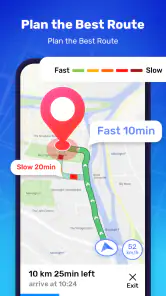
The app boasts a plethora of features designed to make your journey smoother. One of the highlights is the real-time traffic updates. We've all been there—stuck in a never-ending traffic jam, wishing we had known sooner. This feature ensures you're always in the know, helping you dodge congested areas with ease.
More From Our News Desk

Weather by Xiaomi Review: Clear at a Glance, Less Clear Up Close

X Under Pressure: Can It Recover When Posting Goes Wrong?

Clash of Clans Is Won Between the Battles

Android Auto Makes the Case for Quieter Car Software

MobiOffice: Transforming Mobile Productivity with Seamless Integration

EA SPORTS FC™ Mobile Soccer: Redefining Mobile Sports Gaming
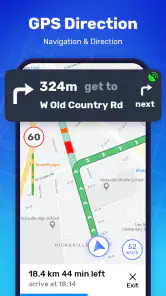
Another noteworthy feature is the voice-guided navigation. I found the voice instructions to be clear and timely, which is a huge plus when you're driving solo and can't afford to keep glancing at your phone. Plus, the app supports multiple languages, which is a thoughtful addition for international travelers.
Making Offline Maps Useful
Offline maps are most helpful when I plan for them before connectivity becomes unreliable. I’d prepare the area I expect to visit while I still have a dependable connection, then avoid assuming that every live feature will behave the same way once I’m offline. Traffic information, by its nature, depends on current information, so I wouldn’t count on it as a substitute for a downloaded map in a signal dead zone. For a rural drive or a subway-to-walking handoff in a city, that distinction can prevent a frustrating surprise.
A practical routine is to keep the route visible before leaving, listen for the next instruction, and let a passenger handle any rerouting or destination changes. If I’m driving alone, I’d pull over before searching for a new stop. Navigation should reduce distraction, not create another reason to interact with a screen at the wrong moment.
What offline preparation changes
Offline maps are most valuable when I treat them as preparation rather than a guarantee that the whole trip will work exactly as it would online. Before heading somewhere with uncertain reception, I’d make sure the map covers the area I need and think through the route while the phone is connected. A useful extra step is to note the next major town, road, or recognizable landmark. If a turn is easy to miss, that mental checkpoint gives me another way to orient myself without repeatedly handling the phone.
This approach is useful for a weekend drive through rural areas, but it also helps in a city where a basement car park or underground station interrupts reception. I can plan the transition from driving to walking before I leave the car, then use the map as a reference when service returns or remains weak. The trade-off is that offline readiness takes a little attention up front; it is not a feature I’d want to discover only after the connection has dropped.
User Experience
In terms of user experience, the app is a joy to use. Inputting destinations is a breeze, thanks to the app's smart search functionality. Whether you're searching by address, landmark, or even coordinates, the app handles it seamlessly. I also appreciated the offline maps feature, which is a lifesaver when you're venturing into areas with spotty internet coverage.
One thing that caught my attention was the app's power efficiency. Unlike some other navigation apps that drain your battery faster than you can say "low power mode," this one seems to have optimized its energy consumption quite well.
A commute is a better test than a first drive
I wouldn’t decide whether to keep a navigation app after one unfamiliar trip. On a route I know, I can notice whether a suggested detour is genuinely useful, whether the spoken instructions arrive at a comfortable moment, and whether the app’s chosen roads make sense for my routine. Familiar roads give me a reference point; a new route can make it hard to tell whether a strange choice is a map issue or simply a road I haven’t used before.
For a new user, I’d try one routine journey and one destination that requires a little more planning. The first shows whether the app fits daily use, while the second tests the practical value of offline maps and landmark search. I’d also set the phone in a stable, visible position before moving and rely on voice guidance where possible. That workflow is less exciting than testing every feature at once, but it gives a fairer picture of whether the app will be comfortable to use repeatedly.
How It Fits Beside Other Navigation Choices
Compared with the map app many people already use on their phone, this one makes most sense if you want a straightforward navigation-focused experience and value having offline maps available. A familiar general-purpose map may be more convenient if you already rely on it for saved places and other planning habits. I wouldn’t switch solely because of a clean interface; I’d compare the route suggestions on a commute I know well and see which one gives clearer directions and a more useful alternative when traffic changes.
It may suit drivers who want spoken guidance, people visiting areas with patchy reception, and travelers who prefer entering an address or landmark and getting moving. It is less compelling for someone who needs a navigation tool to double as a detailed trip planner, or who expects every live update to work without a connection. The app is rated for Everyone, runs on Android 5.0 or later, and its current version is 2.11. Optional in-app purchases range from $4.99 to $29.99 per item, so I’d check what an offered purchase covers before paying; the basic download is free.
Who benefits most from this style of navigation
I can see this being a sensible fit for a commuter who wants a direct route, spoken instructions, and a map option for journeys through areas with unreliable data service. It also suits someone borrowing a car or traveling in a place where they don’t know the street layout, provided they prepare the destination and map before setting off. Those are focused jobs, and the app’s navigation-first feel may be more useful than a crowded collection of planning tools.
I’d be less inclined to recommend it as the only tool for a complicated multi-stop holiday, a trip that depends on detailed research before departure, or a journey where I need to coordinate several people and saved plans. In those cases, a general map service or dedicated trip-planning tool may be a better companion. I’d also keep another way to orient myself for a remote drive: offline mapping reduces dependence on a connection, but it doesn’t remove the need to pay attention to road signs and conditions.
Where the Route Can Still Frustrate
No navigation app can make every road decision for me. Traffic suggestions can be less useful if I’m already committed to a turn, and following a route blindly is a poor idea when signs, closures, or local restrictions point elsewhere. I’d use the directions as assistance, keep an eye on the road, and choose a safe place to stop if the route needs attention. On a trip where precise local knowledge is essential, checking the route against another map before departure is a sensible backup.
There is also a difference between a map being available offline and having every convenience available offline. I’d prepare the destination and route before a journey with uncertain reception, keep my phone charged, and avoid relying on a last-minute search in a disconnected area. Those habits make the offline option more useful without assuming it removes every travel uncertainty.
Questions I’d settle before depending on it
Would I use it without mobile reception? I’d use the offline map only after preparing the relevant area while connected, and I’d avoid assuming that traffic updates or every search will be available without a live connection. Can it help with a new address? The search supports addresses, landmarks, and coordinates, so I’d choose the clearest one and verify the destination before departure. Those checks are simple, but they help avoid confusing a search result with the exact place I intend to reach.
Would I replace a map app I already know? Only after comparing the two on my regular route and on a less familiar one. Does free mean there are no paid options? The download is free, though optional in-app purchases are offered; I’d review what a purchase includes in the app before deciding whether it is worthwhile. These are practical questions to resolve early, rather than assumptions to make midway through a journey.
Final Thoughts
All in all, the GPS Navigation Route Finder is a solid choice for anyone in need of reliable navigation assistance. Its user-friendly interface, coupled with essential features like real-time traffic updates and offline maps, make it a must-have for both everyday commutes and adventurous road trips. While no app is perfect, this one comes pretty close. So next time you're planning a journey, you might want to give this app a shot. Who knows, it might just become your new favorite travel companion!
My recommendation is to try it on a familiar drive first, then prepare an offline area before taking it somewhere with uncertain coverage. That gives you a grounded sense of how its route choices and spoken guidance fit your habits without asking you to trust it blindly. For straightforward point-to-point travel, it has a clear role; for elaborate planning or journeys where every live detail matters, I’d pair it with another source. Used with those expectations, GPS Navigation Route Finder is worth considering as a practical everyday option.
GPS Navigation Route Finder Frequently Asked Questions
Is GPS Navigation Route Finder suitable for everyday commuting?
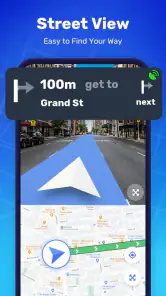
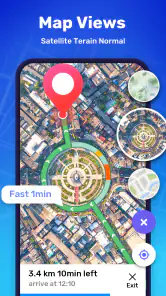
GPS Navigation Route Finder is aimed at making everyday commutes better, and its maps-and-navigation focus also suits people planning trips to unfamiliar places. Its store summary highlights offline maps and street view, which may be useful when you want more context about a route. Whether it fits your routine depends on the locations and navigation options you need.
Can I install GPS Navigation Route Finder on an iPhone or iPad?
GPS Navigation Route Finder is described as an app for Android devices, with Android 5.0 or later required. If you are considering it for an iPhone or iPad, check the app store available on your device before downloading, since the supported platform matters. For Android users, confirming the operating system version is a practical first step.
Who develops GPS Navigation Route Finder, and what devices can install it?
GPS Navigation Route Finder is a Maps & Navigation app developed by Travel Tools Studio. It is available for Android devices running Android 5.0 or later, so checking your device’s operating system before downloading is a useful first step. The app is free to download, and its content rating is Everyone, making it suitable for a broad audience.
What is the current version of GPS Navigation Route Finder?
The current version of GPS Navigation Route Finder is 2.11, and the app was released on December 3, 2020. If you already have it installed, keeping the app updated can help you use the latest available version. The app has reached over 10 million installs and holds an average rating of 4.4, giving prospective users a sense of its broad reach and reception.
What features does the GPS Navigation Route Finder offer?
The GPS Navigation Route Finder offers a comprehensive set of features including real-time traffic updates, voice-guided navigation, offline maps, and route optimization. It also provides points of interest along your route, such as gas stations and restaurants, ensuring a seamless journey whether you're commuting or exploring new areas.
Pros
- Accurate and up-to-date maps.
- Real-time traffic updates.
- Voice-guided turn-by-turn navigation.
- Offline map access available.
- Multiple route options.
Cons
- Occasional GPS signal loss.
- High battery consumption.
- Ads in free version.
- Limited offline features.
- In-app purchases for premium features.
- Category
- Maps & Navigation
- Version
- 2.11











