GPS Location Tracker Pro
- 107.00
- 3.5
- Installs
- 5.00M
- Price
- Free

Screenshots
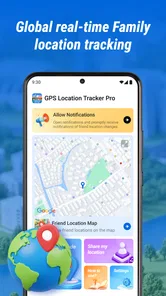
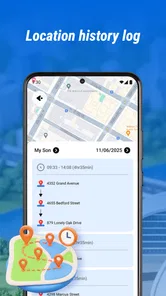
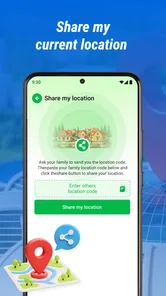
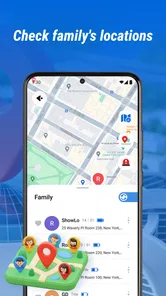
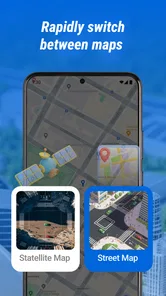
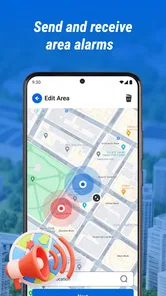
Analysis by Reviewed
Keeping track of a child’s journey home or checking that an older relative has reached an appointment can bring peace of mind—but location sharing works best when it supports a conversation rather than replacing one. GPS Location Tracker Pro is built around that practical need. I see it as a straightforward option for families who want a shared view of where loved ones are, not as a full navigation suite or a substitute for checking in directly.
The app sits in the maps and navigation category, and its purpose is narrower than the broad category might suggest: it focuses on seeing the locations of seniors and children. That focus is useful if family safety is your main reason for installing a tracker. It also sets expectations. If what you need is turn-by-turn directions, route planning, or a general-purpose map, a conventional navigation app is likely a better fit.
A practical test before installing
I would start by asking the person who will carry the phone what would make location sharing feel helpful rather than intrusive. A child might be comfortable with a check after the school walk, while an older relative may prefer sharing only during trips to unfamiliar places. Setting that boundary before anyone opens the map makes it easier to judge whether a family tracker fits the relationship, not just the technology.
It also helps to decide what happens when the app cannot settle a question. If a person’s location looks unexpected, the next step should be a call or message, not an immediate assumption that something has gone wrong. This simple rule can prevent a stale or confusing map position from turning into unnecessary worry. For a household that cannot agree on this kind of restraint, a tracker may add stress instead of reassurance.
What to consider before relying on a family location app
I’d begin with the agreement behind the map: who is comfortable sharing, when a check is reasonable, and what you’ll do if a position seems unexpected. That conversation helps separate everyday coordination from constant monitoring and gives everyone a clear way to raise concerns. With those ground rules in place, it becomes easier to judge whether this particular tracker fits your family’s routine.
Make the sharing agreement part of setup
Before choosing any location tracker, I’d decide who will see whose location and when everyone is comfortable being checked. This matters especially with older children, who may reasonably expect more privacy than younger ones, and with seniors who should understand how their location is being shared. A tracker is most helpful when the people involved know why it is being used and can discuss changes as needs evolve.
It is also worth agreeing on what a location update means. A dot on a map is a snapshot, not proof that someone is safe or available to talk. If a relative’s position looks unexpected, I would use it as a reason to call or message rather than jump to conclusions. Location can be imprecise or delayed in everyday circumstances, so treating it as context—not a verdict—makes the tool more useful and less stressful.
More From Our News Desk

Weather by Xiaomi Review: Clear at a Glance, Less Clear Up Close

X Under Pressure: Can It Recover When Posting Goes Wrong?

Clash of Clans Is Won Between the Battles

Android Auto Makes the Case for Quieter Car Software

MobiOffice: Transforming Mobile Productivity with Seamless Integration

EA SPORTS FC™ Mobile Soccer: Redefining Mobile Sports Gaming
Think about the routine, not just the emergency
The best reason to install GPS Location Tracker Pro is often a recurring, ordinary concern: a child walking between school and home, a senior travelling to a familiar appointment, or family members coordinating who is nearby. In those situations, checking a location can save repeated “Are you there yet?” messages. For rare emergencies, however, a family should not assume that an app alone will provide dependable help. Agree on a direct contact plan as well.
A useful test is to picture a normal weekday. If you would check the map at predictable moments, and the person being tracked is willing to share, the app’s central purpose may suit your household. If you mainly want directions to a destination, or you are looking for a private personal map that no one else sees, the family-tracking approach may feel like the wrong tool.
What the app is—and what it is not
GPS Location Tracker Pro is a location-tracking app from RadoanHossanDev. It is free, has an Everyone age rating, and is currently at version 2.6.0.0, with Android 7.0 as its minimum operating system. The app has a 3.5 average from around 5,900 ratings, and more than 5 million installs. Those figures show that many people have tried it, but they are not a guarantee that it will suit your family’s devices, habits, or expectations.
The app’s appeal is its clear use case: keeping an eye on the whereabouts of children and seniors. I would not treat the word “Pro” in its name as evidence of particular premium tools or assume it includes functions beyond location tracking. For a careful decision, focus on whether the people who need to share a location can use it comfortably and whether its actual behavior meets your household’s needs.
Where GPS Location Tracker Pro makes sense
I see the app as most useful when a family has a recurring, practical reason to check a child’s or senior’s whereabouts, rather than a wish to watch every trip. A helpful test is to try it on a familiar outing and decide beforehand what action a location check should prompt. That keeps the tool tied to a real need and makes its role clearer in ordinary family coordination.
A focused choice for family check-ins
Compared with a general map app, a family tracker is organized around people rather than destinations. That distinction can make a location check more direct: instead of opening a map to search for an address, you are using the app for the specific question of where a participating relative is. For a parent coordinating a child’s walk home, or an adult child checking that a senior has set out for an appointment, that narrower purpose is easier to understand.
One practical workflow is to make location checks part of a routine instead of watching the map continuously. For example, a parent might check once after school and then call if the child has not arrived as expected. A family member supporting an older relative could check before leaving to pick them up, avoiding a trip based on an outdated assumption. This approach reduces unnecessary checking and keeps human contact at the center.
Another useful habit is to decide in advance what you will do if a location seems wrong. First, check whether the person can respond; then confirm the situation directly before changing plans. A map point can be helpful for coordination, but it does not explain why someone is in a particular place. That distinction is especially important when a senior has changed plans or a child has stopped somewhere with permission.
Useful for simple coordination, not constant surveillance
I think the strongest case for this app is a family that wants occasional reassurance without turning location sharing into a running commentary on someone’s day. A child can benefit from a parent being able to confirm a safe arrival, while an older adult may appreciate fewer repeated calls from relatives worried about a routine trip. In both cases, a mutually understood check-in practice is more respectful than silently monitoring every movement.
There is a trade-off here: the more a family depends on a tracker, the more important it becomes to keep expectations realistic. A location display can help answer “where should I look?” but it cannot answer “is everything all right?” on its own. I would keep normal calls, agreed meeting points, and emergency contacts in the plan, especially for someone who may need help communicating or travelling independently.
Its broad reach is encouraging, but reviews still matter
With over 5 million installs, GPS Location Tracker Pro has reached a substantial audience. Its 3.5 average rating is more mixed than an enthusiastic endorsement, so I would approach it as an option to test rather than a solution to trust immediately. Ratings can reflect different phones, expectations, and family situations; what matters is whether location sharing works consistently enough for your own routine.
Since it is free, trying it does not require a purchase, but there is still a cost in time and attention. You will need to decide who participates, become familiar with the app, and see whether its location information is useful in the places your family actually travels. I would not make it the sole basis for a safety decision until each person has had a chance to confirm that the arrangement works for them.
Test the parts that matter in your own routine
A useful trial is not simply opening the map once while everyone is at home. I would check the setup during a short, ordinary outing: have the person carrying the phone travel a familiar route, then see whether the other family member can interpret the displayed position and act on it without guessing. This tests the real decision the app is meant to support—whether a location check helps you coordinate—not just whether the app launches.
Try the same routine in the places where your family actually needs it. A position that is easy to interpret near home may be less useful around a large school, a busy appointment area, or a route with several possible entrances. If the map leaves you unsure which meeting point to use, agree on a call or a recognizable landmark as the fallback. That small rehearsal is more useful than treating a successful first glance as proof that every later check will be clear.
When another kind of app may be better
The key question is whether your need is actually about locating a person. If you mainly want directions, route choices, or a one-time way to meet someone, a navigation app or temporary sharing option may involve less ongoing coordination. I’d also treat consent as decisive: when sharing feels unwelcome, a direct call or agreed meeting point is a better starting place than switching to another tracker.
Choose a navigation app for routes and directions
If your main need is to find an address, compare routes, or get guidance while driving, a standard navigation app is a more natural choice. GPS Location Tracker Pro is aimed at tracking people, so it should not be selected simply because it appears in the maps and navigation category. A route-focused app answers where to go; a family tracker addresses where a participating person is. Some households may need both kinds of tool, but they serve different jobs.
Consider built-in sharing for occasional, temporary needs
For a one-off meeting or a short trip, the location-sharing option already available on a phone or in a messaging service may be more convenient. It can avoid asking everyone to adopt another app for a single occasion. By contrast, a dedicated tracker can make more sense when the same relatives need to coordinate repeatedly and want a consistent place to check.
The choice is not simply about which option has more features. It is about how often you need sharing, who needs access, and whether a new app fits the family’s habits. If only one person wants location information and the other does not agree to share it, choosing a different tracker will not solve the underlying issue. A direct conversation is more important than the particular map interface.
Skip it when privacy or independence takes priority
GPS Location Tracker Pro is not the right choice for someone who does not want their location shared, or for a household where tracking would create more tension than reassurance. Older children and seniors deserve a say in how location checks are used. If a family cannot agree on reasonable boundaries, I would not recommend installing a tracker as a workaround.
It may also be a poor fit when you need a highly dependable emergency service rather than a way to check a location. No family should interpret a tracker as a guarantee that someone is safe, reachable, or receiving assistance. Keep a separate plan for urgent situations, and use the app only as one possible source of information.
Switching is easiest when you keep the routine simple
If your family is moving from another location-sharing method, avoid changing every habit at once. Decide who will check, when a check is reasonable, and what counts as a reason to contact the person. Then try the new arrangement during an ordinary trip before relying on it for a more important journey. This gives everyone a chance to see whether the app’s location view is clear and whether the check-in routine feels comfortable.
When switching away from GPS Location Tracker Pro, tell the other participants rather than simply stopping checks without explanation. If the app has become part of how relatives coordinate, changing tools can create confusion about where to look. A short agreement about the replacement—whether that is occasional phone-based sharing or direct calls—can preserve the useful part of the routine without making anyone feel monitored by default.
Account for the human cost of changing tools
The biggest switching cost may not be learning a different screen; it is rebuilding a shared habit. If one relative checks this app and another expects a phone call, a quiet change can make both people think the other has missed an agreed check-in. Before replacing it, tell everyone what will happen instead and choose a simple fallback that works for the person being tracked as well as the person checking.
I would also avoid running two tracking routines indefinitely just to feel safer. That can make it unclear which location view the family should trust and encourage more checking than the original arrangement required. Test a replacement on a low-pressure trip, confirm that everyone understands it, and then keep one agreed method for routine coordination. If the household only needs occasional contact, a direct call may be simpler than maintaining any location-sharing arrangement.
My recommendation for families
I would recommend GPS Location Tracker Pro to families who want a focused way to check on a child or senior and are willing to make location sharing a shared, clearly understood arrangement. Its free price and straightforward purpose make it reasonable to try, while its average rating suggests that I would test it in ordinary circumstances before depending on it. The app is most compelling when it reduces repetitive coordination and supports a real conversation, not when it is expected to replace one.
I would choose a navigation app instead if routes and directions are the priority, and a temporary built-in sharing option if the need is occasional. I would skip any tracking app if the people involved are uncomfortable with it or if the family needs guaranteed emergency support. For the right household, GPS Location Tracker Pro can be a practical location check-in tool; the deciding factor is less the map itself than whether your family can use it with clear boundaries and sensible expectations.
GPS Location Tracker Pro Frequently Asked Questions
What does GPS Location Tracker Pro do?
GPS Location Tracker Pro is designed to use a device’s location services to show or record where the device is on a map. The exact tools can vary by app version, so check its current store listing for details such as location history, route tracking, or sharing options. It is not a substitute for emergency services, and GPS accuracy can be affected by buildings, weather, device settings, and network coverage.
Does GPS Location Tracker Pro track someone without their knowledge?
A location-tracking app should be used only with the device owner’s permission and in accordance with local law. Do not install or use it to monitor another person secretly. If the app offers location sharing, confirm what information is shared, with whom, and how sharing can be stopped. Parents and guardians should also consider age, privacy, and applicable consent requirements before tracking a child’s device.
Does GPS Location Tracker Pro work without internet access?
GPS positioning may sometimes determine a device’s location without a mobile-data connection, but map loading, account features, or sending location updates may require internet access. Performance also depends on whether location services are enabled and the device can receive a clear satellite signal. Before relying on the app offline, check its current description and test the relevant feature in a safe, familiar place.
Is GPS Location Tracker Pro free, and does it include ads or in-app purchases?
Pricing and monetization can differ by platform, region, and version. The app may be free to install while offering paid features, subscriptions, or advertising, so review the Google Play or App Store listing before downloading. Check the displayed price, in-app purchase details, and cancellation terms carefully. Do not assume that a feature shown in promotional material is included at no extra cost.
What permissions and privacy details should I check before installing GPS Location Tracker Pro?
Review the app’s requested permissions and privacy information in the official store listing before installation. Location access is central to a tracker, but the app may also request other access depending on its features. Check whether location is collected in the background, shared with third parties, or retained in an account, and read the developer’s data and deletion policies. Grant only permissions you understand and need.
Pros
- Records routes and locations for later reference.
- Can help you retrace a route if you lose your way.
- Location sharing may help contacts keep track of your journey.
- Useful for organizing trips and reviewing past travel.
- GPS-based tracking can work without a mobile data connection.
Cons
- Continuous GPS use can drain your battery quickly.
- Location accuracy may vary indoors or in dense urban areas.
- Sharing location data raises privacy concerns.
- Background tracking may require extra permissions and setup.
- GPS signals can be unreliable in tunnels or remote areas.











