Google Voice
- 114.94K
- 4.2
- Installs
- 10.00M
- Price
- Free

Screenshots




Analysis by Reviewed
Have you ever found yourself juggling multiple phone numbers and craving a simpler way to manage your communications? Well, let me introduce you to Google Voice, an app that promises to streamline your calling and messaging experience. I've taken it for a spin, and here's my take on whether it lives up to the hype.
Getting Started with Google Voice
First things first, setting up Google Voice is a breeze. All you need is a Google account, and you're good to go. The app allows you to choose a unique phone number, which can be a blessing if you're tired of sharing your personal number with everyone. The interface is clean and user-friendly, making it easy even for the non-tech-savvy among us to navigate through the features without a hitch.
Features That Make Life Easier
What really caught my attention is the seamless integration with other Google services. Whether you are using Gmail, Google Calendar, or any other Google app, Google Voice fits right in like a missing puzzle piece. You can make calls, send texts, and even set up voicemail—all from a single platform. And the best part? You can access all these features from your desktop or mobile device.
Another standout feature is the call screening and blocking capabilities. If you're someone who gets a lot of spam calls, this is a lifesaver. The app screens your calls and lets you decide which ones to pick up and which ones to send to voicemail. Plus, you can block numbers with just a tap.
Communication Like Never Before
Text messaging is another area where Google Voice shines. The app supports both SMS and MMS, which means you can send text messages, photos, and even documents without any hassle. And because it's synced across all your devices, you can start a conversation on your phone and continue it on your laptop without missing a beat.
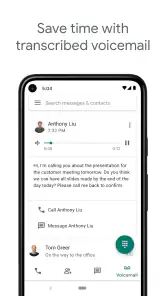
Voicemail transcription is another nifty feature I found useful. It converts your voicemails into text, so you can read them when listening isn't an option. It's not always perfect, but it gets the job done most of the time.
Final Thoughts
In conclusion, Google Voice is a fantastic tool for anyone looking to consolidate their communication channels. It's not just about making calls or sending texts; it's about creating a unified communication experience. While it might not replace your primary phone number, it's a great secondary option for both personal and professional use.
If you're looking for a way to manage your calls and messages more efficiently, Google Voice is definitely worth a try. With its array of features and seamless integration with the Google ecosystem, it has the potential to make your communication less chaotic and more organized.
Pros
- Free US number for calls and texts
- Integration with Google services
- Voicemail transcription service
- Customizable call forwarding
- Multi-device support
Cons
- Limited international call support
- Requires internet for full functionality
- Complex initial setup
- No emergency call support
- Occasional call quality issues

- Category
- Communication
- Version
- 2025.11.16.833077271











