GoFundMe
- 15.71K
- 4.7
- Installs
- 5.00M
- Price
- Free

Screenshots
Analysis by Reviewed
When I first opened GoFundMe, I wanted to know whether I could make sense of the process without already being an experienced fundraiser. My impression is that the app is built to make starting and sharing a campaign feel approachable, while still asking you to do the most important work yourself: explain the need clearly and tell people what kind of help would make a difference. It’s a finance app from GoFundMe Inc, and it’s free to download, so taking a look does not require a purchase.
For a first-time user, the reassuring part is that the app gives you a central place to work on a campaign rather than asking you to coordinate the whole appeal through scattered messages. The more important decision happens before you tap through setup: whether you are comfortable making the request public and keeping its story current. I’d treat the app as a useful tool for organizing an appeal, not as a promise that people will see it or contribute.
Getting from a first visit to a clear purpose
GoFundMe is not a magic button for raising money. It gives you a place to present a cause and reach potential supporters, but your story, your audience, and the trust you build are what give a campaign its meaning. I’d recommend going in with a specific purpose in mind rather than opening the app and hoping an idea will appear. A clear explanation makes it easier for someone who has never met you to understand why you are asking and how support could help.
What to expect when you begin
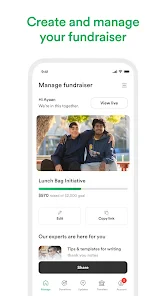
First things first, setting up a campaign on GoFundMe is a breeze. I mean, you can literally get your campaign up and running in just a few taps. The app guides you through the process like a breeze, making sure you know exactly what to do. What I love is that it's super intuitive. No need to be a tech wizard here!
That quick start is useful, but I wouldn’t confuse an easy setup with a finished campaign. Before you begin, jot down the essentials: who needs help, what the funds are intended for, and what you can share publicly. This small preparation can save you from writing a vague description in a hurry. If you’re organizing a fundraiser for someone else, agree on what details and images they are comfortable sharing before publishing anything.
That preparation also helps you decide whether to start now or wait. If you are still checking what the need is, who will manage the campaign, or which details can be made public, take time to settle those points first. A polished appeal is less important than a truthful one that you can stand behind if friends ask for clarification. For a first campaign, I’d keep a private draft of the basic explanation and read it as if you were a stranger encountering the request for the first time.
Making the campaign feel personal
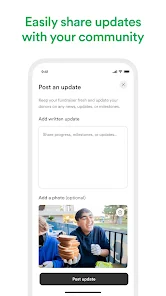
Once you've set up the basics, the app gives you plenty of options to customize your campaign. You can add images, tell your story, and share updates with your supporters. They even have this cool feature where you can see how many times your campaign has been shared. It’s like having your personal PR team!
More From Our News Desk

Weather by Xiaomi Review: Clear at a Glance, Less Clear Up Close

X Under Pressure: Can It Recover When Posting Goes Wrong?

Clash of Clans Is Won Between the Battles

Android Auto Makes the Case for Quieter Car Software

MobiOffice: Transforming Mobile Productivity with Seamless Integration

EA SPORTS FC™ Mobile Soccer: Redefining Mobile Sports Gaming
The practical value of those pieces is easy to underestimate. A photo can help visitors connect the request to a real person or project, while a direct story answers the questions a short appeal leaves open. I’d keep the writing specific and readable, then use updates to explain meaningful progress rather than repeating the original request. Share counts can give you a clue about whether people are passing the campaign along, but a share is not the same as a donation, so I wouldn’t treat that number as a measure of success on its own.
A useful writing check is to make the first few lines answer the basic questions without requiring a reader to scroll through a long backstory: who is involved, what happened or is being planned, and what kind of help is being requested. Then use the fuller story for context. This makes the page easier to understand when someone opens it from a message on a phone, and it gives supporters a clear explanation they can pass along in their own words.
And let’s not forget about the easy sharing options. You can blast your campaign on social media or send personal messages to friends and family with just a few taps. It’s all about getting the word out, right?
For a first-time organizer, I’d start with a personal message to a few people who know the situation, then widen the circle if it feels appropriate. A short note explaining why you’re sharing is more considerate than dropping a fundraising link without context. It also gives early supporters a chance to ask questions, which can help you make the campaign explanation clearer for everyone else.
There is a trade-off between broad reach and personal context. A public post can travel farther, but it may reach people who have no way to judge the appeal beyond what is on the page. A direct message reaches a narrower audience, yet it lets you explain why you thought that person might care. I’d choose the channel based on the relationship and the sensitivity of the story, rather than sharing everywhere by default.
Giving, browsing, and keeping people informed
One thing that really stood out to me is the sense of community within the app. There are tons of stories of people coming together to support each other, and it gives you all the warm fuzzies. Plus, GoFundMe has a section where you can explore other campaigns, which is great if you’re looking to support someone else or get inspired by their stories.
As a donor, browsing can help you find causes you might otherwise never encounter. I’d still take time to read the campaign details and updates before giving, especially when the organizer is unfamiliar to me. If your main goal is to make a one-off contribution to a person whose fundraiser you already trust, a direct donation route may be simpler; the app’s broader appeal is having campaigns and giving in one place, rather than replacing every way people support one another.
For a donor deciding whether to contribute, I’d read the appeal for a coherent account of the need and look at whether later updates fit the original explanation. If something is unclear, asking the organizer a respectful question before giving is more sensible than filling in the gaps with assumptions. That is a practical use of the app’s campaign format: it gives you a place to assess the story, but your own judgement still matters.
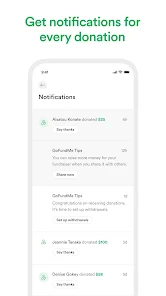
Oh, and the app has a neat feature where you can send thank you messages to your donors. It's a nice way to show appreciation and keep them updated on your progress.
That follow-through matters in a realistic everyday situation. Imagine a neighbor organizing help after an unexpected setback: they can draft the story when they have a quiet moment, share it with people who know the family, and later post a concise update when circumstances change. The useful habit is to set aside time to keep the page accurate, not just launch it and forget it. For someone who cannot comfortably share personal details or keep supporters informed, asking a trusted friend to help communicate may be a better fit.
That scenario also shows why it helps to agree on a simple update rhythm before sharing widely. You do not need to turn every small development into a post; a meaningful change in the situation or a clear account of progress is more useful. If another person is helping, decide who will answer questions and keep the information consistent. This avoids the awkwardness of supporters receiving different explanations from different people.
Trust, questions, and sensible limits
Now, let’s talk about security because I know that’s a biggie for many of us. GoFundMe has got you covered with top-notch security measures. They ensure that all transactions are safe and secure, so you can focus on your campaign. And if you ever hit a snag, their support team is just a message away. They’re super responsive and friendly, which is always a plus in my book.
I’d approach any fundraiser with care even when using a dedicated platform. A donor should understand who is organizing the campaign and what the appeal says; an organizer should be prepared for people to want context before contributing. The app can make sharing easier, but it cannot guarantee that a campaign will reach the right people or meet its goal. That is the main trade-off: convenience and visibility help, yet the result still depends on the cause and the people willing to support it.
Another point worth considering is the emotional work involved. Fundraising can mean explaining a difficult situation repeatedly, responding to questions, and deciding how much of someone else’s experience to share. The app can bring those tasks together around a campaign, but it does not remove them. If the organizer is already stretched, sharing responsibility with a trusted person or choosing a less public way to ask for help may be more sustainable.
If you’re wondering whether it is only for people raising money, no: browsing campaigns and giving are part of the experience too. If you’re wondering whether it suits every kind of fundraising, I’d say it is most useful when a personal or community cause benefits from a shareable story. For a formal organization that needs a specialized fundraising workflow, or for someone who wants a private way to collect help without a public-facing appeal, another approach may be more suitable.
Compared with asking for help through a group chat, a campaign page gives people one place to return to for the explanation and later updates. Compared with a formal fundraising system, it is better suited to a straightforward personal appeal than to a complex organization’s internal process. And compared with giving directly through a channel you already trust, browsing within the app offers more discovery but asks you to assess each campaign on its own merits. Those differences are why I would choose the tool based on the shape of the need, not just on how quickly I could start.
Who I’d recommend it to
The app has a 4.7 average from around 76,000 ratings, and it has been installed over 5 million times. It is rated for Everyone, with a current version of 12.1.0 and a minimum operating system requirement of 8.0. Those details make it easy for many people to try, but the right choice still depends on what you need: I’d use it when a campaign needs a clear home and straightforward sharing, not as a substitute for planning, honest communication, or personal follow-up.
It is a sensible option for someone who has a specific personal or community need, can explain it plainly, and wants supporters to have a shareable place to understand the request. It can also suit a donor who wants to explore different causes rather than contribute only through an existing contact. I would hesitate to recommend it to someone who needs complete privacy, does not want to maintain a public story, or expects the platform itself to find an audience for them.
One last practical question is what counts as a first successful action. It does not have to be reaching a particular fundraising milestone. For an organizer, success might be completing a clear page and sharing it with the first few people who can give useful feedback. For a donor, it might simply be finding a campaign whose details make sense and deciding to support it thoughtfully. Starting with a manageable step keeps the experience grounded and gives you a chance to learn before widening your involvement.
In the end, if you’re looking for a hassle-free, effective way to raise funds, GoFundMe is definitely worth checking out. Whether you’re raising money for a personal cause, someone in need, or a community project, this app makes it easy and accessible for everyone. Give it a try, and you might just find yourself amazed at the generosity and support out there!
GoFundMe Frequently Asked Questions
Does GoFundMe require an account to browse campaigns or donate?
Before downloading, consider how you plan to use GoFundMe: browsing campaigns, giving, or managing a fundraiser. The app brings campaign discovery and fundraising together on a mobile device, so it can be useful when you want to keep up with campaigns away from a computer. If you plan to organize a campaign or make a donation, review the steps shown in the app and provide the information requested for that action.
Can I use GoFundMe to support a campaign from my phone?
Yes, GoFundMe is designed to bring fundraising and giving to a mobile device. You can use the app to explore campaigns and support causes, while organizers can use it to manage a campaign. Before donating, take time to read the campaign story and understand its purpose. The app is free to download, so you can install it and see whether its mobile experience fits the way you prefer to give.
How can I tell whether a GoFundMe campaign is trustworthy before donating?
Before contributing, read the campaign story carefully and check that its purpose, organizer, and planned use of funds are clearly explained. Look for updates that show how the organizer is communicating progress, and consider asking questions if anything is unclear. GoFundMe is a finance app for fundraising and giving, but reviewing a campaign’s details yourself helps you make an informed decision about whether to donate.
What can I do with the GoFundMe app?
GoFundMe’s short description is simply “GoFundMe,” while its central purpose is captured by “Fundraise. Give. Help.” The app brings campaign discovery and fundraising together, so users can support causes or manage a campaign from a mobile device. It is listed as a finance app, is free to download, and is intended for Everyone. Its developer is GoFundMe Inc.
1. What is GoFundMe and how does it work?
GoFundMe is a popular crowdfunding platform that allows individuals to raise money for personal causes, charitable events, and community projects. Users can create a campaign by setting a fundraising goal and sharing their story with potential donors. The platform makes it easy to share campaigns via social media, email, and other channels. Donors can contribute directly to the campaign through the website or app, and campaign organizers can withdraw funds directly to their bank accounts.
Pros
- User-friendly interface for all ages
- Fast setup for fundraising campaigns
- Wide range of categories supported
- Secure payment process for donors
- Instant sharing options on social media
Cons
- High platform fees reduce earnings
- Limited customization for campaigns
- Slow customer support response
- Requires internet connection to use
- No direct contact with donors
- Category
- Finance
- Version
- 12.1.0











