GoDaddy Conversations
- 596.00
- 3.6
- Installs
- 100.00K
- Price
- Free

Screenshots






Analysis by Reviewed
When I first opened GoDaddy Conversations, the appeal was easy to understand: it aims to give a small business owner one place to keep track of customer communication instead of jumping between disconnected channels. That sounds simple, but it addresses a real daily problem. A missed message can mean a delayed quote, a forgotten appointment, or a customer who quietly moves on to another business.
I see this as a communication app for people who already work with GoDaddy and want a more centralized way to stay in touch. It is free to install, suitable for Everyone, and developed by GoDaddy Operating Company, LLC. The app has passed the initial discovery stage with more than one hundred thousand installs, although its average rating of 3.6 shows that the experience is useful for some people while still leaving room for frustration.
My main question was not whether the app could be helpful for a busy business. It clearly can. The more important question was whether it would still deserve a regular place on my phone after the first week, once the novelty of having a communication hub had worn off. That is where the practical details matter: how often the app genuinely saves time, how much attention it demands, and whether it fits naturally into an existing customer-service routine.
What the first week feels like
The first useful change is mental rather than flashy. Instead of treating every customer message as an isolated interruption, I could approach communication as one ongoing work queue. That is valuable for a solo operator who answers questions between jobs, during a commute break, or after closing time. The app’s purpose is not entertainment; it is to reduce the number of places I need to remember to check.
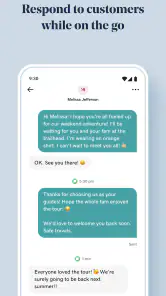
A realistic example would be a local cleaner who receives a question about availability, a request for a price, and a follow-up from an existing customer in the same afternoon. Without a central view, those conversations can become scattered across different tools. With GoDaddy Conversations, the intended workflow is easier to understand: open the app, review what needs attention, respond, and move on to the next customer instead of reconstructing the day from memory.
That does not mean every business will instantly feel organized. A communication app only helps if I make it part of my routine. During the first week, I would set a few fixed moments to review messages rather than opening it constantly. Checking once at the start of the workday, once around lunch, and once before finishing can be more sustainable than reacting to every alert. The best value comes from creating a dependable habit, not from treating the app as another source of continuous notifications.
One practical advantage is that the app is easier to justify when customer communication is already tied to a GoDaddy-based business setup. In that situation, it feels less like adding a completely separate service and more like extending an existing workflow. If I am not using GoDaddy for anything connected to my business, however, the reason to choose this particular communication tool becomes less obvious. A standalone messaging platform may be more familiar or more flexible for someone who is starting from scratch.
More From Our News Desk

Weather by Xiaomi Review: Clear at a Glance, Less Clear Up Close

X Under Pressure: Can It Recover When Posting Goes Wrong?

Clash of Clans Is Won Between the Battles

Android Auto Makes the Case for Quieter Car Software

MobiOffice: Transforming Mobile Productivity with Seamless Integration

EA SPORTS FC™ Mobile Soccer: Redefining Mobile Sports Gaming
The first week also reveals an important trade-off. Centralization can make messages easier to find, but it can also create the impression that everything now belongs in one place. I would not assume that installing the app automatically replaces every communication method a business uses. Customers may still contact a company through channels that require separate attention, and the owner remains responsible for deciding what gets handled in the app and what does not.
Where it helps a small operation
I think the strongest audience is a small business with a manageable flow of customer questions and no dedicated support team. A hairdresser, tutor, repair service, photographer, or independent consultant may not need an elaborate customer relationship system. What they do need is a reliable way to avoid losing track of conversations while handling the rest of the business.
The app can also help someone who shares customer duties with one or two colleagues, provided everyone agrees on a simple process. The useful conversation is not only “Can we use this?” but also “Who checks it, when do we reply, and how do we know a message is finished?” Without those decisions, a central inbox can still become a place where messages wait indefinitely.
My first concrete tip is to use the app as a triage point rather than a permanent workspace. I would quickly separate messages that need an answer today from those that can wait, then deal with the urgent group in a focused session. This avoids the common mistake of opening a communication tool repeatedly without actually completing the conversations inside it.
Another useful habit is to write replies that close the loop. Instead of sending a vague response such as “I will check,” I would include the next action or a clear question. That makes the app more valuable because the conversation becomes easier to resume later. The software can gather communication, but it cannot compensate for unclear replies or missing business procedures.
What the rating tells me about expectations
The current version is 1.186.0, and the app has received around twelve hundred ratings alongside hundreds of written reviews. I would read that feedback profile as a reason to approach it with realistic expectations rather than as a simple approval or rejection. The average rating is 3.6, which suggests that the central idea works for a portion of users but that the day-to-day experience may depend heavily on setup, business context, and personal tolerance for app friction.
That middle-ground rating matters because communication software is judged repeatedly. A game can entertain me for an evening even if it has rough edges; a business inbox is different. If opening it becomes confusing, slow, or repetitive, I feel the cost every working day. My advice is to test it during a normal busy period, not only during a quiet afternoon. The real test is whether it helps when several customer requests arrive close together.
Does it earn a place month after month?
After the first week, the central benefit becomes less about discovery and more about consistency. If the app gives me a dependable place to review customer communication, it can become part of a monthly operating rhythm. That is especially useful for businesses where messages lead directly to bookings, estimates, support questions, or repeat work.
The value is strongest when communication is frequent enough to be difficult to remember but not so complex that a full customer-management platform is necessary. In that middle range, a focused communication app can be a sensible compromise. It may save me from building a complicated system while still giving customer messages more structure than an ordinary personal inbox.
For a very small business, that simplicity may be exactly the point. I do not always need reports, elaborate automation, or a large collection of administrative tools. I need to know what customers said, which conversations still require attention, and whether I have replied. GoDaddy Conversations is easier to evaluate through that lens than through a long list of advanced business features.
For a growing company, the calculation changes. Once several people handle customer service, I would want to understand how well the app supports ownership, handoffs, and internal accountability before making it the center of operations. If the business requires detailed customer histories, complex workflows, or formal support reporting, a dedicated customer relationship or help-desk product may be a better long-term fit. The more complicated the organization becomes, the less likely a simple communication hub is to cover every need.
The free price makes experimentation easier. I can try the basic experience without committing to an upfront purchase, which is useful for an independent business watching expenses. At the same time, the presence of in-app purchases priced at $12.99 per item means I would review any paid option carefully before building it into a recurring workflow. I would ask what specific problem the purchase solves and whether it saves enough time to justify becoming part of normal operating costs.
My second non-obvious tip is to judge paid additions by avoided work, not by the feature list. If an upgrade only looks attractive because it adds another setting, I would probably skip it. If it reduces repeated manual checking or helps prevent missed customer follow-ups, the calculation is more practical. Small businesses often lose money through forgotten conversations, so the right question is whether the purchase improves reliability rather than whether it makes the app feel more complete.
Where the monthly value can fade
The risk is that the app becomes one more inbox instead of the single place I hoped it would be. If customers continue contacting me through several unrelated channels, I may still need a broader routine. In that case, the app can remain useful without being universal, but I should not expect it to eliminate all communication maintenance.
There is also a difference between collecting messages and improving customer service. A central view can show me what needs attention, but it does not automatically create faster answers, better policies, or a consistent tone. I would pair the app with a small set of reusable business details: service areas, typical response times, booking requirements, and information customers ask for repeatedly. That makes each conversation more efficient while keeping replies personal.
A third practical insight is to use recurring customer questions as a test of the app’s lasting value. During a month, I would note which questions appear repeatedly and refine my response process around them. If the app helps me spot those patterns and answer more consistently, it is earning its place. If I am merely opening it to read the same unresolved messages, the problem is probably the workflow rather than the number of conversations.
The app is less compelling for someone who only communicates occasionally. If I receive a handful of customer messages each month, a normal email account or the communication tools already connected to my business may be enough. Adding another app introduces a checking obligation, and that obligation is not worthwhile unless the centralization solves a real problem.
The maintenance burden behind the convenience
Every communication hub has a maintenance cost, even when the interface is straightforward. I need to keep the habit alive, decide which conversations are complete, and avoid allowing old threads to blend into current work. The app can reduce scattered attention, but it cannot remove the need for attention altogether.
I would begin with a very small operating rule: check messages at planned times, respond to anything urgent, and leave the app only after deciding what happens to the rest. That final decision is important. “I saw it” is not the same as “I handled it.” A message may need a later answer, information from a colleague, or a customer follow-up. If I do not record that next step somewhere appropriate, centralization can create false confidence.
Another maintenance issue is notification fatigue. Communication apps can become stressful when every incoming message feels equally urgent. I would avoid letting the app dictate the entire day. For a business that promises rapid replies, frequent monitoring may be necessary, but for many small operators a stated response window is healthier and more realistic. The app should support that promise, not pressure me into being permanently available.
The age rating of Everyone makes the app broadly approachable from a content perspective, but that does not mean every business will find the workflow equally comfortable. A person who is not confident with mobile organization may need time to establish a method. Likewise, a team that already has a carefully maintained support system may see the app as duplication rather than simplification.
Because the developer is GoDaddy Operating Company, LLC, the app makes the most sense to evaluate alongside the wider GoDaddy environment a business already uses. I would not choose it solely because of the developer’s name. I would choose it if the communication workflow fits the way I already attract customers and manage work. Brand familiarity can reduce the learning curve, but it is not a substitute for a good operational match.
Small habits that prevent the tool from becoming clutter
I would reserve a short weekly review for conversations that are still open. This is different from checking new messages. The weekly pass is where I would look for customers waiting on information, requests that were answered but never confirmed, and threads that should be closed. That simple separation between daily triage and weekly cleanup is one of the best ways to keep a communication app useful over time.
I would also avoid copying every internal business note into customer conversations. Keeping replies focused makes them easier to scan later. If a message contains several unrelated subjects, I would resolve them one at a time rather than adding more detail than the customer needs. This is not a special button or hidden setting; it is a workflow choice that makes a centralized conversation history more valuable.
For a shared business, I would agree on ownership before inviting the app into the routine. Two people replying to the same customer can be just as confusing as no one replying. A simple rule such as assigning conversations by service type, workday, or customer stage can prevent duplication. If the app does not fit that arrangement naturally, a more specialized team inbox may be a better option.
What creates fatigue over time
The biggest source of fatigue is not necessarily the number of messages. It is the feeling that I must open another app to discover whether anything important happened. If GoDaddy Conversations becomes an additional destination rather than a replacement for a scattered process, its long-term value weakens. I would pay close attention to that during the first month.
Another possible frustration is the gap between a neat central concept and messy real-world communication. Customers do not always follow the route I prefer. They may send incomplete details, change topics, or return after a long pause. No app can make those conversations tidy automatically. The benefit comes from making the mess easier to review, not from eliminating it.
There is also a risk of overestimating what a communication app can do for customer retention. A faster reply is helpful, but it is only one part of a good experience. If prices are unclear, appointments are unreliable, or service information is inconsistent, centralizing messages will not solve the underlying issue. I would use the app as support for a sound business process, not as the process itself.
Compared with ordinary email, the appeal is a more focused customer-communication routine. Email remains better for long documents, formal records, and businesses that already have a disciplined inbox system. Compared with social messaging, a dedicated work-oriented app can feel less mixed with personal conversations, while social platforms may be better when a business depends heavily on public interaction and discovery. Compared with a full help desk, this is likely to be easier to approach but less suitable for layered support operations.
That comparison leads to a clear trade-off: GoDaddy Conversations is most attractive when I want more structure than casual messaging but less complexity than enterprise support software. It is not automatically the best choice at either extreme. A very informal seller may find it unnecessary, while a larger support team may outgrow it.
The app’s release date, November 15, 2022, places it in the category of a product that has had time to become a practical tool rather than a brand-new experiment. I would still judge each update by whether it improves everyday communication, not by version numbers alone. The current version is 1.186.0, but a high version number does not by itself guarantee that the app will suit my business.
My long-term verdict
I would recommend GoDaddy Conversations to a small business owner who already has a GoDaddy-centered workflow and regularly loses time switching between customer messages. Its strongest quality is not excitement; it is the possibility of making communication more deliberate. When I use it as a focused triage and follow-up point, it can help turn scattered requests into a manageable routine.
I would skip it if my customer volume is very low, if I already have a well-organized email system, or if my team needs advanced support management. In those situations, the app may add another place to maintain without removing enough work. I would also be cautious about paid in-app items until I had used the free experience long enough to identify a specific recurring problem they solve.
The average rating of 3.6 keeps my recommendation measured. This is not an app I would install blindly and assume it will reorganize a business overnight. I would run a short trial during a normal work period, define when messages will be checked, and compare the number of missed or delayed follow-ups before and after adopting it. That test says more than the promise of a central inbox.
For me, the lasting value depends on discipline. The app earns space on the phone when it becomes the place I reliably review customer communication, not when it simply gives me another notification badge. Its free entry point makes that experiment reasonable, and its broad Everyone rating keeps it approachable. But the long-term winner is the business that builds a clear habit around it.
My final view is positive but selective: this is a useful communication companion for the right GoDaddy-based small business, especially one that needs a calmer way to manage everyday customer contact. It is not a universal replacement for email, social messaging, or a full support platform. If it reduces missed conversations without creating a new layer of maintenance, it has earned its place. If it merely adds another inbox to check, the usual alternatives may serve me better.
GoDaddy Conversations Frequently Asked Questions
What devices and operating systems can run GoDaddy Conversations?
GoDaddy Conversations is a mobile communication app for Android and iOS users. Before downloading, check that your phone meets the minimum operating-system requirement, as an older device may not be able to install or run the app properly. Keeping your operating system current can also help with app compatibility and notifications. The app is listed for Everyone, so its content rating is suitable for a general audience.
Who develops GoDaddy Conversations, and is it an established app?
GoDaddy Conversations is developed by GoDaddy Operating Company, LLC and is intended for managing business communications. It has been available since November 15, 2022, and has more than 100,000 installs. The app has a 3.6 average rating from around 1,200 ratings, with 596 written reviews, giving prospective users a sense of its reception while leaving room to read feedback that matches their own business needs.
What is GoDaddy Conversations, and what can I use it for?
GoDaddy Conversations is a business communication tool designed to help small businesses manage customer interactions from one place. Depending on the available features and your GoDaddy setup, it can bring together text messages, calls, email-style conversations, contact information, and customer inquiries. It is useful for replying promptly, organizing conversations, and maintaining a more professional communication workflow without constantly switching between separate apps.
Is GoDaddy Conversations free to download and use?
The application is free to download, but access to its full communication features can depend on your GoDaddy plan, account type, location, and selected services. Some functions may require a subscription or additional business number and messaging costs. In-app purchases are listed at $12.99 per item. Before relying on it for daily customer support, review the current pricing, trial conditions, usage limits, and renewal terms shown in your GoDaddy account.
Do I need a GoDaddy account or another GoDaddy service to use the app?
In most cases, GoDaddy Conversations is intended to work as part of the GoDaddy business ecosystem, so you should expect to sign in with a GoDaddy account. Certain features may also require an eligible GoDaddy product, business phone setup, or connected communication service. If you only want a standalone messaging app, check the current requirements first, because the experience may be limited without the necessary GoDaddy subscription.
Pros
- Combines calls
- texts
- emails
- and social messages in one inbox.
- Includes business phone features without requiring a separate landline.
- Conversation history helps keep customer interactions organized.
- Supports quick replies and templates for faster customer responses.
- Useful for managing communications while working away from a desk.
Cons
- Some advanced features may require a paid GoDaddy plan.
- The app is less useful if your business already uses another inbox system.
- Notification settings may need careful adjustment to avoid message overload.
- Call and messaging availability can vary by country or phone number.
- Businesses may need time to learn the app’s workflow and integrations.
- Category
- Communication
- Version
- 1.186.0












