GO / Taxi app for Japan
- 260.00
- 4.7
- Installs
- 5.00M
- Price
- Free

Screenshots
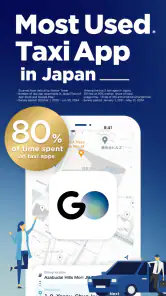


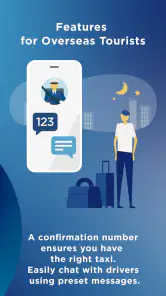
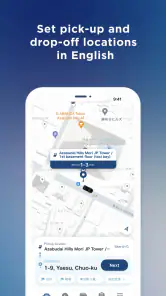
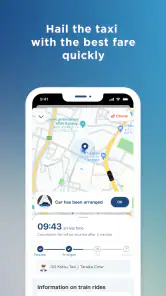


Analysis by Reviewed
For me, a taxi app is most useful when I’m tired, carrying bags, or trying to reach a specific address in a place I don’t know well. In Japan, GO Taxi app is built around that practical need: request a ride through your phone rather than trying to flag one down on a busy street. It’s a free maps and navigation app from GO Inc., and the store lists it for everyone. The key point for visitors is that registration can now be done with a non-Japanese phone number, which removes one potential hurdle before a trip.
Where a taxi fits into a Japan itinerary
I wouldn’t treat GO as a replacement for Japan’s public transport. Trains are usually the sensible choice for crossing a city when stations and routes suit your plans; a taxi makes more sense for a short final leg, late travel, heavy luggage, or a destination that is awkward to reach on foot. That distinction keeps expectations realistic: the app helps arrange a taxi, but it doesn’t make road travel immune to traffic or guarantee that a car will be the best option for every journey.
A useful routine is to decide the address before opening the booking flow. Hotel names and landmarks can be ambiguous, especially when several places share similar names, so I’d check the destination carefully and keep the written address available. If I’m going to a restaurant or appointment, I’d also allow extra time rather than assuming the estimated arrival or drive will be exact. Those small habits matter more than tapping quickly.
Build a calmer pickup routine
Once a ride is requested, tracking the car can help you avoid waiting in the wrong place. I’d stay somewhere safe and easy for a driver to spot, then watch the app instead of repeatedly stepping into the street to look for the taxi. At large stations, hotels, or crowded venues, choosing a clear pickup point and being ready to move there can prevent a confusing last-minute search. Notifications are useful, but I’d still keep the phone accessible and check the ride status if plans change.
One practical question for visitors is whether they need a Japanese phone number to get started. The current registration note says a non-Japanese number is now accepted, which is reassuring for travelers using a number from home. I’d still set the app up before a time-sensitive trip, while connected to reliable internet, rather than waiting until I’m outside in an unfamiliar neighborhood. Registration is only one part of the process; having the destination ready and understanding the pickup point are what make the whole routine smoother.
Using GO with realistic expectations
My impression is that GO is most valuable when convenience matters more than the lowest-cost route. The app has a 4.7 average from around 47,000 ratings and has passed five million installs, so it has a substantial audience, but those figures don’t tell me whether it will suit every traveler’s route or preferences. I’d compare the taxi option with nearby public transport before booking, especially for longer cross-city trips. The app is currently at version 9.9.10, and I’d keep it updated before traveling so I’m using the current release.
What I would check before relying on it
I’d review the app’s available settings and payment choices during setup, then make sure the option I intend to use is actually ready before I need a ride. Don’t assume that a payment method you use at home will be available or configured in Japan. The older description of GO mentions cash, cards, and Japanese mobile payment services, but payment availability can depend on the current app and circumstances, so checking in advance is the safer approach. If paying in cash is your fallback, carry enough yen and confirm the fare and payment process with the driver when needed.
More From Our News Desk

Weather by Xiaomi Review: Clear at a Glance, Less Clear Up Close

X Under Pressure: Can It Recover When Posting Goes Wrong?

Clash of Clans Is Won Between the Battles

Android Auto Makes the Case for Quieter Car Software

MobiOffice: Transforming Mobile Productivity with Seamless Integration

EA SPORTS FC™ Mobile Soccer: Redefining Mobile Sports Gaming
Language support can make the booking screens easier to handle, but I wouldn’t rely on it to solve every conversation with a driver. Keep the destination written clearly, and use a map or translation tool if you need to explain a special stop or change. A simple, prepared address is often more useful than trying to improvise directions in a language you don’t speak confidently. This is especially worth doing when a hotel has more than one entrance or sits inside a large complex.
Who will get the most from it
GO suits visitors who want an organized way to request a taxi and feel more comfortable seeing the ride progress on a phone. It can also help residents who regularly travel with luggage or need a direct trip at an inconvenient time. I’d be less enthusiastic about using it for every journey if I were traveling on a tight budget, moving between well-connected stations, or trying to explore without a fixed destination. In those cases, trains, buses, or walking may be simpler and cheaper in practice.
For a realistic example, imagine leaving a hotel with a suitcase for an appointment in an unfamiliar part of town. I’d enter the destination while still indoors, confirm the pickup location, and wait where the driver can find me. When the car is on the way, I’d use tracking to time my walk to the pickup point rather than standing outside for an uncertain stretch. After the ride, I’d check that I have my belongings before moving on. None of that is complicated, but doing it in that order reduces avoidable stress.
Where the convenience has limits
A taxi app can simplify the request, but it cannot remove the trade-offs of a taxi: road congestion, a higher cost than many public-transport trips, and the need to coordinate a pickup in a crowded area. The best choice can also change with the time of day and your luggage. If a station is nearby and the route is straightforward, I’d take the train; if walking is easy, I wouldn’t summon a car just because the app is there. GO is a useful option, not a reason to stop comparing routes.
I’d also avoid leaving setup until the moment I need help. Install the app, try the registration process with your non-Japanese number, check the destination-entry flow, and confirm your preferred payment method beforehand. That gives you time to sort out a login or setting without a driver waiting. Travelers who prefer not to use a phone for transport, or who mainly want the cheapest way around Japan, may be better served by public transport and a paper note with their destination.
Making the booking flow work for you
The first thing I noticed about the GO Taxi app is that the basic idea is easy to understand: set a destination, request a taxi, and follow the ride status. I wouldn’t confuse a straightforward booking flow with a guarantee that every pickup will be effortless, though. The most useful preparation happens before the request: check the destination spelling, decide where you can safely wait, and avoid starting the process while you are already rushing out of a crowded building.
For repeated journeys, I’d make the same checks each time rather than trusting memory. A hotel’s most convenient entrance may not be the best place for a car to stop, and a busy station can have several possible meeting points. If I’m traveling with someone else, I’d agree on the pickup spot before ordering so one person can keep an eye on the app while the other gathers bags. That simple division of attention is more reliable than trying to solve everything at the curb.
Settings and habits worth checking
Setup is a good time to look through the choices GO actually presents on your device, especially the payment method and any language settings you plan to use. I’d verify that the selected option is ready instead of assuming the app will default to the one I prefer. A traveler may use one arrangement for most rides and still want a cash fallback, but the important point is to know how you intend to pay before the car arrives, not to discover a mismatch at the end.
I’d also keep the app current before a trip and make sure I can access the phone number used for registration. That is a small but practical safeguard if signing in becomes necessary away from home. The non-Japanese number option makes registration more approachable for visitors, but it doesn’t remove the value of setting things up calmly while connected to the internet. For anyone who relies on a translation app as well, checking that it is ready before leaving the hotel can make an unusual instruction easier to handle.
Faster patterns for familiar journeys
Once I know a route, I can make the process faster without assuming GO has a special shortcut for it. I keep the destination written in a form I can select or copy, identify a sensible pickup point before opening the booking screen, and avoid waiting until the exact departure minute to request a ride. For a regular appointment, I’d also think about the return trip in advance: note the address where I need to be collected and check whether a nearby station could be a better fallback if traffic or pickup conditions are awkward.
This is particularly useful when the journey combines different kinds of transport. I might take a train for the long, predictable part and use a taxi only for the last stretch to a hotel, clinic, or venue that is inconvenient to reach on foot. That approach keeps the app in its strongest role: helping with a specific leg rather than replacing route planning altogether. It also gives me a clear decision point if the taxi would add little beyond what a short walk can accomplish.
What tracking can and cannot solve
Real-time ride progress is helpful because it gives me a way to coordinate my own movement with the car’s arrival. I can stay inside until it makes sense to walk to the pickup point, rather than standing outdoors for an uncertain period. Notifications and status updates can reduce guesswork, but I’d treat them as guidance rather than a promise that the car will reach me at an exact moment. A crowded curb, a blocked entrance, or a change in my plans still requires attention from me.
If the pickup area is confusing, I’d prioritize a clear meeting point over shaving a few steps off the walk. Being visible and ready is often better than choosing the closest doorway where a driver may have trouble stopping. I’d keep my phone available, check that I’m looking at the current ride information, and avoid moving to another entrance without confirming that the new location makes sense. This kind of coordination is where a taxi app helps most, while the traveler still has to manage the real-world handoff.
Choosing between GO and the usual alternatives
Compared with checking train or bus routes, GO solves a different problem. Public transport is generally the better starting point when the route is direct, cost matters, and stations are convenient; a taxi can be more appealing when luggage, a late schedule, or a hard-to-reach address changes the calculation. Walking may beat both for a short, simple connection. I’d choose based on the whole door-to-door journey, not just the time it takes to get into a vehicle.
That comparison matters for visitors who are unfamiliar with Japanese streets and station layouts. A taxi can reduce transfers and the effort of carrying bags, but it doesn’t automatically make a cross-city trip quicker, particularly when roads are busy. If a train provides a clear route, I’d use it and reserve GO for the portion that is genuinely inconvenient. If the destination is difficult to explain verbally, I’d prepare a written address whichever option I choose; that habit is useful beyond taxi travel.
When I would skip a taxi request
I would not reach for GO simply because I have the app installed. If I’m close to a station, traveling light, and going somewhere well connected, public transport is likely to be the more sensible choice. If I’m exploring without a fixed destination, walking gives me more freedom than arranging a car. And if I’m trying to keep spending down, I’d compare the road journey with buses or trains before committing to a taxi.
I’d also pause before booking if I cannot settle on a clear pickup point or if I’m not ready to leave when the car arrives. In that situation, taking a moment to move to a better location or finish preparing is kinder to everyone than requesting a ride in a rush. GO helps coordinate the booking, but it cannot decide whether my timing, destination, or meeting point is practical. A little judgment before tapping is part of using it well.
My verdict after getting the routine right
GO is at its best when I treat it as one part of a transport plan, not the whole plan. I’d use it for the awkward leg that trains don’t solve neatly, prepare the destination before requesting a car, and keep a public-transport alternative in mind if the road looks inconvenient. That approach makes the app more useful without asking it to do something a taxi cannot.
For travelers, the non-Japanese number registration option is a welcome practical detail, while checking the current payment setup and pickup point ahead of time avoids common sources of friction. For someone who wants a direct ride and appreciates app-based coordination, GO is worth considering. If price, speed across a congested city, or avoiding phone-based booking matters more, I’d choose another way to get around. My recommendation is therefore simple: keep it ready for the journeys where a taxi genuinely earns its convenience.
GO / Taxi app for Japan Frequently Asked Questions
Can I use GO to find a taxi near my current location?
GO is a taxi app for Japan in the maps and navigation category, so it is intended to help users arrange taxi travel. If you are considering it for a trip, check that location access and the app’s booking flow suit the way you plan to travel. Availability and the options shown may depend on where you are using the app.
Do I need to create an account before using GO?
GO supports registration with a non-Japanese phone number, which can be useful for visitors who do not have a local number. That registration detail is worth checking before you travel, especially if you plan to arrange taxis through the app. GO is developed by GO Inc.; install the app and follow its sign-up prompts to get started.
Can I use GO in English if I do not speak Japanese?
The published description of GO focuses on taxi travel in Japan, and visitors may want to check the language displayed in the app before relying on it for a journey. The app’s sign-up and booking screens are the practical places to see what is available on your device. If you are unfamiliar with Japanese, consider preparing your destination details in advance.
Can I sign up for GO with a non-Japanese phone number?
Yes. GO supports registration with a non-Japanese phone number, which can make getting started more convenient for visitors and other users who do not have a local number. GO is a free app from GO Inc. for maps and navigation, and it is rated for Everyone. Before installing, check that your device meets the app’s operating-system requirement.
Is GO available for my phone, and what does it cost to download?
GO is free to download and is available for devices running iOS 11 or later. The app is designed for maps and navigation, so it may be useful to have it installed before arranging taxi travel in Japan. Its current version is 9.9.10, and the app is rated for Everyone. Keep in mind that the download price is separate from any costs associated with taxi rides.
Pros
- User-friendly interface
- Multiple payment options
- Reliable ride tracking
- Efficient customer support
- Frequent promotions
Cons
- Limited to urban areas
- Higher rates during peak hours
- Occasional app crashes
- Language barrier for some
- Limited driver availability
- Category
- Maps & Navigation
- Version
- 9.9.10











