GIF Maker, Video to GIF Editor
- 627.00
- 4.6
- Installs
- 1.00M
- Price
- Free
Screenshots
Analysis by Reviewed
I often want to share a tiny moment from a longer clip without asking someone to watch the whole video. That is the simple appeal of GIF Maker, Video to GIF Editor: it is a photography app for turning video moments into GIFs on a phone. I’d consider it for quick reactions, short demonstrations, or a playful clip to send to friends, rather than as a replacement for a full video-editing suite.
Finding your way through the editing process
The app’s basic workflow is easy to understand: choose a video, select the part worth keeping, then shape the result. In my experience, that focused path makes more sense for a first-time GIF creator than opening a general editor full of tools you may never use. Galaxy studio apps is the developer, and the app is free to install, with optional in-app purchases ranging from $0.99 to $99.99 per item. It is rated for Everyone and requires Android 5.0 or later.
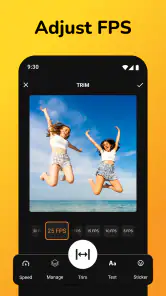
Its customization tools give you choices without requiring a complicated editing routine. Adjusting speed or frame rate can help a reaction feel snappier, while text or stickers can make the point clear when the GIF is viewed without context. I’d add a caption only after choosing the clip: that way, it is easier to keep the text brief and avoid covering the action that makes the moment funny or useful.
Choosing a clip that survives the loop
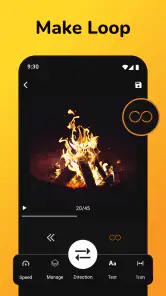
A useful workflow is to identify the visual punchline before opening the editor. I’d watch the source once for context, then replay the likely moment and note where the movement starts and settles. That small bit of planning matters because a GIF repeats automatically; a loop that cuts off a hand gesture or facial reaction can feel more jarring than the same cut in an ordinary video. If I’m making a demonstration, I’d include enough lead-in for the viewer to understand what changes, but remove any dead time before the action.
When a source video contains camera movement or several people, I’d keep the crop of time especially selective. More footage is not automatically more informative: a short loop often communicates better when one action stays central. I’d also avoid putting text over a moving face or the object being demonstrated. The strongest caption usually names the point or adds context, rather than narrating every movement already visible.
Turning Videos into Memorable GIFs
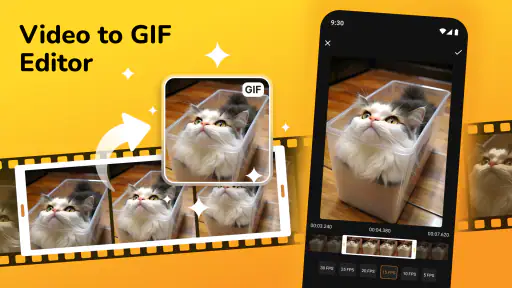
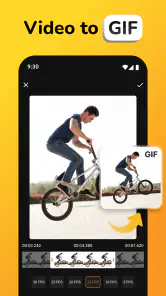
So, let's dive right into it. You've got a video, and there's that one scene that's just begging to be a GIF. With the GIF Maker, Video to GIF Editor, this process is as smooth as butter. Simply upload your video, choose the segment you want, and voilà, you've got yourself a GIF! The app's interface is user-friendly, making it super simple to navigate even if you're not a tech guru.
Customization at Your Fingertips
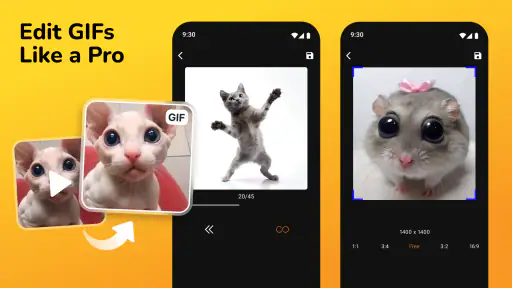
One of the coolest features of this app is the level of customization it offers. You can tweak the frame rate, adjust the speed, and even add text or stickers to your GIFs. Imagine being able to add a quirky caption or a funny sticker to your creation, making it unique and personal. It's all about letting your creativity shine!
More From Our News Desk

Weather by Xiaomi Review: Clear at a Glance, Less Clear Up Close

X Under Pressure: Can It Recover When Posting Goes Wrong?

Clash of Clans Is Won Between the Battles

Android Auto Makes the Case for Quieter Car Software

MobiOffice: Transforming Mobile Productivity with Seamless Integration

EA SPORTS FC™ Mobile Soccer: Redefining Mobile Sports Gaming
The app also supports a variety of video formats, so you don't have to worry about converting files before uploading them. Whether it's MP4, AVI, or MOV, the app handles it all. This flexibility is a huge plus if you have a diverse media library.
Making a GIF that works in real life
For a practical example, imagine a friend sends you a long clip of a dog doing something ridiculous. I’d trim it to the exact moment the action becomes clear, then check that the loop still makes sense when it starts again. A GIF can feel confusing if it begins halfway through a gesture or ends before the reaction lands, so I’d preview the chosen section before adding decoration. For a quick how-to, I’d prioritize readable text and a steady pace over extra stickers.
This app is a good fit if you mainly want to turn existing phone videos into short, shareable loops and enjoy making small adjustments yourself. It may be less suitable if you need precise timeline editing, extensive color controls, or a polished video project with multiple tracks. A dedicated video editor is usually the better choice for those jobs; a basic GIF converter may be quicker if you only need an unedited clip and do not care about adding text or changing playback.
When a phone workflow makes sense
I’d reach for a phone-based GIF maker when the clip is already on my device and I want to send a reaction while the conversation is still happening. Picture filming a friend’s cheerful wave at a get-together, then trimming out the surrounding chatter and turning the gesture into a loop for a group chat. The phone workflow keeps the task close to the footage and avoids moving files to another device. For a quick social moment, that convenience can matter more than having every fine-grained editing option.
For a work or study explanation, I’d use the same approach differently: select a short sequence that demonstrates one visible change, then add a concise label if someone might view it without the original explanation. I would not use a GIF for instructions that depend on spoken detail, subtle color differences, or a long sequence of steps. In those cases, a video with audio or a set of still images may carry the information more clearly and be easier for a viewer to pause and inspect.
Sharing and Saving Made Simple
Once you've crafted the perfect GIF, sharing it is a breeze. The app provides direct sharing options to social media platforms like Instagram, Facebook, and Twitter. You can also save your GIFs to your device, ensuring you have access to them whenever you want to relive those moments or share a laugh with friends.
Before sharing, I’d check the result in the destination where I plan to use it. A loop that looks clear in an editing preview can feel too fast or too busy in a message thread, especially on a small screen. Saving a copy first gives me the option to reuse it or share it somewhere else without rebuilding the edit. If the platform or conversation is the main reason for making the GIF, I’d keep the text and visual treatment simple so the central action remains recognizable.
Comfort, access, and practical limits
For people who find dense editing screens tiring, a straightforward video-to-GIF task can be easier to approach than a professional editor. Still, ease of use is not the same as access for everyone: small controls, visual-only instructions, or the need for precise tapping can create friction. I’d work in a calm setting, choose a clip before starting, and make one adjustment at a time rather than trying to tune speed, text, and stickers all at once. Captions can also help viewers understand a GIF without audio, though they need to stay concise and avoid obscuring the subject.
One useful trade-off is that GIFs are best for brief, repeatable moments, not long scenes or fine detail. If the source clip is busy, trimming tightly can make the main action easier to follow; if it is already visually clear, extra effects may only distract. The app’s current version is 2.0.3, and it has a 4.6 average from around 45,000 ratings, with over one million installs. That gives a sense of its reach, but I’d still judge it by whether its editing choices suit the way you want to share.
Reading and interacting at your own pace
For comfortable use, I’d treat the editing session as a few separate decisions instead of one long round of tweaking: select the moment, check its pacing, then decide whether a caption or sticker genuinely helps. That order reduces the chance of spending time decorating a clip that does not loop well. It also makes it easier to notice when the action is too small or visually crowded to work as a GIF at all. A still image or a longer video can be the more considerate choice when viewers need time to read or examine detail.
People who rely on assistive interaction or need larger targets may want to test the actual controls before committing to a longer editing session. I would not assume that a simple workflow automatically means every control is easy to reach or understand. If making repeated precise selections is uncomfortable, preparing a shorter source clip beforehand or using an editor with a more suitable interface could reduce the effort. The app is aimed at a broad audience, but individual comfort depends on the device, settings, and the person using it.
In terms of performance, the app runs smoothly without any significant lags or crashes. It's lightweight, so it doesn't hog your phone's resources, which is always a relief. Plus, the developers regularly update the app, ensuring new features and improvements are consistently rolled out.
Where another format is the better answer
The usual alternatives solve different problems. A full video editor is preferable when I need several clips, precise timing, layered sound, or a carefully finished sequence. A simple converter is more appealing when I want to change a clip into a GIF with as few decisions as possible. This app sits between those approaches: it is for someone who wants a short loop and values the option to adjust playback or add a little context, without turning the task into a larger editing project.
I’d also skip GIF format when the original moment depends on speech, music, or a lot of fine detail. A GIF’s repeated motion is great for a reaction or a quick visual demonstration, but it is not a universal substitute for video. If the goal is to show a complete event, preserve sound, or let a viewer control playback, sharing the original video is likely clearer. Choosing the format first helps avoid editing a clip into a form that cannot communicate what matters.
Final Thoughts
All in all, the GIF Maker, Video to GIF Editor is a fantastic tool for anyone looking to create and share GIFs with ease. It's packed with features that cater to both casual users and those who want a bit more control over their creations. Whether you're capturing a funny moment with friends, a memorable scene from a movie, or just experimenting with your creativity, this app has got you covered.
So, if you're on the hunt for a reliable, feature-rich GIF maker, give this app a try. It's like having a mini creative studio right in the palm of your hand. Happy GIF-making!
What I’d check before making it part of my routine
If I were choosing between this and a desktop workflow, I’d base the decision on where the original clips live and how exact the finished loop needs to be. Working on the phone is convenient for a video I just recorded, while a desktop editor can be easier when I need frame-by-frame precision or want to manage many source files together. For everyday sharing, I’d keep the original video until I’m happy with the exported GIF, since the source gives me room to choose a different moment if the first trim feels abrupt.
Before installing, I’d also think about the purchase model: the app is free, but optional items have a broad listed price range, so I’d check any in-app purchase screen carefully before confirming anything. Its release date is December 4, 2021. I’d recommend trying the core workflow first and deciding whether the controls feel comfortable on your device; if tapping small editing controls is difficult, a larger-screen editor or a simpler conversion tool may be a better fit.
Who I think will get the most from it
I’d recommend it most to people who already keep short videos on their phone and regularly want to turn one expressive moment into something easy to replay. It suits casual creators, group-chat regulars, and anyone who occasionally needs a compact visual example rather than a polished production. The appeal is not that every clip becomes better as a GIF; it is that choosing a small, clear moment can make sharing quicker and more focused than sending a longer video.
I’d be more cautious if you make GIFs in batches, need repeatable professional settings, or have to control every frame precisely. In that situation, a desktop workflow or a full editor may save frustration, even if it takes longer to set up. Someone who only wants a one-tap conversion with no captions or speed adjustments might also prefer a more basic tool. The right choice depends less on how many options an app has and more on whether its level of control matches your usual task.
A practical way to decide whether it fits
My first test would be a short clip with one obvious action, not the most complicated video in my gallery. I’d trim it, preview the repeat, and see whether the controls feel manageable on my device. If I can make a clear result without fighting the selection or decoration steps, I’d try a second clip that needs a caption or a speed adjustment. That gives a better sense of the app’s real value than judging it only by its list of tools.
At the end of that trial, I’d ask whether I can recognize the intended moment immediately, whether the loop feels natural, and whether I can share or save the result where I need it. If those basics work for my routine, the optional creative controls are a welcome extra. If I find myself needing more precise editing, or if interaction is uncomfortable, moving to another kind of editor is a sensible decision rather than a failure of the app.
GIF Maker, Video to GIF Editor Frequently Asked Questions
Is GIF Maker, Video to GIF Editor suitable for sharing GIFs online?
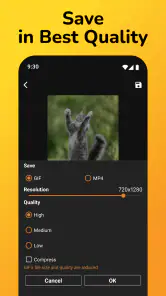
Yes. The app focuses on creating and editing GIFs, and its summary emphasizes making high-quality GIFs without watermarks. You can use it to prepare animated content for sharing, then choose a sharing method that works for you. The finished GIF can also be saved to your device, so you can decide where and when to post or send it.
Who develops GIF Maker, Video to GIF Editor, and what kind of app is it?
GIF Maker, Video to GIF Editor is a photography app developed by Galaxy studio apps. Its main purpose is creating and editing GIFs, including converting video clips into animated images. If you are looking for a dedicated tool rather than a general photo editor, this app is built around GIF creation and related editing tasks.
Can I create GIFs from photos as well as videos?
GIF Maker, Video to GIF Editor is centered on making GIFs and editing them, with video-to-GIF conversion among its key tools. If you want to animate a series of photos, check the options available in the app after installation to see whether they fit your project. The app is free to download, so you can explore its workflow before deciding whether it suits your needs.
What features does the GIF Maker, Video to GIF Editor offer?
The GIF Maker, Video to GIF Editor offers a comprehensive suite of features, including the ability to convert videos into high-quality GIFs, add text and stickers, apply filters, and adjust the speed and size of GIFs. It also allows users to edit existing GIFs, ensuring a personalized touch for social media sharing.
Is GIF Maker, Video to GIF Editor user-friendly for beginners?
Yes, the GIF Maker, Video to GIF Editor is designed with a user-friendly interface that caters to beginners. It provides easy-to-follow instructions, intuitive controls, and a seamless editing process, making it accessible for users of all skill levels to create and edit GIFs effortlessly.
Pros
- User-friendly interface for quick GIF creation
- Supports multiple video formats for conversion
- Wide range of editing tools available
- High-quality output without losing details
- Allows adding text and stickers easily
Cons
- Limited free version features
- Occasional app crashes reported
- Ads can be intrusive at times
- No option for batch processing
- Requires in-app purchases for premium features
- Category
- Photography
- Version
- 2.0.3












