GIF Keyboard by Tenor
- 11.78K
- 3.8
- Installs
- 50.00M
- Price
- Free

Screenshots
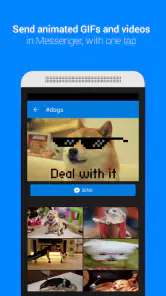
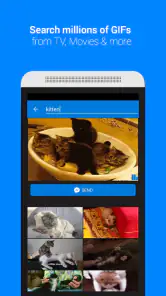
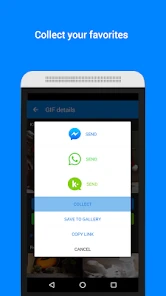
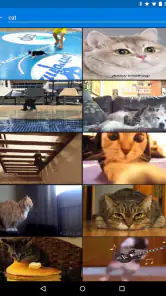
Analysis by Reviewed
When I reach for a GIF in a conversation, the deciding factor is often the moment: I want a reaction that fits without turning a quick reply into a long search. GIF Keyboard by Tenor is built around that habit, bringing GIF discovery into the keyboard rather than asking me to switch to a separate browsing app. It is a free app from Tenor Google in the video-player and editing space, though its practical appeal is much more about expressive messaging than editing video.
When a GIF search depends on the connection
Searching a broad library is most useful when I have a stable connection. If I am looking for a particular reaction, a short search term can be quicker than scrolling through a general collection, but the experience still depends on loading results when I need them. That makes this a convenient choice for everyday messaging on a reliable network, not something I would count on for a moment when access is uncertain.
There is a small but useful habit that makes searches more effective: I try a plain description of the feeling or scene before reaching for a niche phrase. A friend’s dry “sure” might call for a skeptical reaction, while a celebratory message calls for something unmistakably upbeat. Thinking about the tone first helps me avoid sending a GIF that is funny in isolation but wrong for the conversation.
How it fits into real mobile routines
The keyboard format makes sense when I am already replying in a messaging app and want to keep the conversation moving. For example, if a friend sends a photo of a cake that has gone slightly wrong, I can look for a playful reaction in the same exchange instead of leaving the chat, opening a separate GIF app, and returning with a file. That shorter route is the clearest advantage over browsing GIFs elsewhere and copying or sharing one back.
It is also a better fit for people who use reactions to add warmth or humor to short messages than for anyone who mainly wants to edit clips or organize media. The Teen content rating is worth keeping in mind for households choosing apps for younger users. With a 3.8 average from around 259,000 ratings and more than 50 million installs, it is widely used, but those figures do not guarantee that its keyboard workflow will suit everyone.
Why GIF Keyboard by Tenor is a Game Changer
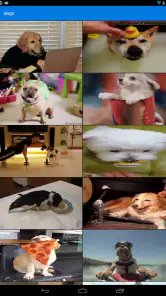
Let's dive right into the good stuff. The GIF Keyboard by Tenor integrates seamlessly with both iOS and Android devices. What I love most is how it effortlessly blends into my existing keyboard, allowing me to search and send GIFs without having to leave my current app. Whether I'm on WhatsApp, Messenger, or even sending a tweet, I can easily find the perfect GIF to match my mood or the tone of the conversation.
Now, you might be wondering about the variety of GIFs available. Well, let me tell you - it's endless! From hilarious memes and trending pop culture references to cute animal clips and reaction GIFs, there's something for everyone. The app's search functionality is intuitive and quick, making it a breeze to find exactly what you're looking for.
More From Our News Desk

Weather by Xiaomi Review: Clear at a Glance, Less Clear Up Close

X Under Pressure: Can It Recover When Posting Goes Wrong?

Clash of Clans Is Won Between the Battles

Android Auto Makes the Case for Quieter Car Software

MobiOffice: Transforming Mobile Productivity with Seamless Integration

EA SPORTS FC™ Mobile Soccer: Redefining Mobile Sports Gaming
Choosing it over a built-in GIF picker
A phone’s built-in GIF option may be enough if I only send one occasionally and already like what it offers. This keyboard is more appealing when I want a dedicated search-and-send routine across conversations. The trade-off is that adding a keyboard means another interface to select and learn; someone who prefers keeping the default keyboard untouched may be happier using the GIF tools already available in their messaging app.
For work chats, I would use a little restraint. A reaction GIF can soften a brief reply among people who share the same sense of humor, but a visual joke can also distract or be misread when the conversation is formal. I treat the keyboard as a quick way to find an expression, not as a reason to add one to every message.
Customization and Personal Touch
One of the standout features for me is the ability to create and save my own personalized GIFs. This feature adds a personal touch to my chats, letting me express myself in a way that static images or plain text simply can't. Plus, with the option to create GIFs from videos or live photos, the possibilities are endless. I can capture moments that matter and share them in a fun and engaging way.
Making a personal GIF is most worthwhile when the moment has a clear punchline or a recognizable gesture; a short, focused clip is easier to understand in a chat than a busy scene. I would also think about the audience before sharing a private moment. A funny clip can travel beyond the original exchange once sent, so I prefer using material that everyone in the conversation is comfortable seeing.
The app also keeps track of your most frequently used GIFs, which is super handy. It means you can quickly access your favorites without having to search for them every time. This feature alone has saved me so much time and made my chatting experience far more enjoyable.
User Experience and Interface
When it comes to user experience, the GIF Keyboard by Tenor scores high in my book. The interface is sleek and straightforward, ensuring that even the least tech-savvy among us can navigate it with ease. The app doesn't bombard you with ads or confusing menus, making it a pleasant experience overall.
On a small screen, I find it helps to search with a single clear idea rather than trying to describe a whole conversation. I also check the selected GIF before sending: the tone, loop, and visual context can land differently from the search result’s thumbnail. That extra glance matters in fast chats, where a wrong reaction is more awkward than taking a second to choose carefully.
When a search stalls and what to do
If results take longer than expected, I would first check whether the current connection is behaving normally, then try a simpler search rather than repeatedly tapping the same query. If I am in a hurry, a text reply or an emoji is the sensible fallback; the point is to keep the conversation flowing, not to wait on a GIF. I would not assume a keyboard-based search will be equally smooth in every network situation.
For data-conscious use, I would save GIF searching for moments when a visual reply genuinely adds something, rather than browsing repeatedly just to find a slightly different reaction. A text message is lighter in spirit and usually clearer when the subject is practical. If I am away from a dependable connection, I would choose that simpler reply rather than plan around access to a searchable GIF library.
Installation is a breeze and takes just a few moments. Once installed, you can enable it in your keyboard settings, and voila, you're ready to start GIF-ing away. The app is lightweight and doesn't hog your device's resources, which is always a plus in my book.
Making the most of quick searches
One useful way to keep the keyboard from slowing down a chat is to decide what job the GIF needs to do before opening search. Is it meant to celebrate, tease gently, show sympathy, or simply acknowledge a message? That intention narrows the hunt and helps avoid scrolling through reactions that look amusing but carry the wrong tone. I also find it useful to keep a reliable text response in mind when the perfect animation does not appear quickly.
For a group conversation, I would be more selective than in a one-to-one chat. A reaction that lands with one friend may be confusing to several people with different references or humor. In that setting, a familiar visual or a short written message is often safer than an obscure meme. The practical benefit of searching from the keyboard is speed, but speed is not the same as good judgment.
Version, access, and who should skip it
The current version is 2.1.77, and it requires Android 7.0 or later on Android devices. Since the keyboard is the central part of the experience, I would check that I am comfortable enabling an additional keyboard before installing; people who avoid third-party keyboards or rarely send GIFs may get more value from their phone’s built-in picker. The app is free, so it is easy to try, but installing it only makes sense if the faster in-chat workflow is something I will actually use.
There are 12,000 reviews alongside the ratings, and the app has been available since March 25, 2015. I see that as a sign of a long-running tool with a substantial audience, not a promise that every search or keyboard interaction will feel equally smooth on every device. If I mostly want conventional video editing, I would choose an editor designed for that job instead; this app’s strengths are finding and sharing GIFs as part of a conversation.
Where it sits among messaging alternatives
Compared with opening a separate GIF browsing app, the keyboard approach is best when I already know the conversation that needs a reaction. It reduces the back-and-forth of finding an animation elsewhere and then returning to the chat. A standalone browsing app can be more comfortable if I want to explore casually, collect ideas, or spend time choosing outside the pressure of a live exchange. The right choice depends less on the size of a library than on whether I value discovery or an in-chat shortcut.
Built-in pickers have a different advantage: they keep the phone’s existing keyboard arrangement unchanged and may be sufficient for occasional use. I would try that route first if I only send a GIF once in a while. Tenor becomes more compelling when search is a regular part of how I communicate and I want the same kind of reaction-finding habit available across conversations. It is a specialized convenience, not an automatic upgrade for every phone user.
Small-screen habits and sharing choices
When I am walking between errands or replying with one hand, I value a compact search idea more than a perfect, elaborate phrase. If the first results miss the mood, I revise the wording once and then move on rather than turning a small reply into a long browsing session. This is especially useful when someone is waiting for a response: a simple emoji can carry the moment while I save GIF searching for a less hurried exchange.
I also treat personal GIF creation as a deliberate choice rather than a default. A short clip with one clear action is easier to read in a chat, while a longer or visually busy moment may lose its meaning when looped. Before turning a personal scene into a reaction, I consider whether the people shown would be comfortable with it being shared. That bit of care matters more than adding another custom item to a collection.
When the network interrupts the flow
If a search is slow during a commute or in a crowded place, I would avoid repeatedly refreshing or changing several settings at once. A simpler query can help distinguish a wording problem from a connection problem; if that still does not help, I would send the message without an animation and return to the idea later. This keeps a temporary interruption from becoming the main event of the conversation.
For anyone watching mobile data use, the practical choice is to search selectively rather than browsing a series of near-identical options. GIFs are visual replies, so I reserve them for moments where movement adds meaning—a celebratory loop, a clear reaction, or a bit of shared humor. If the message is logistical or time-sensitive, words are more direct and avoid relying on a visual search at all.
Final Thoughts
In conclusion, if you're looking to add a bit of fun and flair to your conversations, the GIF Keyboard by Tenor is a must-have tool in your messaging arsenal. It's not just about sending a funny GIF; it's about enhancing the way you communicate and connect with others. The app's extensive library, user-friendly interface, and customization options make it stand out in a crowded market.
So, next time you're looking to spice up your chats, give the GIF Keyboard a try. Trust me, you won't regret it!
My connectivity verdict
I would recommend it to someone who sends GIF reactions often, likes searching from the keyboard, and has dependable connectivity for that routine. I would skip it if I rarely use animated replies, prefer a built-in picker, or want an app for editing videos rather than communicating through GIFs. Its best moments are quick and social; its main limitation is that the search-led convenience is tied to the conditions around using it. For me, it earns a place as a messaging extra, not an essential keyboard replacement for everyone.
GIF Keyboard by Tenor Frequently Asked Questions
Does GIF Keyboard by Tenor work with the messaging apps I already use?
GIF Keyboard by Tenor is designed to make GIFs easier to add to conversations, so it may suit people who regularly share animated replies or reactions. After installing it, you can access the keyboard from a messaging app and insert GIFs into chats. Whether it fits your routine depends on the apps you use and how often you share GIFs.
What is GIF Keyboard by Tenor, and what does it do?
GIF Keyboard by Tenor is a keyboard app built around finding and sharing GIFs in conversations. Its purpose is to help you add tone to messages by searching for a GIF and inserting it into a chat rather than switching to a separate app to find one. It is free to download and is listed for a Teen audience.
What platforms is GIF Keyboard by Tenor available on?
GIF Keyboard by Tenor is available for both Android and iOS platforms. Users can download it from the Google Play Store and the Apple App Store respectively. It seamlessly integrates with various messaging and social media apps, making it easy to access and share GIFs across different platforms, including WhatsApp, Facebook, and Instagram.
How do I search for GIFs using GIF Keyboard by Tenor?
Searching for GIFs on GIF Keyboard by Tenor is straightforward. Once installed, you can access the keyboard within any messaging app. Simply tap the search bar on the keyboard, enter your desired keyword or phrase, and browse through the extensive collection of GIFs that appear. The app uses advanced algorithms to provide relevant and high-quality results quickly.
Can I create my own GIFs using GIF Keyboard by Tenor?
Yes, GIF Keyboard by Tenor allows users to create their own GIFs. The app includes a feature where you can record short videos or select clips from your gallery and convert them into GIFs. This customization option enables users to express themselves uniquely and share personal moments with friends and family in a fun and engaging way.
Pros
- Wide variety of GIFs available for all moods.
- Easy integration with popular messaging apps.
- Fast and responsive search feature.
- User-friendly interface for quick navigation.
- Regular updates with trending GIFs.
Cons
- Contains ads that may be intrusive.
- Requires internet connection to function.
- Limited customization options for GIFs.
- Occasional lag in loading GIFs.
- Some GIFs may not be appropriate for all ages.
- Category
- Video Players & Editors
- Version
- 2.1.77











