GIANT
- 3.36K
- 4.2
- Installs
- 500.00K
- Price
- Free

Screenshots
Analysis by Reviewed
If you’re anything like me, you’ve probably found yourself aimlessly scrolling through your app store, searching for that next big thing to download. Well, let me introduce you to GIANT. It’s not just another app; it’s an experience. And trust me, it’s worth checking out.
What first-week use is really for
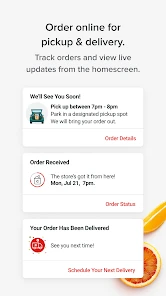
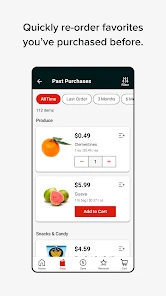
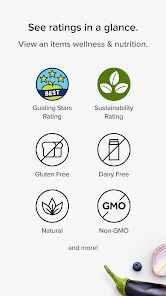
That opening pitch makes GIANT sound like a general-purpose social or productivity app, but I need to be clear about what it actually is: a shopping app from Giant Foods Stores, LLC, built around the store’s online and in-store shopping. The useful question is not whether it can replace every app on your phone; it is whether it makes your regular grocery routine easier enough to keep using it. If you already shop at GIANT, there is a practical reason to try it. If you do not, its value is much less obvious.
During the first few uses, I would treat it as a companion to an actual shopping trip rather than something to explore for its own sake. Open it when you are planning what to buy, then check it again before heading to the store or placing an online order. That gives you a fair test of its central purpose: keeping shopping tasks together instead of switching between a paper list, a browser, and separate store information. The app is free, so trying that workflow does not require a purchase, though the time it saves depends on whether it fits your habits.
GIANT is rated for Everyone and has a 4.2 average from around 9,100 ratings, with roughly 3,400 written reviews. Those figures suggest many shoppers have found it useful, but they do not guarantee that every part of the experience will suit your store, device, or preferred way of shopping. I would judge it by a small, ordinary task first: make a short list, use the app to support one trip, and see whether it reduces the little bits of planning you normally do elsewhere.
Making the routine earn its place
The lasting value of a grocery app usually comes from repeated chores, not a flashy first impression. For GIANT, that means asking whether it helps with the recurring decisions behind a shop: what is running low, what you need for meals, and what must not be forgotten. I would keep a single list for the household and add items as they come to mind, rather than waiting until the day of the shop to reconstruct everything. That is a small habit, but it is the kind of habit that makes a shopping tool more useful month after month.
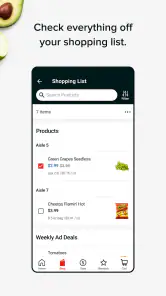
A realistic use case is a busy weekday evening. I notice that breakfast staples and a few ingredients for dinner are running low, so I add them to my shopping plan while the thought is fresh. Before leaving, I review the list and remove anything I no longer need. In the store, the list becomes a prompt rather than a script: I can adjust when plans change, but I am less likely to forget the items I came for. If I am ordering online instead, I can use the app’s shopping role as the place to begin that task rather than treating a general grocery note as the whole process.
One non-obvious benefit of keeping the list current is that it can help separate essentials from impulse decisions. I would mark down the ingredients for planned meals and household basics first, then make a deliberate second pass for extras. That simple sequence makes it easier to notice when a quick grocery run has grown into a larger basket. It is not a budgeting system by itself, and I would not rely on it to control spending automatically, but the list can make your intentions visible before you start browsing.
More From Our News Desk

Weather by Xiaomi Review: Clear at a Glance, Less Clear Up Close

X Under Pressure: Can It Recover When Posting Goes Wrong?

Clash of Clans Is Won Between the Battles

Android Auto Makes the Case for Quieter Car Software

MobiOffice: Transforming Mobile Productivity with Seamless Integration

EA SPORTS FC™ Mobile Soccer: Redefining Mobile Sports Gaming
The app’s online and in-store focus also gives it a different job from a general grocery list app. A neutral list tool can be handy across several retailers, especially if your household shops wherever is convenient. GIANT is more compelling when you consistently buy from Giant Foods and want a store-specific starting point. If you divide your shopping among several chains, keeping one app per store may add friction; a single cross-store list might be a better fit, with GIANT reserved for the trips you make there.
How it fits into everyday grocery shopping
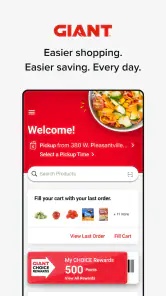
Upon opening GIANT, the first thing that hits you is the sleek and intuitive design. It’s like the developers knew exactly what I wanted - simplicity and functionality. No frills, just straight to the point. The vibrant color scheme and easy navigation make it super user-friendly, even for the less tech-savvy among us.
Using it without creating extra work
So, what exactly does GIANT offer? Well, it’s packed with features that are designed to make your life a little easier and a lot more fun. From the seamless integration with your existing apps to the highly customizable interface, it feels like a tool that adapts to you, rather than the other way around.
One standout feature is the real-time collaboration tools. Whether you’re working on a project with colleagues or planning a trip with friends, GIANT makes sharing and working together a breeze. The app also boasts a robust set of productivity tools that help keep you organized and on track.
Those statements describe functions that do not fit a grocery-shopping app, so they should not be taken as a guide to GIANT’s real use. The dependable way to think about it is narrower: it is intended for shopping online and in store with Giant Foods. That distinction matters when you are deciding what to install. I would not choose it expecting project collaboration, chat rooms, or broad personal organization. I would choose it only if its connection to your grocery routine is useful.
For a smoother trip, I find it helps to prepare the list in two passes. First, add the things you know you need before you start browsing. Then, just before shopping, scan the list for vague entries that might cause confusion, such as “snacks” or “something for lunch,” and make them more specific in your own notes if necessary. This is a practical safeguard whenever a shopping app is being used as a reminder: a list is only as useful as the detail you put into it.
There is also a trade-off between keeping everything in one retailer’s app and preserving flexibility. Starting in GIANT can make sense when you already plan to shop at Giant Foods, but it may not be the best place to manage a household list if different people buy groceries from different stores. In that case, I would keep the shared master list somewhere everyone already uses, then copy only the relevant items into the retailer-specific workflow when it is time to shop. That adds a step, but it prevents one store’s app from becoming the bottleneck for the whole household.
What I would check before relying on it
Using GIANT feels like a breath of fresh air. It’s fast, responsive, and there are no annoying lags or crashes. The developers have clearly put a lot of thought into the user experience, and it shows. There’s a certain joy in using an app that just works, without any hiccups or frustrations.
My practical advice is to keep a backup for the details that matter on an important trip. A short written note or a familiar list app can cover you if your phone is unavailable, you have poor connectivity, or you simply prefer not to handle every shopping task on a screen. I would not assume that an app alone removes the need to check your basket, confirm what you meant to buy, or make a final pass before leaving the store. Digital convenience works best when it supports the routine rather than becoming the routine’s only point of failure.
It is also worth considering the device you plan to use. GIANT’s current version is 8.13.3, and its stated minimum operating system is 8.1. If you are using an older device, check that it meets that requirement before building a workflow around the app. For a household where one person does the planning and another does the shopping, agree on who maintains the list and when it is considered final. Without that small agreement, even a well-organized app can end up with duplicate items or last-minute changes that the shopper never sees.
For me, the maintenance burden should stay low: add items when they run out, clear what has been bought, and review the remaining list before the next shop. If maintaining the app starts to feel like a separate chore, simplify the process rather than creating elaborate categories or rules you will not keep up. The strongest test is whether you still open it after the novelty has faded. A tool that takes less effort than rebuilding a list from memory can earn a place; one that needs constant tending may not.
Another point to watch is how you divide online and in-store shopping. If you use both, it helps to decide before you start whether a particular list is for a delivery-style order or for a physical trip. Mixing errands, meal ideas, and items for different shopping methods can make a list harder to act on. Even without a complicated system, I would separate those intentions in the way that feels natural to you, such as maintaining a clear “next trip” list and removing items as soon as the shop is complete.
Who should keep it, and who should move on
Another thing I love is the community aspect of GIANT. There are forums and chat rooms where you can connect with other users, share tips, and even get support from the developers. It feels like being part of a community, rather than just another user.
That description of forums and chat rooms does not represent the shopping app’s purpose. I would not install GIANT for a community feed or conversations with other shoppers. Its more useful audience is someone who already shops at Giant Foods and wants a retailer-specific way to approach online or in-store purchases. It can also suit a household member who does most of the grocery planning, provided the rest of the household is comfortable following the same list.
I would be less enthusiastic if you shop at many different supermarkets, avoid retailer-specific apps, or prefer to compare options across stores before deciding where to buy. A general list app is usually simpler for those situations because it is not tied to one retailer. Likewise, if you rarely shop at Giant Foods, installing a dedicated app may create more clutter than value. In those cases, a paper list or the basic notes tool already on your phone can be the more sensible choice.
As a shopping app, GIANT is free and has been available since January 5, 2012. The long-running presence and 500,000-plus installs show that it has reached a substantial group of users, but I would still base the decision on your own shopping pattern, not popularity alone. The developer is Giant Foods Stores, LLC, so its natural role is serving shoppers connected to that retailer, rather than acting as a universal comparison service. That is a useful boundary to understand before making it part of a weekly routine.
To keep the habit from becoming tiring, I would avoid opening the app just to browse when I have no shopping decision to make. Use it when there is a clear task: prepare a list, review what is needed, or begin an online shop. That gives each visit a purpose and makes it easier to tell whether the app is genuinely saving effort. If you find yourself repeatedly transferring the same information between GIANT and another tool, that is a sign to simplify or choose the workflow that fits your household better.
Does it deserve a lasting spot?
In a world crowded with apps vying for your attention, GIANT stands out for all the right reasons. It’s not just about what it can do, but how it makes you feel while using it. The combination of practical tools, ease of use, and a vibrant community makes it a must-have for anyone looking to enhance their digital experience.
For a fair long-term verdict, I would set aside the claims about productivity tools and community features: they do not describe what this grocery app is for. The case for keeping GIANT is more grounded. If you shop at Giant Foods often, an app designed around that retailer may be a convenient home for shopping tasks. If you shop elsewhere most of the time, or need one neutral place for several stores, a general-purpose list is likely the better everyday choice.
The app has a 4.2 average, which is a useful sign that many people find it worthwhile, but ratings cannot answer the most personal question: does it make your own grocery routine easier? Try it with a real list and a normal shopping trip, not a special occasion. After a few cycles, ask whether you are remembering more, spending less time organizing, or finding it easier to move from planning to shopping. If the answer is no, there is little reason to keep maintaining another app.
If you haven’t already, give GIANT a try. It might just become your new favorite app.
That recommendation comes with a clear condition: make sure Giant Foods is part of your regular shopping life. For the right shopper, the app can earn its space through repeated, practical use rather than novelty. Keep the list simple, decide who is responsible for updating it, and review whether the routine still feels easier after the first few weeks. If those small habits hold, it is worth keeping; if they do not, a plain list or a retailer-neutral alternative may serve you better.
GIANT Frequently Asked Questions
Is GIANT free to download, and are purchases required to use it?
GIANT is a free shopping app from Giant Foods Stores, LLC. You can download it without paying for the app itself. As with any shopping app, the cost of groceries or other items you choose to buy is separate from the download. It is designed for online and in-store shopping, so you can use it to support your shopping routine.
What is GIANT and what does it offer?
GIANT is a cutting-edge application designed to enhance productivity and efficiency in managing tasks and projects. It offers a suite of tools including task scheduling, collaborative features, and real-time updates to keep users on track. With its intuitive interface, GIANT aims to simplify workflow management for both individuals and teams, making it a must-have tool for anyone looking to optimize their work processes.
Is GIANT available on both Android and iOS platforms?
Yes, GIANT is available for download on both Android and iOS platforms. Users can easily find it on the Google Play Store for Android devices and the Apple App Store for iOS devices. The app is designed to provide a seamless experience across different devices, ensuring users can access their projects and tasks anytime, anywhere.
Does GIANT offer a free version or is it a paid app?
GIANT offers both a free version and a premium subscription model. The free version includes basic features that cater to simple task management needs. However, for users who require advanced functionalities like enhanced collaborative tools, detailed analytics, and priority support, the premium version is recommended. The premium subscription is available on a monthly or annual basis.
How secure is my data with GIANT?
GIANT prioritizes the security and privacy of its users' data. The app employs robust encryption methods to protect user information and ensure data integrity. Additionally, GIANT adheres to strict privacy policies and complies with global data protection regulations, providing users with peace of mind regarding the safety of their personal and professional information.
Pros
- Intuitive user interface enhances experience.
- Rich variety of features for all users.
- Highly customizable settings available.
- Seamless integration with other platforms.
- Regular updates improve functionality.
Cons
- Occasional bugs affect performance.
- Some features hidden behind paywall.
- Steep learning curve for new users.
- Battery consumption can be high.
- Limited offline functionality.
- Category
- Shopping
- Version
- 8.13.3











