Geozilla - Family GPS Locator
- 3.18K
- 4.2
- Installs
- 10.00M
- Price
- Free

Screenshots


Analysis by Reviewed
I can see why a family might try GeoZilla - Family GPS Locator during a hectic week: it offers a quick way to check where everyone is without turning every late arrival into a phone call. The harder question is whether it remains useful once that first burst of curiosity wears off. In my view, it can earn a place in a household routine, but only when everyone agrees on how and when location sharing should be used.
When a location check helps in real life
The most useful routine is often a small one. Imagine a parent finishing work while a teenager is travelling home: instead of sending several messages, the parent checks whether the trip appears to be underway, then uses a message or call if the plan seems to have changed. That division matters. A map can answer a basic “where?” but it cannot explain a delay, confirm that someone is safe, or tell you what they need.
I would also use a shared location view to coordinate a pickup when family members are already on the move. It can save the back-and-forth of asking for an estimated arrival, especially when plans are familiar and nobody needs a detailed conversation. For a new or complicated plan, though, a direct message is still better: location alone can leave everyone guessing about the next step.
From first-week reassurance to a lasting habit
GeoZilla is a free lifestyle app from GeoZilla Inc. Its average rating is 4.3 from around 549,000 ratings, and it has more than 10 million installs. It is rated for Everyone, with optional in-app purchases ranging from $2.99 to $89.99 per item. Those figures suggest a widely used app, but the practical test is whether its location checks make daily coordination easier for your particular family.
The first week: useful context, not a substitute for conversation
In the first few days, opening a family location map can feel reassuring. If someone is travelling home or has not replied yet, a glance may answer the immediate question without a string of messages. That convenience is most valuable when the group has opted in and everyone understands that a location check is for coordination, not constant supervision.
A realistic routine might be a parent checking whether a teenager has reached school, then using a place-based alert as a prompt to follow up only if the expected arrival does not happen. This can reduce repeated “Where are you?” texts. It does not tell you why someone is delayed, however, and a map should not replace a call when the situation genuinely needs one.
Making location sharing earn its place month after month
The lasting value depends less on checking the map all day and more on choosing a few moments when it saves effort. A household might use it for school runs, coordinating a pickup, or seeing whether a family member is likely to be home soon. If the same people are already comfortable sharing their whereabouts, the app can make those small logistics smoother. If everyone still has to send a message for context, location alone may not change much.
More From Our News Desk

Weather by Xiaomi Review: Clear at a Glance, Less Clear Up Close

X Under Pressure: Can It Recover When Posting Goes Wrong?

Clash of Clans Is Won Between the Battles

Android Auto Makes the Case for Quieter Car Software

MobiOffice: Transforming Mobile Productivity with Seamless Integration

EA SPORTS FC™ Mobile Soccer: Redefining Mobile Sports Gaming
Compared with ordinary messaging, a location-sharing app can answer “where?” without waiting for a reply, while a text or call is better for “what happened?” and “what should we do?” A phone’s built-in location-sharing tools may be enough for families who want only occasional checks and already use them comfortably. GeoZilla makes more sense when the family wants a shared, dedicated routine rather than scattered arrangements across different apps.
Setup and upkeep: agree on the rules first
The app is available on Android and iOS, which helps when a household uses a mix of phones. Still, every person whose location is shared needs to be comfortable participating. Before relying on it, I would make the purpose explicit, decide who belongs in the family group, and agree on what counts as a reasonable check. That conversation is more important than installing the app quickly.
Location tools also depend on phones being available and able to report their position. A low battery, a powered-off device, or a delayed update can make a displayed location less useful than it looks. I would treat the map as helpful context, not a guarantee of someone’s exact situation, and keep a direct call or message as the backup for urgent plans.
Keeping the routine lightweight
For a family to keep using a location app, the routine should take less effort than the messages it replaces. I would agree on a few ordinary use cases—such as checking an expected arrival or coordinating a pickup—and avoid turning the app into a running commentary on everyone’s day. That boundary gives the map a practical job while leaving room for privacy and independence.
It is also sensible to revisit the arrangement when routines change. A school schedule, commute, or household membership can shift, making an old check-in habit unnecessary. Rather than letting location sharing continue on autopilot, I would ask whether the current setup still solves a real problem. If it does not, scaling it back is a healthy outcome, not a failure to get value from the app.
Where notification fatigue can creep in
Place alerts can be handy when they answer a recurring question, such as whether someone has arrived at a familiar destination. They can also become noise if the family creates too many locations or expects every movement to deserve attention. Start with only the places that solve a real coordination problem, then remove alerts that stop being useful. This small bit of housekeeping helps keep the app from becoming another source of interruptions.
Privacy is another ongoing consideration, not a box to tick once during setup. Sharing a location with family can feel different to each person, especially teenagers who want more independence. I would check in periodically about whether the arrangement still feels fair and useful. If a family member dislikes being tracked, pushing them to participate can damage trust rather than improve safety; a simple check-in message may be the better choice.
Who is likely to benefit—and who may prefer another approach
I see the strongest fit for families coordinating regular journeys or pickups, particularly when delayed replies cause avoidable worry. It may be less useful for people who rarely need to coordinate, prefer not to share location, or already have a reliable system through their phones. It is also not a replacement for emergency services or a conversation when someone needs help. Its value is in everyday awareness, not in resolving every uncertainty.
GeoZilla is free to install, but optional purchases are available. I would begin with the basic routine the family actually needs and consider a purchase only if a specific paid option solves a problem you encounter. That keeps the decision grounded in use rather than the assumption that more features automatically create more peace of mind.
My long-term take
Have you ever found yourself in a situation where you just wished you could know where your family members are, especially when they’re running late or not picking up their phones? Well, let me tell you about an app that’s like a digital guardian angel for your family - GeoZilla - Family GPS Locator. I’ve been trying it out for a while, and here’s the scoop on what makes this app a standout in the crowded marketplace of location-sharing apps.
Stay Connected Effortlessly
First off, let’s talk about the user-friendly interface. The design of GeoZilla - Family GPS Locator is clean and intuitive, making it a breeze to navigate. You don’t need a degree in rocket science to figure out how to use it. Simply install the app on your smartphone, and you’re good to go. It’s available on both Android and iOS, so no one in the family feels left out!
Real-Time Location Sharing
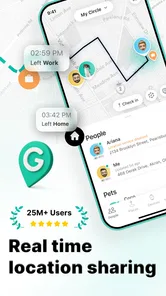
The real magic happens with its real-time location sharing feature. Imagine this: you’re waiting for your spouse to pick you up, and they’re nowhere in sight. Instead of panicking, just open GeoZilla and see exactly where they are. It’s like having a GPS tracker for your family, but way cooler and less creepy!
GeoZilla uses your phone’s GPS, WiFi, and cell tower triangulation to provide accurate and up-to-date locations. Plus, if you’re worried about battery drain – and let’s face it, who isn’t? – the app is designed to be easy on your phone’s battery life.
Safety and Peace of Mind
One of the features I love the most is the geofencing capability. You can set up geofences around specific locations such as your home, school, or workplace. Whenever someone enters or leaves these zones, you get notified. It’s a great way to ensure your kids made it to school safely or to know when your partner is on their way home.
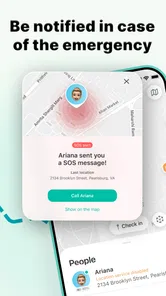
Another great feature is the SOS button. In case of an emergency, a family member can press this button to send an immediate alert with their location to everyone in the group. It’s an amazing way to ensure that help is just a tap away if needed.
Privacy and Data Security
Now, you might be wondering about privacy. The app takes your data security seriously, with encrypted location sharing to prevent unauthorized access. You have control over who sees your location and when, ensuring your privacy is respected at all times.
Deciding whether to keep it installed
After the novelty fades, I would judge the app by whether it quietly removes friction rather than by how often I open it. If a quick check regularly prevents duplicate calls or makes a pickup simpler, that is a useful habit. If the family rarely looks at the map, or if every check creates tension, there is little reason to keep location sharing running just because it was installed.
For someone deciding between GeoZilla and a phone’s built-in sharing option, the choice is mostly about routine and comfort. Built-in tools can be a cleaner fit when a household already shares locations casually and needs no separate family workflow. GeoZilla is more appealing when the family wants a dedicated place to check whereabouts and make use of arrival notifications. Either way, I would choose the least complicated option that everyone is willing to use consistently.
In a world where staying connected is more important than ever, GeoZilla - Family GPS Locator offers not just convenience but also peace of mind. Whether you’re keeping tabs on your adventurous teenagers or just making sure everyone’s safe, this app does it all with style and simplicity. Give it a try, and you might just find it becomes an indispensable part of your family’s daily routine!
Geozilla - Family GPS Locator Frequently Asked Questions
Can I use GeoZilla without sharing my location all the time?
GeoZilla is built around family location sharing, so its main features depend on participating members making their location available. You can discuss when sharing is appropriate with your family and review the app’s location settings together. If someone pauses or limits location access, other members may not see that person’s current location as expected.
Does GeoZilla work without an internet connection?
An internet connection is important for GeoZilla’s core purpose because family members need to share location information through the app. If a phone is offline, location updates may not reach the rest of the group until it reconnects. Before relying on the app to coordinate with family, make sure everyone understands that connectivity can affect when shared locations appear.
Does everyone in my family need to install GeoZilla?
GeoZilla is designed for family members to share their locations with one another, so each person whose location is to be viewed will need to use the app and take part in location sharing. Before downloading, it is worth discussing this with your family so everyone understands how sharing works and is comfortable joining the same family group.
What permissions and phone settings does GeoZilla need for location sharing?
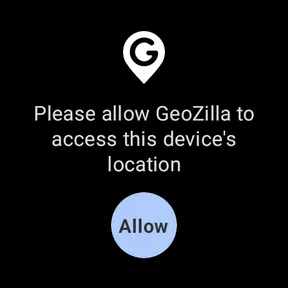
GeoZilla relies on a phone’s location capabilities to show where participating family members are. Location access and an internet connection are therefore important for its core purpose. Check that the people in your group are willing to enable the relevant permissions and keep location sharing active; otherwise, their location may not be available to other members when they expect it.
What is GeoZilla - Family GPS Locator?
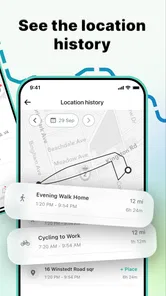
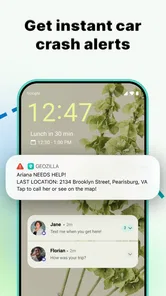
GeoZilla is a family GPS locator app designed to help families stay connected. It allows users to share their real-time location with family members, ensuring safety and peace of mind. The app offers features such as location history, alerts for arrival and departure from specific locations, and emergency notifications. It's ideal for families wanting to keep track of each other's whereabouts efficiently.
Pros
- Real-time location tracking
- Battery-friendly GPS usage
- Family chat feature
- Location history access
- Cross-platform compatibility
Cons
- Requires internet connection
- Limited free version features
- In-app ads can be intrusive
- Occasional location inaccuracies
- Subscription needed for premium features











