Formula 1®
- 3.44K
- 3.9
- Installs
- 10.00M
- Price
- Free
Screenshots



Analysis by Reviewed
I judge a race companion by whether it helps me understand what is happening when the broadcast cannot show everything at once. That is where the Formula 1® app makes its clearest case: its live timing gives me a way to follow the race lap by lap, rather than relying only on the order shown in a camera shot. I can keep the broader contest in view while the TV follows another car, or check updates when I cannot watch continuously. The app is free to download, and I would begin with that experience before deciding whether any optional purchase is worth it to me.
Why live timing changes the way I follow a race
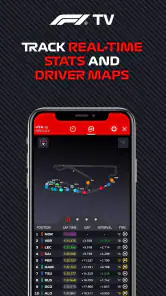
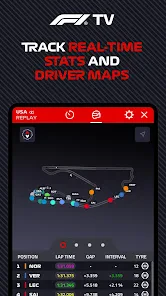
Live timing is valuable because Formula 1 can change quickly, and a position on screen does not always tell the whole story. Watching the order develop alongside the race helps me keep track of the wider contest, especially when the camera is focused on another part of the circuit. It gives a more involved way to follow what is happening without requiring me to leave the broadcast entirely.
I find this most useful when I’m watching with other people who are happy to enjoy the spectacle but do not want every detail explained. I can glance at the app when I’m curious about how the race is unfolding, then return to the television without turning the evening into a running commentary. It is also a practical option when I’m away from a screen and want to keep up through updates instead of trying to follow a full live broadcast.
Following the race beyond the main screen
Picture this: you’re sitting at home, work, or maybe even at a café, and suddenly, you need a quick fix of F1 action. The Formula 1® app is here to save the day. It’s like having the whole F1 universe in your pocket. From live race updates to exclusive content and interviews, it’s your one-stop-shop for everything F1. I was particularly impressed with the live timing feature. It’s incredibly detailed and makes you feel like you’re right there in the pit with the team.
Timing works best as a check-in, not a second broadcast
On a busy race day, I would open timing at a natural pause—after a pit stop, a safety-car period, or a sudden change in the order—rather than stare at the phone throughout. That small habit makes the information easier to interpret: I can compare what I noticed on screen with the developing order, then put the phone down again. It is a better fit for a shared living room, too, because I can follow the detail without making everyone else watch a stream of scrolling data.
There is a useful distinction between wanting to know what happened and wanting to see it happen. Timing and updates can help me stay oriented while I am commuting, working through a break, or waiting somewhere, but they are not a substitute for watching the cars. If I have only a minute, a quick check can answer whether the race has changed; if I want the feel of a close battle, I would rather return to the broadcast or watch a replay or highlight when I have time.
Using timing without letting it take over
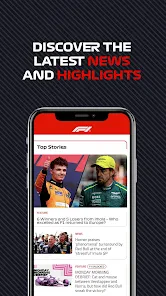
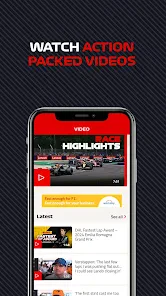
Now, let’s talk about usability. The app is slick, intuitive, and pretty darn easy to navigate. I’ve fiddled around with quite a few sports apps in my day, and let me tell you, this one ranks up there with the best. You can customize your newsfeed to focus on your favorite teams and drivers, which is a neat little touch. Plus, the race highlights and video content are top-notch. The graphics? Simply stunning. It’s like they’ve managed to capture the essence of the track and translate it into pixel-perfect visuals.
More From Our News Desk

Weather by Xiaomi Review: Clear at a Glance, Less Clear Up Close

X Under Pressure: Can It Recover When Posting Goes Wrong?

Clash of Clans Is Won Between the Battles

Android Auto Makes the Case for Quieter Car Software

MobiOffice: Transforming Mobile Productivity with Seamless Integration

EA SPORTS FC™ Mobile Soccer: Redefining Mobile Sports Gaming
For a calmer race-day routine, I’d use the app as a second screen rather than constantly switching between every available view. Pick a driver or team to follow, keep timing nearby, and check it when the race situation changes. That approach makes the information easier to absorb and leaves room to enjoy the broadcast. If you mainly want a quick recap after a session, the highlights and news are a more convenient starting point than keeping a live screen open.
One practical tip is to decide what question you want the timing view to answer before opening it. Am I checking whether a driver has moved up, whether the order has changed, or whether I missed a turning point? A specific question makes a dense race screen more useful than browsing every number without context. For newer fans, following one driver at a time can also make the flow easier to learn than trying to understand the entire field at once.
What the extra viewing options mean
One feature that deserves a special mention is the F1 TV access. If you’re willing to shell out a bit more, you get access to live broadcasts and onboard cameras that bring you even closer to the action. It’s like having a VIP pass to every race, without leaving your couch.
I would not assume that everyone needs those paid options. If you already watch races through another service, the free news, timing, and clips may be enough; paying makes more sense when you specifically want the additional viewing experience. And if you prefer to keep a race simple, relying on a television broadcast alone can be less distracting than following extra data on a phone. The best setup depends on whether you enjoy tracking details or just want to watch the cars.
That is also the point where I would compare it with the usual alternatives. A broadcaster’s app or service is the more direct choice if my priority is watching a live race in one place, subject to what that service offers. A general sports app is better if I want results from several sports and competitions together. The F1 app has a narrower purpose: it is most appealing when I want race-specific context, news, and timing around Formula 1, rather than a broad sports dashboard.
Keeping up between race weekends
In a world where things change at the speed of light, staying updated is crucial. The app ensures you’re never left in the dark. With instant notifications about race schedules, driver standings, and even weather conditions on race day, you’re always in the loop. And if you love detailed stats and analysis, you’ll find yourself geeking out over the data available.
Notifications are most helpful when I choose them with a little restraint. If I am busy, a small number of useful alerts can bring me back for a key update; too many interruptions can make following the sport feel like another task. I’d check the settings before a race weekend and decide whether I want reminders, news, or both. That simple choice helps the app fit around a normal day instead of demanding constant attention.
For example, if I know I will miss a session because of work, I can use updates to keep a loose sense of the weekend and then look for a recap when I am free. That is more realistic than trying to follow a live feed while handling other responsibilities. It also helps answer a common practical question: can I use the app without treating every race as an appointment? Yes, its news and updates can make it useful between sessions, though the strongest experience is still for someone who enjoys keeping track of the championship as it unfolds.
Compared with general sports apps, this one is the more focused choice when Formula 1 is the sport I care about: its appeal is the race-specific information and material gathered around the championship. A general sports app may be more convenient if I want one place for several leagues, while the F1 app makes more sense when I want to stay close to this particular series. It is also useful for newcomers who want to learn names and follow the season gradually, though the amount of timing detail may feel like too much if they only want occasional highlights.
Who gets the most from it
The app is published by Formula One Digital Media Limited and is listed in the sports category. It has a 3.9 average from around 164,000 ratings, with more than 10 million installs, which gives a sense of how widely it is used without guaranteeing that every part will suit every fan. It is free, rated for Everyone, and its current version is 13.8.1; it first arrived on March 12, 2014. It is built for operating systems starting at version 10, and optional in-app purchases range from $2.99 to $29.99 per item.
For someone deciding whether to try it, the answer to “Do I need to pay to get value?” is no: I would start with the free experience and see whether the news, updates, and timing fit my routine. The optional purchases are a separate decision, best considered only if I know I want the extra viewing experience. Before buying, I would also check that the particular content I want is available through the option I am considering, rather than assuming that every paid feature is necessary for ordinary race tracking.
In practice, I think it suits fans who want a closer read on a race, people who miss sessions and need a way to catch up, and anyone who enjoys checking standings and news between events. A casual viewer can still get value from the clips and updates without using every feature. Someone who dislikes phone notifications, does not care about race detail, or already has all the coverage they need elsewhere may find it unnecessary. I would start with the free experience and see whether the extra timing and updates improve how I follow F1 before spending anything.
It may also be a poor fit for a fan who wants a completely hands-off experience. Timing is useful because it asks me to pay attention to context; it does not make the race more relaxing if I feel compelled to monitor every change. If I mainly want a quick result, a simple results page can be faster. If I want the full visual drama, the television or a suitable video service is the natural choice. This app earns its place when I want an informed middle ground between those two habits.
A focused companion for fans who like context
So, is the Formula 1® app worth your time? I think so if you enjoy knowing why the running order matters, want race information close by, or need a manageable way to keep up when you cannot watch every moment. Its strongest role is as a companion to the event, not as a requirement for enjoying it. I would install it, tailor what I follow, and try the timing during a race before deciding whether any paid option adds enough to my own routine.
Formula 1® Frequently Asked Questions
Is the Formula 1® app suitable for someone new to the sport?
It can be a useful starting point for new fans, as the app focuses on Formula 1 news and stats and brings information about the sport into one place. Its content rating is Everyone, so it is suitable for a broad audience. The app is also relevant to longtime followers who want a dedicated way to keep up with Formula 1.
How popular is the Formula 1® app?
The app has a 3.9 average rating from around 164,000 ratings, with about 3,400 written reviews. It has also passed 10 million installs, reflecting interest from Formula 1 fans looking for news and stats on their phones. Ratings can offer a general sense of user opinion, but your experience will depend on which features you use.
Is the Formula 1® app free to download?
Yes. The Formula 1® app is free to download, so you can install it and explore its free features without paying upfront. Some features are offered through in-app purchases, with prices ranging from $2.99 to $29.99 per item. Check the purchase details in the app before subscribing or buying, and consider whether the features included match what you want from an F1 companion.
What operating system does my phone need to run the Formula 1® app?
The Formula 1® app requires Android 10 or later, or iOS 10 or later. Check your device’s operating system version before downloading, particularly if you use an older phone or tablet. If your device meets the minimum requirement, you can install the app from the relevant app store and use it to follow Formula 1 news and stats.
What platforms is the Formula 1® app available on?
The Formula 1® app is available for download on both Android and iOS platforms. Users can find it on the Google Play Store for Android devices and the Apple App Store for iOS devices. It's designed to provide a seamless experience across smartphones and tablets, ensuring fans stay updated with the latest Formula 1 news, live timing, and in-depth analysis.
Pros
- Real-time race updates
- Detailed driver statistics
- Customizable notifications
- High-quality video content
- Exclusive team insights
Cons
- Requires stable internet
- Heavy on battery usage
- Subscription for full access
- Occasional app crashes
- Limited offline features
- Category
- Sports
- Version
- 13.8.1





