ESPN
- 198.26K
- 4.3
- Installs
- 100.00M
- Price
- Free

Screenshots

Analysis by Reviewed
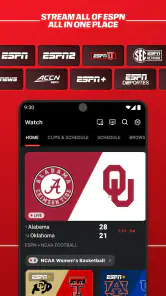
When a match is underway and I only have a moment to check in, I want the score first, then enough context to decide whether to keep following. That quick check is where the ESPN app makes the most sense to me: it brings scores, sports coverage and live viewing into one place, without requiring me to settle in for a full broadcast. I’d recommend it most to people who follow several teams or leagues and want a flexible way to keep up through the day.
From a quick check to a fuller picture
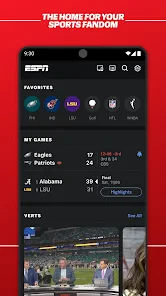
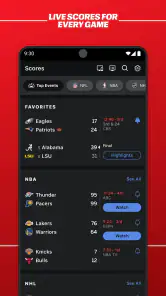
My practical routine is to open the app, scan the latest scores and headlines, then go deeper only when a result catches my attention. Setting favorite teams and sports helps make that first screen more relevant, so I’m less likely to spend time scrolling past coverage I don’t follow. I’d use it before work to see what happened overnight, or during a break to check whether a close game has changed direction.
A useful habit is to treat the feed as a starting point rather than a complete picture. A headline can tell me what happened, while the score and stats help explain how a game is unfolding. If I only need a final result, I can stop there; if I’m deciding whether to watch, I can look for more coverage or a viewing option. That makes the app handy for both casual check-ins and more involved following, though the amount of available sports content can feel busy if I have not narrowed my interests.
Where ESPN fits among sports apps
Compared with a single-league app, ESPN is appealing when my interests cross team or sport boundaries: I can use one destination for a broader mix of news, scores and analysis. A league’s own app may be a better fit when I want a narrow, official focus on one competition, while a basic score tracker can be quicker if all I need is a result. I see ESPN as the middle ground: broader than a scoreboard, but still useful for short visits rather than only long viewing sessions.
The viewing handoff is the part to plan around. The app can connect a score check to live sports viewing, but streaming access depends on an ESPN+ subscription, so installing the app alone should not be mistaken for access to every live event. If watching is my main reason for downloading it, I’d check the subscription requirement and the event’s availability before relying on it. If I mainly want alerts and scores, I can still get value without making streaming the center of my routine.
Your Daily Sports Companion
Okay, let’s dive into the nitty-gritty. The ESPN app is essentially your one-stop-shop for sports news, live scores, and pretty much everything in between. The first thing I noticed was how slick and user-friendly the interface is. You open the app, and bam! You’re greeted with the latest headlines and scores from your favorite teams. It’s like the app just knows what you want.
Features that Score Big
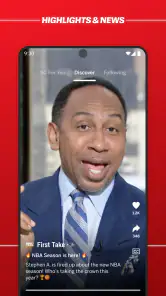
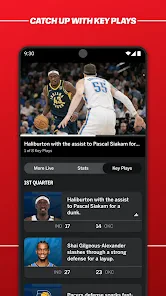
One of the standout features for me is the personalized feed. Once you set up your favorite teams and sports, the app curates content just for you. No more sifting through endless information that you’re not interested in. Want to watch highlights from last night’s game? It’s right there. Need to check the standings? Easy peasy.
More From Our News Desk

Weather by Xiaomi Review: Clear at a Glance, Less Clear Up Close

X Under Pressure: Can It Recover When Posting Goes Wrong?

Clash of Clans Is Won Between the Battles

Android Auto Makes the Case for Quieter Car Software

MobiOffice: Transforming Mobile Productivity with Seamless Integration

EA SPORTS FC™ Mobile Soccer: Redefining Mobile Sports Gaming
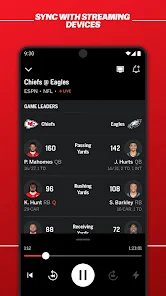
Another cool feature is the live streaming option. If you’re an ESPN+ subscriber, you can stream live games wherever you are. Just think about it—catching the game while you’re stuck in traffic or during your lunch break. It’s like magic, only better because it’s sports.
The Stats and Beyond
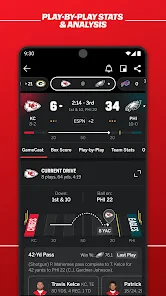
Now, I’m a bit of a stats nerd, so the comprehensive stats and analysis sections are right up my alley. Whether you’re looking for player stats, team performance, or even fantasy league updates, the app’s got it all. It’s like having a sports analyst in your pocket, ready to drop some serious knowledge at any time.
Making the routine work for you
For a busy day, I’d choose a small set of teams to follow rather than trying to personalize everything at once. That keeps the feed useful and makes alerts easier to interpret when I glance at my phone between tasks. If I’m following a game closely, stats are most helpful when I have a question in mind—such as whether a player’s performance is changing the matchup—instead of opening every data panel just because it is there.
One trade-off is that a wide sports feed can compete for attention. If I want a quiet, score-only experience, a lightweight tracker may suit me better; ESPN is more rewarding when I also want reporting, context and analysis. And for someone who watches only one team, a team-focused source may feel more direct. I’d skip ESPN if I’m looking for an entirely distraction-free scoreboard or expect every live stream to be included without a separate subscription.
The practical details behind the download
ESPN is a free sports app from Disney, with in-app purchases ranging from $4.99 to $79.99 per item. It is rated for Everyone 10+, has a 4.3 average from around 1.2 million ratings, and has passed 100 million installs. It has been available since June 15, 2010, and supports Android 5.1 and later. Those figures suggest a widely used, established option, but they don’t guarantee that its mix of sports or viewing access will match every person’s needs.
If you’re wondering whether you need to pay to use it, the app itself is free, while some purchases and streaming access can involve additional costs. If you’re wondering whether it suits a casual fan, I think it does—as long as you pick a few interests and use it for quick updates rather than expecting a tailored feed automatically. For a fan who wants broader coverage in one place, that small setup step can make the experience feel much more manageable.
Putting a game-day check into practice
Imagine I’m heading into a meeting shortly before a game ends. I can check the score first, see whether the outcome is still in doubt, and decide whether a quick headline is enough or whether I want to follow the finish more closely. That is a useful distinction: I don’t have to commit to watching just because I opened a sports app. A short visit can answer the immediate question, while a longer one is there if the game deserves my attention.
For a weekend with several games across different sports, following a few teams gives me a way to move between results without juggling separate league apps. The trade-off is that a broad feed can surface stories beyond the particular match I came to check. I’d use favorites as a filter, not as a promise that every screen will contain only the exact updates I want. This approach works best when I make a deliberate choice about what I’m following rather than treating every headline as urgent.
Alerts, attention and timing
Alerts are most useful when they answer a question I genuinely care about: whether a game has started, whether a result is final, or whether a closely watched contest has changed. I’d be selective instead of turning on every notification for every sport. Too many interruptions can make score updates feel like noise, especially on a busy day, and can undo the benefit of a personalized feed. When I want a calmer routine, I can open the app on my own schedule and check several results together.
There is also a practical difference between knowing a score and watching the event. A notification or scoreboard can keep me informed when I’m away from a screen, but it doesn’t replace the live experience. If I might want to watch, I’d check the viewing route before the event begins rather than assume that an available stream is included with a free download. That small bit of planning avoids discovering a subscription requirement at the moment I want to tune in.
Choosing between breadth and focus
The main alternative depends on how I follow sports. A dedicated league app can make more sense if almost all my interest is tied to one competition and I prefer its official, focused coverage. A simple score app is a cleaner choice if I want results with minimal reading. ESPN earns its place when I move between sports and want scores alongside articles, analysis and a possible path to viewing. I wouldn’t call it the best fit for every fan; its value comes from having several kinds of sports coverage together.
That breadth can also be a weakness. If I only care about one team, broader headlines and coverage may feel like extra material between me and the update I want. If I’m trying to avoid screen time, a score-only tool may be more disciplined. I’d also choose another option if my priority is guaranteed access to a particular live event without checking subscription or availability first. The app is strongest as a flexible hub, not as a universal answer to every sports-watching need.
Who will get the most from it
I think it suits fans who follow more than one team, keep an eye on several sports, or want to turn a quick score check into a little more context when time allows. It can also help a casual follower stay connected without watching full games: check a result, read a relevant story, then get back to the day. The setup is worth doing if those interests are stable, because a few carefully chosen favorites make the experience easier to scan.
I’d be less enthusiastic about recommending it to someone who wants nothing but a compact scoreboard, or someone who expects every live game to be available at no additional cost. Those expectations don’t line up with the app’s mix of coverage and subscription-dependent viewing. A fan who enjoys reading around the game is more likely to appreciate the extra material than someone who sees anything beyond the score as clutter.
The Stats and Beyond
Now, I’m a bit of a stats nerd, so the comprehensive stats and analysis sections are right up my alley. Whether you’re looking for player stats, team performance, or even fantasy league updates, the app’s got it all. It’s like having a sports analyst in your pocket, ready to drop some serious knowledge at any time.
Ending on a High Note
So, is the ESPN app worth the download? Absolutely. It’s not just an app; it’s a sports lifeline. Whether you’re catching up on the latest news, streaming a game, or diving into stats, this app covers all bases. It’s like having an entire sports network in your pocket, and honestly, what’s cooler than that? Give it a shot, and you might just find yourself wondering how you ever lived without it.
In conclusion, for any sports enthusiast, the ESPN app is a must-have. It’s comprehensive, user-friendly, and just plain fun. So go ahead, download it, and let the sports adventures begin!
ESPN Frequently Asked Questions
Is the ESPN app free to download, and what might require payment?
ESPN is free to download, and fans can use it to follow scores, news, alerts, and some video content. Some live streams and premium programming may require a subscription or another eligible access method. In-app purchases are available, with prices ranging from around $5 to $80 per item, so check the purchase details before confirming anything.
Who makes the ESPN app, and what kind of app is it?
ESPN is a sports app developed by Disney for people who want to keep up with sports in one place. Its central purpose is to provide scores, news, alerts, and access to live sports. The app may be useful whether you mainly check results and headlines or want to explore video content, though access to some programming can depend on subscriptions or provider credentials.
Does the ESPN app work on older Android phones?
The ESPN app supports Android devices running version 5.1 or later, so it may suit users with older phones that meet this requirement. Before downloading, check your device’s software version and make sure you have enough room for the app. ESPN is a sports app from Disney, designed for following scores, news, alerts, and live sports.
What are the main features of the ESPN app?
The ESPN app provides users with live sports streaming, real-time scores, news updates, and on-demand sports content. It covers a wide range of sports, including football, basketball, baseball, golf, and more. Users can customize notifications for their favorite teams and leagues, and access exclusive ESPN+ content with a subscription.
Is the ESPN app free to use?
The ESPN app is free to download and offers a variety of free content, including scores, news, and some video clips. However, to access premium features such as live streaming and exclusive ESPN+ content, a subscription is required. Pricing may vary, and there might be trial periods available for new subscribers. The app also offers in-app purchases, so review any purchase details before subscribing.
Pros
- Live scores and news updates.
- Wide range of sports covered.
- User-friendly interface.
- High-quality video streaming.
- Customizable notifications.
Cons
- Requires subscription for full access.
- Ads can be intrusive.
- Occasional streaming lags.
- Limited content for lesser-known sports.
- High data usage for streaming.
- Category
- Sports
- Version
- Varies with device





