F1 TV
- 5.33K
- 4.4
- Installs
- 5.00M
- Price
- Free

Screenshots
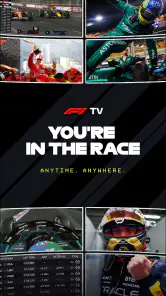
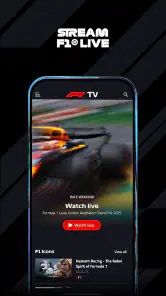
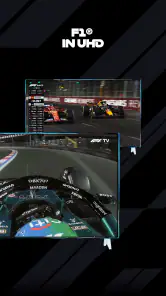
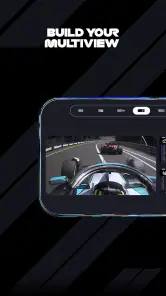
Analysis by Reviewed
I enjoy F1 TV most when I treat it as a way to follow a race more closely, rather than simply as another place to watch a broadcast. The difference is important: Formula 1 is already easy to encounter through general sports coverage, but a dedicated app can make the details between the headline moments easier to follow. Whether it suits you depends on how much of that extra context you want—and on which access option makes sense for you.
What the cost does—and doesn’t—tell you
The app is free to download, while in-app purchases range from $3.49 to $29.99 per item. That gives you a clear starting point, but it doesn’t mean every viewing feature is free. I’d check the purchase options shown in the app before planning around live coverage, and decide based on the access you actually expect to use. Formula One Digital Media Limited develops it, and the app is listed for Teen audiences.
That distinction matters if you only want a quick look at F1 content now and then. Free installation makes it easy to explore the app, but paid access is a separate decision; I wouldn’t assume that downloading it alone unlocks everything. If you mainly watch races through a television package or another service, compare what you already get before paying for overlapping access.
Choosing a useful way to watch
Before committing to a purchase, I’d think about what a typical race weekend looks like for me. Someone who watches a whole Grand Prix live may value a different access option from someone who mainly checks results or catches up afterward. The useful question isn’t simply whether the app has a lot to explore; it’s whether the parts you care about fit your routine often enough to justify paying for them.
It also helps to separate access from habit. A live stream is valuable only when I can watch at the right time and have a connection I trust. Replays and highlights suit a more flexible schedule, but they don’t necessarily make every paid option worthwhile. I’d compare the available purchase choices inside the app with the coverage I already receive, then avoid assuming that one plan or purchase is the right fit for every fan.
For a first visit, I’d browse before race day rather than trying to learn the menus during a close finish. That simple bit of preparation makes it easier to decide whether the app’s focused approach is genuinely useful to me. It also keeps curiosity from turning into an impulse purchase: first find the material you want, then check whether access to it is covered by the option you’re considering.
Getting Started with F1 TV
First things first, downloading F1 TV was a breeze. It's available on both Android and iOS, so no worries about compatibility. Once installed, the setup was straightforward. You can choose between two plans: F1 TV Access and F1 TV Pro. I opted for the Pro version, which offers live streaming of every track session for all Grand Prix, along with onboard cameras and team radios. Talk about being in the driver's seat!
More From Our News Desk

Weather by Xiaomi Review: Clear at a Glance, Less Clear Up Close

X Under Pressure: Can It Recover When Posting Goes Wrong?

Clash of Clans Is Won Between the Battles

Android Auto Makes the Case for Quieter Car Software

MobiOffice: Transforming Mobile Productivity with Seamless Integration

EA SPORTS FC™ Mobile Soccer: Redefining Mobile Sports Gaming
Features That Rev Up the Experience
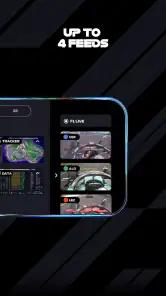
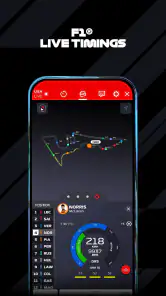
The app is packed with features designed to enhance the viewing experience. One of my favorites is the ability to switch between different camera angles. Whether you want the bird's eye view or a close-up from the cockpit, the choice is yours. The app also offers live timing data and real-time telemetry, allowing you to track your favorite drivers as if you were part of the pit crew.
Those options are most useful when I give myself a small job to follow instead of trying to absorb every screen at once. For example, I might watch the main picture while checking timing during a pit-stop phase, then switch to an onboard view for a driver whose progress I’m following. That keeps the extra data meaningful rather than turning a race into a wall of numbers. If you’re watching with friends, the main stream is usually the easiest shared view; the additional angles are better for the moments when you want to dig into one driver’s perspective.
Another cool feature is the race replays and highlight reels. Missed the race? No problem. You can catch up on all the action at your convenience. And if you're a stats geek like me, the detailed data and analysis sections are pure gold. From driver standings to circuit history, it's all there at your fingertips.
The User Interface: Smooth as a Pit Stop
Now, let's talk about the user interface. It's sleek and intuitive, making navigation a piece of cake. The menu is neatly organized, so finding your way around is as easy as pie. The video quality is top-notch, ensuring you don't miss any of the high-speed action. Even on a not-so-great internet connection, the app manages to deliver a decent streaming experience.
Still, for a live race I’d open the app a little before the start rather than waiting until the lights are about to go out. It gives me time to find the session and settle on the view I want, instead of making navigation part of the opening lap. Replays also make the app practical when race timing clashes with work, family plans, or an inconvenient time zone: I can catch up later without needing to follow live updates and spoil the result for myself.
For a realistic weekend routine, I’d use the main feed when I’m giving a race my full attention, then turn to timing or an onboard perspective when a particular moment raises a question. If I’m busy, I’d leave the session alone and return to a replay or highlights when I have time. This avoids the awkward middle ground of half-watching a live stream while also trying to work, where I can miss the action and still feel tied to the screen.
A small but useful viewing habit is to choose one driver or one strategic question before opening the extra information. For instance, I might follow how a driver’s position changes around a pit stop rather than trying to monitor every competitor. Timing data and onboard views can help make a race’s cause and effect clearer, but they’re most rewarding when I use them to answer a specific question. Without that focus, extra screens can distract more than they explain.
Compared with a standard sports-streaming service, F1 TV’s appeal is its Formula 1 focus: onboard perspectives, team radio, timing, and race material sit alongside the main viewing experience. A general broadcaster may be the simpler choice if you want a broad mix of sports, or if you already have dependable F1 coverage included elsewhere. I’d also choose ordinary highlights when I only have a few minutes; the deeper tools reward attention, so they’re not automatically better for a casual check-in.
There is a trade-off in that specialist focus. If I want a single, simple screen and nothing more, the extra viewing choices may feel like clutter rather than an advantage. A traditional television broadcast or a service I already use can be more convenient when I’m watching casually with other people. On the other hand, when I want to explore a driver’s view or follow race timing closely, a general sports service may not offer the same dedicated experience.
The app has a 4.4 average from around 203,000 ratings, and it has been installed over five million times. Those figures suggest that it has found a substantial audience, but they don’t guarantee that the experience will fit every device, connection, or viewing habit. I’d think of them as context, not a substitute for checking whether the available purchase option and the way you watch races line up.
However, I did encounter a few bumps along the way. Occasionally, the app would crash during live streams, which was a bit of a bummer. But hey, nothing a quick app restart couldn't fix. Hopefully, future updates will iron out these issues.
Who Gets the Most from It?
I’d recommend it most to fans who follow individual drivers, enjoy replaying key moments, or like understanding why a race changed rather than only seeing the final result. It’s also a good fit for someone who regularly misses live sessions and values catching up later. The app has been available since 2018, and its core attraction remains clear: it puts F1 viewing and related detail in one dedicated place.
It can also suit a newer fan who wants to learn how to read a race, as long as they’re willing to start with the basics. I’d begin with the main coverage, then look at timing when I want to understand a change in order. After that, an onboard view can add perspective on a particular driver. Taking those steps gradually is less overwhelming than trying to make sense of every feature at once.
On an ordinary race weekend, I might be making breakfast while a session is on, then sit down later to watch a replay and use timing or an onboard view to make sense of a close battle. That’s a more useful routine than leaving a live stream running in the background and hoping I catch the important moments. If you’re a newcomer, start with the main coverage and add the extra views only when you have a question to answer—who gained time, where a driver made a move, or how a pit stop affected the order.
Families or groups sharing a screen may prefer to keep the main feed on for most of the race. Constantly switching perspectives can make it hard for everyone to follow the same moment, especially if not everyone wants the same level of detail. I’d treat the extra angles as a personal side trip during quieter stretches, then return to the shared view for the decisive action.
I’d skip it if you rarely watch Formula 1, only want short clips, or don’t care about driver-specific detail. It may also be the wrong choice if you expect the free download to include all the access you want, or if a stream interruption would make live viewing frustrating. In those cases, a general sports service you already use or free race highlights may be a better fit, depending on what they include for you.
If your main question is whether you can use it without paying, the practical answer is to distinguish downloading the app from accessing the viewing you want. The download is free, but in-app purchases are offered, so I’d check the choices presented before relying on a particular feature. If you’re wondering whether it replaces a general sports subscription, I’d say only when Formula 1 is the main thing you watch; broader coverage may be more useful if your interests span several sports.
Final Thoughts
In conclusion, F1 TV is a must-have for any F1 fan. It brings the thrill of the races right to your pocket, offering an immersive experience that's hard to beat. Despite a few minor glitches, the app's features and performance make it a worthy companion for anyone looking to dive deep into the world of Formula 1. So, if you're ready to feel the roar of the engines and the excitement of the track, this app is definitely worth a spin.
My more practical verdict is that it earns its place when you’ll use the viewing tools, replays, and race detail often enough to justify the paid access you choose. The free download is an easy way to get started, but I’d review the in-app purchase choices first and avoid paying just because you’re curious about one race. For a committed fan, the focused coverage can add a lot; for an occasional viewer, highlights or an existing sports subscription may be the better value.
So I’d make the decision around a real habit, not the promise of having more options. If I follow races closely, return to sessions I missed, and enjoy investigating how the action unfolded, the specialist tools have a clear purpose. If I mostly want a quick result or a short recap, I’d save the effort and use a simpler source I already have. That’s the dividing line that makes this app worthwhile for some fans and unnecessary for others.
F1 TV Frequently Asked Questions
Can I watch F1 TV without creating an account?
F1 TV is designed around streaming Formula 1 content, so you should expect to use an account to access viewing features and manage any subscription. You can download the app for free, but downloading it does not necessarily provide access to every stream or replay. Check the sign-in options and available content in the app before deciding whether it fits how you want to watch.
How much mobile data can watching F1 TV use?
Streaming video can use a substantial amount of mobile data, especially when you watch for a long session. If your plan has a data allowance, consider connecting to Wi-Fi before watching live coverage or replays. You can also review the app’s playback settings and your device’s data controls, then monitor usage to avoid unexpected charges from your mobile provider.
Can I watch races live, or is F1 TV only for replays?
F1 TV’s live options depend on the subscription plan available to you and the viewing rights in your region. Some plans include live race streaming, while others focus on on-demand content such as highlights and replays. Before subscribing, check the plan details shown for your account so you know whether it offers the live coverage you want.
Does F1 TV include content beyond race broadcasts?
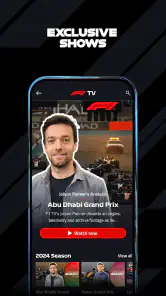
Yes. F1 TV is a streaming service dedicated to Formula 1 fans, offering live coverage of races, on-demand replays, exclusive interviews, and in-depth analysis. Subscribers can also access live timing data, radio broadcasts, and onboard cameras from multiple angles. Historical race footage is another part of its appeal for fans who want more than the latest race coverage.
Is F1 TV free to download, and what might require payment?
F1 TV is free to download, so you can install the app without paying upfront. Some features require a subscription or in-app purchase, and available options can depend on your region. Before purchasing, check the plans shown in the app and make sure they include the coverage you want, particularly if live race streaming is important to you.
Pros
- High-quality live streaming
- Exclusive onboard cameras
- Ad-free experience
- Comprehensive race coverage
- Multi-language support
Cons
- Requires subscription
- Occasional streaming lags
- Limited offline content
- Region-locked content
- No free trial available
- Category
- Sports
- Version
- Varies with device





