Da Fit
- 10.75K
- 3.8
- Installs
- 50.00M
- Price
- Free

Screenshots
Analysis by Reviewed
I’d consider Da Fit when a household wants a simple way to check everyday activity from a compatible wristband or smartwatch, rather than a demanding training platform. It’s a free sports app from MO YOUNG LTD, and its appeal is practical: the wearer can glance at movement and sleep information without turning every walk into a serious workout. I’d be comfortable recommending it to someone who likes gentle reminders and basic routine tracking, with one important caveat: each person should treat their own wearable and its readings as personal, rather than assuming the app is designed for shared profiles.
A shared routine works best with clear ownership
Picture two adults getting ready on a busy morning. One checks their activity, then leaves the phone and wearable for the other person to use. That may sound convenient, but fitness records are most useful when they belong to the person wearing the device. I would not pass one paired band around the household and expect the resulting steps or sleep history to make sense. A better routine is for each person to use their own compatible device and keep track of which phone it is paired with.
This matters especially for sleep tracking: wearing a device overnight is part of the routine, so swapping it between people can make the record hard to interpret. If the goal is simply to see whether the family got outside for a walk, a shared conversation may be more useful than treating one person’s daily totals as everyone’s. The app can support an individual habit; it should not be mistaken for a household dashboard.
Deciding whether a companion app is the right fit
Compared with a phone-only step counter, Da Fit depends on a compatible wearable and is more suited to someone who wants activity and sleep information collected at the wrist. Compared with a dedicated training platform, its appeal is lighter: it can help make everyday movement visible without asking you to build a detailed program around every session. That middle ground is useful if your goal is consistency, but it is not the best match for an athlete who wants structured coaching or for a household that expects centralized family reporting.
Before committing to a routine, I’d check that the specific watch or band is compatible and decide what you actually want to review. If you mainly want a rough sense of how active your day was, basic tracking may be enough. If you want one place to analyze workouts from several brands, or a phone-based record without wearing anything, your existing health or fitness app may be more convenient. The key trade-off is straightforward: Da Fit can make a compatible wearable more useful, but the wearable remains central to the experience.
For a shared home, I’d also agree on a simple boundary: each person checks their own history, and nobody treats another person’s figures as a household score. That prevents accidental comparisons from taking over a friendly goal, particularly when one person has a desk job and another is on their feet all day. A walk together can still be the shared activity; the tracking record does not have to be shared for the habit to be social.
Getting Started with Da Fit
First things first, getting started with Da Fit is a breeze. I mean, who has time for complicated setups when you’re trying to get your steps in, right? Simply download the app, pair it with your smartwatch, and voilà, you're ready to go. The interface is super user-friendly, even for tech newbies. The app syncs seamlessly with a variety of smartwatch brands, which is a huge plus if you're a gadget enthusiast like me.
More From Our News Desk

Weather by Xiaomi Review: Clear at a Glance, Less Clear Up Close

X Under Pressure: Can It Recover When Posting Goes Wrong?

Clash of Clans Is Won Between the Battles

Android Auto Makes the Case for Quieter Car Software

MobiOffice: Transforming Mobile Productivity with Seamless Integration

EA SPORTS FC™ Mobile Soccer: Redefining Mobile Sports Gaming
Pairing and keeping expectations realistic
I’d start by pairing the wearable that will actually be used day to day, then give it time to build a consistent personal routine. If several people in a home are setting up their own devices, do the pairing separately and check whose phone is connected before relying on the records. That small bit of coordination is less confusing than trying to untangle activity histories later.
Compatibility is worth checking before choosing Da Fit as the center of a household’s fitness routine. Its usefulness depends on having a wearable that works with it; it is not a phone-only tracker that replaces a band. If someone already has a watch tied to a different companion app, switching just for a shared routine may add friction rather than simplify things. For that person, the watch’s existing app may be the more sensible choice.
Keeping device and account boundaries practical
When more than one person is setting up a wearable in the same home, I would make the pairing step deliberate rather than rushing through it. Keep each person’s phone and device together during setup, and confirm that the wearable being worn is the one connected to that person’s phone. This is a small, useful safeguard against the everyday mix-up of checking a record that belongs to someone else.
I would also avoid assuming that installing the app on a family member’s phone creates a shared household view or a parent-managed profile. The sensible approach is to treat each setup as an individual arrangement and make sure the wearer understands which phone and wearable are involved. If a person changes phones or replaces a band, take a moment to check the connection again before relying on new records; continuity is more useful than trying to reconstruct an interrupted history afterward.
A question I’d ask before buying a wearable for someone else is whether they are comfortable keeping it charged, wearing it regularly, and using a phone to review the information. If not, an app-centered routine may become another chore. A simpler watch, or no tracker at all, can be a better gift than a device whose records nobody checks.
Features That Make You Move
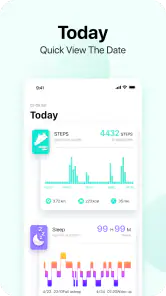
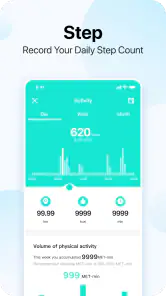
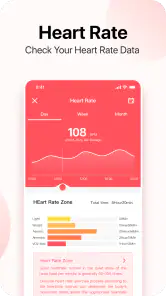
One of the standout features of Da Fit is its comprehensive tracking capabilities. From steps to sleep, heart rate to calories burned, this app covers it all. And let’s be real, there’s something oddly satisfying about seeing those numbers rack up throughout the day. It even tracks your sedentary time and gives you a gentle nudge to get moving. Talk about a friendly reminder!
Those prompts can work well as a cue, not a command. I’d use them to break up a long stretch at a desk with a short walk, then look at the day’s activity later rather than checking the screen every few minutes. A useful trade-off is that the app makes basic progress visible, while people who want coaching, detailed training plans, or a deeper performance analysis may prefer a more specialized fitness service. Da Fit is better suited to steady awareness than to replacing a coach.
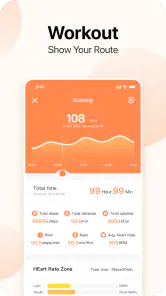
Another feature that caught my eye is the workout mode. Whether you're into running, cycling, or even yoga, Da Fit has a mode for you. It provides real-time stats that help you keep track of your progress. Plus, the data syncs with your phone so you can analyze your performance at your leisure.
Coordination without turning tracking into a contest
For a couple or housemates trying to be more active, the practical benefit is having a personal prompt to move, then choosing a shared activity together. One person might take a short walk after lunch while another prefers a cycle later; comparing routines can be encouraging if both people want that, but I would avoid making one person’s numbers the household target. Different schedules and habits make raw totals a poor measure of who is trying harder.
A simple workflow is to check your own record at a consistent point in the day, notice whether you have been sitting for a long stretch, and decide on one realistic next action. That turns a nudge into something usable. It also prevents the common trap of treating every figure as a verdict on health. If you want medical interpretation or a precise basis for changing treatment, a general activity app is not the right substitute for professional advice.
For example, after a long stretch of remote work, I’d treat a sedentary-time prompt as a reason to refill a glass of water or walk around the block, not as proof that I have failed a daily target. Someone else in the home might prefer an evening cycle. The app can help each person notice their own pattern, while a shared plan stays flexible enough to suit different routines.
One subtle trade-off with workout records is that the value comes from using the mode consistently, not from starting it for every bit of movement. I’d reserve it for a walk, ride, or session I genuinely want to review. That keeps casual errands from cluttering the moments I care about and makes it easier to compare my own sessions in context. If remembering to start and stop a workout feels like an irritating extra task, simply reviewing general daily activity may be a better fit.
Why I’m Loving Da Fit
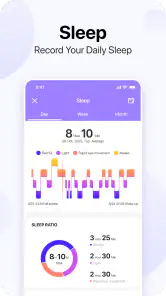
Honestly, what I love most about Da Fit is how it motivates me to stay active. There’s a certain level of accountability when you have your daily activity goal staring right at you. And let’s not forget the sleep tracking feature. It’s a real eye-opener (pun intended) to see how much rest you’re actually getting. The detailed sleep analysis helps in understanding your sleep patterns and how to improve them.
For a realistic weekday, I can see the appeal of checking sleep in the morning, going about work, and using a reminder to stand or move when the day gets too static. Later, a workout mode can make a walk or ride feel more intentional, while the phone gives you a place to review the record. The best use is noticing broad patterns over time, not worrying over a single night or one unusually quiet day. Wearable estimates can be motivating, but they are not a diagnosis.
Age is another reason to set expectations clearly. The app’s content rating is Everyone, but that does not automatically make a child’s wearable data something a parent should assume is shared or supervised through a family feature. I’d treat setup, phone access, and whose activity is being recorded as adult-guided decisions in a household, and explain to younger users that activity and sleep information is personal. For a family that needs dedicated parental oversight or central management, a product specifically built around those needs is a better fit.
For younger users, I’d focus on whether tracking feels encouraging rather than pressuring. A child should not be made to defend a sleep estimate or compete with an adult’s daily total. If a parent chooses a wearable, it makes sense to agree on what the numbers are for—perhaps noticing a regular bedtime or enjoying a walk—without presenting them as a measure of health or effort. Where a family needs a clear parent dashboard, managed child accounts, or formal oversight, this is not the tool I would choose.
Also, the battery life of the app is impressive. I can go for days without having to charge my smartwatch, which is a relief because who wants to constantly charge gadgets, am I right?
The Little Things Matter
It's often the little things that make an app truly enjoyable. With Da Fit, I appreciate the customizable watch faces and notifications. You can tailor the app to suit your style and preferences, making the whole experience much more personal. Plus, the notifications are subtle yet effective, ensuring you don’t miss out on any important updates.
Notifications are most helpful when they stay selective. I’d decide which alerts genuinely belong on the wrist instead of turning every phone update into a tap. That keeps a reminder to move from getting lost among less useful interruptions. Watch faces are similarly a personal choice: pick one that makes the information you care about easy to glance at, rather than spending time changing designs whenever the novelty wears off.
Another practical question is what to do when a phone or wearable is not nearby. I would not build a household routine around expecting everyone’s records to appear together or remain instantly available across different devices. The most dependable habit is the one the wearer can follow with their own setup: wear the device, check their own information when useful, and avoid making a shared decision depend on a number that another person has not reviewed.
At home, I’d keep coordination low-pressure: agree on a walk after dinner, but let each person decide whether they want to track it. That approach works even when one person forgets to wear a band or prefers not to monitor sleep. It also makes the app easier to live with because the social part of exercise does not depend on every household member having the same device or interest in tracking.
Da Fit has an average rating of 3.8 from around 362,000 ratings, with more than 11,000 written reviews, and it has been installed over 50 million times. It is free, rated for Everyone, and its current version is V2.9.2-122-g132c9bb7ad; Android support starts at version 5.0. Those figures suggest a widely used companion app, but they do not guarantee that every wearable or household setup will feel equally smooth. I’d judge it by whether the specific device pairs reliably and whether the tracking is useful for your own routine.
One helpful way to judge the fit is to give the setup a short, low-stakes trial: use the wearable during an ordinary workday, check whether the activity and sleep summaries answer questions you actually have, and notice whether reminders help or distract. I would not change my schedule just to produce a more impressive record. If the information feels repetitive or the device is uncomfortable to keep wearing, the app is unlikely to solve that problem by itself.
If your priority is straightforward personal activity tracking with a compatible wearable, Da Fit is an approachable place to start. I’d skip it if you need one shared family account, tightly managed child profiles, medical-grade interpretation, or the sort of advanced coaching offered by dedicated training platforms. For a household, my verdict is to use it person by person: keep devices and records distinct, coordinate walks or workouts in conversation, and let the app encourage habits without turning private measurements into a competition.
Da Fit Frequently Asked Questions
What should I check before pairing my wearable with Da Fit?
Before downloading, check that your fitness band or smartwatch is compatible with Da Fit and that your phone can install the app. Da Fit is designed to work with compatible wearables, rather than every model on the market. Confirming this first can help avoid pairing problems and lets you know whether the app is likely to support the functions you want to use.
Can I use Da Fit on both Android and iPhone?
Da Fit is available for Android and iOS, so it can be used on phones running either platform. On Android, the minimum operating system requirement is version 5.0. Before installing, check that your phone meets the relevant system requirements and that your wearable can pair with Da Fit; compatibility between the phone and the specific wearable matters for a smooth setup.
Is Da Fit free to download, and what devices can install it?
Da Fit is free to download and is intended for use with compatible fitness bands and smartwatches. It is available for Android and iOS, so you can check the app store on your phone before installing. On Android, the listed minimum requirement is version 5.0. The app is rated for Everyone, though the wearable you plan to pair should also support Da Fit.
What is the current version of Da Fit?
The current version of Da Fit is V2.9.2-122-g132c9bb7ad. If you are deciding whether to install it, check the app store on your device for the latest release available to you, since updates may appear at different times across platforms. Keeping the app updated can help you use its current features and maintain compatibility with your phone and wearable.
What is Da Fit and what features does it offer?
Da Fit is a comprehensive fitness and health tracking application designed to work seamlessly with various smartwatches and fitness bands. It offers features like step tracking, heart rate monitoring, sleep analysis, workout recording, and notifications for calls and messages. Users can customize watch faces and set fitness goals directly within the app, making it a versatile tool for maintaining a healthy lifestyle.
Pros
- User-friendly interface
- Wide range of sports modes
- Customizable watch faces
- Long battery life
- Affordable price
Cons
- Limited third-party app support
- Occasional syncing issues
- Basic notification handling
- Limited health metrics
- Requires frequent app updates
- Category
- Sports
- Version
- V2.9.2-122-g132c9bb7ad





