LiveScore: Live Sports Scores
- 5.12K
- 4.5
- Installs
- 50.00M
- Price
- Free

Screenshots


Analysis by Reviewed
When I first opened LiveScore: Live Sports Scores, I wanted a quick answer to a simple question: what is happening in the match I care about right now? That is the clearest way to approach this sports app. It brings live football scores together with match highlights, statistics and breaking news, so you can check in without treating every score update as a reason to open several different apps. For me, its strongest use is keeping up with a match when I cannot watch it live.
What to expect from a live-score app
LiveScore is a free sports app from LiveScore Limited, and its football focus is apparent in the way it presents scores and match information. It is rated for Everyone, has an average rating of 4.5 from around 566,000 ratings, and has been installed over 50 million times. Those figures suggest it is a familiar choice, but they do not mean it will suit every fan. If you mainly want a fast score check and useful match context, it makes sense; if you need a full live video broadcast, a score app is not a substitute for a viewing service.
When comparing it with the usual alternatives, I find the key choice is between a dedicated scores app and a club, league or broadcaster app. Those alternatives may be a better fit when you want one team’s official updates or video coverage. LiveScore is more practical when you follow several fixtures and want a single place to scan what is going on. Its football scores, highlights, stats and news give a broader match-following routine than checking a result alone, without making it a replacement for every sports source.
Getting from setup to a useful match check
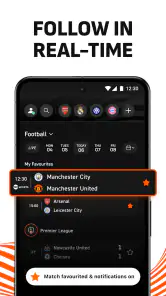
One of the coolest things about LiveScore is how comprehensive it is. You can follow a ton of sports, from soccer to basketball, tennis, and even cricket! I'm talking about real-time updates that let you know what's happening as it happens. Imagine watching a game and the app buzzes with the latest goal or point. It’s like having a personal commentator in your pocket!
Make the first visit count
Now, I know some apps can be as confusing as a referee’s decision, but not this one. The interface is super clean and easy to navigate. Even if you're not the most tech-savvy, you'll find your way around like a pro. The app is designed to make sure you get all the information you need without any fuss. It's like they’ve thought of everything to make our lives easier.
For a first-time user, I would start with one match you already care about rather than trying to follow everything at once. Find the fixture, open its match page, and use the score and available match details as your first useful check. Then decide whether following a team or setting an alert would genuinely help. This small, deliberate start makes it easier to learn the layout and keeps a busy match list from becoming noise.
Use the details, not just the score
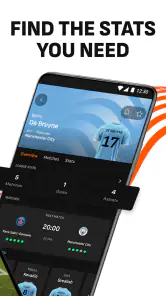
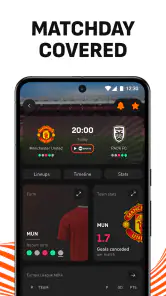
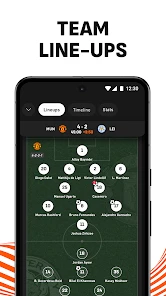
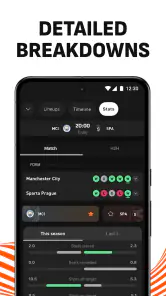
Let’s talk features. The app doesn’t just stop at live scores. You get detailed match analysis, in-depth stats, and even team line-ups. Whether you're trying to win that fantasy league or just want to impress your friends with some sports trivia, LiveScore equips you with all the right tools. And the best part? It's all free! That's right, no hidden costs or annoying ads popping up every two seconds.
More From Our News Desk

Weather by Xiaomi Review: Clear at a Glance, Less Clear Up Close

X Under Pressure: Can It Recover When Posting Goes Wrong?

Clash of Clans Is Won Between the Battles

Android Auto Makes the Case for Quieter Car Software

MobiOffice: Transforming Mobile Productivity with Seamless Integration

EA SPORTS FC™ Mobile Soccer: Redefining Mobile Sports Gaming
A useful habit is to check the match details when a score changes, instead of relying on the number alone. Stats and line-ups can help explain the shape of a game or give you context before joining a conversation with friends. They are still snapshots, not a guarantee of what happens next, so I would treat them as supporting information rather than a prediction engine. For fantasy players, that distinction matters: the app can help you follow a fixture, but it cannot make team-selection decisions for you.
Another highlight is the notification system. You can customize it to get alerts for specific matches or your favorite teams. It's like having your own personal sports assistant making sure you never miss a beat.
Choose alerts that fit your day
Notifications are most helpful when you use them selectively. If you have a match on during a commute or while you are busy at home, an alert can bring you back at a meaningful moment without requiring you to keep refreshing the screen. I would begin with a single team or fixture, then adjust if the messages feel too frequent. Following too many matches can turn a useful reminder into a stream of interruptions, especially on a packed sports day.
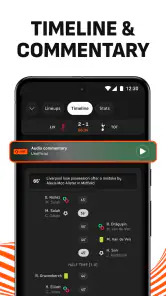
There is also a practical distinction between following the match and watching it. A score update is handy when you are away from a screen, but it cannot recreate the pace or atmosphere of a live broadcast. If you want commentary, video or a club-specific experience, the relevant broadcaster or official team app may serve you better. I see LiveScore as the quick companion you check around the match, not the place to expect every kind of coverage.
Why You'll Love It
What really sets this app apart is its reliability. You know how sometimes apps can crash right when you need them the most? Well, LiveScore is rock solid. It's been around for over two decades, and there's a reason it's still going strong. The updates are quick, and the information is accurate, which is exactly what you need when following live sports.
LiveScore was released on June 1, 2011, and its current version is 8.15, with Android 7.0 as the minimum operating system requirement. I would still judge any live score service by whether it fits my own routine: open it when a match matters, use the details to understand the score, and keep alerts limited to fixtures I truly want to track. That approach is more useful than leaving every possible update switched on.
Honestly, if you're a sports enthusiast, this app is a must-have. It's like having a ticket to every game, right in the palm of your hand. So go ahead, give it a try and see how it transforms your sports-watching experience. Trust me, once you start using LiveScore: Live Sports Scores, you won't want to go back.
My recommendation is more specific: try it if you want an uncomplicated way to keep tabs on football and other sports while carrying on with your day. It is especially handy for people who follow multiple fixtures but do not want to open separate team pages just to check the latest score. If you only care about one club’s official news, or need live video rather than score updates, a dedicated club or streaming app may be the better daily choice. For everyone else, starting with one match and a carefully chosen alert is an easy way to find out whether LiveScore earns a place on your phone.
A realistic match-day routine
Picture a Saturday when you are travelling across town while your team is playing. You cannot keep a stream open, and repeatedly searching the web for the score is awkward. I would use LiveScore in short visits: check the fixture before leaving, look in when there is a natural pause, and open the match details if the score has changed. That gives me enough context to follow the story without turning the journey into constant screen-checking. The app is most useful when it supports what I am already doing, rather than demanding my attention for the whole match.
The same approach works when several games matter at once. Instead of opening each club’s app, I can use a scores-focused service to get an overview and then spend attention on the fixture that becomes most interesting. This is a practical advantage over single-team sources, but it also creates a trade-off: a broad match view may not provide the depth or official club material that a dedicated source offers. I would use LiveScore to identify what is happening, then move to a club or broadcaster source when I need a more focused experience.
Getting past the first score check
After finding a fixture, the next useful step is to ask what information you actually need. If you only want the result, the score may be enough. If you are joining a conversation late, line-ups and match statistics can help you understand who is involved and how the game is unfolding. Highlights can be useful when you missed an important moment, though I would not assume that a score app provides the same complete viewing experience as a broadcast. Matching the feature to the question keeps the app useful without turning every visit into a long browse.
For a new user, I would also resist enabling every alert immediately. First see how you naturally check in: perhaps you care about a particular team, perhaps only about a handful of fixtures, or perhaps you want a quick update during a busy evening. Once that pattern is clear, select the alerts that answer a real need. This small bit of restraint is especially worthwhile if you follow multiple competitions, because a phone that reports every event can become more distracting than helpful.
Where it fits among sports apps
Sports fans often end up with a mix of sources: a broadcaster for watching, a club app for official announcements and a general scores app for checking the wider schedule. LiveScore fits best in that last role. It gives a single place to follow scores and related match information across fixtures, which is more convenient than opening separate team pages whenever curiosity strikes. A broadcaster is the better choice when video is the point; a club app can be better when you want team-specific updates rather than a broad scoreboard.
Compared with a simple search result or a phone notification from another service, a dedicated match page can provide more context than a changing score alone. The value is not that every fan needs to inspect every statistic. It is that when a result surprises you, the match details give you somewhere to look next. I would use that context to understand, not to overinterpret: statistics describe parts of a game, but they do not turn a live match into something predictable.
There is a different choice for people who mostly follow one competition or one club. If an official source already gives you the exact news, commentary or video you want, adding another app may not improve your routine. LiveScore is most compelling when your interests cross team or fixture boundaries, or when you want to check a score quickly without navigating a broadcaster’s viewing interface. That distinction is more useful than declaring one kind of app universally better.
Small habits that make it easier to use
I find it helps to treat the app as a check-in tool rather than a place to sit and wait for events. Open the match when you have a reason, read the score and relevant details, then leave it until an alert or a convenient moment brings you back. This keeps the information in proportion and avoids the habit of refreshing repeatedly when there is no meaningful change to see. If notifications interrupt more than they help, narrow them to the fixture you care about most.
It is also worth separating curiosity from commitment. A match can be interesting enough to glance at without deserving an alert, while a team you follow closely may justify a reminder. I would make that distinction early, especially if I am following a busy schedule. It lets the app serve both casual checks and more deliberate match tracking without treating every game as equally important.
When using stats, I would look for a comparison that answers a specific question rather than scanning every available number. For example, if a scoreline seems unexpected, match details may give a clearer sense of the contest. The useful takeaway is context, not certainty. That mindset helps prevent the common mistake of treating a live statistic as a guarantee of the final result, which is particularly important for anyone using match information alongside fantasy discussions.
Who will get the most from it
I would recommend LiveScore to someone who follows more than one team, checks scores while away from a television, or wants match details close at hand. It suits a casual fan just as well as a committed follower if the main need is staying informed. The free price also makes it easy to try as a companion to whatever viewing or club sources you already use, rather than asking you to replace a routine that works.
On the other hand, I would skip it as a primary sports app if my main purpose were watching full matches or receiving a team’s complete official coverage. A score-focused service cannot provide the atmosphere of a live broadcast, and a wider overview may feel less personal than a club’s own channel. Someone who dislikes notifications should be cautious about following too many fixtures at once, though selective alerts can make the experience calmer.
The practical first success is simple: choose a match you already care about, find its score, and use one detail or alert only if it adds something to your day. If that saves you from checking several places, the app has already proved its value. If you find yourself wanting video or deeper team-specific news instead, that is a useful sign to pair it with—or choose—a more specialized source. For me, LiveScore works best as a clear, convenient window onto the games I cannot follow continuously.
LiveScore: Live Sports Scores Frequently Asked Questions
Can I use LiveScore on both Android and iOS?
Yes. LiveScore is available as a mobile app for Android and iOS, so you can follow scores and sports updates on either platform. Before downloading, check that your device meets the operating system requirements. On Android, the app requires version 7.0 or later, which makes it important to confirm your phone or tablet is compatible.
Is LiveScore appropriate for younger users?
LiveScore is rated for Everyone, making it suitable for a broad audience interested in following sports. Its main purpose is to provide sports information, including live football scores, match highlights, statistics, and breaking news. As with any app, parents may wish to review its content and settings with younger users and decide what use best fits their household.
Who develops LiveScore, and is it an established app?
LiveScore is developed by LiveScore Limited and has been available since 2011. It is a well-established sports app, with a large audience using it to follow scores and related updates. If you are choosing an app before downloading, its long-running presence and focus on live sports information may help you decide whether it suits the way you follow matches.
What can I see in the LiveScore app besides live scores?
LiveScore brings football scores together with match highlights, statistics, and breaking news, so it can be useful both during a game and when you are catching up afterward. The app is focused on following sporting action, with live match information at its center. If you mainly want a place to keep track of football results and related updates, its overall purpose is easy to understand.
Is LiveScore suitable for someone who mainly follows football?
Yes. Football is a central focus of LiveScore, and the app brings live football scores together with match highlights, statistics, and breaking news. That makes it relevant if you want more than a final score and prefer to follow matches as they unfold. It is a sports app, though, so football fans can use it while also keeping an eye on other sports covered in the app.
Pros
- Real-time score updates.
- Comprehensive sports coverage.
- User-friendly interface.
- Customizable notifications.
- Fast loading times.
Cons
- No offline mode available.
- Ads can be intrusive.
- Limited in-depth analysis.
- Occasional score delays.
- Subscription required for premium features.
- Category
- Sports
- Version
- 8.15





