Find Your Phone By Clap
- 2.85K
- 4.5
- Installs
- 10.00M
- Price
- Free

Screenshots

Analysis by Reviewed
I find clap-to-locate tools most useful for a small, familiar problem: the phone is somewhere nearby, but I can’t remember where I put it. That is the promise of Find Your Phone By Clap, a free Android utility from Trusted App Global. Its focus is deliberately simple, and that makes it appealing if you want a quick way to search a room without borrowing another device or retracing every step. I’d think of it as a convenience tool for everyday misplacement, not a replacement for a service that tracks a lost phone outside your home.
What to expect from a clap search
When you clap, the app listens for the sound and responds so you can follow the alert to your phone. The idea is easy to understand, but the surroundings matter: a quiet room gives the sound a better chance of standing out, while a television, conversation, or other sharp noise can make a search less predictable. I’d use it when the phone is probably nearby, rather than relying on it to find a device left somewhere across town.
That distinction also helps set expectations about alternatives. Android’s built-in device-finding tools are the better choice for a phone that is lost away from you or needs to be located through an account. A clap finder is more direct when the device is close and you need an audible cue. Neither approach covers every situation, so I see this app as one handy option in a broader plan for keeping track of a phone.
How It Works
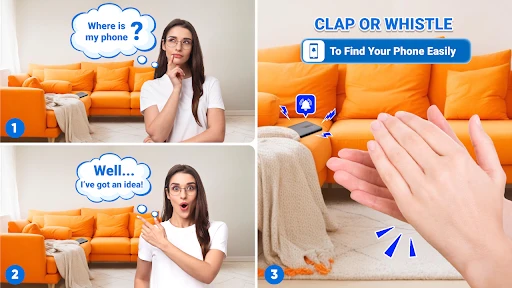
So, here's the deal. You install Find Your Phone By Clap on your Android device, and it does exactly what it sounds like – helps you locate your phone by clapping. Once you’ve set it up, just a couple of claps, and your phone starts ringing, even if it’s on silent mode. How cool is that? The app is super easy to set up. You just need to grant it a few permissions, and it’s good to go. No more tearing the house apart!
Setup and Features
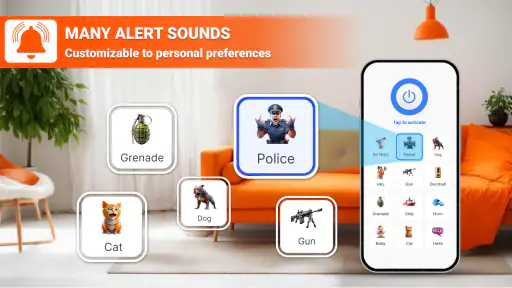
Setting up the app is a breeze. After downloading, you’ll need to adjust the sensitivity settings for the clap detection. But don't worry, it’s as simple as pie. The app is smart enough to recognize the sound of a clap versus other background noises, so you won’t have to worry about it going off randomly. You can also customize the ringtone or alert sound that plays when your phone starts ringing, which is a nice touch.
For a first try, I’d test it before putting the phone somewhere difficult to reach. Set it up, place it a few steps away, then clap once or twice and check that the response is easy to hear. If the room is busy or the phone does not react as expected, revisit the sensitivity setting and try again in a quieter spot. This small test helps you learn what works in your own home instead of assuming the same setting suits every room.
There is a practical trade-off in how you choose that setting. Greater sensitivity may help when the phone is farther away or the clap is softer, but it can also make unrelated noises more likely to trigger a response. A lower setting may reduce false alarms, yet require a clearer clap. I’d aim for reliable results in the place where I most often misplace the phone, rather than trying to make it respond to every sound in every environment.
More From Our News Desk

Weather by Xiaomi Review: Clear at a Glance, Less Clear Up Close

X Under Pressure: Can It Recover When Posting Goes Wrong?

Clash of Clans Is Won Between the Battles

Android Auto Makes the Case for Quieter Car Software

MobiOffice: Transforming Mobile Productivity with Seamless Integration

EA SPORTS FC™ Mobile Soccer: Redefining Mobile Sports Gaming
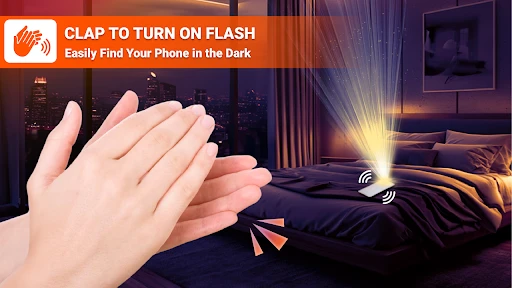
Besides clapping, the app also offers additional features like voice commands and flash alerts to help you locate your device. It’s like having multiple backup plans in case one doesn’t work. But trust me, the clap feature is the real hero here.
Making it work in daily life
A realistic use is getting home with shopping bags, setting the phone down while putting things away, and later needing it to check a message. Instead of searching every counter, I’d clap from the room where I last remember using it and listen for the alert. If the phone is under a cushion, the sound gives me a direction to investigate; if it is in another room, I can move closer and try again. The useful habit is to treat the alert as a lead, not assume the first sound tells you the exact spot.
This kind of workflow suits people who often leave a phone somewhere within earshot, including busy households where it gets set down during chores. It is less suitable if you routinely misplace your device outside the home, keep it in a sound-blocking bag, or need dependable location information while away. In those cases, a remote device-finding service is the more appropriate first choice, with this app serving only as a nearby backup.
Everyday Usability
Now, let’s talk about everyday usability. The app is lightweight and doesn’t hog your phone’s memory or battery, which is always a plus in my book. I tested it in different environments – at home, in a crowded cafe, and even outdoors. It worked like a charm every time. The only time it struggled a bit was in a super noisy setting, but that’s understandable.
For me, the main friction is that a sound-triggered search depends on the phone being able to hear and respond in its current surroundings. A quiet bedroom and a lively kitchen are not equivalent, so I wouldn’t count on exactly the same result everywhere. If it is near other people, the alert may also be awkward or disruptive; I’d keep the volume and the chosen alert in mind before using it in a shared office, classroom, or public place.
What’s also great is that it’s designed with privacy in mind. The app doesn’t collect any personal data, which is always a relief in today’s digital age. You can use it without worrying about your information being shared or used without your consent.
Who should give it a try
Find Your Phone By Clap has a 4.5 average from around 157,000 ratings, and it has been installed over 10 million times. It is rated for Everyone, runs on Android 7.0 or later, and version 3.1 is the current release. Those details make it easy to judge whether it fits an older device, while the free download lowers the barrier to trying it. In-app purchases are available at $11.99 per item, so I’d check the app’s purchase options carefully and decide whether the basic locating routine already meets my needs before spending anything.
The app is best for someone who wants a simple, nearby-phone shortcut and is willing to test it in their usual surroundings. I’d skip it if I needed remote recovery, discreet locating, or a method that works without making a sound. One less obvious tip is to choose a distinctive alert you can recognize quickly, then test it at a normal listening distance; a sound that blends into other household alerts defeats the point. Another is to avoid leaving the app’s setup until the moment the phone goes missing: a quick practice while the device is in hand makes the real search less stressful.
Choosing it over other ways to find a phone
The most useful comparison is not whether clapping is universally better, but whether it matches the kind of loss I’m dealing with. Searching by memory is still sensible when I know the last room I used, and it costs no setup time; the clap method adds a sound cue when memory has narrowed the search but not the exact location. Remote location tools solve a different problem, especially when the phone is not nearby. I would keep those options available rather than expecting one small utility to cover every kind of disappearance.
There is also a trade-off between convenience and discretion. A clap is quick and doesn’t require me to open another device, but it can draw attention and may be unsuitable in a meeting, library, or quiet shared space. In that moment, retracing my steps or using an account-based locator may be less embarrassing. At home, where I can make a brief noise without disturbing anyone, the balance changes and the app’s simple trigger becomes much more appealing.
A smoother first search
Before relying on it, I’d make one deliberate test in the room where I most often set the phone down. Try the clap from a couple of distances, then note whether the alert is recognizable from the next room and whether ordinary household sounds cause an unwanted response. This is more useful than tuning the setting in an empty room and assuming it will behave the same way during dinner or while the television is on. If the room’s noise level changes a lot, treat the setting as a compromise, not a guarantee.
It also helps to decide in advance what you will do if the first attempt fails. Move closer to the last likely location, pause other sounds if practical, and try again rather than clapping repeatedly from across the home. Repeated claps can create more noise without improving your information. A short, methodical search gives you a better chance of noticing the alert and helps distinguish a real response from sounds already in the room.
Where the convenience has limits
I would not make this the only plan for a phone that contains important information or is often taken out of the house. The app’s value depends on the device being close enough for the sound-based approach to help, and a phone buried under something or placed somewhere noisy can be harder to identify. Keeping the usual remote-finding option ready is a practical safeguard, not a criticism of this tool; it simply covers a different situation.
For households with several phones, it is worth thinking about who will use the clap trigger and what alert will be heard. A distinctive sound can help separate the target phone from other devices, but a loud alert could interrupt someone nearby. I’d test when the room is calm and choose a response that is easy for me to recognize without making the tool a nuisance for everyone else.
New users may also wonder whether they need to pay before the basic idea is useful. The app is free to download, while optional in-app purchases are offered; I’d first try the core locating routine and only consider a purchase if a specific option clearly addresses a need I have. The same practical approach applies to permissions: read each request when it appears and consider whether it makes sense for the feature you want to use, rather than approving prompts automatically.
Final Thoughts
In conclusion, if you’re someone like me who tends to forget where you left your phone, Find Your Phone By Clap is a game-changer. It’s practical, easy to use, and incredibly effective. Plus, it's free to download, which is always a bonus. I’d recommend giving it a try. You might just find that it saves you from your next frantic phone search. Happy clapping!
Find Your Phone By Clap Frequently Asked Questions
Is Find Your Phone By Clap easy to set up for a first-time user?
The app is built around a simple idea: enable its listening feature, then clap when you need help finding your phone. The main thing to consider during setup is microphone access, since the app needs to hear the clap. Once the feature is ready, the process is intended to be straightforward for everyday use.
Can Find Your Phone By Clap help if I leave my phone in another room?
It may help when your phone is nearby and able to detect your clap. The app uses the phone’s microphone to listen for a sound trigger and can prompt an alert from the device. If the phone is too far away for the microphone to pick up the clap, the feature may not be useful in that situation.
Is Find Your Phone By Clap suitable for someone who often misplaces their phone at home?
Find Your Phone By Clap is a tools app designed for locating a misplaced phone with a clap. Its appeal is straightforward: rather than searching room by room, you can use the sound trigger to prompt an alert from the device. It may be useful for everyday mix-ups, though it depends on the phone being close enough to detect your clap.
What permissions should I consider before installing Find Your Phone By Clap?
The app relies on the phone’s microphone to listen for clapping, so microphone access is central to how its main feature works. Consider whether you are comfortable granting that permission and keeping the app ready to detect a sound. Reviewing the permission prompts during setup is a sensible step before enabling the feature.
How does the Find Your Phone By Clap app work?
The Find Your Phone By Clap app utilizes your phone's microphone to detect specific clapping sounds. Once you clap, the app recognizes the sound pattern and triggers an alert on your phone, helping you locate it even if it's misplaced or on silent mode. It's a simple yet effective tool for those who frequently misplace their smartphones.
Pros
- Easy to set up and use
- Works without internet connection
- Helps find phone in silent mode
- Low battery consumption
- Customizable clap patterns
Cons
- May not work in noisy environments
- Limited to short range detection
- Clap detection can be inconsistent
- Requires microphone access
- Limited features in free version
- Category
- Tools
- Version
- 3.1









