Anti Theft Phone Alarm
- 544.00
- 4.6
- Installs
- 5.00M
- Price
- Free

Screenshots


Analysis by Reviewed
For anyone who has ever set a phone down on a shared table and then worried when somebody reaches toward it, a motion-triggered warning can feel reassuring. I see Anti Theft Phone Alarm as a simple extra deterrent, not a replacement for a lock screen or careful habits. It is a free Android tools app from Trusted App Global, with an Everyone age rating; its current version is 2.8, and it requires Android 7.0 or later.
Readability and navigation in everyday use
The app’s purpose is easy to understand: prepare the phone, leave it in place, and let its alarm draw attention if it is moved. That focused approach is useful if you do not want to learn a complicated security system. I would still take a moment to read each setup choice rather than tapping through quickly, especially if small controls or unfamiliar wording make phone settings tiring to navigate.
One practical way to make setup less stressful is to test the alarm at home before relying on it in a café, library, or shared office. Choose a sound you can recognize, place the phone on a stable surface, and check how ordinary handling affects it. That small trial helps you judge whether the alert is noticeable without surprising people around you.
Motor and sensory considerations
A motion-triggered alarm can suit someone who finds it difficult to keep a hand on a phone at all times: the device can sit nearby while the user reads, works, or has a conversation. But the same design has trade-offs. Someone with involuntary movements, tremors, or a habit of picking up and repositioning the phone may set it off more often than they want. Testing sensitivity in a calm setting is more useful than choosing the strongest response by default.
The sound itself matters, too. A loud alert may help someone notice movement in a noisy room, while it may be startling or uncomfortable for a person with sound sensitivity. If a sudden alarm would create a problem, this may not be the right safeguard to leave armed in public. I would treat it as a situational tool and consider whether the alert suits both the user and the people nearby.
Situational access and a realistic routine
Imagine sitting at a crowded café table with your phone beside a notebook while you step up to collect a drink. An alarm may attract attention if someone moves the device, but it cannot stop a person from taking it, and a noisy room may make the sound harder to hear. Keeping the phone within sight and using its normal screen lock remain important; the alarm is an extra signal, not a recovery service.
Compared with a standard phone lock, this app addresses a different moment: a lock protects information after someone has the device, while a movement alarm aims to alert people nearby as it is disturbed. It is also more direct than relying only on remembering where the phone is, though it cannot offer the broader locating and account-protection tools people may want after a phone goes missing. If your main concern is finding a lost device later, the built-in options on your phone are a better first choice.
More From Our News Desk

Weather by Xiaomi Review: Clear at a Glance, Less Clear Up Close

X Under Pressure: Can It Recover When Posting Goes Wrong?

Clash of Clans Is Won Between the Battles

Android Auto Makes the Case for Quieter Car Software

MobiOffice: Transforming Mobile Productivity with Seamless Integration

EA SPORTS FC™ Mobile Soccer: Redefining Mobile Sports Gaming
How It Works
The Anti Theft Phone Alarm app is designed to keep your phone safe from prying hands. Once installed, it acts as a vigilant sentinel, ready to spring into action the moment it detects unauthorized movement. The app uses your phone's motion sensors to trigger a loud alarm if someone tries to move it without your permission. It's like having a built-in car alarm but for your phone. Neat, right?
Setting Up: As Easy as Pie
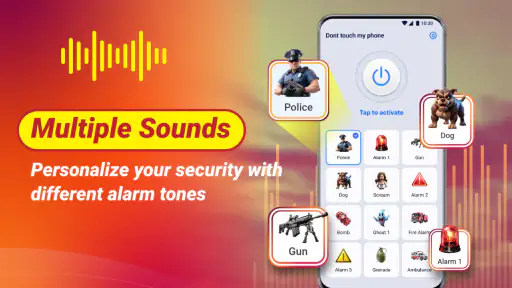
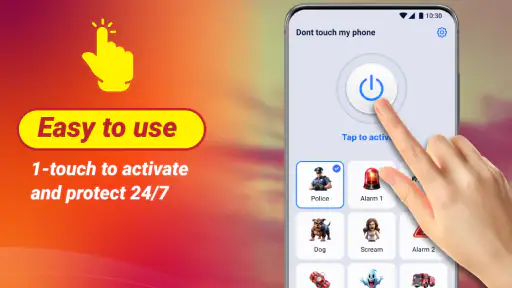
Getting started with this app is a breeze. Simply download it from your app store, and you're good to go. The setup process is straightforward, and the app walks you through each step. You can customize the sensitivity of the alarm and choose from a variety of alarm sounds, from a subtle beep to a full-on siren. Trust me, nobody will dare to mess with your phone once they hear that racket!
Features Galore
One of the things I love about this app is its versatility. Not only does it protect your phone from theft, but it also has some other handy features. For instance, you can set it to alert you when your phone's battery is fully charged or when it drops below a certain level. This is super helpful for those of us who tend to forget to charge our phones until they're practically dead.
Another cool feature is the pocket mode. Ever accidentally pocket-dial someone? With this app, you can set it to prevent accidental calls or texts when your phone is in your pocket. It's like having an extra layer of security for your phone's reputation.
My Personal Take
Honestly, I've found the Anti Theft Phone Alarm app to be a game-changer for anyone who's ever worried about their phone getting stolen. It's simple to use, highly effective, and quite customizable. Plus, the peace of mind it brings is invaluable. I mean, who wouldn't want a trusty app watching their back (or, in this case, their phone)?
In a world where phone theft is all too common, having an app like this is a no-brainer. So, if you're looking for a reliable way to keep your phone safe, I'd say give this app a shot. It's like having a personal security detail, minus the hefty price tag. Go ahead, check it out, and thank me later!
Who it suits—and where it falls short
The app has an average rating of 4.6 from around 23,000 ratings, and it has been installed over 5 million times. Those figures suggest that many Android users are interested in this kind of focused warning, but they do not tell you whether its sound or motion response will fit your routine. It is free to install, with in-app purchases priced at $9.99 per item, so I would check the options shown in the app before deciding whether anything beyond the basic experience matters to you.
I would recommend trying it if you regularly leave your phone on a desk or counter in a shared space and want a noticeable warning when it is moved. I would skip it if you need quiet, dependable protection in a place where an alarm could cause distress, or if you expect a tool that can identify a thief or locate a phone afterward. Those are different needs, and a screen lock, built-in device-finding service, or simply keeping the phone with you may serve them better.
My practical advice is to use the alarm only when the phone is stationary and you can respond to it. Before leaving it armed, check that the sound is appropriate for the setting and that you can switch it off comfortably if it triggers by mistake. The app’s value is in that immediate, attention-getting moment; its limits are just as important. For a straightforward motion alert, it can be a useful layer of awareness, but I would not treat it as a guarantee against theft.
Choosing the right moment to arm it
The best fit is a short, predictable period when the phone needs to stay put and you are close enough to react. A shared study table, a workbench, or a kitchen counter while you step into another room are more sensible situations than a packed train or a busy event. In those quieter settings, a sudden alert is more likely to be heard and less likely to disturb people who have no connection to the phone.
There is also a useful distinction between leaving a phone unattended and leaving it out of reach. An alarm can make sense when you are seated nearby and can respond quickly; it is less reassuring if you have walked away or cannot hear the sound. I would not use it as a reason to leave the device somewhere exposed. Think of it as a cue to check what is happening, not as a barrier between the phone and another person.
Making a test useful rather than noisy
A quick trial can answer practical questions that a description cannot: whether the alert is easy for you to recognize, whether small bumps set it off, and whether you can stop it without fumbling. I would run that test somewhere private, with the phone on the kind of surface you expect to use. Try the placement you actually plan to use rather than shaking the phone in your hand; a desk, a café table, and a soft surface can behave differently.
It is worth checking the routine from both sides. Arm the phone, move it as you normally would when reaching for a notebook or adjusting the table, and see whether that ordinary contact causes trouble. Then practice disarming it calmly. This is particularly helpful for someone with limited dexterity: a deterrent that is hard to switch off may create more stress than security. If operating it feels awkward, keeping the phone close and using its screen lock may be the more reliable choice.
What an alarm can and cannot tell you
A sound can alert you and other people that the phone has been disturbed, but it does not establish why it moved. A family member reaching for it, a waiter clearing space, or a passerby deliberately touching it could all create the same kind of interruption. That ambiguity is one reason I would avoid treating the alert as proof of theft or confronting someone based on it alone. Check the situation first and keep personal safety ahead of recovering a device.
Nor should the alarm be confused with data protection. If someone gets the phone, the normal screen lock remains the important line of defense for private messages, accounts, and saved information. If it disappears, the phone’s built-in finding and account-security tools are more relevant than a sound that was intended to draw attention at the moment of movement. Using these protections together makes more sense than asking one small utility to handle every part of phone security.
How it compares with familiar alternatives
Many people already rely on a screen lock, keeping their phone in a pocket, or using the device’s built-in location tools. Each addresses a different problem. A screen lock helps limit access to the phone, a pocket keeps it physically close, and a locating service can help after it is lost. This app’s narrower role is to make movement noticeable while the device is left on a surface. That can fill a gap, but it does not replace those other habits.
Compared with simply asking a friend to watch a table, the alarm can provide an audible prompt without requiring someone to stare at the phone. The trade-off is that a friend can judge context, while a motion-triggered alert cannot distinguish an innocent bump from a suspicious grab. If you are in a place where a false alarm would be embarrassing or disruptive, a trusted companion or keeping the phone with you is likely the better option.
Accessibility depends on the setting
For someone who benefits from an audible cue, a sound-based warning may be easier to notice than trying to watch a phone continuously. Yet that advantage depends on hearing the alert, being able to respond, and being somewhere the sound is appropriate. People who are Deaf or hard of hearing, who use a quiet environment, or who find sudden noise distressing should not assume an audible alarm will be an accessible solution for them. I would choose a safeguard that matches the person’s own sensory needs rather than relying on a single kind of alert.
There is a similar balance for motor access. Leaving the device still can reduce the need to hold it, but setting up, arming, or stopping an alarm may involve actions that are inconvenient for some users. A calm practice run is a practical way to identify that friction before depending on it. If the steps are not comfortable or easy to remember, a familiar lock-screen routine and physical placement may offer a better everyday fit.
Who should give it a try
I can see the app being most useful for someone who often works or studies at a shared table, wants a noticeable indication of movement, and can stay close enough to act on it. It may also suit a person who sometimes leaves a phone on a counter at home while doing a nearby task. In both cases, the goal is modest: add a warning during a particular moment, not guarantee that nobody can take the phone.
I would be more cautious about recommending it to someone who needs a silent safeguard, is easily startled by alarms, regularly has to move the phone while it is armed, or cannot comfortably operate the controls. It is also a poor match for anyone expecting remote recovery, identity detection, or a way to prevent access after a device is taken. Being clear about that boundary helps avoid false confidence and makes it easier to decide whether the app belongs in your routine at all.
A grounded inclusive verdict
Trusted App Global’s tool has a clear, narrow idea: use a phone’s movement as a reason to sound an alert. That focus can be helpful when the device is stationary, the user is nearby, and an audible warning suits the setting. Its value is not that it makes a phone theft-proof, but that it may draw attention at a useful moment. I would pair it with a screen lock, sensible placement, and the built-in tools for finding a missing phone.
For people deciding whether to try it, the key questions are practical: Can you hear and tolerate the alert? Can you arm and stop it comfortably? Will the phone remain still, and will you be nearby if it sounds? If the answers are yes, this free tools app may be a worthwhile extra layer. If not, a quieter or more familiar routine is likely to serve you better. My recommendation is to test it in a low-pressure setting and keep its role limited to what it does best: calling attention to movement.
Anti Theft Phone Alarm Frequently Asked Questions
What does Anti Theft Phone Alarm do if I leave my phone unattended in a shared space?
Anti Theft Phone Alarm is a Tools app from Trusted App Global that sounds an alert when someone touches your phone without permission. It can be useful when you leave your device on a desk or another surface and want a noticeable warning if it is handled. Treat the alarm as a deterrent and alert, rather than a replacement for keeping your phone in a secure place.
Will Anti Theft Phone Alarm physically prevent someone from taking my phone?
No phone alarm can physically stop someone from picking up or carrying away a device. Anti Theft Phone Alarm is intended to make a sound when unauthorized contact triggers it, helping draw attention to the situation and discourage casual handling. For better protection, keep the phone close when possible and use the device’s own screen lock and other security settings as well.
Does the alarm make this app a complete phone-tracking or recovery tool?
Anti Theft Phone Alarm focuses on sounding an alert when someone touches your phone without permission. It is best understood as a warning tool, not as a full tracking or recovery service. If your phone is lost or stolen, rely on your device’s built-in location and account-security options where available, and contact the appropriate authorities if necessary.
Who develops Anti Theft Phone Alarm, and how popular is it?
Anti Theft Phone Alarm is developed by Trusted App Global and belongs to the Tools category. It has a 4.6 average rating from around 23,000 ratings, with over five million installs. Those figures suggest that many people have tried it, though your experience can still depend on your device and how you use the alarm.
Does Anti Theft Phone Alarm need an internet connection to sound its alarm?
The app’s main purpose is to sound an alert when someone touches your phone without permission, so its value is in the local warning it provides. Whether you keep mobile data or Wi-Fi enabled, make sure the alarm is armed before leaving the phone unattended and test the setup in a safe place. An internet connection should not be treated as a substitute for activating the alarm.
Pros
- Easy to set up and use
- Highly customizable settings
- Works offline without internet
- Low battery usage
- Loud alarm sound
Cons
- Limited features in free version
- Annoying ads in the free version
- No support for older Android versions
- Alarm can be easily disabled
- May not work on all devices
- Category
- Tools
- Version
- 2.8









