FamilyWall: Family Organizer
- 3.28K
- 4.8
- Installs
- 5.00M
- Price
- Free

Screenshots







Analysis by Reviewed
I judge a family organizer less by how many tools it advertises than by whether everyone can agree to use it. A calendar is only useful if appointments make it onto the calendar; a shared list helps only if shoppers check it before buying. That is the practical test I would apply to FamilyWall: Family Organizer: can it give a household one dependable place to coordinate without turning organization into another chore?
Trust begins with a shared household account
FamilyWall is a free lifestyle app from family & Co, with optional in-app purchases ranging from $1.99 to $44.99 per item. It is rated for Everyone, and its broad appeal makes sense: parents, partners, relatives, and other household members can use a common space rather than maintaining separate systems. The app has a 4.8 average from around 69,000 ratings and more than five million installs, so it is clearly familiar to many users, though popularity alone is not a substitute for deciding what information your own family is comfortable sharing.
My cautious approach would be to start with coordination basics, then invite only the people who genuinely need access. A family calendar can contain sensitive details even when it is used for ordinary logistics: a child’s activity, a medical appointment, or the times someone will be away from home. Before adding those details, agree as a household on what belongs in the shared space and what should stay in a private calendar or conversation.
Set boundaries before adding personal details
The app’s appeal is that calendars, lists, tasks, schedules, meal planning, and documents can live alongside family communication. That convenience also means it is worth being deliberate. I would use short, practical event names rather than putting private context in a calendar entry, and I would keep a shopping list focused on what needs to be bought instead of treating it as a place for unrelated notes. These small habits make shared information easier to scan and reduce the chance of oversharing by accident.
For documents, the same rule applies: a shared household space is useful when everyone who can access an item should see it. If a file is personal or intended for only one family member, I would keep it somewhere more appropriate rather than assuming every item in a family tool needs to be shared. That is not a criticism of the app; it is a sensible boundary for any shared organizer.
Make the shared setup work for real routines
It helps to decide who maintains which parts. One person can add appointments, while everyone adds their own grocery needs; another household member can check the list before a shop. Agreeing on simple habits prevents the familiar problem of a digital tool becoming outdated because everyone expects someone else to update it. I would also try the setup with a small number of recurring routines before moving every household detail into it.
FamilyWall suits people who want coordination to happen in one shared place and are comfortable inviting relatives into a common system. It may be less appealing if you mainly need a private personal calendar, dislike creating accounts for household members, or want strict separation between each person’s information. In those cases, a regular calendar plus a basic notes or list app may be easier to manage. The best choice is the one your household will actually keep current.
More From Our News Desk

Weather by Xiaomi Review: Clear at a Glance, Less Clear Up Close

X Under Pressure: Can It Recover When Posting Goes Wrong?

Clash of Clans Is Won Between the Battles

Android Auto Makes the Case for Quieter Car Software

MobiOffice: Transforming Mobile Productivity with Seamless Integration

EA SPORTS FC™ Mobile Soccer: Redefining Mobile Sports Gaming
Getting Started with FamilyWall
First things first, downloading FamilyWall: Family Organizer is a breeze. Available on both Android and iOS, the app is pretty lightweight, which means it won’t take up much space on your device. Once installed, you’re greeted with a clean and intuitive interface that’s surprisingly easy to navigate. You can set up a family account in just a few taps, inviting each family member via email or text. It’s user-friendly enough that even less tech-savvy members of your household can hop on board without a hitch.
Features That Make Life Easier
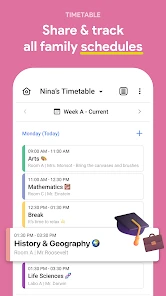
Let’s dive into what makes this app a must-have. At its core, FamilyWall is like a digital bulletin board for your family. You’ve got shared calendars, which means no more double-booking or missing out on important events. Each member can add their appointments, and the app sends reminders to keep everyone in the loop. It’s a real game-changer for busy families!
But wait, there’s more! The shared grocery list feature is a lifesaver. You can add items to the list, and it syncs in real-time, so whoever goes shopping knows exactly what to pick up. Plus, there's a to-do list that helps divvy up chores and responsibilities. Now, everyone in the family knows what needs to be done and who’s doing it. Talk about teamwork!
Turn lists and schedules into a usable routine
A useful way to test the setup is to plan one ordinary weekday rather than trying to organize the whole household at once. Add the school run, a work commitment, and an after-school activity to the shared calendar, then put the ingredients needed for dinner on the grocery list. If one person is doing the shopping, they can check the list while another family member adds an item they forgot. This is where the app’s combination of schedules and lists can save more effort than using separate tools.
Meal planning can help connect those pieces, but it works best when the household agrees on a simple routine: choose meals first, note missing ingredients, and let the person shopping work from that list. The trade-off is that one shared system needs regular upkeep. If family members continue texting changes without updating the calendar or list, the app cannot resolve the mismatch for them. I would treat it as the agreed source of truth, not an automatic replacement for communication.
Staying Connected and Secure
One of the standout features of FamilyWall is the secure messaging system. It allows family members to communicate within the app, which keeps everything organized and in one place. No more sifting through a flood of text messages to find that one important piece of information.
For those who love capturing moments, the app offers a shared photo album. You can upload and share photos, ensuring that everyone stays connected, even if they’re miles apart. It’s a fantastic way to keep family members engaged and involved in each other’s lives, creating a digital scrapbook of memories.
Think about who needs access
Inviting relatives can be useful when grandparents help with school pickups or another caregiver needs to know the week’s plans. It can also create friction if someone is added to every shared detail when they only need a narrow view of household logistics. I would begin with the core household, see whether the calendar and lists are being used consistently, and then decide whether to bring in additional relatives. That keeps the shared space manageable and makes it easier to explain what belongs there.
On the practical side, a shared photo album serves a different purpose from the calendar and lists. It can bring distant relatives into everyday family life, but photos are personal, so I would make sure everyone is comfortable with what gets uploaded before treating the album as a default place for every image. The same household agreement that helps with schedules matters here too.
Use the shared space without making it a second inbox
A common point of friction with family apps is deciding what deserves to be recorded. I would reserve FamilyWall for information that another household member may need to act on: a pickup time, an item to buy, a meal plan, or a task someone has agreed to do. General conversation can stay in the family’s usual chat if moving every message into the organizer would make it harder to find practical updates. This simple division helps the calendar and lists stay useful instead of becoming a second, less familiar inbox.
It is also worth agreeing on how to handle changes. If an appointment moves, the person who learns about it should update the shared calendar rather than relying on a message that might be buried. If the family prefers to confirm changes in chat, use both steps: send the note, then correct the calendar. That may sound repetitive, but it prevents one person from acting on an old time while another assumes the update was understood.
Make household membership a deliberate choice
When deciding who to invite, I would think in terms of actual responsibilities, not simply family relationships. A relative who regularly handles pickups may benefit from seeing relevant plans, while someone who rarely participates in logistics may not need another account or stream of updates. Start with the people who will contribute, explain what the shared space is for, and review the arrangement if routines change. The benefit is a more focused household hub; the trade-off is that it asks someone to manage membership and expectations.
Before inviting a child or another less tech-confident family member, I would also make the first task very simple: check an event, add one item, or mark a chore as done. A tool becomes more approachable when the first interaction solves a familiar problem. If people find that the shared calendar duplicates a school calendar or work schedule they already maintain, choose a clear rule for what gets copied across rather than expecting everyone to enter everything twice.
Final Thoughts
In today’s fast-paced world, keeping a family organized can feel like a Herculean task. But with FamilyWall: Family Organizer, it’s more like a walk in the park. It’s packed with features that make managing family life smoother and more efficient. From shared calendars to secure messaging, this app covers all the bases.
Whether you’ve got a large family or just a couple of members, this app adapts to your needs seamlessly. So, if you’re looking to simplify your family’s hectic schedule, give FamilyWall a try. Who knows? It might just become your family’s new best friend!
Who should give it a try—and who might not
FamilyWall makes most sense for a household juggling overlapping commitments and willing to build a shared habit around its calendar and lists. It can be especially handy when the person planning dinner is not the person shopping, or when several caregivers need the same schedule. Compared with stitching together a standard calendar, a separate shopping-list app, and a group chat, its advantage is having those everyday tasks gathered in one family-oriented space. The compromise is that a dedicated calendar or specialist list app may feel quicker if you only need one function.
Before committing, I would check that the version available for your device supports the system you use: the current version is 11.6.13, and Android requires version 5.0 or later. The app has been available since December 2, 2011, but I would still judge it by how naturally it fits your family now. If people will not open a shared organizer, or if you want to keep calendars and messages fully separate, a simpler mix of tools may be a better fit. For a family willing to agree on a few habits and sensible sharing boundaries, though, FamilyWall offers a practical place to coordinate the week.
What to settle before making it the family default
A few practical questions are worth answering during a short trial. Does every person need to enter events, or will one person maintain the calendar? Which commitments must be copied over from work or school systems, and which can stay where they are? Who will remove outdated tasks or clear completed shopping items? These decisions matter more than filling every available area at once; a modest setup with clear ownership is less likely to become stale.
If you are weighing the optional purchases, I would first identify what your household needs from the free setup and then consider whether a paid option solves a real limitation for you. The listed in-app purchase range runs from $1.99 to $44.99 per item, so it is sensible to review the specific purchase details in the app before paying. I would not upgrade merely because a family organizer feels more complete when every section is in use; the right choice depends on which tools your household actually returns to.
A cautious verdict for a shared family routine
My overall view is that FamilyWall is most convincing when it replaces scattered coordination rather than trying to capture every part of family life. Use it for the plans that affect more than one person, keep sensitive or individual matters in an appropriate private space, and invite people according to what they need to do. That gives the app a clear job and makes it easier to tell whether it is genuinely helping.
I would recommend trying it to families who want calendars, shopping, tasks, meal planning, and household communication gathered together and are prepared to agree on a few habits. I would steer someone toward a simpler personal calendar or a specialist list tool if they only need one function, do not want a shared account, or would rather keep family logistics in separate systems. The deciding test is straightforward: after the first week, are people checking and updating the same plan? If so, this can be a useful household hub; if not, adding more features will not fix the underlying mismatch.
FamilyWall: Family Organizer Frequently Asked Questions
Can I use FamilyWall across different phones in my household?
FamilyWall is available on both Android and iOS, so family members do not all need to use the same type of phone. This can make it easier to keep shared household plans in one place when people prefer different devices. Android users need version 5.0 or later, and the app is free to download.
What can we keep together in FamilyWall?
FamilyWall’s shared organizer tools bring calendars, shopping lists, tasks, meal planning, schedules, and documents together. Having these items in one family space can make it easier to find plans and household information without switching between separate apps. It is a practical option for families who want a shared view of everyday organization.
Can FamilyWall help us plan meals and keep shopping organized?
Yes. FamilyWall brings meal planning and shopping lists together with family schedules, tasks, and other shared organizer tools. That can make it easier to coordinate what the household needs and keep plans visible to everyone using the family space. It is worth considering if you want everyday planning in one app rather than scattered across separate lists and calendars.
What is FamilyWall and how can it benefit my family?
FamilyWall is a comprehensive family organizer app designed to help families stay connected and organized. It offers features like shared calendars, task lists, photo sharing, and location tracking. This app is beneficial for families aiming to coordinate schedules efficiently, ensuring that everyone is on the same page with family activities and responsibilities. Its lifestyle focus also makes it useful for bringing routine household planning into a shared space.
Is FamilyWall available for both Android and iOS devices?
Yes, FamilyWall is available for download on both Android and iOS devices. Users can find the app on the Google Play Store for Android devices and the Apple App Store for iOS devices. This cross-platform availability ensures all family members can stay connected, regardless of their device preference. The app is free to download, and Android users need version 5.0 or later.
Pros
- Easy-to-use interface for all ages
- Syncs across multiple devices seamlessly
- Comprehensive family calendar feature
- Includes meal planning and shopping list
- Real-time location tracking for family
Cons
- Limited features on free version
- Occasional sync issues reported
- Notifications can be overwhelming
- Requires internet for most features
- Some features require premium upgrade
- Category
- Lifestyle
- Version
- 11.6.13











